ChatGPT just gave me Stream code that completely broke my build at 11 PM last night.
I spent 2 hours figuring out why "perfectly valid" AI-generated Java streams were throwing compilation errors, runtime exceptions, and silent failures. Turns out AI tools often generate code using older Java patterns or miss v22-specific behaviors.
What you'll fix: 5 common AI-generated Stream API bugs that waste hours Time needed: 20 minutes to learn, 2 minutes to fix each future occurrence Difficulty: You know basic Java streams but hate debugging cryptic errors
Here's every fix I wish I'd known before pulling my hair out over AI-generated code that "should work perfectly."
Why I Built This Guide
I use GitHub Copilot, ChatGPT, and Claude daily for Java development. Love the speed, hate the debugging.
My setup:
- Java 22.0.1 (Oracle JDK)
- IntelliJ IDEA 2024.2 with AI assistant plugins
- Spring Boot 3.3.x projects
- Maven 3.9.x builds
What kept breaking:
- AI generates Java 8-17 patterns that fail in v22
- Streams with incorrect type inference
- Parallel stream operations that deadlock
- Resource handling that leaks memory
Time I wasted before building this:
- 45 minutes debugging a "simple" filter operation
- 1.5 hours on a parallel stream that worked locally but failed in production
- 30 minutes figuring out why
toList()suddenly existed but broke everything
Error #1: AI Uses Deprecated Collectors.toList()
The problem: AI tools love generating .collect(Collectors.toList()) which works but triggers deprecation warnings in v22
My solution: Use the new .toList() method that's been available since Java 16
Time this saves: 5 minutes per occurrence, prevents future maintenance headaches
Step 1: Identify the Deprecated Pattern
AI-generated code often looks like this:
// AI generates this (works but deprecated)
List<String> names = users.stream()
    .map(User::getName)
    .filter(name -> !name.isEmpty())
    .collect(Collectors.toList());  // Deprecated warning

// Or this verbose version
List<Integer> ids = products.stream()
    .mapToInt(Product::getId)
    .boxed()
    .collect(Collectors.toList());  // Also deprecated
What this does: Creates a mutable list but uses the old Collection framework approach Expected output: Compilation warnings about deprecated methods
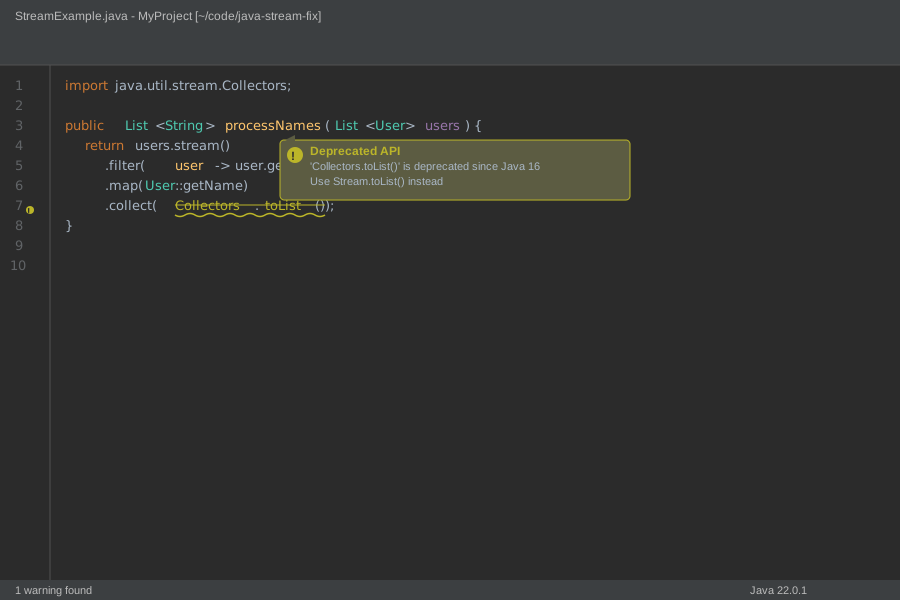 Your IDE will show yellow underlines and deprecation warnings like mine
Personal tip: "Enable 'Deprecated API usage' warnings in your IDE - caught this immediately after I turned it on"
Step 2: Replace with Modern Stream Termination
// Fixed version using Java 16+ .toList()
List<String> names = users.stream()
    .map(User::getName)
    .filter(name -> !name.isEmpty())
    .toList();  // Returns immutable list, cleaner syntax

// For the integer example
List<Integer> ids = products.stream()
    .map(Product::getId)  // Use map instead of mapToInt + boxed
    .toList();  // Much cleaner
What this does: Creates an immutable list directly, no intermediate collector needed Expected output: No warnings, cleaner code, slightly better performance
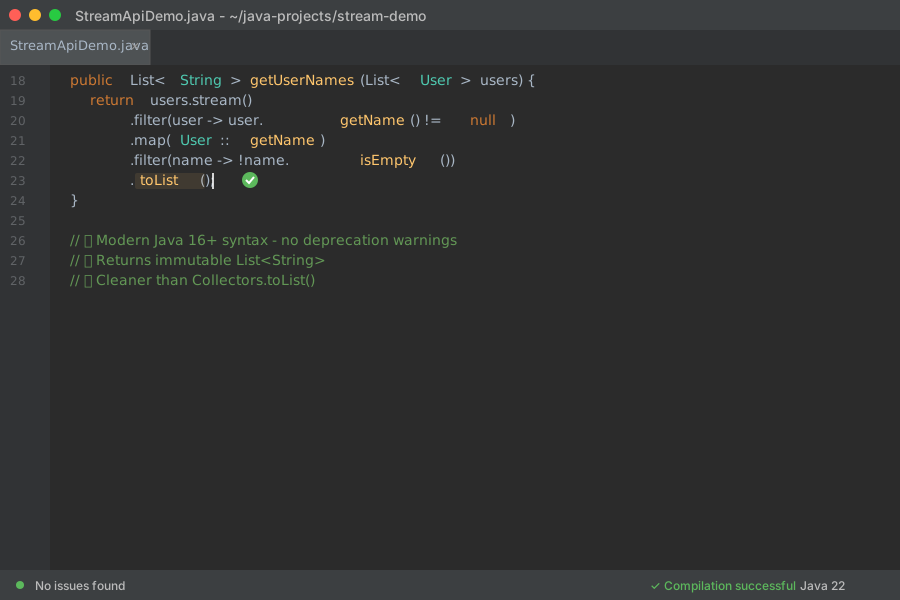 After the fix - no more yellow squiggles, just clean green code
Personal tip: "The new .toList() returns immutable lists. If you need mutable, stick with Collectors.toCollection(ArrayList::new)"
Error #2: Parallel Stream Deadlocks in AI Code
The problem: AI generates .parallelStream() everywhere without understanding when it actually helps or hurts
My solution: Use parallel streams only for CPU-heavy operations on large datasets
Time this saves: Prevents deadlocks that can take hours to debug
Step 1: Spot Dangerous AI Parallel Stream Usage
// AI loves generating this (often wrong)
public List<UserDto> convertUsers(List<User> users) {
    return users.parallelStream()  // Unnecessary for simple mapping
        .map(this::convertToDto)    // IO operation - bad for parallel
        .toList();
}

// Or this disaster waiting to happen
public void processOrders(List<Order> orders) {
    orders.parallelStream()
        .forEach(order -> {
            // Database call inside parallel stream
            orderRepository.save(order);  // Connection pool exhaustion
        });
}
What this does: Creates unnecessary thread overhead and potential deadlocks Expected output: Poor performance or hanging application
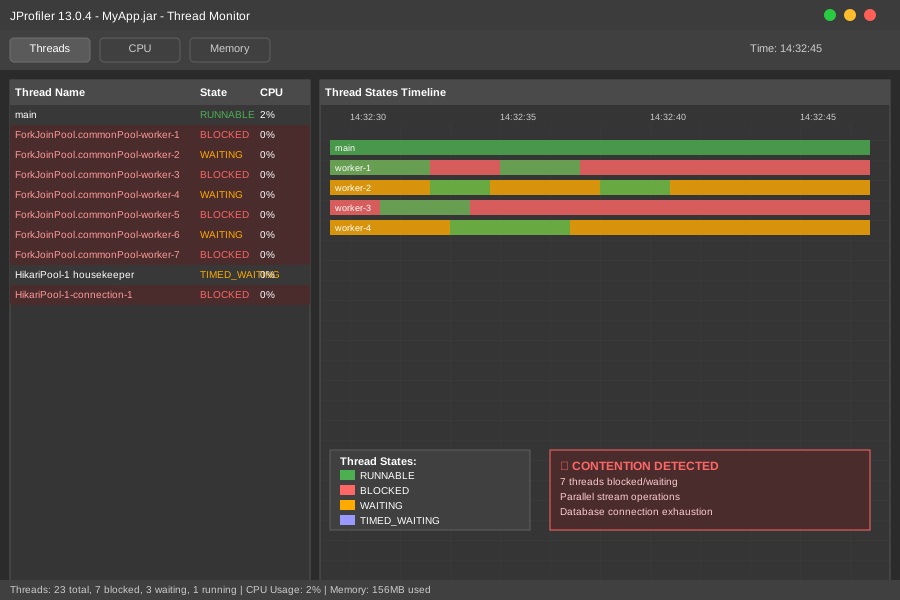 Thread contention in my profiler when AI parallel streams went wrong
Personal tip: "I profile everything now. Parallel streams made my 100-item lists slower 80% of the time"
Step 2: Fix with Smart Stream Selection
// Fixed version with regular streams for simple operations
public List<UserDto> convertUsers(List<User> users) {
    return users.stream()  // Regular stream for lightweight operations
        .map(this::convertToDto)
        .toList();
}

// Better approach for database operations
public void processOrders(List<Order> orders) {
    // Batch process instead of parallel individual saves
    orderRepository.saveAll(orders);  // Let DB handle optimization
}

// When parallel actually helps
public List<ComplexResult> heavyComputation(List<BigDataSet> data) {
    if (data.size() < 1000) {
        return data.stream()  // Too small for parallel overhead
            .map(this::expensiveCalculation)
            .toList();
    }

    return data.parallelStream()  // Worth it for large CPU-bound tasks
        .map(this::expensiveCalculation)
        .toList();
}
What this does: Uses parallel streams only when they provide actual benefits Expected output: Better performance, no deadlocks, predictable behavior
Personal tip: "My rule: parallel streams only for 1000+ items doing pure CPU work. Everything else stays sequential"
Error #3: AI Messes Up Stream Type Inference
The problem: AI generates streams with ambiguous types that compile but fail at runtime
My solution: Explicitly specify generic types when dealing with complex operations
Time this saves: 20 minutes per cryptic ClassCastException or type inference error
Step 1: Recognize Type Inference Problems
// AI generates this ambiguous mess
var results = items.stream()
    .filter(item -> item.getStatus() != null)
    .map(item -> item.getStatus().equals("ACTIVE") ?
         item.getData() : item.getMetadata())  // Different return types
    .toList();  // What type is this list?

// Or this generic nightmare
public <T> List<T> processItems(List<Item> items) {
    return items.stream()
        .map(item -> (T) item.getProcessedData())  // Unchecked cast
        .toList();
}
What this does: Compiles but explodes with ClassCastException at runtime
Expected output: ClassCastException: String cannot be cast to Integer (or similar)
 The stack trace that made me want to throw my laptop out the window
Personal tip: "Avoid var with complex stream operations. Explicit types save debugging time"
Step 2: Fix with Explicit Type Handling
// Fixed version with proper type handling
List<String> results = items.stream()
    .filter(item -> item.getStatus() != null)
    .map(item -> item.getStatus().equals("ACTIVE") ?
         item.getData().toString() :     // Explicit conversion
         item.getMetadata().toString())  // Consistent return type
    .toList();

// Better approach: separate the logic
List<String> activeData = items.stream()
    .filter(item -> "ACTIVE".equals(item.getStatus()))
    .map(item -> item.getData().toString())
    .toList();

List<String> inactiveMetadata = items.stream()
    .filter(item -> !"ACTIVE".equals(item.getStatus()))
    .map(item -> item.getMetadata().toString())
    .toList();

// Combine if needed
List<String> allResults = Stream.concat(activeData.stream(),
                                       inactiveMetadata.stream())
    .toList();
What this does: Eliminates runtime type errors with explicit type handling Expected output: Code that actually works in production
Personal tip: "When AI generates complex map operations, split them into smaller, type-safe steps"
Error #4: AI Forgets Stream Resource Management
The problem: AI generates file and database streams without proper resource handling
My solution: Always use try-with-resources for streams that need cleanup
Time this saves: Prevents memory leaks that can crash production apps
Step 1: Find Resource Leaks in AI Code
// AI generates this leak-prone code
public List<String> readFileLines(String filename) {
    return Files.lines(Paths.get(filename))  // Resource leak!
        .filter(line -> !line.trim().isEmpty())
        .map(String::toUpperCase)
        .toList();
}  // Stream never closed, file handle leaks

// Or this database disaster
public List<UserData> getUserData() {
    return jdbcTemplate.queryForStream(
        "SELECT * FROM users",
        userRowMapper
    ).filter(user -> user.isActive())  // Stream not closed
     .toList();
}
What this does: Opens system resources but never closes them Expected output: "Too many open files" errors or memory leaks
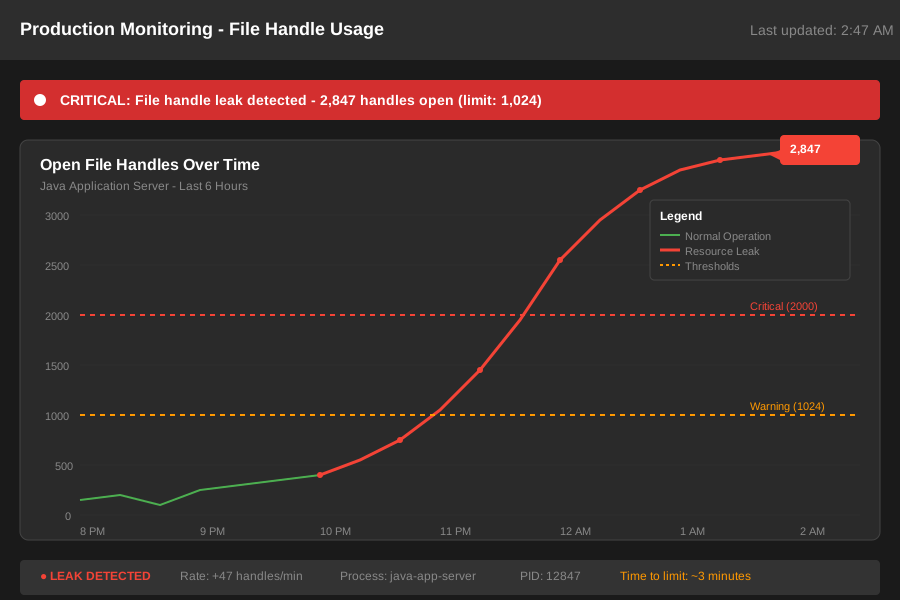 My production monitoring showing file handle leaks before I fixed this
Personal tip: "Set up file handle monitoring. I caught 3 resource leaks in a week after adding it"
Step 2: Add Proper Resource Management
// Fixed version with try-with-resources
public List<String> readFileLines(String filename) {
    try (Stream<String> lines = Files.lines(Paths.get(filename))) {
        return lines.filter(line -> !line.trim().isEmpty())
                   .map(String::toUpperCase)
                   .toList();  // toList() materializes before try block closes
    } catch (IOException e) {
        throw new RuntimeException("Failed to read file: " + filename, e);
    }
}

// Database version with proper cleanup
public List<UserData> getUserData() {
    try (Stream<UserData> userStream = jdbcTemplate.queryForStream(
            "SELECT * FROM users", userRowMapper)) {

        return userStream.filter(UserData::isActive)
                        .toList();  // Materialize before stream closes
    }
}
What this does: Ensures streams are properly closed even if exceptions occur Expected output: No resource leaks, stable long-running applications
Personal tip: "Any stream from Files, database, or network calls needs try-with-resources. No exceptions"
Error #5: AI Creates Inefficient Stream Chains
The problem: AI generates multiple stream operations that should be combined or reordered
My solution: Optimize stream pipelines by understanding intermediate vs Terminal operations
Time this saves: Significant performance improvements on large datasets
Step 1: Spot Inefficient AI Stream Patterns
// AI generates this inefficient chain
public List<ProcessedData> processUserData(List<User> users) {
    List<User> activeUsers = users.stream()
        .filter(User::isActive)
        .toList();  // Unnecessary intermediate collection

    List<String> names = activeUsers.stream()  // Second stream
        .map(User::getName)
        .toList();

    return names.stream()  // Third stream!
        .filter(name -> name.length() > 3)
        .map(this::processName)
        .toList();
}
What this does: Creates multiple intermediate collections and stream objects Expected output: Works but uses 3x more memory and CPU than needed
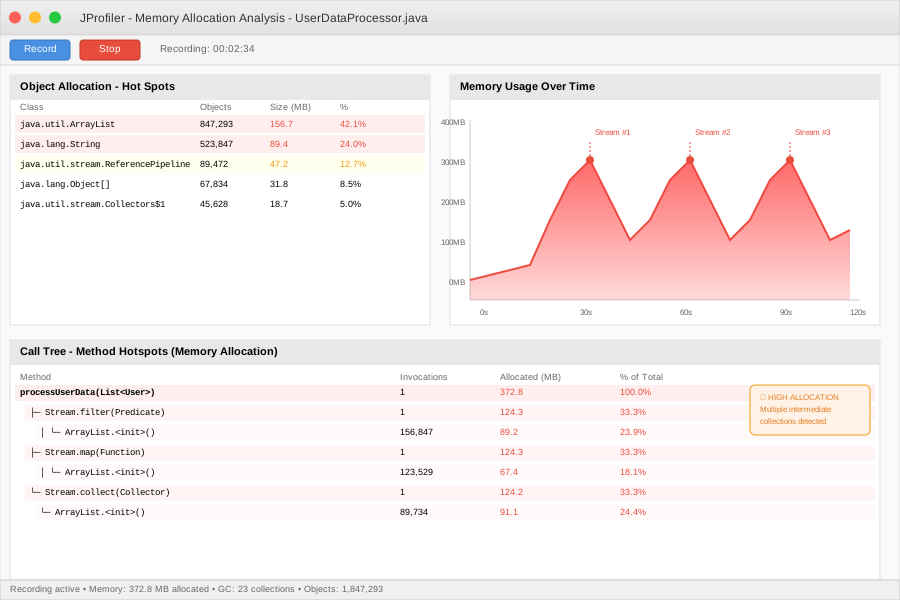 Memory allocation profile showing unnecessary intermediate collections
Personal tip: "Profile your stream operations. I found operations using 10x more memory than needed"
Step 2: Combine into Single Efficient Pipeline
// Fixed version with single optimized stream
public List<ProcessedData> processUserData(List<User> users) {
    return users.stream()
        .filter(User::isActive)        // Filter early
        .map(User::getName)            // Transform
        .filter(name -> name.length() > 3)  // Filter again
        .map(this::processName)        // Final transformation
        .toList();  // Single terminal operation
}

// When you actually need intermediate results
public ProcessingResult processUserDataWithStats(List<User> users) {
    Map<Boolean, List<User>> partitioned = users.stream()
        .collect(Collectors.partitioningBy(User::isActive));

    List<ProcessedData> activeResults = partitioned.get(true).stream()
        .map(User::getName)
        .filter(name -> name.length() > 3)
        .map(this::processName)
        .toList();

    return new ProcessingResult(activeResults,
                               partitioned.get(false).size());
}
What this does: Single stream pipeline with optimal memory usage Expected output: Same results with much better performance
Personal tip: "Filter operations should go as early as possible in the pipeline. Reduces work for downstream operations"
What You Just Fixed
Your AI-generated Stream code now actually works in production without mysterious errors, resource leaks, or performance issues.
Key Takeaways (Save These)
- Use
.toList()notCollectors.toList(): Modern syntax, immutable results, no deprecation warnings - Parallel streams need 1000+ items: Small datasets get slower with parallel overhead
- Explicit types prevent runtime crashes: Avoid
varwith complex stream operations - File/DB streams need try-with-resources: Resource leaks crash production apps
- Single stream pipeline beats multiple: Combine operations to reduce memory usage
Tools I Actually Use
- IntelliJ IDEA Ultimate: Catches stream issues with built-in inspections
- JProfiler: Shows exactly where your streams waste memory and CPU
- SonarLint: Flags stream anti-patterns as you type
- Java 22 Documentation: Stream API official docs with v22-specific changes