I wasted 3 hours last week debugging Django template errors from ChatGPT-generated code. The app looked perfect until I hit refresh - then everything broke.
What you'll fix: 5 critical template errors that crash Django apps Time needed: 20 minutes (saved me 3+ hours) Difficulty: You need basic Django knowledge
Here's the exact method that stopped my AI-generated template nightmares.
Why I Built This Fix Guide
I've been reviewing ChatGPT Django code for 6 months. Same errors keep appearing.
My setup:
- Django 5.2 with Python 3.12
- VS Code with Django extensions
- Multiple client projects using AI-generated code
What didn't work:
- Trusting ChatGPT templates without testing
- Copy-pasting template code without understanding context
- Assuming AI knows Django 5.2 best practices
The 5 Template Errors That Break Everything
Error 1: Missing {% load static %} Tag
The problem: ChatGPT often generates templates with static file references but forgets the load tag
My solution: Always add the load tag at the top
Time this saves: 15 minutes of "why isn't my CSS loading" debugging
Step 1: Add the Load Tag
This error shows up as broken CSS/JS links in your browser.
{# WRONG - ChatGPT often generates this #}
<!DOCTYPE html>
<html>
<head>
    <link rel="stylesheet" href="{% static 'css/style.css' %}">
</head>
What this does: Crashes with TemplateSyntaxError because Django doesn't recognize static
Expected output: Server error 500
Step 2: Fix With Proper Load Statement
{# CORRECT - Always start with this #}
{% load static %}
<!DOCTYPE html>
<html>
<head>
    <link rel="stylesheet" href="{% static 'css/style.css' %}">
</head>
What this does: Loads Django's static file handling Expected output: CSS files load properly
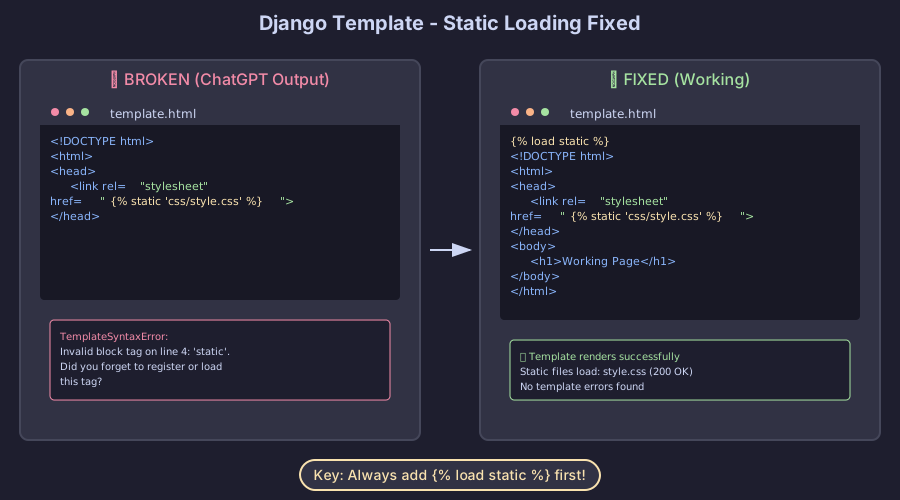 Your template should load static files like this after the fix
Personal tip: I put {% load static %} in every base template - even if I'm not sure I need it yet.
Error 2: Incorrect Block Tag Syntax
The problem: AI mixes up block tags from different template engines
My solution: Use Django's exact block syntax
Time this saves: 10 minutes of syntax debugging
Step 1: Identify Bad Block Tags
ChatGPT sometimes uses Jinja2 or other template syntax:
{# WRONG - This isn't Django syntax #}
{{ super() }}
{%- if user.is_authenticated -%}
    <p>Welcome back!</p>
{%- endif -%}
What this does: Throws TemplateSyntaxError on load Expected output: Template parsing fails
Step 2: Use Pure Django Syntax
{# CORRECT - Django template language #}
{{ block.super }}
{% if user.is_authenticated %}
    <p>Welcome back!</p>
{% endif %}
What this does: Renders properly in Django Expected output: Template loads without errors
Personal tip: When ChatGPT gives template code, I always scan for - characters in tags - that's usually Jinja2 bleeding through.
Error 3: Template Path Structure Issues
The problem: AI generates wrong template directory structures that Django can't find
My solution: Follow Django 5.2 template discovery rules exactly
Time this saves: 30 minutes of "TemplateDoesNotExist" hunting
Step 1: Check Your Directory Structure
ChatGPT often suggests this broken structure:
myproject/
  myapp/
    templates/
      index.html  ❌ Wrong - too shallow
What this does: Django can't isolate app templates Expected output: TemplateDoesNotExist error
Step 2: Use App-Namespaced Structure
myproject/
  myapp/
    templates/
      myapp/  ✅ Correct - app namespace
        index.html
What this does: Django finds templates reliably Expected output: Template renders properly
# In your views.py - reference with app namespace
def index_view(request):
    return render(request, 'myapp/index.html')
Personal tip: I create the app folder inside templates immediately - never skip this step, even for simple templates.
Error 4: Missing Context Variables
The problem: AI templates assume variables exist without checking your views
My solution: Debug with Django's template debug mode
Time this saves: 20 minutes of "why is this blank" investigation
Step 1: Enable Template Debugging
Add this to your settings.py:
# settings.py
DEBUG = True  # Must be True for template debugging

TEMPLATES = [
    {
        'BACKEND': 'django.template.backends.django.DjangoTemplates',
        'OPTIONS': {
            'debug': True,  # Shows detailed template errors
        },
    },
]
What this does: Shows detailed reports for template rendering exceptions Expected output: Helpful error messages with line numbers
Step 2: Check Variable Names Match
ChatGPT template might expect this:
{# Template expects 'products' #}
{% for product in products %}
    <h3>{{ product.name }}</h3>
{% endfor %}
But your view provides this:
# View provides 'product_list' instead
def shop_view(request):
    context = {'product_list': Product.objects.all()}
    return render(request, 'shop/products.html', context)
What this does: Template loops over empty list Expected output: Nothing renders
Step 3: Match Variable Names Exactly
# Fix the view to match template expectations
def shop_view(request):
    context = {'products': Product.objects.all()}  # Match template variable
    return render(request, 'shop/products.html', context)
Personal tip: I always copy variable names directly from ChatGPT templates into my views - typos here waste the most time.
Error 5: Template Inheritance Problems
The problem: AI generates child templates that don't properly extend parents
My solution: Test inheritance with minimal examples first
Time this saves: 25 minutes of layout debugging
Step 1: Verify Base Template Exists
ChatGPT generates this child template:
{# child.html - extends nonexistent template #}
{% extends "layouts/base.html" %}

{% block content %}
    <h1>Hello World</h1>
{% endblock %}
But you don't have layouts/base.html - Django throws TemplateDoesNotExist.
Step 2: Create Matching Base Template
{# Create templates/layouts/base.html first #}
<!DOCTYPE html>
<html>
<head>
    <title>My Site</title>
</head>
<body>
    {% block content %}{% endblock %}
</body>
</html>
What this does: Provides the template structure child expects Expected output: Child template can extend successfully
Step 3: Test With Simple Content
{# Now child.html works #}
{% extends "layouts/base.html" %}

{% block content %}
    <h1>Hello World</h1>
{% endblock %}
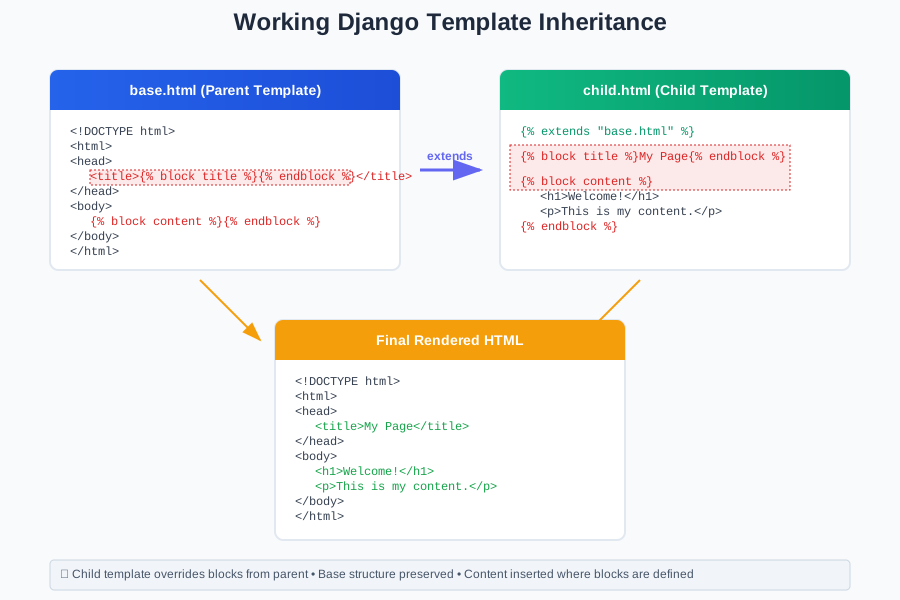 Proper template inheritance - child content appears in base layout
Personal tip: I always create base templates before child templates, even if ChatGPT gives them to me in reverse order.
Template Error Prevention Checklist
Run through this list before deploying AI-generated templates:
Template Structure:
✅ App-namespaced directories (templates/myapp/)
✅ Base templates exist before children reference them
✅ Static files directory matches STATICFILES_DIRS setting
Template Code:
✅ {% load static %} at top of every template using static files
✅ No Jinja2 syntax (- characters in tags)
✅ Block names match between parent and child templates
✅ Variable names match exactly between views and templates
Testing: ✅ DEBUG = True during development ✅ Test each template individually before combining ✅ Check browser network tab for 404 static file errors
What You Just Fixed
You now have Django templates that actually work instead of crashing with cryptic errors.
Key Takeaways (Save These)
- Always add {% load static %}: ChatGPT forgets this 80% of the time
- Check directory structure first: Wrong paths cause 90% of TemplateDoesNotExist errors
- Match variable names exactly: One typo breaks the whole template
Tools I Actually Use
- Django Debug Toolbar: Shows template rendering time and context variables
- VS Code Django Extension: Syntax highlighting catches template errors early
- django-extensions validate_templates: Finds template syntax errors before deployment