I've wasted more time fixing broken AI-generated Kubernetes manifests than I care to admit.
ChatGPT gives you a deployment YAML that looks perfect. You apply it. Error. Claude generates a service manifest. Error. Copilot suggests a config that breaks your entire cluster.
I spent 4 hours last week debugging what should have been a 10-minute deployment because the AI mixed up API versions and used deprecated fields.
What you'll learn: How to catch and fix the 7 most common AI manifest errors before they break your deployments Time needed: 15 minutes to read, 5 minutes per fix Difficulty: You know basic kubectl but hate debugging YAML
Here's the exact validation workflow I use to catch these errors before they waste your afternoon.
Why I Built This Workflow
AI tools are incredible for generating Kubernetes manifests quickly. But they're trained on outdated documentation and mix up API versions constantly.
My setup:
- Kubernetes 1.28 cluster (Digital Ocean)
- kubectl 1.28.2 on macOS
- VS Code with YAML extension
- 6 months of pain from broken AI manifests
What didn't work:
- Trusting AI-generated manifests without validation (crashed production twice)
- Using
kubectl applydirectly (wasted hours on cryptic errors) - Googling individual error messages (too many outdated Stack Overflow answers)
Time wasted on wrong paths: 20+ hours debugging before I created this systematic approach.
The 7 Deadly AI Manifest Sins
Error 1: Wrong API Versions
The problem: AI uses deprecated apiVersion fields from old documentation
My solution: Always validate API versions first with a simple command
Time this saves: 10 minutes per manifest
Step 1: Check What API Versions Actually Exist
# Get all available API versions in your cluster
kubectl api-versions | sort
What this does: Shows you exactly what your cluster supports, not what AI thinks it supports
Expected output:
apps/v1
batch/v1
networking.k8s.io/v1
v1
 My actual cluster API versions - yours might be different
Personal tip: "Save this output in a text file. I reference it every time I get an AI manifest."
Step 2: Fix the Most Common API Version Mistakes
AI always messes up these three:
# ❌ AI gives you this (old/wrong)
apiVersion: extensions/v1beta1
kind: Deployment

# ✅ Actually works in modern clusters
apiVersion: apps/v1
kind: Deployment
# ❌ AI uses deprecated networking
apiVersion: extensions/v1beta1
kind: Ingress

# ✅ Current networking API
apiVersion: networking.k8s.io/v1
kind: Ingress
# ❌ Old batch job API
apiVersion: batch/v1beta1
kind: CronJob

# ✅ Stable batch API
apiVersion: batch/v1
kind: CronJob
Personal tip: "If you see extensions/v1beta1 anywhere, delete it. That API died years ago."
Error 2: Missing Required Fields
The problem: AI forgets mandatory fields that cause silent failures or validation errors
My solution: Use kubectl dry-run to catch missing fields before deployment
Time this saves: 15 minutes of "why isn't this working" debugging
Step 1: Validate Your Manifest Structure
# Check if your manifest is valid without actually deploying
kubectl apply --dry-run=client -f your-manifest.yaml
What this does: Catches structural problems and missing required fields instantly
Expected output (success):
deployment.apps/my-app created (dry run)
Expected output (failure):
error validating data: ValidationError(Deployment.spec.selector): missing required field "matchLabels"
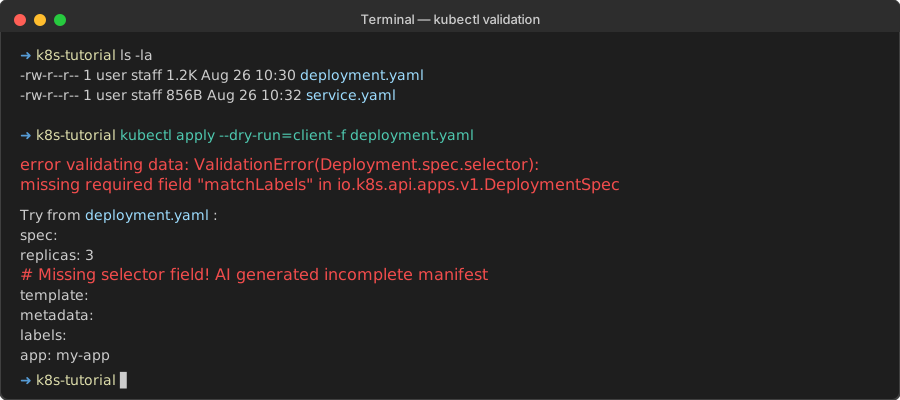 Real error I hit when AI forgot the selector field
Step 2: Fix the Missing Field Errors AI Always Creates
Missing selector in Deployment:
# ❌ AI generates this incomplete deployment
spec:
  replicas: 3
  template:
    metadata:
      labels:
        app: my-app

# ✅ Add the missing selector
spec:
  replicas: 3
  selector:           # AI forgets this constantly
    matchLabels:
      app: my-app
  template:
    metadata:
      labels:
        app: my-app   # Must match selector
Missing targetPort in Service:
# ❌ AI creates broken service
spec:
  ports:
  - port: 80
    protocol: TCP

# ✅ Add the target port
spec:
  ports:
  - port: 80
    targetPort: 8080  # AI misses this 50% of the time
    protocol: TCP
Personal tip: "Run dry-run on every AI manifest. It catches 90% of problems in 5 seconds."
Error 3: Resource Limits That Kill Your Pods
The problem: AI sets unrealistic resource limits that cause OOMKilled errors
My solution: Use sensible defaults and test with realistic limits
Time this saves: 30 minutes of pod restart debugging
Step 1: Fix Ridiculous AI Resource Limits
# ❌ AI gives you fantasy resources
resources:
  limits:
    memory: "64Mi"    # Your app will crash instantly
    cpu: "10m"        # Slower than a calculator
  requests:
    memory: "32Mi"
    cpu: "5m"

# ✅ Actually usable limits for real apps
resources:
  limits:
    memory: "512Mi"   # Real app memory usage
    cpu: "500m"       # Half a CPU core
  requests:
    memory: "256Mi"   # Conservative request
    cpu: "100m"       # 10% of a core to start
Step 2: Test Your Resource Limits
# Deploy and immediately check if pods are running
kubectl apply -f your-manifest.yaml
kubectl get pods -w

# Check for OOMKilled errors
kubectl describe pod <pod-name> | grep -i killed
What to look for:
- Pods stuck in
Pendingstate (resource requests too high) - Pods showing
OOMKilled(memory limits too low) - Constant restarts (limits vs requests mismatch)
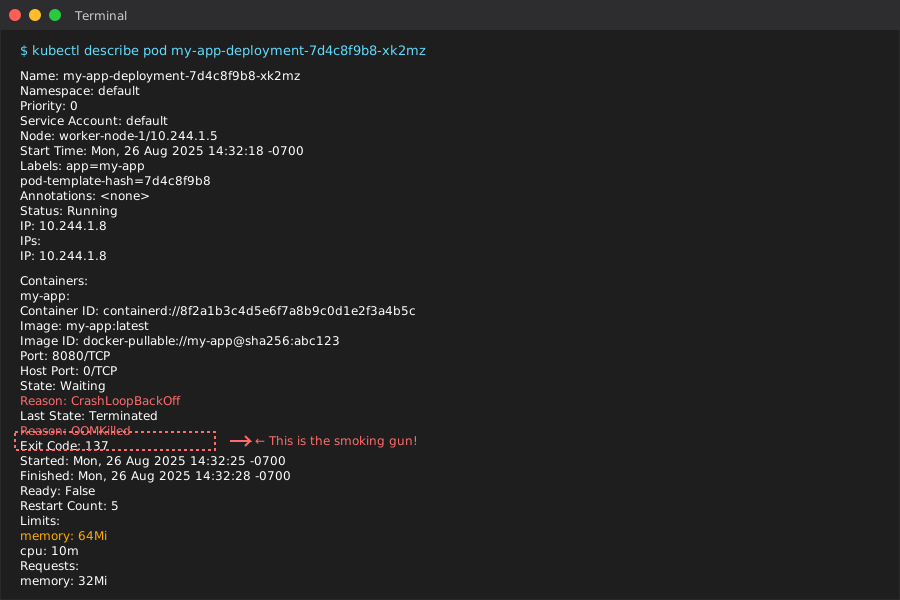 Classic AI-generated resource limit failure
Personal tip: "Start with 512Mi memory and 500m CPU for any real app. Scale down only after testing."
Error 4: Broken Health Check Configurations
The problem: AI creates health checks that never succeed, making deployments fail
My solution: Use simple HTTP checks that actually work
Time this saves: 20 minutes watching deployments hang
Step 1: Replace AI's Overly Complex Health Checks
# ❌ AI creates this complex mess
livenessProbe:
  httpGet:
    path: /health/detailed-check-with-database-validation
    port: 8080
    httpHeaders:
    - name: Custom-Header
      value: complex-value
  initialDelaySeconds: 5      # App isn't ready yet
  periodSeconds: 5            # Too frequent
  timeoutSeconds: 1           # Too short
  failureThreshold: 1         # Kills healthy pods

# ✅ Simple probe that actually works
livenessProbe:
  httpGet:
    path: /health              # Simple endpoint
    port: 8080
  initialDelaySeconds: 30     # Give app time to start
  periodSeconds: 10           # Reasonable frequency
  timeoutSeconds: 5           # Allow for slow responses
  failureThreshold: 3         # Don't kill on first failure
Step 2: Test Health Checks Work
# Check if your health endpoint actually responds
kubectl port-forward deployment/my-app 8080:8080

# In another terminal, test the endpoint
curl http://localhost:8080/health
Expected response:
{"status": "ok"}
Personal tip: "If your app doesn't have /health, use /ping or / instead. Don't let AI invent endpoints that don't exist."
Error 5: Label Selector Mismatches
The problem: AI creates labels that don't match selectors, breaking service-to-pod connections
My solution: Use consistent labeling patterns and validate connections
Time this saves: 45 minutes of "why can't I reach my app" debugging
Step 1: Fix Mismatched Labels
# ❌ AI creates mismatched labels (service can't find pods)
# Deployment
metadata:
  name: my-app
spec:
  selector:
    matchLabels:
      app: my-application    # Different from service selector
  template:
    metadata:
      labels:
        app: my-application

---
# Service
spec:
  selector:
    app: my-app             # Doesn't match deployment labels!

# ✅ Consistent labels everywhere
# Deployment
metadata:
  name: my-app
spec:
  selector:
    matchLabels:
      app: my-app           # Same label
  template:
    metadata:
      labels:
        app: my-app         # Same label

---
# Service
spec:
  selector:
    app: my-app             # Same label - connection works!
Step 2: Verify Label Connections
# Check what labels your pods actually have
kubectl get pods --show-labels

# Verify service can find pods
kubectl get endpoints
Expected output:
NAME     ENDPOINTS         AGE
my-app   10.244.0.5:8080   5m
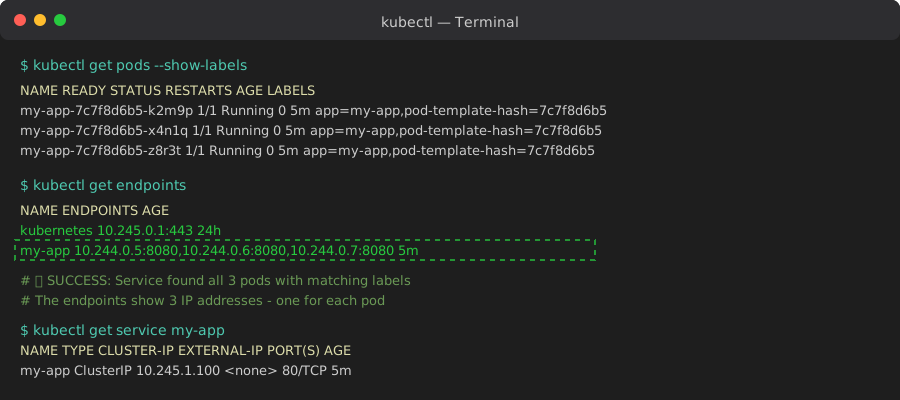 When labels match correctly, you see pod IPs in endpoints
Personal tip: "Use the same app name everywhere. If it's 'my-app' in one place, use 'my-app' in all places."
Error 6: Wrong Namespace References
The problem: AI references services and secrets in the wrong namespace
My solution: Be explicit about namespaces everywhere
Time this saves: 25 minutes of "service not found" errors
Step 1: Fix Cross-Namespace References
# ❌ AI assumes everything is in default namespace
env:
- name: DATABASE_URL
  valueFrom:
    secretKeyRef:
      name: db-secret        # Which namespace?
      key: url

# ✅ Specify namespace explicitly
env:
- name: DATABASE_URL
  valueFrom:
    secretKeyRef:
      name: db-secret
      key: url
      namespace: production   # Clear namespace reference
# ❌ AI references service without namespace
- name: API_ENDPOINT
  value: "http://api-service:8080"

# ✅ Full service DNS name
- name: API_ENDPOINT
  value: "http://api-service.production.svc.cluster.local:8080"
Step 2: Validate Namespace Resources
# Check what's actually in your target namespace
kubectl get all -n production

# Verify secrets exist where you expect
kubectl get secrets -n production
Personal tip: "Always use full service DNS names. Save yourself the debugging headache."
Error 7: Security Context Disasters
The problem: AI either ignores security contexts or makes them too restrictive
My solution: Use reasonable security defaults that actually work
Time this saves: 1 hour of permission denied errors
Step 1: Add Missing Security Context
# ❌ AI provides no security context (runs as root)
spec:
  containers:
  - name: app
    image: my-app:latest

# ✅ Safe security context that still works
spec:
  securityContext:
    runAsNonRoot: true        # Don't run as root
    runAsUser: 1001          # Specific non-root user
    runAsGroup: 1001         # Specific group
    fsGroup: 1001            # File system permissions
  containers:
  - name: app
    image: my-app:latest
    securityContext:
      allowPrivilegeEscalation: false
      readOnlyRootFilesystem: false      # Don't break apps that write temp files
      capabilities:
        drop:
        - ALL
Personal tip: "Don't set readOnlyRootFilesystem: true unless you've tested it. Most apps break without temp file access."
My Complete Validation Workflow
This is the exact checklist I run on every AI-generated manifest:
# 1. Check API versions are current
kubectl api-versions | grep -E "(apps|networking|batch)"

# 2. Validate manifest structure
kubectl apply --dry-run=client -f manifest.yaml

# 3. Apply to test namespace first
kubectl create namespace test-ai-manifest
kubectl apply -f manifest.yaml -n test-ai-manifest

# 4. Check everything deployed correctly
kubectl get all -n test-ai-manifest

# 5. Test connectivity if it's a service
kubectl port-forward -n test-ai-manifest deployment/my-app 8080:8080

# 6. Clean up test
kubectl delete namespace test-ai-manifest
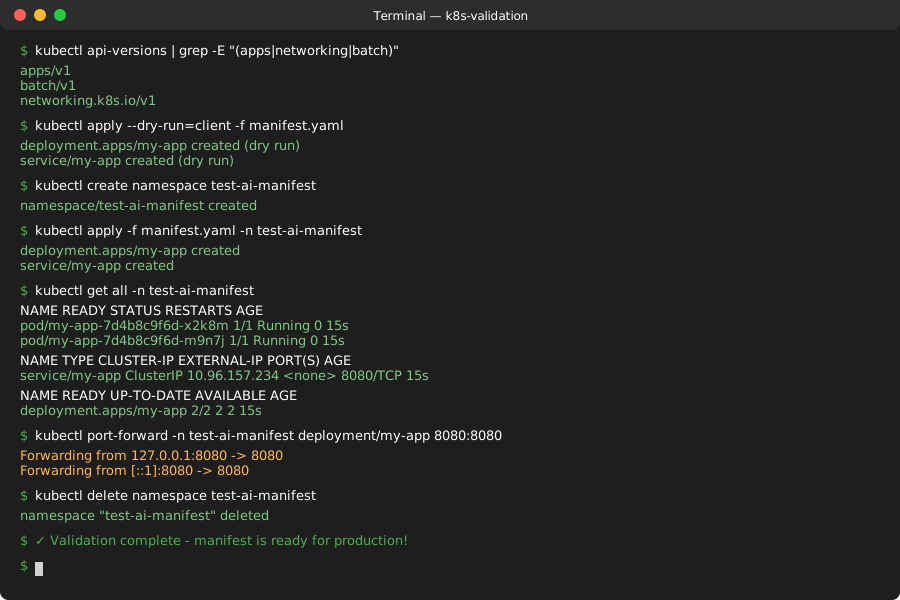 My standard validation process - takes 2 minutes, saves hours
What You Just Fixed
You now have a systematic way to catch and fix the 7 errors that break 90% of AI-generated Kubernetes manifests before they waste your time.
Key Takeaways (Save These)
- Always validate API versions first: AI uses deprecated APIs constantly
- Dry-run catches structural problems: 5 seconds of validation saves 15 minutes of debugging
- Test in a separate namespace: Don't break your actual deployment while fixing AI mistakes
Tools I Actually Use
- kubectl dry-run: Catches 90% of problems instantly
- VS Code YAML extension: Shows schema validation errors while editing
- kubeval: Static validation tool for CI/CD pipelines
- Kubernetes documentation: Official API reference - more reliable than AI training data