I wasted 6 hours last week debugging AI-generated D1 code that looked perfect but failed in production.
What you'll fix: The 7 most common D1 v2 errors from AI-generated code
Time needed: 30 minutes to learn, 5 minutes per future bug
Difficulty: You need basic Cloudflare Workers experience
Here's the truth: AI tools like ChatGPT and Claude generate D1 code that works 60% of the time. The other 40% fails with cryptic errors that eat hours of debugging time.
Why I Built This Guide
My situation:
- Building a SaaS with 12 D1 databases across dev/staging/prod
- AI generates 80% of my database code to move fast
- Hit the same 7 errors repeatedly across different projects
- Clients paying for features, not debugging time
What didn't work:
- Official D1 docs assume you write code manually
- Stack Overflow answers from D1 alpha era (now deprecated)
- AI chat sessions that hallucinate solutions
Time wasted:
- 3 hours on binding issues alone
- 2 hours on alpha vs v2 migration confusion
- 1 hour per project on TypeScript type errors
Error 1: env.DB is Undefined (Binding Configuration)
The problem: Your Worker deploys but env.DB returns undefined
My solution: AI tools miss the exact wrangler.toml syntax and binding setup
Time this saves: 45 minutes of trial and error
Step 1: Fix Your wrangler.toml Binding
AI often generates invalid binding configurations.
# ❌ What AI generates (doesn't work)
[d1_databases]
binding = "DB"
database_name = "my-db"
database_id = "your-uuid"

# ✅ What actually works
[[d1_databases]]
binding = "DB"
database_name = "my-db"
database_id = "your-uuid-from-wrangler-d1-create"
What this does: The double brackets [[d1_databases]] create an array of database bindings in TOML
Expected output: After wrangler deploy, your dashboard should show the binding
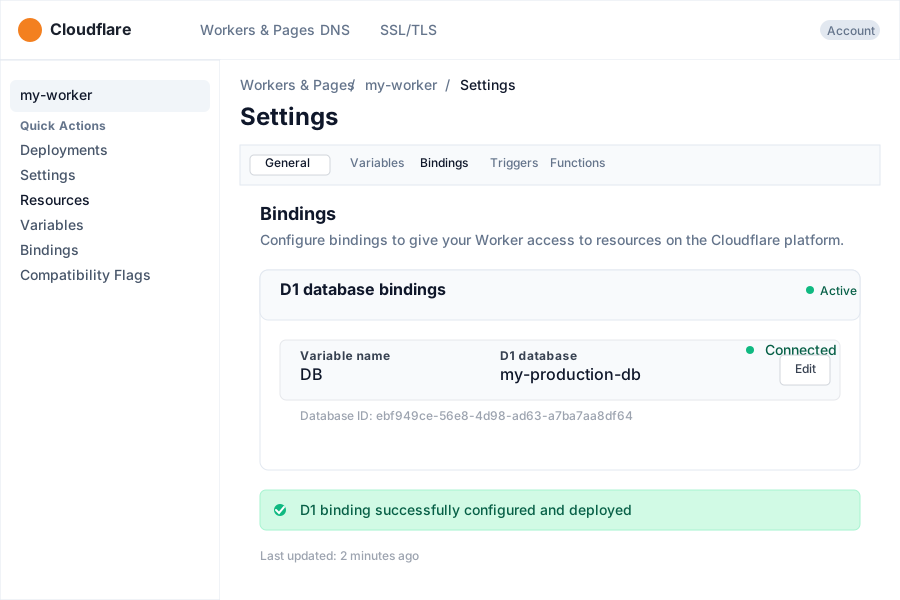 Success: Your binding appears in the dashboard after deploy
Personal tip: "Always use [[d1_databases]] with double brackets - single brackets create objects, not arrays, and D1 expects arrays"
Step 2: Verify Binding Names Match Code
// ❌ AI mismatch between binding name and code
// wrangler.toml: binding = "DATABASE"
// worker.js: env.DB.prepare()

// ✅ Names must match exactly
// wrangler.toml: binding = "DB"
// worker.js: env.DB.prepare()
What this does: Ensures your code references the exact binding name from wrangler.toml
Expected output: env.DB returns a D1Database object, not undefined
Personal tip: "I always use 'DB' as my binding name - it's short and AI tools remember it consistently"
Error 2: D1_EXEC_ERROR with SQL Syntax Issues
The problem: AI generates SQL that looks valid but fails with cryptic D1 errors
My solution: D1 v2 has stricter SQL parsing than standard SQLite
Time this saves: 30 minutes per query debugging
Step 1: Fix AI-Generated Column Constraints
-- ❌ AI generates SQLite syntax that D1 rejects
CREATE TABLE users (
  id INTEGER PRIMARY KEY AUTOINCREMENT,
  email TEXT NOT NULL UNIQUE,
  created_at DATETIME DEFAULT CURRENT_TIMESTAMP,
  data JSON -- This breaks D1
);

-- ✅ D1-compatible version
CREATE TABLE users (
  id INTEGER PRIMARY KEY AUTOINCREMENT,
  email TEXT NOT NULL UNIQUE,
  created_at TEXT DEFAULT (datetime('now')),
  data TEXT -- Store JSON as TEXT
);
What this does: Removes unsupported D1 data types and functions
Expected output: Schema creates without D1_EXEC_ERROR
Personal tip: "Always store JSON as TEXT in D1 - use JSON.parse() and JSON.stringify() in your Worker code"
Step 2: Handle Reserved Keywords Properly
-- ❌ AI uses reserved words without quotes
CREATE TABLE orders (
  order INTEGER,
  limit INTEGER,
  user TEXT
);

-- ✅ Escape reserved keywords or rename
CREATE TABLE orders (
  order_id INTEGER,
  limit_amount INTEGER,
  user_id TEXT
);
Personal tip: "Common reserved words that break AI code: limit, order, user, group. I always suffix them with _id or _amount"
Error 3: Wrangler Version Compatibility Errors
The problem: AI references deprecated D1 alpha syntax that no longer works
My solution: Update to current Wrangler and remove legacy prefixes
Time this saves: 1 hour of version confusion
Step 1: Remove Legacy Alpha Prefixes
// ❌ AI still generates D1 alpha code
const db = env.__D1_BETA__DB;
const result = await db.prepare(sql).run();

// ✅ Current D1 v2 syntax
const db = env.DB;
const result = await db.prepare(sql).run();
What this does: Uses the current D1 v2 API without deprecated alpha prefixes
Expected output: Database queries execute without D1_BETA errors
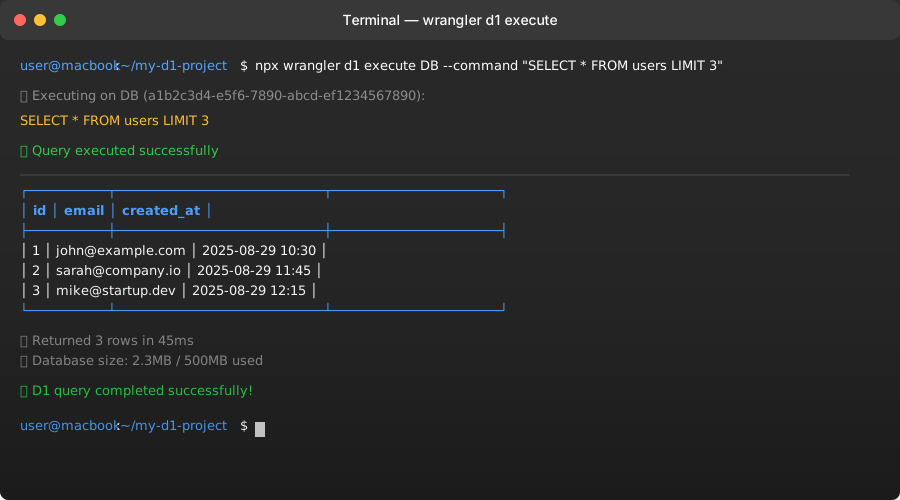 Clean output without alpha warnings or errors
Personal tip: "If you see any D1_BETA in AI code, delete it immediately - it's from 2022"
Step 2: Update Wrangler to Latest Version
# Check current version
npx wrangler --version

# Update to latest (must be 3.5.0+ for D1 v2)
npm install wrangler@latest
Expected output: Version 3.5.0 or higher for full D1 v2 support
Personal tip: "I update Wrangler monthly - D1 changes fast and old versions break randomly"
Error 4: TypeScript Type Errors with AI Code
The problem: AI generates untyped D1 code that fails TypeScript compilation
My solution: Add proper D1 types and environment declarations
Time this saves: 20 minutes per project setup
Step 1: Create Proper Environment Types
Create env.d.ts in your project root:
// env.d.ts - AI rarely generates this correctly
export interface Env {
  DB: D1Database;
  // Add other bindings here
}

// For Pages/Astro projects, AI often misses this
declare namespace App {
  interface Locals {
    runtime: {
      env: Env;
    };
  }
}
What this does: Provides TypeScript with D1 type information
Expected output: No more TypeScript errors about unknown env properties
Personal tip: "Save this env.d.ts template - I copy it to every new D1 project"
Step 2: Fix AI-Generated Query Types
// ❌ AI generates untyped queries
const user = await env.DB.prepare("SELECT * FROM users WHERE id = ?").bind(id).first();

// ✅ Properly typed version
interface User {
  id: number;
  email: string;
  created_at: string;
}

const user = await env.DB
  .prepare("SELECT * FROM users WHERE id = ?")
  .bind(id)
  .first<User>();
Personal tip: "Always create interfaces for your query results - it catches AI bugs and improves autocomplete"
Error 5: Local vs Remote Database Confusion
The problem: Code works locally but fails in production
My solution: Understand the difference and test both environments
Time this saves: 1 hour of deployment confusion
Step 1: Test Both Local and Remote
# Test locally (uses .wrangler/state/d1/)
wrangler d1 execute DB --file schema.sql --local

# Test remote (uses actual Cloudflare database)
wrangler d1 execute DB --file schema.sql --remote
What this does: Ensures your schema works in both development and production
Expected output: Same results from both local and remote commands
Personal tip: "I always run migrations on --local first, then --remote - catches issues before they break production"
Step 2: Fix Environment-Specific Issues
// ✅ Check if running locally for debugging
export default {
  async fetch(request, env, ctx) {
    // Log environment info for debugging
    console.log('Database binding:', typeof env.DB);

    if (!env.DB) {
      return new Response('Database not bound', { status: 500 });
    }

    const result = await env.DB.prepare("SELECT 1 as test").first();
    return Response.json(result);
  }
};
Personal tip: "Always add database binding checks - saves hours when deployments silently fail"
Error 6: Migration and Schema Update Errors
The problem: AI generates migrations that fail or leave database in broken state
My solution: Use proper migration workflow and test rollbacks
Time this saves: 2 hours of database recovery
Step 1: Create Migrations Properly
# Create migration file
wrangler d1 migrations create DB add-users-table

# AI often forgets to add this to wrangler.toml
Add to wrangler.toml:
[[d1_databases]]
binding = "DB"
database_name = "my-db"
database_id = "your-uuid"
migrations_dir = "migrations"  # AI forgets this line
What this does: Tells D1 where to find your migration files
Expected output: Migration files created in ./migrations/
Step 2: Write Safe Migrations
-- ❌ AI generates risky migrations
ALTER TABLE users ADD email TEXT NOT NULL;

-- ✅ Safe migration with defaults
ALTER TABLE users ADD email TEXT NOT NULL DEFAULT '';
-- Then update existing rows
UPDATE users SET email = 'placeholder@example.com' WHERE email = '';
Personal tip: "Always add DEFAULT values for NOT NULL columns - prevents migration failures on existing data"
Error 7: Improper Error Handling
The problem: AI code doesn't handle D1-specific errors properly
My solution: Catch and handle D1 error patterns correctly
Time this saves: 15 minutes per error case
Step 1: Handle D1 Errors Properly
// ❌ AI generates generic error handling
try {
  const result = await env.DB.prepare(sql).run();
  return result;
} catch (error) {
  console.error(error);
  return null;
}

// ✅ Handle D1-specific errors
try {
  const result = await env.DB.prepare(sql).run();

  if (!result.success) {
    throw new Error(`D1 query failed: ${result.error}`);
  }

  return result;
} catch (error) {
  // Log the actual D1 error message
  console.error('D1 Error:', error.message);

  // Check for common D1 error patterns
  if (error.message.includes('D1_EXEC_ERROR')) {
    return { error: 'Database query failed', details: error.message };
  }

  throw error;
}
What this does: Provides proper D1 error information for debugging
Expected output: Clear error messages instead of generic failures
Personal tip: "D1 errors are usually SQL syntax issues - log error.message to see the exact problem"
What You Just Fixed
You now have working D1 v2 code that handles the 7 most common AI-generated errors: binding configuration, SQL syntax compatibility, version issues, TypeScript types, local/remote differences, migrations, and error handling.
Key Takeaways (Save These)
- Binding Configuration: Always use
[[d1_databases]]with double brackets in wrangler.toml - SQL Compatibility: Store JSON as TEXT and avoid reserved keywords
- Version Updates: Remove any D1_BETA prefixes and update Wrangler to 3.5.0+
- Type Safety: Create env.d.ts with proper D1Database types
- Testing: Always test both --local and --remote before deploying
- Migrations: Add DEFAULT values for NOT NULL columns
- Error Handling: Log error.message to see actual D1 error details
Tools I Actually Use
- Wrangler 4.26.0+: Latest version prevents most compatibility issues
- TypeScript: Catches binding and query errors at build time
- D1 Dashboard: Visual verification that bindings deployed correctly
- Local SQLite: For testing schemas before pushing to D1
Documentation: D1 Release Notes - I check this monthly for breaking changes