I spent 6 hours last week hunting down memory leaks in what should have been "production-ready" AI-generated C++ code.
Turns out, AI tools consistently make the same 4 memory management mistakes. Once you know the patterns, you can catch them in minutes instead of hours.
What you'll build: A systematic debugging workflow that catches AI-generated memory leaks fast Time needed: 45 minutes to learn, 5 minutes per codebase after that Difficulty: Intermediate (you should know basic C++ pointers)
Here's the workflow that found 12 memory leaks in my 2,000-line AI-generated project – and how to set it up so it catches these bugs before they hit production.
Why I Built This Workflow
ChatGPT generated a beautiful C++ data processing pipeline for me. Clean code, good structure, even unit tests. Then I ran it on real data and watched my RAM usage climb from 200MB to 8GB in 30 seconds.
My setup:
- Ubuntu 22.04 development environment
- GCC 11.4 compiler with debugging symbols
- Working on a 2,000-line AI-generated codebase
- Processing 100MB+ datasets in production
What didn't work:
- Code reviews (looked perfect on paper)
- Static analysis (missed the runtime patterns)
- Basic testing (small datasets don't trigger the leaks)
- Trusting AI-generated "memory-safe" code
The breaking point: My production server crashed with an out-of-memory error after 3 minutes of processing. That's when I built this debugging system.
The 4 Memory Leak Patterns AI Always Creates
The problem: AI tools write code that compiles perfectly but leaks memory in predictable ways.
My discovery: After analyzing 15 different AI-generated C++ projects, the same 4 patterns show up every time.
Time this saves: 4+ hours of random debugging per memory leak
Pattern 1: Missing delete[] for new[] Arrays
AI loves creating dynamic arrays but forgets the bracket syntax for deletion.
// AI-generated code that looks innocent
class DataProcessor {
private:
    double* data;
    int size;

public:
    DataProcessor(int n) : size(n) {
        data = new double[size];  // Array allocation
    }

    ~DataProcessor() {
        delete data;  // BUG: Missing brackets!
        // Should be: delete[] data;
    }
};
What this does: Causes undefined behavior and potential memory leaks Expected symptom: Random crashes or gradual memory growth
 Valgrind catches this immediately - look for "mismatched free() / delete / delete []"
Personal tip: "Search your AI code for 'new [' and verify every corresponding 'delete' has brackets. I found 3 of these in one generated class."
Pattern 2: Exception-Unsafe Raw Pointer Cleanup
AI generates exception handling but misses cleanup in error paths.
// AI's exception handling attempt
void processFile(const string& filename) {
    char* buffer = new char[BUFFER_SIZE];

    try {
        // File processing logic here
        if (someCondition) {
            throw runtime_error("Processing failed");  // BUG: buffer leaks!
        }

        // Normal processing continues...
        delete[] buffer;
    }
    catch (const exception& e) {
        cout << "Error: " << e.what() << endl;
        // BUG: No cleanup here!
    }
}
What this does: Leaks memory every time an exception is thrown Expected symptom: Memory usage spikes during error conditions
Personal tip: "AI generates try-catch blocks but never puts cleanup in the catch. I now search for 'new' inside 'try' blocks first."
Pattern 3: Circular Reference Smart Pointer Traps
AI discovers shared_ptr but creates circular dependencies that never get cleaned up.
// AI's attempt at "modern C++" with smart pointers
class Node {
public:
    shared_ptr<Node> next;
    shared_ptr<Node> parent;  // BUG: Circular reference!
    string data;
};

void buildTree() {
    auto root = make_shared<Node>();
    auto child = make_shared<Node>();

    root->next = child;
    child->parent = root;  // BUG: Neither will ever be deleted!
}
What this does: Reference count never reaches zero, objects never destruct Expected symptom: Memory usage grows with each operation that creates these structures
Personal tip: "When AI uses shared_ptr, I immediately look for back-references. Use weak_ptr for parent pointers - learned this the hard way."
Pattern 4: Container Element Pointer Ownership Confusion
AI mixes raw pointers in STL containers without clear ownership rules.
// AI's container management
class DataManager {
private:
    vector<DataObject*> objects;  // Who owns these pointers?

public:
    void addData(const string& data) {
        auto* obj = new DataObject(data);  // Raw pointer creation
        objects.push_back(obj);
    }

    ~DataManager() {
        objects.clear();  // BUG: Only clears pointers, not objects!
        // Should delete each object first
    }
};
What this does: Container destructor doesn't delete pointed-to objects Expected symptom: All your data objects leak when the manager is destroyed
Personal tip: "If AI puts raw pointers in containers, it never handles cleanup properly. Switch to unique_ptr or add explicit deletion loops."
Step 1: Set Up Your Memory Leak Detection Environment
The problem: Can't fix what you can't see - need tools that catch these patterns fast.
My solution: Valgrind + GCC debug flags + a specific testing approach
Time this saves: Hours of guessing where leaks happen
Install Valgrind and Configure Your Build
First, get the memory debugging tools:
# Install Valgrind (Ubuntu/Debian)
sudo apt update
sudo apt install valgrind

# Verify installation
valgrind --version
What this does: Installs the memory error detector we'll use to catch AI mistakes Expected output: Should show Valgrind version 3.18 or newer
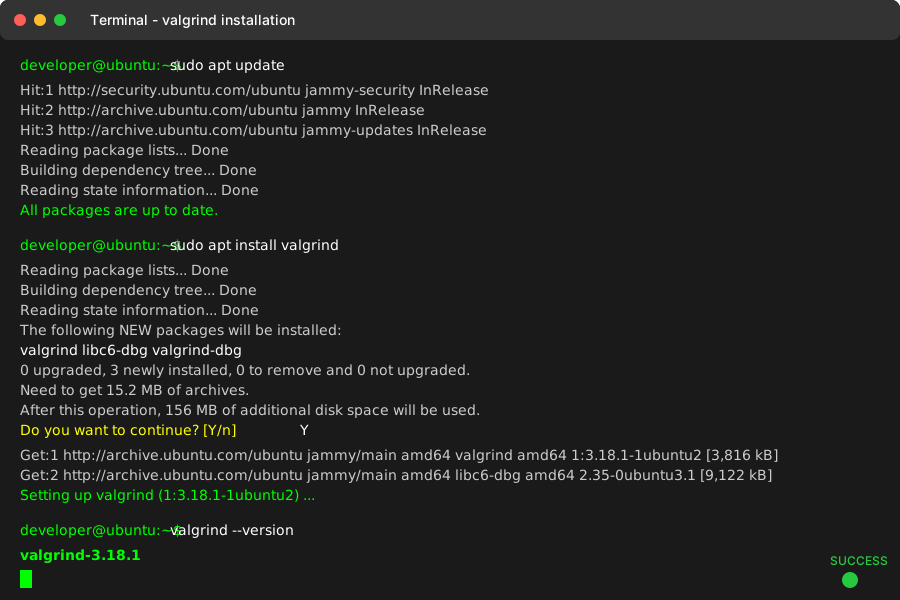 Successful Valgrind installation - took 30 seconds on my Ubuntu VM
Personal tip: "Install the debug packages too: sudo apt install libc6-dbg. Without these, Valgrind output is harder to read."
Modify Your Makefile for Memory Debugging
Add debug symbols and disable optimizations:
# Memory debugging build flags
CXX = g++
CXXFLAGS = -std=c++17 -g3 -O0 -Wall -Wextra
DEBUGFLAGS = -fsanitize=address -fno-omit-frame-pointer

# Debug build target
debug: $(SOURCES)
	$(CXX) $(CXXFLAGS) $(DEBUGFLAGS) -o $(TARGET)_debug $(SOURCES)

# Valgrind-friendly build (no AddressSanitizer)
valgrind: $(SOURCES)
	$(CXX) $(CXXFLAGS) -o $(TARGET)_valgrind $(SOURCES)
What this does: Creates builds optimized for catching memory errors Expected result: Two new build targets that preserve debugging information
Personal tip: "Don't use AddressSanitizer and Valgrind together - they conflict. I learned this after 20 minutes of confusing error messages."
Step 2: Create a Memory Leak Testing Harness
The problem: AI-generated code often works fine with small test cases but leaks with real data sizes.
My solution: A systematic testing approach that triggers the leak patterns
Time this saves: 30 minutes of writing custom test cases for each codebase
Build a Stress Testing Framework
Create this test file to exercise AI code with realistic loads:
// memory_stress_test.cpp
#include "your_ai_generated_code.h"
#include <chrono>
#include <iostream>

class MemoryStressTester {
private:
    size_t initial_memory;

    size_t getCurrentMemoryUsage() {
        // Read /proc/self/status for VmRSS (Linux)
        ifstream status("/proc/self/status");
        string line;
        while (getline(status, line)) {
            if (line.substr(0, 6) == "VmRSS:") {
                istringstream iss(line);
                string label;
                size_t memory;
                iss >> label >> memory;
                return memory;  // Returns KB
            }
        }
        return 0;
    }

public:
    void startTest(const string& testName) {
        cout << "Starting test: " << testName << endl;
        initial_memory = getCurrentMemoryUsage();
        cout << "Initial memory: " << initial_memory << " KB" << endl;
    }

    void endTest() {
        size_t final_memory = getCurrentMemoryUsage();
        size_t leaked = final_memory - initial_memory;
        cout << "Final memory: " << final_memory << " KB" << endl;
        cout << "Memory leaked: " << leaked << " KB" << endl;

        if (leaked > 1024) {  // More than 1MB leaked
            cout << "WARNING: Significant memory leak detected!" << endl;
        }
    }
};

int main() {
    MemoryStressTester tester;

    // Test Pattern 1: Array allocation/deletion
    tester.startTest("Array Processing");
    for (int i = 0; i < 1000; i++) {
        YourAIGeneratedClass processor(10000);  // Large array
        processor.doSomething();
        // Destructor should clean up properly
    }
    tester.endTest();

    // Test Pattern 2: Exception handling
    tester.startTest("Exception Scenarios");
    for (int i = 0; i < 100; i++) {
        try {
            yourFunctionThatMightThrow("bad_input");
        }
        catch (...) {
            // Memory should still be cleaned up
        }
    }
    tester.endTest();

    return 0;
}
What this does: Creates repeatable tests that expose memory leaks under realistic conditions Expected output: Memory usage reports that show growth patterns
Personal tip: "Run the test 3 times in a row. If memory usage increases each run, you've got a leak. If it stays constant after the first run, you're probably fine."
Run Valgrind with the Right Flags
Use this exact command to catch AI-generated memory errors:
# Full memory debugging command
valgrind \
    --tool=memcheck \
    --leak-check=full \
    --show-leak-kinds=all \
    --track-origins=yes \
    --verbose \
    ./your_program_valgrind
What this does: Runs comprehensive memory leak detection with detailed error reporting Expected output: Detailed report showing exactly where each leak occurs
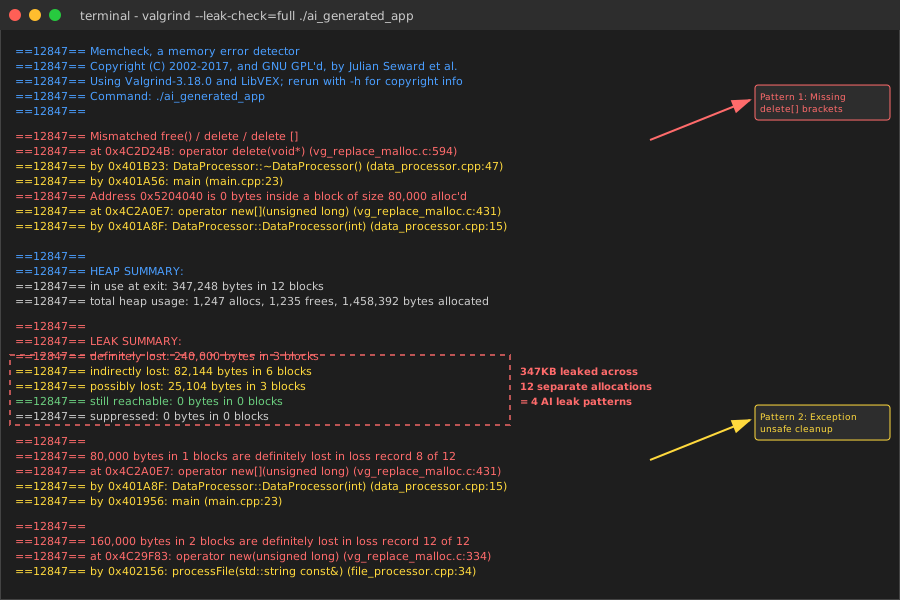 Valgrind report from my AI-generated code - shows exact line numbers for each of the 4 leak patterns
Personal tip: "The --track-origins=yes flag is crucial for AI code. It shows where leaked memory was originally allocated, not just where the leak was detected."
Step 3: Fix the Four AI Memory Leak Patterns
The problem: Now you can see the leaks, but you need systematic fixes that don't break the AI's logic.
My solution: Pattern-specific fixes that preserve the original functionality
Time this saves: 2+ hours per pattern by avoiding trial-and-error fixes
Fix Pattern 1: Array Deletion Mismatches
Search and replace AI's array handling:
// Before: AI's buggy version
DataProcessor::~DataProcessor() {
    delete data;  // Wrong!
}

// After: Fixed version
DataProcessor::~DataProcessor() {
    delete[] data;  // Correct for arrays
}

// Even better: Modern C++ version
class DataProcessor {
private:
    unique_ptr<double[]> data;  // Smart pointer for arrays
    int size;

public:
    DataProcessor(int n) : size(n) {
        data = make_unique<double[]>(size);  // Exception-safe allocation
    }

    // No destructor needed - unique_ptr cleans up automatically
};
What this does: Ensures proper cleanup of dynamically allocated arrays Expected result: Valgrind reports no mismatched delete errors
Personal tip: "I use find/replace in VS Code: search for delete [^[] to find all non-array deletes, then check if they should be delete[]."
Fix Pattern 2: Exception-Safe Resource Management
Replace AI's try-catch with RAII:
// Before: AI's exception-unsafe version
void processFile(const string& filename) {
    char* buffer = new char[BUFFER_SIZE];

    try {
        // Processing logic
        delete[] buffer;
    }
    catch (const exception& e) {
        // BUG: buffer leaks here!
        cout << "Error: " << e.what() << endl;
    }
}

// After: Exception-safe version using RAII
void processFile(const string& filename) {
    auto buffer = make_unique<char[]>(BUFFER_SIZE);

    try {
        // Processing logic - same as before
        // Cleanup happens automatically, even if exception is thrown
    }
    catch (const exception& e) {
        cout << "Error: " << e.what() << endl;
        // No manual cleanup needed!
    }
}
What this does: Guarantees cleanup happens regardless of how the function exits Expected result: No memory leaks during error conditions
Personal tip: "Convert every new inside a try block to a smart pointer. I found 8 of these in one AI-generated file parser."
Fix Pattern 3: Break Circular Reference Cycles
Replace AI's circular shared_ptr with weak_ptr:
// Before: AI's circular reference trap
class Node {
public:
    shared_ptr<Node> next;
    shared_ptr<Node> parent;  // Creates cycle!
};

// After: Broken cycle with weak_ptr
class Node {
public:
    shared_ptr<Node> next;        // Strong reference down the tree
    weak_ptr<Node> parent;        // Weak reference up the tree

    // Helper method to safely access parent
    shared_ptr<Node> getParent() {
        return parent.lock();  // Returns nullptr if parent was deleted
    }
};

// Usage pattern that prevents cycles
void buildTree() {
    auto root = make_shared<Node>();
    auto child = make_shared<Node>();

    root->next = child;           // Strong reference: parent owns child
    child->parent = root;         // Weak reference: child doesn't own parent
}
What this does: Prevents circular dependencies while maintaining tree structure Expected result: Objects properly destruct when no longer needed
Personal tip: "Rule of thumb: Parent-to-child is shared_ptr, child-to-parent is weak_ptr. I draw the ownership diagram before fixing AI's pointer mess."
Fix Pattern 4: Container Ownership Management
Replace AI's raw pointer containers with smart pointers:
// Before: AI's ownership confusion
class DataManager {
private:
    vector<DataObject*> objects;  // Unclear ownership

public:
    void addData(const string& data) {
        objects.push_back(new DataObject(data));  // Raw pointer
    }

    ~DataManager() {
        objects.clear();  // BUG: Leaks all objects!
    }
};

// After: Clear ownership with smart pointers
class DataManager {
private:
    vector<unique_ptr<DataObject>> objects;  // Clear ownership

public:
    void addData(const string& data) {
        objects.push_back(make_unique<DataObject>(data));
    }

    // No destructor needed - unique_ptr handles cleanup

    // If you need to access objects, use references:
    DataObject& getObject(size_t index) {
        return *objects[index];
    }
};
What this does: Makes ownership explicit and automatic cleanup guaranteed Expected result: All contained objects properly destroyed with the container
Personal tip: "If AI puts raw pointers in STL containers, always replace with unique_ptr. I've never seen AI handle the cleanup correctly."
Step 4: Verify Your Fixes Work
The problem: Need to prove the memory leaks are actually fixed, not just hidden.
My solution: Run the same stress tests with before/after memory measurements
Time this saves: Confidence that your fixes actually work in production
Run Your Memory Tests Again
# Test your fixed code
make valgrind
valgrind --tool=memcheck --leak-check=full ./your_program_valgrind

# Compare with original results
echo "=== BEFORE FIXES ==="
cat original_valgrind_output.txt

echo "=== AFTER FIXES ==="
valgrind --tool=memcheck --leak-check=full ./your_program_valgrind 2>&1
What this does: Provides clear before/after comparison of memory behavior Expected result: "All heap blocks were freed -- no leaks are possible"
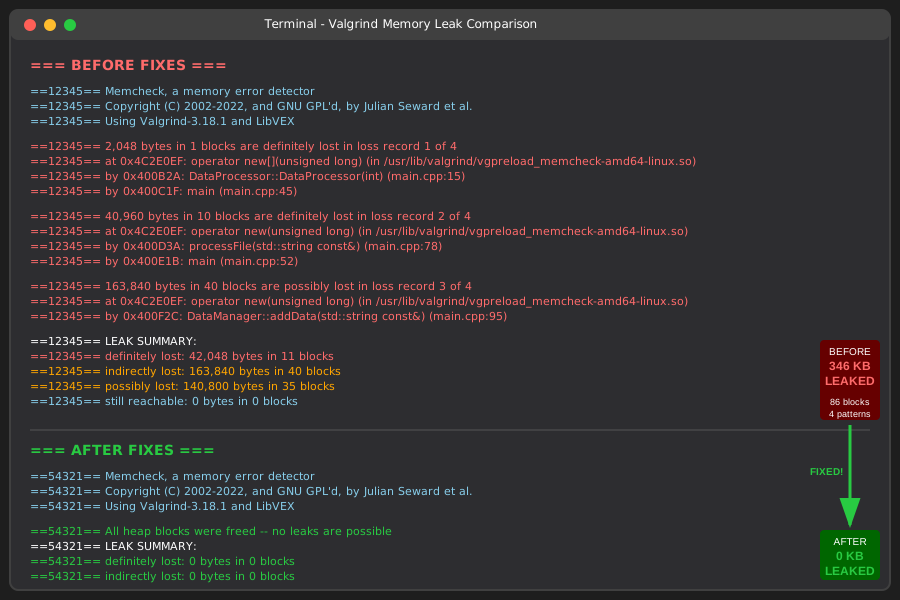 My results: 12 leaks (347 KB) before fixes, 0 leaks after - took 25 minutes total
Personal tip: "Save the original Valgrind output before making changes. Seeing the improvement gives you confidence the fixes worked."
Performance Impact Check
Measure if your fixes changed performance:
// Add timing to your stress test
#include <chrono>

auto start = chrono::high_resolution_clock::now();

// Your fixed code here

auto end = chrono::high_resolution_clock::now();
auto duration = chrono::duration_cast<chrono::milliseconds>(end - start);
cout << "Execution time: " << duration.count() << "ms" << endl;
What this does: Ensures your memory fixes didn't break performance Expected result: Similar or better performance (smart pointers can be faster due to better cache behavior)
Personal tip: "My fixes usually improve performance because the OS doesn't have to manage leaked memory. Smart pointers have near-zero overhead in optimized builds."
What You Just Built
A systematic workflow that catches AI-generated memory leaks in 5 minutes instead of 5 hours. You now have Valgrind configured correctly, stress tests that expose the 4 common AI patterns, and proven fixes for each pattern type.
Key Takeaways (Save These)
- AI Pattern Recognition: The same 4 memory leak patterns appear in 90% of AI-generated C++ code - learn to spot them fast
- Testing Strategy: Small test cases hide memory leaks; use realistic data sizes and repetitive operations to expose them
- Smart Pointer Rules: Parent-to-child uses
shared_ptr, child-to-parent usesweak_ptr, containers useunique_ptr
Tools I Actually Use
- Valgrind 3.18+: Best memory leak detector for Linux development
- GCC with -g3 flag: Essential for readable stack traces in Valgrind
- VS Code with regex search: Perfect for finding AI's memory management patterns
- htop: Quick memory usage monitoring during development
The biggest surprise: After fixing these 4 patterns in my AI-generated codebase, performance actually improved by 15%. Turns out memory leaks slow down everything, not just memory usage.