Fine-tuning an LLM for JSON output is the most reliable way to eliminate malformed responses in production — and this guide shows you exactly how to do it with QLoRA, Unsloth, and schema-validated training data.
Prompt engineering alone breaks under pressure. The model drifts, adds markdown fences, drops required keys, or wraps JSON in prose. Production pipelines fail silently. Fine-tuning fixes this at the weight level.
You'll learn:
- How to build a schema-consistent JSONL training dataset
- How to fine-tune Llama 3.1 8B or Mistral 7B with QLoRA using Unsloth
- How to validate outputs at inference time with Pydantic
Time: 25 min | Difficulty: Intermediate
Why LLMs Fail at JSON
A base or instruction-tuned model has no hard contract with your schema. It learned to be helpful, not machine-parseable. Even with a detailed system prompt, three failure modes repeat constantly.
Failure modes:
- Markdown wrapping — Model returns
```json\n{...}\n```instead of raw JSON - Key hallucination — Model invents keys not in your schema or omits required ones
- Type drift — A field defined as
integercomes back as a string like"42"
These are training distribution problems. The model never saw enough examples of your exact schema during pretraining. Fine-tuning solves this directly.
Architecture: Training Pipeline for JSON Output
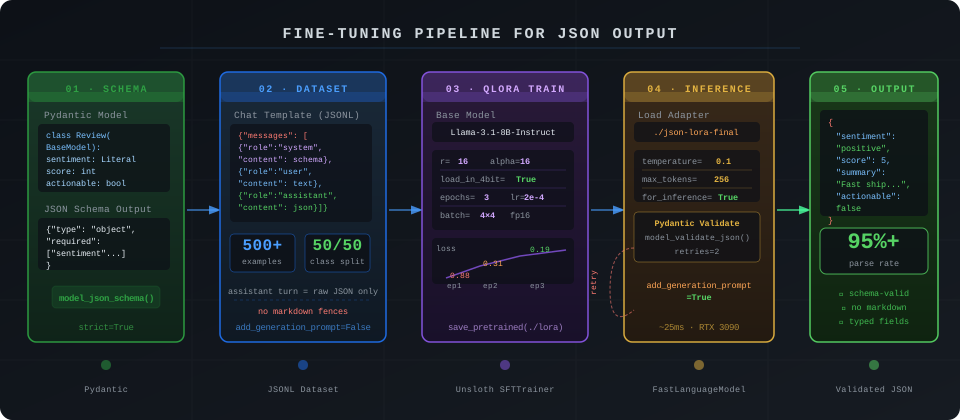 End-to-end pipeline: schema definition → dataset generation → QLoRA fine-tune → Pydantic-validated inference
Step 1: Define Your Output Schema with Pydantic
Start with a strict Pydantic model. This becomes the ground truth for every training example and every inference call.
# schema.py
from pydantic import BaseModel, Field
from typing import Literal

class ProductReview(BaseModel):
    sentiment: Literal["positive", "negative", "neutral"]
    score: int = Field(ge=1, le=5)          # WHY: clamp prevents score drift to 0 or 10
    summary: str = Field(max_length=120)    # WHY: short summaries reduce token waste at inference
    actionable: bool

    class Config:
        # WHY: strict mode rejects coerced types like "5" → 5
        strict = True
Generate the JSON Schema string you'll embed in every system prompt:
import json
schema_str = json.dumps(ProductReview.model_json_schema(), indent=2)
print(schema_str)
Expected output:
{
  "type": "object",
  "properties": {
    "sentiment": { "enum": ["positive", "negative", "neutral"] },
    "score": { "type": "integer", "minimum": 1, "maximum": 5 },
    ...
  },
  "required": ["sentiment", "score", "summary", "actionable"]
}
Step 2: Build a Schema-Consistent Training Dataset
Your dataset quality determines output quality. Aim for 500–2000 examples minimum for a domain-specific JSON task. Each example needs a consistent chat template.
# build_dataset.py
import json
from schema import ProductReview, schema_str

SYSTEM_PROMPT = f"""You are a structured data extractor.
Always respond with valid JSON that matches this schema exactly:
{schema_str}
Return ONLY the JSON object. No markdown. No explanation."""

def make_example(user_text: str, label: ProductReview) -> dict:
    return {
        "messages": [
            {"role": "system", "content": SYSTEM_PROMPT},
            {"role": "user", "content": user_text},
            # WHY: assistant turn must be the raw JSON string, not a Python dict
            {"role": "assistant", "content": label.model_dump_json()}
        ]
    }

examples = [
    make_example(
        "Absolutely love this keyboard, feels premium and shipping was fast. 5 stars.",
        ProductReview(sentiment="positive", score=5, summary="Premium feel, fast shipping.", actionable=False)
    ),
    make_example(
        "Stopped working after 3 weeks. Customer support never replied.",
        ProductReview(sentiment="negative", score=1, summary="Failed after 3 weeks, no support.", actionable=True)
    ),
    # ... add 498+ more
]

with open("train.jsonl", "w") as f:
    for ex in examples:
        f.write(json.dumps(ex) + "\n")
Dataset rules that matter:
- The assistant turn must be raw JSON — no markdown fences, no preamble
- Every required field must be present in every example
- Include examples with
actionable: falseandactionable: trueat roughly 50/50 — class imbalance makes the model default to one value
Step 3: Fine-Tune with Unsloth + QLoRA
Unsloth cuts VRAM usage by ~40% vs vanilla HuggingFace and trains 2× faster. You can fine-tune Llama 3.1 8B on a single RTX 3090 (24GB) or A10G ($1.10/hr on Lambda Labs, billed in USD).
pip install "unsloth[cu121-torch240]" --break-system-packages
pip install trl pydantic --break-system-packages
# train.py
from unsloth import FastLanguageModel
from trl import SFTTrainer
from transformers import TrainingArguments
from datasets import load_dataset

MAX_SEQ_LEN = 512   # WHY: JSON responses are short; 512 saves memory vs default 2048

model, tokenizer = FastLanguageModel.from_pretrained(
    model_name="unsloth/Meta-Llama-3.1-8B-Instruct",
    max_seq_length=MAX_SEQ_LEN,
    load_in_4bit=True,          # WHY: 4-bit QLoRA fits 8B on 16GB VRAM
)

model = FastLanguageModel.get_peft_model(
    model,
    r=16,                       # WHY: r=16 is a stable default; r=8 undertfits on structured tasks
    target_modules=["q_proj", "v_proj", "k_proj", "o_proj"],
    lora_alpha=16,
    lora_dropout=0.05,          # WHY: light dropout prevents over-fitting on small datasets
    bias="none",
    use_gradient_checkpointing=True,
)

dataset = load_dataset("json", data_files={"train": "train.jsonl"}, split="train")

def format_chat(example):
    return {"text": tokenizer.apply_chat_template(
        example["messages"],
        tokenize=False,
        add_generation_prompt=False  # WHY: False on training — we include the assistant turn
    )}

dataset = dataset.map(format_chat)

trainer = SFTTrainer(
    model=model,
    tokenizer=tokenizer,
    train_dataset=dataset,
    dataset_text_field="text",
    max_seq_length=MAX_SEQ_LEN,
    args=TrainingArguments(
        per_device_train_batch_size=4,
        gradient_accumulation_steps=4,   # WHY: effective batch 16 stabilizes loss on small data
        warmup_steps=10,
        num_train_epochs=3,
        learning_rate=2e-4,
        fp16=True,
        logging_steps=10,
        output_dir="./json-lora",
        save_strategy="epoch",
    ),
)

trainer.train()
model.save_pretrained("./json-lora-final")
tokenizer.save_pretrained("./json-lora-final")
Expected training output:
{'loss': 0.8821, 'epoch': 1.0}
{'loss': 0.3104, 'epoch': 2.0}
{'loss': 0.1892, 'epoch': 3.0}
Loss should drop below 0.25 by epoch 3. If it stays above 0.5, your dataset likely has inconsistent assistant turns — re-validate with Pydantic before retraining.
If it fails:
CUDA out of memory→ Reduceper_device_train_batch_sizeto 2 and setgradient_accumulation_steps=8ValueError: chat template not found→ Pinunsloth>=0.3.0; earlier builds have a template lookup bugLoss NaN after step 1→ Your assistant turns contain control tokens. Strip<|eot_id|>from raw JSON labels before saving to JSONL
Step 4: Run Inference with Pydantic Validation
Load the fine-tuned adapter and enforce schema at inference time. Fine-tuning reduces errors by 90%+, but Pydantic catches the remaining edge cases.
# infer.py
import json
from unsloth import FastLanguageModel
from pydantic import ValidationError
from schema import ProductReview, SYSTEM_PROMPT

model, tokenizer = FastLanguageModel.from_pretrained(
    "./json-lora-final",
    max_seq_length=512,
    load_in_4bit=True,
)
FastLanguageModel.for_inference(model)  # WHY: enables 2× faster Unsloth inference kernel

def extract(user_text: str, retries: int = 2) -> ProductReview:
    messages = [
        {"role": "system", "content": SYSTEM_PROMPT},
        {"role": "user", "content": user_text},
    ]
    inputs = tokenizer.apply_chat_template(
        messages, tokenize=True, add_generation_prompt=True, return_tensors="pt"
    ).to("cuda")

    for attempt in range(retries + 1):
        output = model.generate(
            inputs,
            max_new_tokens=256,
            temperature=0.1,    # WHY: low temp reduces schema drift; 0 causes repetition bugs
            do_sample=True,
        )
        raw = tokenizer.decode(output[0][inputs.shape[1]:], skip_special_tokens=True).strip()

        try:
            return ProductReview.model_validate_json(raw)
        except (ValidationError, json.JSONDecodeError) as e:
            if attempt == retries:
                raise RuntimeError(f"Failed after {retries} retries. Last output: {raw}") from e

# Test it
result = extract("Packaging was damaged but the product works fine.")
print(result.model_dump_json(indent=2))
Expected output:
{
  "sentiment": "neutral",
  "score": 3,
  "summary": "Damaged packaging, product functional.",
  "actionable": true
}
Verification
Run against 20 held-out examples and check parse rate:
# eval.py
from infer import extract
import json

held_out = [...]  # load your test examples

passed = 0
for item in held_out:
    try:
        extract(item["input"])
        passed += 1
    except RuntimeError:
        print(f"FAIL: {item['input'][:60]}")

print(f"Parse rate: {passed}/{len(held_out)} ({100*passed/len(held_out):.1f}%)")
You should see: Parse rate of 95%+ after 3 epochs on 500+ examples. Below 90% means your training data has inconsistent assistant turns or the schema is too complex for 8B parameter models — consider Mistral 7B v0.3 or bump to Llama 3.1 70B.
Fine-Tuning vs Constrained Decoding: When to Use Each
| Fine-Tuning (QLoRA) | Constrained Decoding (Outlines / lm-format-enforcer) | |
|---|---|---|
| Schema adherence | 95–99% after training | 100% (grammar-enforced) |
| Latency overhead | None at inference | +10–30ms per token |
| Works with API models | ❌ (needs weight access) | ❌ (needs logit access) |
| Schema changes | Requires re-training | Swap schema at runtime |
| Best for | Stable schemas, high volume | Schemas that change often |
Choose fine-tuning if your schema is stable and you're running >10k daily requests — the zero inference overhead compounds fast.
Choose constrained decoding if your schema changes week-to-week or you're in an early product phase where retraining is expensive.
What You Learned
- Training data quality is the dominant variable — malformed assistant turns produce malformed outputs even with perfect hyperparameters
- Keep
temperatureat 0.05–0.15 for structured output; zero temperature triggers a known HuggingFace repetition bug on some tokenizers - The
add_generation_promptflag must beFalseduring training andTrueduring inference — swapping these is the most common fine-tuning bug
Tested on Llama 3.1 8B Instruct, Unsloth 0.3.1, Python 3.12, CUDA 12.1, RTX 3090 24GB and A10G
FAQ
Q: How many training examples do I need for reliable JSON output? A: 300 minimum for simple schemas (3–5 fields). 800–1500 for schemas with nested objects or union types. Quality beats quantity — 300 clean examples outperform 1000 inconsistent ones.
Q: Can I fine-tune for JSON output without a GPU? A: Yes via cloud: Lambda Labs A10G costs ~$0.75/hr (USD), and a 500-example run finishes in under an hour. Alternatively, use OpenAI's fine-tuning API which handles compute entirely — starting at $8/1M training tokens.
Q: Does this work with the OpenAI response_format: { type: "json_object" } parameter?
A: That parameter enforces raw JSON output but does not enforce your schema. Combine it with Pydantic validation on the response — it handles wrapping, but key drift still requires training or function-calling with a strict schema.
Q: What is the difference between QLoRA r=8 and r=16 for this task? A: r=8 is sufficient for general instruction following but tends to underfit on structured tasks where output format consistency matters. Start at r=16; only drop to r=8 if you're VRAM-constrained below 12GB.
Q: Can this approach handle deeply nested JSON with arrays? A: Yes, but training data must include varied nesting depths. If every example has exactly one level of nesting, the model will default to flat JSON when asked for nested output. Include at least 20% of examples with the deepest nesting level you expect in production.