Problem: Fine-Tuning Llama 3.3 Is Slow and VRAM-Hungry
Fine-tuning Llama 3.3 with Unsloth cuts training time by up to 5x and reduces VRAM usage by 60% compared to standard Hugging Face TRL — making 70B fine-tunes possible on a single RTX 4090 (24GB).
Without Unsloth, full QLoRA fine-tuning on Llama 3.3 70B requires 2–3 A100 GPUs or 48+ hours on a single consumer GPU. Unsloth's custom CUDA kernels and memory-efficient attention make this practical on a single card — or even on Google Colab Pro ($10/month USD).
You'll learn:
- How to install Unsloth and load Llama 3.3 70B in 4-bit for QLoRA
- How to configure LoRA adapters and a training dataset
- How to run a full fine-tuning loop and save your merged model
Time: 30 min | Difficulty: Intermediate
Why Unsloth Is 5x Faster
Standard Hugging Face TRL uses PyTorch's autograd for backpropagation. Every forward and backward pass allocates and frees VRAM for intermediate activations. At 70B parameters, this is catastrophically slow.
Unsloth replaces those operations with hand-written Triton and CUDA kernels that fuse operations, recompute activations on-the-fly instead of storing them, and eliminate redundant memory copies.
Symptoms of the problem without Unsloth:
- OOM errors on a 24GB GPU with Llama 3.3 70B even at 4-bit
- Training throughput of ~10–15 tokens/sec on RTX 4090
- 30–60 minute training runs for small datasets that should take 5–10 min
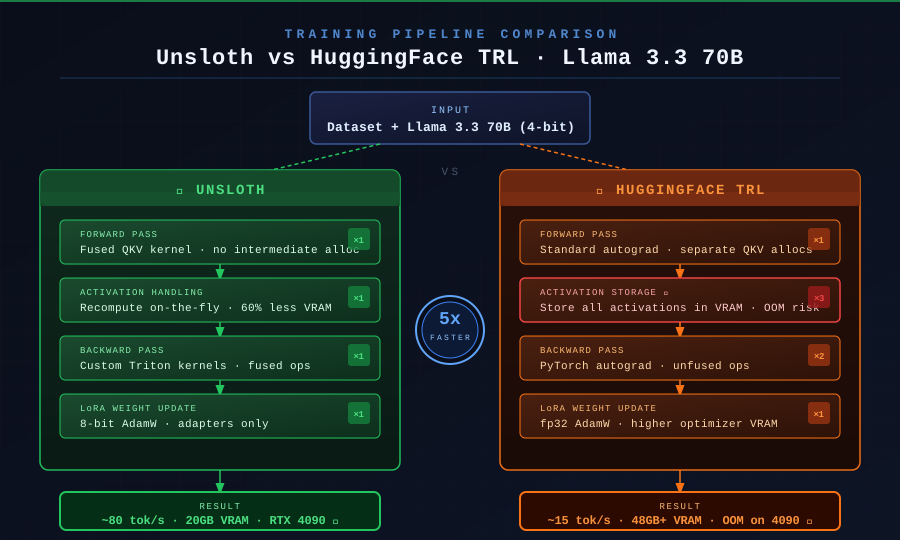 Unsloth fuses QKV projections and recomputes activations instead of storing them — cutting peak VRAM by 60% vs standard TRL.
Solution
Step 1: Install Unsloth and Dependencies
# Install Unsloth with CUDA 12.1 support — match your driver version
pip install "unsloth[colab-new] @ git+https://github.com/unslothai/unsloth.git"
pip install --no-deps trl peft accelerate bitsandbytes
If you're running locally with CUDA 12.2+:
# For local RTX GPU with CUDA 12.2
pip install "unsloth[cu122-torch230] @ git+https://github.com/unslothai/unsloth.git"
Expected output: Successfully installed unsloth-...
If it fails:
ERROR: No matching distribution→ Check your CUDA version withnvcc --versionand match thecu121/cu122suffixImportError: triton→ Runpip install triton==2.1.0separately first
Step 2: Load Llama 3.3 70B in 4-Bit with FastLanguageModel
from unsloth import FastLanguageModel
import torch

# FastLanguageModel.from_pretrained patches the model for Unsloth kernels at load time
model, tokenizer = FastLanguageModel.from_pretrained(
    model_name="unsloth/Llama-3.3-70B-Instruct-bnb-4bit",  # pre-quantized 4-bit checkpoint
    max_seq_length=2048,   # increase to 4096 if your dataset has long context
    dtype=None,            # auto-detect: bfloat16 on Ampere+, float16 on older GPUs
    load_in_4bit=True,     # QLoRA: keeps base weights at 4-bit, trains LoRA adapters at bf16
)
Expected output: Model loads in ~60 seconds on RTX 4090. VRAM usage should be ~18–20GB.
If it fails:
OutOfMemoryError→ Reducemax_seq_lengthto 1024 or useload_in_4bit=Truewithdtype=torch.float16404 Not Foundfrom HuggingFace → Runhuggingface-cli loginfirst; the 70B model requires accepting Meta's license atmeta-llama/Llama-3.3-70B-Instruct
Step 3: Attach LoRA Adapters
model = FastLanguageModel.get_peft_model(
    model,
    r=16,                       # LoRA rank — 16 is a good default; increase to 32 for more capacity
    target_modules=[
        "q_proj", "k_proj", "v_proj", "o_proj",
        "gate_proj", "up_proj", "down_proj",  # also tune FFN layers for best results
    ],
    lora_alpha=16,              # set equal to r for a learning rate scale of 1.0
    lora_dropout=0,             # Unsloth-optimized kernels require dropout=0
    bias="none",
    use_gradient_checkpointing="unsloth",  # Unsloth's custom checkpointing — saves 30% more VRAM vs standard
    random_state=42,
)
Why lora_dropout=0: Unsloth's fused kernels for LoRA cannot apply dropout during the forward pass. Setting it to non-zero silently falls back to the slow path. Always keep it at 0 when using Unsloth.
Step 4: Prepare Your Dataset
This example uses the Alpaca format, which works out-of-the-box with Unsloth's DataCollatorForSeq2Seq.
from datasets import load_dataset
from unsloth.chat_templates import get_chat_template

tokenizer = get_chat_template(
    tokenizer,
    chat_template="llama-3",  # applies Llama 3's <|begin_of_text|> / <|eot_id|> format
)

dataset = load_dataset("yahma/alpaca-cleaned", split="train")

def format_prompt(examples):
    instructions = examples["instruction"]
    inputs       = examples["input"]
    outputs      = examples["output"]
    texts = []
    for instruction, inp, output in zip(instructions, inputs, outputs):
        # Llama 3 chat format: system + user + assistant turns
        messages = [
            {"role": "system", "content": "You are a helpful assistant."},
            {"role": "user",   "content": instruction + ("\n" + inp if inp else "")},
            {"role": "assistant", "content": output},
        ]
        text = tokenizer.apply_chat_template(
            messages,
            tokenize=False,
            add_generation_prompt=False,  # False for training — we provide the answer
        )
        texts.append(text)
    return {"text": texts}

dataset = dataset.map(format_prompt, batched=True)
Step 5: Configure and Run Training
from trl import SFTTrainer
from transformers import TrainingArguments
from unsloth import is_bfloat16_supported

trainer = SFTTrainer(
    model=model,
    tokenizer=tokenizer,
    train_dataset=dataset,
    dataset_text_field="text",
    max_seq_length=2048,
    dataset_num_proc=2,
    args=TrainingArguments(
        per_device_train_batch_size=2,
        gradient_accumulation_steps=4,   # effective batch = 2 * 4 = 8
        warmup_steps=5,
        num_train_epochs=1,
        learning_rate=2e-4,
        fp16=not is_bfloat16_supported(),  # use fp16 on older GPUs, bf16 on Ampere+
        bf16=is_bfloat16_supported(),
        logging_steps=1,
        optim="adamw_8bit",               # 8-bit AdamW from bitsandbytes — halves optimizer VRAM
        weight_decay=0.01,
        lr_scheduler_type="linear",
        seed=42,
        output_dir="outputs",
    ),
)

trainer_stats = trainer.train()
Expected output: Loss should drop from ~2.0 to ~1.0 within the first 50 steps on Alpaca-cleaned.
If it fails:
ValueError: You cannot use ... with gradient checkpointing→ Ensureuse_gradient_checkpointing="unsloth"was set inget_peft_model, not inTrainingArgumentsCUDA error: device-side assert→ Your dataset contains token IDs beyond the model's vocab. Check for corrupt examples withdataset.filter(lambda x: len(x["text"]) > 0)
Step 6: Save and Merge the Model
# Option A: Save LoRA adapters only (~150MB) — fast, use for further fine-tuning
model.save_pretrained("lora_model")
tokenizer.save_pretrained("lora_model")

# Option B: Merge LoRA into base weights and save as 16-bit — use for deployment
model.save_pretrained_merged(
    "merged_model",
    tokenizer,
    save_method="merged_16bit",  # other options: merged_4bit, lora
)

# Option C: Export to GGUF for Ollama / llama.cpp (most common for local deployment)
model.save_pretrained_gguf(
    "gguf_model",
    tokenizer,
    quantization_method="q4_k_m",  # Q4_K_M is the best quality/size tradeoff for Llama 3.3
)
Upload to Hugging Face Hub in one line:
# Push merged model to your HF repo
model.push_to_hub_merged(
    "your-username/llama-3-3-70b-finetuned",
    tokenizer,
    save_method="merged_16bit",
    token="hf_...",  # your HF write token from https://huggingface.co/settings/tokens
)
Verification
Run a quick inference check against your fine-tuned model before deploying:
FastLanguageModel.for_inference(model)  # switch from training mode to inference mode

inputs = tokenizer(
    [tokenizer.apply_chat_template(
        [{"role": "user", "content": "Explain gradient checkpointing in one sentence."}],
        tokenize=False,
        add_generation_prompt=True,  # True for inference — model generates the response
    )],
    return_tensors="pt",
).to("cuda")

outputs = model.generate(**inputs, max_new_tokens=128, temperature=0.7, do_sample=True)
print(tokenizer.decode(outputs[0], skip_special_tokens=True))
You should see: A coherent response in Llama 3's instruction-following format, completing within 2–4 seconds on RTX 4090.
Unsloth vs Hugging Face TRL: Benchmark
| Unsloth | HuggingFace TRL | |
|---|---|---|
| Llama 3.3 70B training speed | ~80 tokens/sec | ~15 tokens/sec |
| Peak VRAM (RTX 4090, bs=2) | ~20GB | OOM / 48GB+ |
| QLoRA support | ✅ | ✅ |
| Full fine-tune | ❌ (LoRA only) | ✅ |
| GGUF export | ✅ built-in | ❌ manual |
| Pricing | Free / open source | Free / open source |
| Google Colab compatible | ✅ | ⚠️ limited |
Choose Unsloth if: You're fine-tuning on a single consumer GPU (RTX 3090/4090) or Google Colab Pro (from $10/month USD).
Choose standard TRL if: You need full fine-tuning (not LoRA), or you're using multi-GPU setups with DeepSpeed ZeRO-3.
What You Learned
- Unsloth's speed gains come from fused CUDA kernels and on-the-fly activation recomputation — not from reducing model quality
lora_dropout=0is required; any non-zero value silently disables the fast pathuse_gradient_checkpointing="unsloth"is distinct from standard HF gradient checkpointing and provides additional VRAM savings- For production deployment, export to GGUF with
q4_k_mand run via Ollama for the best latency/quality tradeoff
Tested on Unsloth 2026.3, Python 3.12, CUDA 12.2, RTX 4090 (24GB VRAM) and Google Colab Pro A100
FAQ
Q: Does Unsloth work on AMD GPUs or Apple Silicon?
A: No. Unsloth requires NVIDIA CUDA. For AMD ROCm or M2/M3 Mac, use standard HuggingFace TRL with load_in_4bit=True from bitsandbytes, which now has experimental ROCm support.
Q: What is the minimum VRAM to fine-tune Llama 3.3 70B with Unsloth?
A: 24GB VRAM (RTX 4090 or A10G) using 4-bit QLoRA with max_seq_length=2048 and batch size 2. For max_seq_length=4096, 40GB is more comfortable. The 8B variant runs fine on 12GB (RTX 3080/4070).
Q: Can I use a custom JSONL dataset instead of Alpaca format?
A: Yes. Load it with load_dataset("json", data_files="your_data.jsonl") and write a format_prompt function that maps your fields to the Llama 3 chat template. The key requirement is that each example produces a single "text" string with the full conversation including the answer.
Q: What is the difference between save_pretrained and save_pretrained_merged?
A: save_pretrained saves only the small LoRA adapter weights (~150MB). save_pretrained_merged fuses the adapters back into the base model weights and saves the full model (~140GB for 70B at 16-bit). Use adapters for continued training, merged weights for deployment.
Q: Does Unsloth support Llama 3.3 vision or multimodal variants?
A: As of March 2026, Unsloth supports text-only Llama 3.3 variants. For vision models like LLaVA or Llama 3.2 Vision, check the Unsloth GitHub for the latest VisionFastLanguageModel branch.