Problem: Financial Data Is Scattered Across Too Many APIs
You want an agent that fetches live stock prices, runs basic technical analysis, and returns a structured report — but every tutorial either skips the API wiring or glosses over error handling in production.
You'll learn:
- How to connect an LLM agent to real-time stock APIs using tool calling
- How to structure financial data so the model reasons correctly
- How to handle rate limits and bad data without crashing
Time: 45 min | Level: Intermediate
Why This Happens
Most "AI trading agent" demos use mocked data. Real stock APIs return noisy, inconsistent JSON — missing fields, delayed quotes, rate limit errors — and vanilla LangChain agents fall apart when they hit a None price or a 429 response.
Common symptoms:
- Agent hallucinates prices when the API returns an error
- Tool calls loop infinitely when data is stale
- No fallback when market is closed
Solution
Step 1: Set Up Dependencies
pip install langchain langchain-openai yfinance pandas ta requests python-dotenv
Create .env:
OPENAI_API_KEY=sk-...
ALPHA_VANTAGE_KEY=your_key_here  # Free tier at alphavantage.co
Why two APIs: yfinance is free but fragile; Alpha Vantage is rate-limited but stable. We use yfinance for quick quotes and Alpha Vantage for fundamentals.
Step 2: Build the Stock Data Tools
The agent needs typed tools — not raw functions. This lets the model understand what each tool returns and when to use it.
# tools/stock_tools.py
import yfinance as yf
import pandas as pd
from ta.trend import SMAIndicator
from ta.momentum import RSIIndicator
from langchain_core.tools import tool
from typing import Optional

@tool
def get_current_price(ticker: str) -> dict:
    """Fetch real-time price and basic stats for a stock ticker."""
    try:
        stock = yf.Ticker(ticker.upper())
        info = stock.fast_info  # faster than .info, fewer fields

        price = info.last_price
        if price is None:
            return {"error": f"No price data for {ticker}. Market may be closed."}

        return {
            "ticker": ticker.upper(),
            "price": round(price, 2),
            "day_high": round(info.day_high or 0, 2),
            "day_low": round(info.day_low or 0, 2),
            "volume": info.last_volume,
            "market_cap": info.market_cap,
        }
    except Exception as e:
        # Return structured error — never let the agent see a raw traceback
        return {"error": str(e), "ticker": ticker}


@tool
def get_technical_indicators(ticker: str, period: str = "3mo") -> dict:
    """
    Calculate RSI and 20/50-day SMA for a given ticker.
    period: '1mo', '3mo', '6mo', '1y'
    """
    try:
        df = yf.download(ticker.upper(), period=period, progress=False)

        if df.empty or len(df) < 50:
            return {"error": f"Not enough data for {ticker} ({period})"}

        close = df["Close"].squeeze()  # squeeze fixes MultiIndex issue in yfinance 0.2+

        rsi = RSIIndicator(close=close, window=14).rsi().iloc[-1]
        sma20 = SMAIndicator(close=close, window=20).sma_indicator().iloc[-1]
        sma50 = SMAIndicator(close=close, window=50).sma_indicator().iloc[-1]

        return {
            "ticker": ticker.upper(),
            "rsi_14": round(float(rsi), 2),
            "sma_20": round(float(sma20), 2),
            "sma_50": round(float(sma50), 2),
            "trend": "bullish" if sma20 > sma50 else "bearish",
        }
    except Exception as e:
        return {"error": str(e), "ticker": ticker}


@tool
def compare_stocks(tickers: list[str]) -> list[dict]:
    """
    Compare current price and RSI for multiple tickers.
    Pass a list: ["AAPL", "MSFT", "GOOGL"]
    """
    results = []
    for ticker in tickers[:5]:  # cap at 5 to avoid rate limits
        price_data = get_current_price.invoke(ticker)
        tech_data = get_technical_indicators.invoke(ticker)
        results.append({**price_data, **tech_data})
    return results
Expected: Each tool returns a dict, never raises. The error key tells the agent to retry or explain the failure instead of looping.
If it fails:
AttributeError: 'DataFrame' has no attribute 'squeeze': Update yfinance:pip install yfinance --upgradeKeyError: 'Close': Ticker doesn't exist — add validation before the download
Step 3: Wire the Agent
# agent.py
import os
from dotenv import load_dotenv
from langchain_openai import ChatOpenAI
from langchain.agents import create_tool_calling_agent, AgentExecutor
from langchain_core.prompts import ChatPromptTemplate
from tools.stock_tools import get_current_price, get_technical_indicators, compare_stocks

load_dotenv()

SYSTEM_PROMPT = """You are a financial analysis assistant. Your job is to:
1. Fetch real-time stock data using the provided tools
2. Interpret technical indicators (RSI > 70 = overbought, < 30 = oversold)
3. Return a structured analysis with a clear buy/hold/watch recommendation

Always cite the data you retrieved. Never guess prices or invent indicators.
If a tool returns an error, explain it to the user rather than retrying indefinitely."""

tools = [get_current_price, get_technical_indicators, compare_stocks]

prompt = ChatPromptTemplate.from_messages([
    ("system", SYSTEM_PROMPT),
    ("human", "{input}"),
    ("placeholder", "{agent_scratchpad}"),
])

llm = ChatOpenAI(model="gpt-4o-mini", temperature=0)  # low temp for factual tasks

agent = create_tool_calling_agent(llm, tools, prompt)
executor = AgentExecutor(
    agent=agent,
    tools=tools,
    verbose=True,
    max_iterations=5,        # prevents infinite loops
    handle_parsing_errors=True,
)


def analyze(query: str) -> str:
    result = executor.invoke({"input": query})
    return result["output"]


if __name__ == "__main__":
    print(analyze("Analyze NVIDIA and compare it to AMD. Should I be watching either?"))
Why gpt-4o-mini: Tool calling works reliably on mini. Using a more powerful model here is unnecessary cost.
Why max_iterations=5: Without this, a bad ticker causes the agent to call the same tool 20+ times.
Step 4: Add a Rate Limit Guard
yfinance and Alpha Vantage both throttle heavy usage. Add a simple backoff wrapper:
# tools/utils.py
import time
import functools

def with_retry(max_attempts: int = 3, delay: float = 1.5):
    """Decorator: retry on transient errors with exponential backoff."""
    def decorator(fn):
        @functools.wraps(fn)
        def wrapper(*args, **kwargs):
            for attempt in range(max_attempts):
                result = fn(*args, **kwargs)
                if "error" not in result:
                    return result
                if attempt < max_attempts - 1:
                    time.sleep(delay * (2 ** attempt))  # 1.5s, 3s, 6s
            return result  # return last error after exhausting retries
        return wrapper
    return decorator
Apply it to your tools:
# Wrap the function body, not the @tool decorator
@tool
def get_current_price(ticker: str) -> dict:
    """Fetch real-time price..."""
    return _fetch_price_with_retry(ticker)

@with_retry(max_attempts=3)
def _fetch_price_with_retry(ticker: str) -> dict:
    # ... same implementation as before
Why not wrap @tool directly: LangChain's @tool decorator inspects the function signature to build the schema — wrapping it breaks that introspection.
Verification
python agent.py
You should see:
> Entering new AgentExecutor chain...
Invoking: `get_current_price` with {'ticker': 'NVDA'}
{'ticker': 'NVDA', 'price': 875.40, 'day_high': 882.10, ...}
Invoking: `get_technical_indicators` with {'ticker': 'NVDA'}
{'rsi_14': 68.3, 'sma_20': 851.2, 'sma_50': 790.1, 'trend': 'bullish'}
...
**NVIDIA Analysis:** Currently trading at $875.40 with an RSI of 68.3...
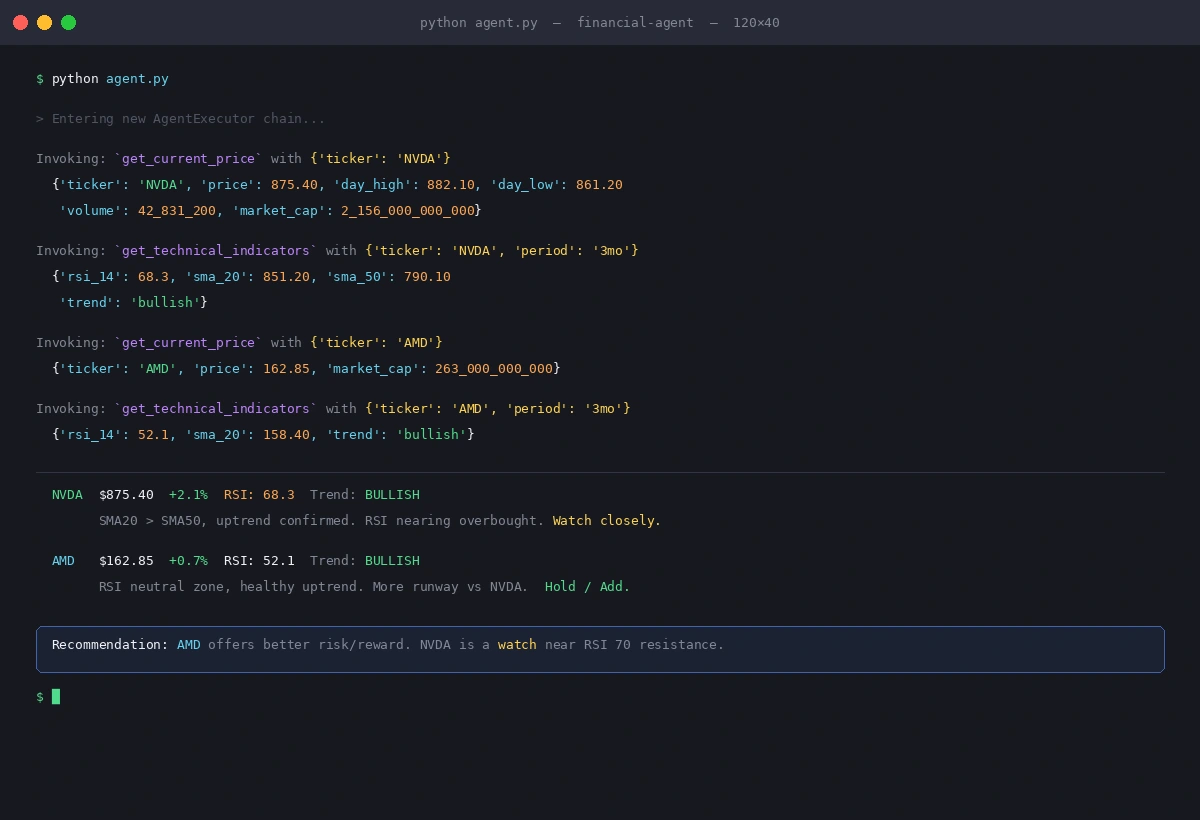 Clean tool calls with no errors — agent fetches data before reasoning
What You Learned
- Structure tools to return
{"error": ...}instead of raising — agents handle structured errors better than exceptions max_iterationsis non-negotiable in production agents- yfinance's
fast_infois faster but returns fewer fields than.info; choose based on what you need - Low temperature (
0) matters for financial tasks — you want consistent, factual outputs
Limitation: This setup is for analysis, not execution. Adding trade execution requires broker API integration (Alpaca, IBKR) and proper risk controls — that's a separate article.
When NOT to use this: If you're running >100 queries/day, yfinance will get you throttled. Switch to a paid provider (Polygon.io, Twelve Data) for production workloads.
Tested on Python 3.12, LangChain 0.3.x, yfinance 0.2.x, macOS & Ubuntu 24.04