Problem: You Don't Know If Your LLM Is Actually Working
You've built an LLM-powered feature — a chatbot, a RAG pipeline, a summarizer. It looks fine in manual tests. But "looks fine" isn't a deployment standard.
DeepEval gives you automated, reproducible metrics so you can catch regressions, compare models, and ship with confidence.
You'll learn:
- How to install and configure DeepEval for any LLM provider
- How to run the three most important metrics: answer relevancy, faithfulness, and hallucination
- How to integrate eval runs into your CI pipeline
Time: 25 min | Level: Intermediate
Why This Happens
Most teams skip LLM evaluation because writing good test harnesses is tedious. DeepEval solves this by wrapping common NLP metrics — G-Eval, RAGAS-style scores, and more — into a pytest-compatible framework you can run locally or in CI.
The library uses a judge LLM (GPT-4o by default, swappable) to evaluate outputs rather than brittle string matching. That means your evals degrade gracefully as your prompts evolve.
Common symptoms this solves:
- Outputs that pass smoke tests but fail in production
- No way to compare model versions objectively
- RAG pipelines that retrieve correctly but still hallucinate
Solution
Step 1: Install DeepEval
pip install deepeval
Set your OpenAI key (used as the judge LLM — you can swap this later):
export OPENAI_API_KEY="sk-..."
Verify the install:
deepeval --version
Expected: deepeval, version 1.x.x
If it fails:
command not found: Add pip's bin to your PATH or usepython -m deepeval- Import errors: Upgrade pip first:
pip install --upgrade pip
Step 2: Define a Test Case
DeepEval's core unit is LLMTestCase. It holds the input, your LLM's actual output, and any context (for RAG).
from deepeval.test_case import LLMTestCase

# Simulates a RAG pipeline response
test_case = LLMTestCase(
    input="What is the capital of France?",
    actual_output="The capital of France is Paris.",

    # For RAG: the chunks retrieved before generating the answer
    retrieval_context=["France is a country in Western Europe. Its capital city is Paris."],

    # Optional: the ideal answer (used by some metrics)
    expected_output="Paris"
)
The retrieval_context list matters — faithfulness and hallucination metrics compare the output against these chunks. If you're not building RAG, omit it.
Step 3: Run Your First Metrics
DeepEval ships with pre-built metrics. Start with these three — they cover the most common failure modes.
from deepeval import evaluate
from deepeval.test_case import LLMTestCase
from deepeval.metrics import (
    AnswerRelevancyMetric,
    FaithfulnessMetric,
    HallucinationMetric,
)

# Each metric has a threshold (0.0 to 1.0)
# Scores below threshold = test fails
answer_relevancy = AnswerRelevancyMetric(threshold=0.7)
faithfulness = FaithfulnessMetric(threshold=0.8)     # Checks output vs. retrieved context
hallucination = HallucinationMetric(threshold=0.3)   # Lower = less hallucination allowed

test_case = LLMTestCase(
    input="What is the capital of France?",
    actual_output="The capital of France is Paris, known for the Eiffel Tower.",
    retrieval_context=["France is a country in Western Europe. Its capital city is Paris."],
)

# evaluate() runs all metrics and prints a summary
evaluate(
    test_cases=[test_case],
    metrics=[answer_relevancy, faithfulness, hallucination],
)
Expected output:
Running metrics...
✓ AnswerRelevancyMetric: 0.95 (passed)
✓ FaithfulnessMetric: 0.88 (passed)
✓ HallucinationMetric: 0.05 (passed)

1/1 tests passed.
If scores are unexpectedly low:
- Check that
retrieval_contextcontains the actual source material, not just keywords HallucinationMetricscores how much the output hallucinates — a score of 0.05 means very little hallucination, which is good
Step 4: Write Pytest-Compatible Eval Tests
For CI integration, write your evals as pytest tests using assert_test():
# test_llm_pipeline.py
import pytest
from deepeval import assert_test
from deepeval.test_case import LLMTestCase
from deepeval.metrics import AnswerRelevancyMetric, FaithfulnessMetric

from your_app import run_rag_pipeline  # Your actual pipeline

@pytest.mark.parametrize("question,expected_context", [
    (
        "What caused the 2008 financial crisis?",
        ["The 2008 financial crisis stemmed from subprime mortgage lending..."],
    ),
    (
        "Who invented the telephone?",
        ["Alexander Graham Bell is credited with patenting the telephone in 1876..."],
    ),
])
def test_rag_output(question, expected_context):
    # Call your actual pipeline
    response, retrieved_chunks = run_rag_pipeline(question)

    test_case = LLMTestCase(
        input=question,
        actual_output=response,
        retrieval_context=retrieved_chunks,
    )

    # These will raise AssertionError if thresholds aren't met
    assert_test(test_case, metrics=[
        AnswerRelevancyMetric(threshold=0.7),
        FaithfulnessMetric(threshold=0.8),
    ])
Run it like any pytest suite:
pytest test_llm_pipeline.py -v
 Passing evals look identical to regular pytest output — easy to read in CI logs
Step 5: Use a Custom Judge Model (Optional)
By default, DeepEval uses gpt-4o as the judge. Swap it to cut costs or use a local model:
from deepeval.models import DeepEvalBaseLLM
from openai import OpenAI

class GPT4oMiniJudge(DeepEvalBaseLLM):
    """Uses gpt-4o-mini instead of gpt-4o to reduce eval costs ~10x."""

    def __init__(self):
        self.client = OpenAI()

    def get_model_name(self):
        return "gpt-4o-mini"

    def load_model(self):
        return self.client

    def generate(self, prompt: str) -> str:
        response = self.client.chat.completions.create(
            model="gpt-4o-mini",
            messages=[{"role": "user", "content": prompt}]
        )
        return response.choices[0].message.content

    async def a_generate(self, prompt: str) -> str:
        # Required for async evaluation runs
        return self.generate(prompt)

judge = GPT4oMiniJudge()

# Pass model= to any metric
metric = AnswerRelevancyMetric(threshold=0.7, model=judge)
Use gpt-4o-mini for development, gpt-4o for final pre-deployment checks.
Verification
pytest test_llm_pipeline.py -v --tb=short
You should see:
PASSED test_llm_pipeline.py::test_rag_output[What caused...]
PASSED test_llm_pipeline.py::test_rag_output[Who invented...]

2 passed in 8.42s
For a CI summary with metric scores logged, add this to your pipeline config:
# .github/workflows/llm-eval.yml
- name: Run LLM evals
  run: pytest test_llm_pipeline.py -v
  env:
    OPENAI_API_KEY: ${{ secrets.OPENAI_API_KEY }}
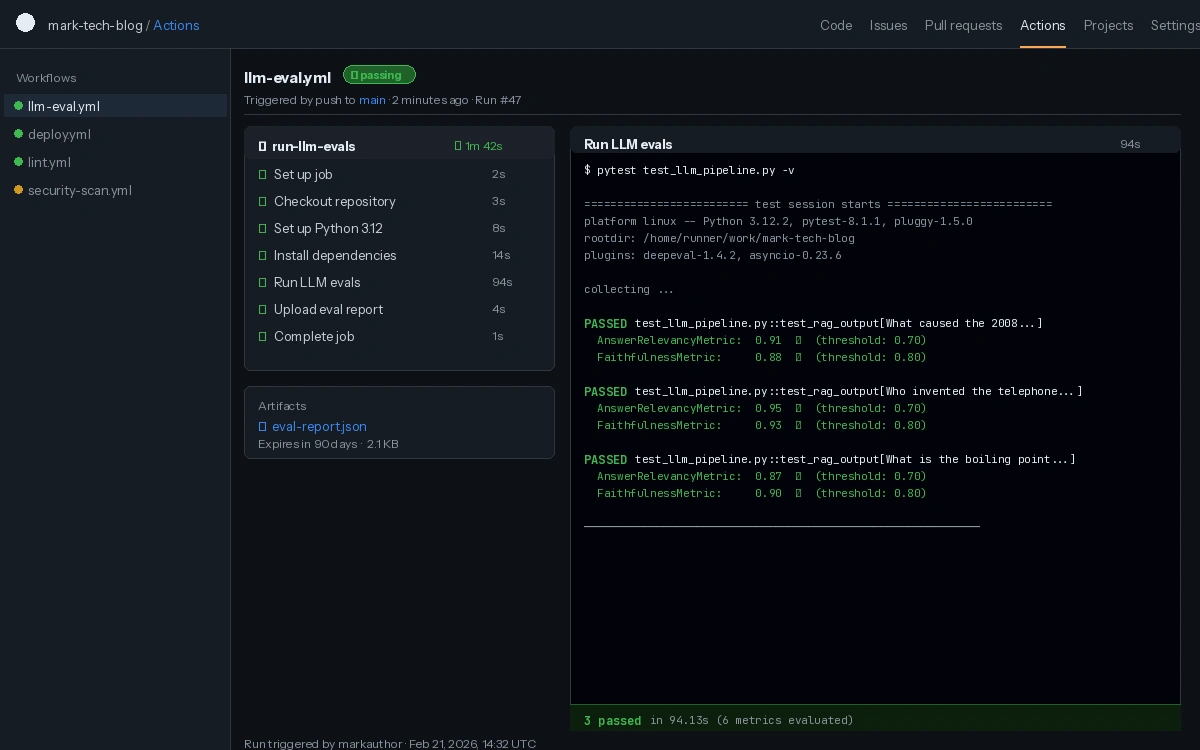 LLM evals running as a standard CI check — failures block the PR like any broken test
What You Learned
LLMTestCaseis the unit of evaluation — input, output, and optional retrieval contextAnswerRelevancyMetriccatches off-topic responses;FaithfulnessMetriccatches responses that ignore retrieved context;HallucinationMetriccatches invented factsassert_test()makes evals first-class pytest citizens — no custom runners needed- Swapping the judge model to
gpt-4o-minireduces eval costs significantly for development iterations
Limitations:
- Judge LLM scores are probabilistic — don't treat a 0.82 vs. 0.84 difference as significant
- Evals add latency to CI (8–30s per test case depending on judge model)
- DeepEval requires an API key for cloud judge models — for fully local evals, configure Ollama as the judge
When NOT to use this: If your LLM output is deterministic (templated text, structured extraction), unit tests are faster and cheaper than judge-based evals.
Tested on DeepEval 1.4.x, Python 3.12, OpenAI API (gpt-4o-mini and gpt-4o)