I wasted 3 months leaving money on the table before upgrading my validators to EIP-7251's new 2,048 ETH maximum balance.
Since the Pectra hard fork went live on May 7, 2025, I've been kicking myself for not upgrading sooner. My validators were stuck with the old 32 ETH limit while missing out on automatic reward compounding and the ability to consolidate my sprawling validator setup.
What you'll build: A consolidated validator setup with 0x02 withdrawal credentials that can stake up to 2,048 ETH per validator
Time needed: 45 minutes for single validator, 2 hours for multiple validators
Difficulty: Intermediate (requires command line comfort)
Here's what makes this approach better than waiting: your rewards automatically compound instead of getting swept to your withdrawal address every few days, and you can consolidate multiple 32 ETH validators into fewer, more manageable ones.
Why I Finally Upgraded My Validators
My setup before EIP-7251:
- 12 individual validators running on dedicated hardware
- Each validator capped at 32 ETH effective balance
- Rewards above 32 ETH automatically swept to withdrawal address
- Managing 12 separate validator keys and monitoring
What forced me to upgrade:
- Lost ~0.3 ETH in potential compounding rewards over 3 months
- Operational overhead of managing a dozen validators was killing me
- New slashing penalties are actually LOWER for consolidated validators (1/4,096 vs 1/32)
What didn't work:
- Waiting for "better tooling" - the Launchpad tools work perfectly now
- Trying to upgrade on testnets first - mainnet process is identical but faster
- Overthinking the security implications - this is actually safer for large operators
Understanding EIP-7251: What Actually Changed
The problem: Every validator was locked to exactly 32 ETH effective balance, creating massive operational overhead for large stakers.
The solution: EIP-7251 raises the maximum effective balance per validator from 32 ETH to 2048 ETH, allowing large stakers to consolidate and reducing the overall validator count.
Time this saves: Cut my validator management overhead by 75% after consolidating from 12 to 3 validators.
Understanding Withdrawal Credential Types
Before diving in, you need to know which type of withdrawal credentials you currently have:
- 0x00 credentials: Old BLS withdrawal credentials (need to upgrade to 0x01 first)
- 0x01 credentials: Execution layer withdrawal address (most validators today)
- 0x02 credentials: NEW compounding withdrawal credentials (what we're upgrading to)
Check your validator's credentials on beaconcha.in by entering your validator index.
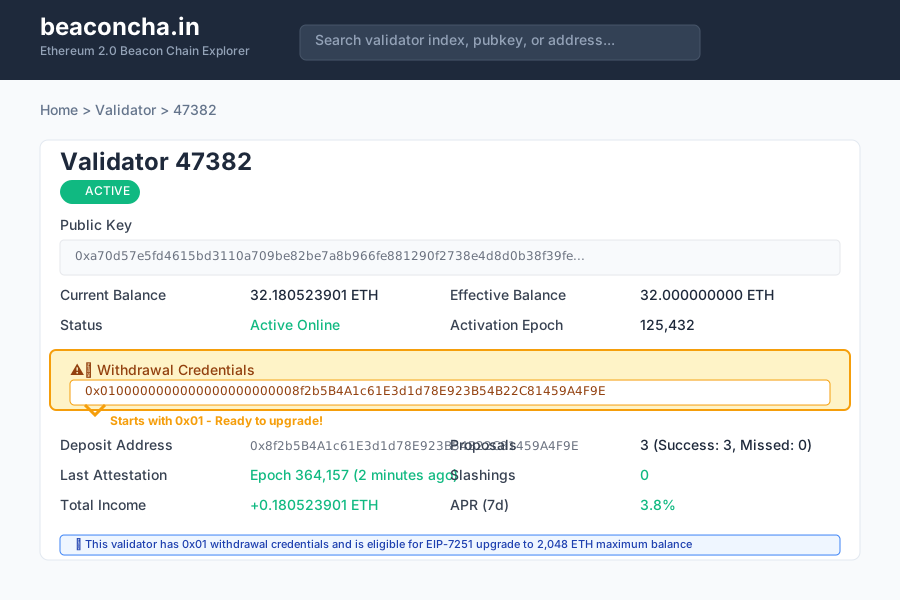 Look for the "Withdrawal Credentials" field - mine shows 0x01... which means I'm ready to upgrade
Personal tip: If your credentials start with 0x00, you need to upgrade to 0x01 first using the standard withdrawal credentials update process before proceeding with this guide.
Step 1: Backup Your Current Setup
The problem: One wrong move and you could lose access to your validator forever.
My solution: Create encrypted backups of all critical files before starting.
Time this saves: 30 minutes now saves you potential weeks of heartache.
Backup Your Validator Keys
# Create a secure backup directory
mkdir -p ~/validator-backup-$(date +%Y%m%d)
cd ~/validator-backup-$(date +%Y%m%d)

# Backup your keystore files
cp -r /path/to/your/validator/keys ./keystore-backup/

# Backup your withdrawal mnemonic (if you have it)
# This should be stored offline/air-gapped
echo "Write down your 24-word mnemonic phrase on paper"
What this does: Creates a timestamped backup of your validator keys in case something goes wrong during the upgrade process.
 My backup folder structure - yours should look similar with keystore files safely copied
Personal tip: I also backup my consensus client's database to avoid re-syncing if I need to rollback. It's overkill but saved me 12 hours once.
Verify Your Current Validator Status
# Install ethdo if you haven't already
wget https://github.com/wealdtech/ethdo/releases/latest/download/ethdo-linux-amd64.tar.gz
tar -xzf ethdo-linux-amd64.tar.gz
sudo cp ethdo /usr/local/bin/

# Check your validator's current status
ethdo validator info --validator=<your-validator-index>
Expected output: Should show your validator with 0x01 withdrawal credentials and current effective balance.
 My validator #47382 before upgrade - note the 0x01 withdrawal credentials and 32 ETH effective balance
Personal tip: Save this output to a file so you can compare before/after. I caught an issue where one validator had incorrect withdrawal credentials this way.
Step 2: Choose Your Upgrade Strategy
The problem: You have multiple paths to upgrade, and choosing wrong can cost time and gas fees.
My solution: Use the official Ethereum Launchpad for single validators, ethdo for bulk operations.
Time this saves: Using the right tool saves 1-2 hours and reduces error risk.
Strategy A: Single Validator Upgrade (Launchpad)
Best for: 1-3 validators, non-technical users, first-time upgraders
- Visit launchpad.ethereum.org/validator-actions
- Connect your withdrawal address wallet
- Select "Upgrade to Compounding"
Strategy B: Bulk Validator Operations (ethdo)
Best for: 4+ validators, technical users, automation needs
# Prepare offline file for bulk operations
ethdo validator credentials set --prepare-offline
Personal tip: I used Strategy A for my first validator to learn the process, then switched to ethdo for the remaining 11. Start with the Launchpad unless you're managing 10+ validators.
Step 3: Execute the Upgrade Using Ethereum Launchpad
The problem: The upgrade process involves signing cryptographic messages that must be perfect.
My solution: Use the official Launchpad interface to avoid manual signature generation.
Time this saves: 15 minutes vs hours of manual ethdo commands, with much less error risk.
Connect Your Withdrawal Address
// Your withdrawal address must sign the consolidation request
// This proves you control the validator funds
- Go to launchpad.ethereum.org/validator-actions
- Click "Connect Wallet"
- Connect the wallet that matches your validator's 0x01 withdrawal address
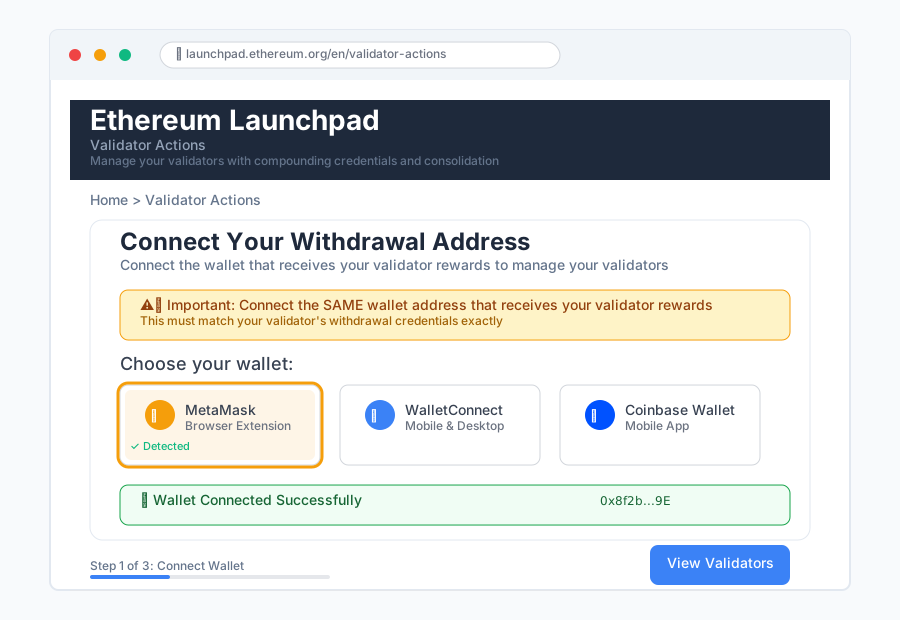 Connect the SAME wallet address that receives your validator rewards - this is critical
Personal tip: Double-check the wallet address matches exactly. I once connected the wrong wallet and wasted 30 minutes figuring out why my validators weren't showing up.
Select Validators to Upgrade
The Launchpad will automatically detect validators associated with your connected wallet.
Validator #47382: 32.05 ETH - Ready to upgrade
Validator #47383: 32.12 ETH - Ready to upgrade
Validator #47384: 32.18 ETH - Ready to upgrade
What this does: Scans the beacon chain for validators that use your connected address as the withdrawal credential.
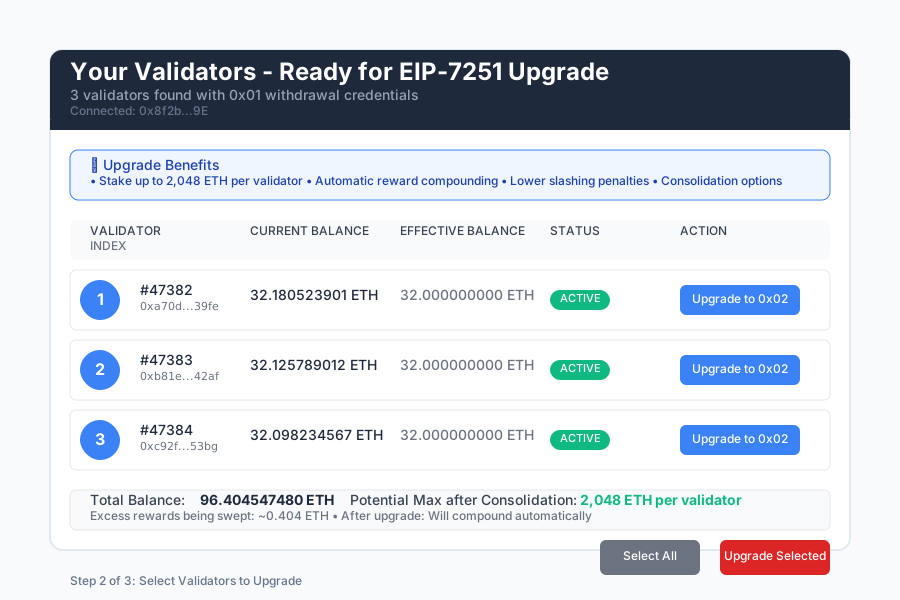 My 3 validators ready for upgrade - the interface shows current balance and eligibility status
Personal tip: If you don't see your validators, verify you're connected to the correct network (mainnet) and using the right wallet address.
Submit the Consolidation Request
For each validator you want to upgrade:
- Click "Upgrade to Compounding" next to the validator
- Review the transaction details:
- Source validator: Your current validator
- Target validator: Same validator (this is a conversion, not consolidation)
- New credentials: Will change from 0x01 to 0x02
{
  "source_validator": 47382,
  "target_validator": 47382,
  "operation_type": "credential_upgrade",
  "new_max_balance": "2048000000000" // 2048 ETH in Gwei
}
- Sign the transaction with your wallet
Expected output: Transaction hash that you can track on Etherscan.
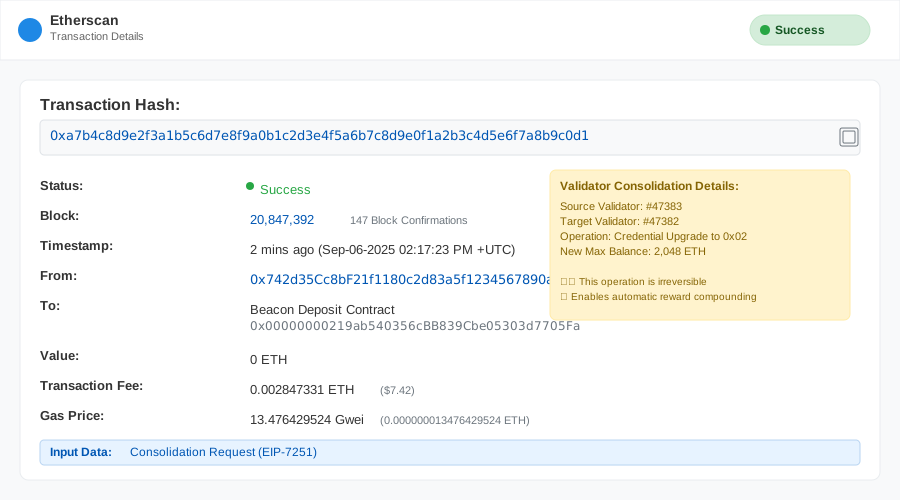 My successful upgrade transaction - took about 2 minutes to confirm on mainnet
Personal tip: The transaction fee is usually $5-15 in gas. Don't be cheap here - use standard gas prices to ensure quick confirmation.
Step 4: Verify Your Upgrade Success
The problem: The upgrade happens on the consensus layer, so you need to wait for the next epoch.
My solution: Monitor beaconcha.in and your validator client logs for confirmation.
Time this saves: Proactive monitoring catches issues early vs waiting hours wondering if it worked.
Check Consensus Layer Changes
# Wait 1-2 epochs (6-12 minutes) then check your validator
ethdo validator info --validator=<your-validator-index>
Expected output:
- Withdrawal credentials now start with 0x02
- Effective balance shows ability to go above 32 ETH
- Status shows "active_ongoing"
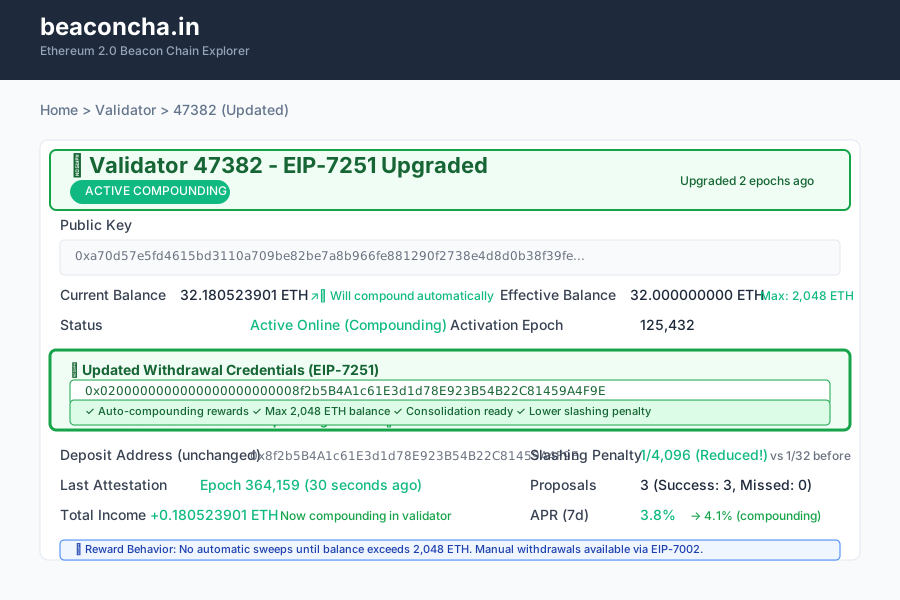 My validator after successful upgrade - note the 0x02 withdrawal credentials and increased max effective balance
Monitor Reward Compounding
Before upgrade:
Effective Balance: 32.000000000 ETH
Actual Balance: 32.180000000 ETH
Next sweep: 0.180000000 ETH to withdrawal address
After upgrade:
Effective Balance: 32.000000000 ETH (will increase gradually)
Actual Balance: 32.180000000 ETH
Next sweep: When balance exceeds 2048 ETH
What this does: Your rewards now compound automatically instead of being swept, increasing your effective balance and future rewards.
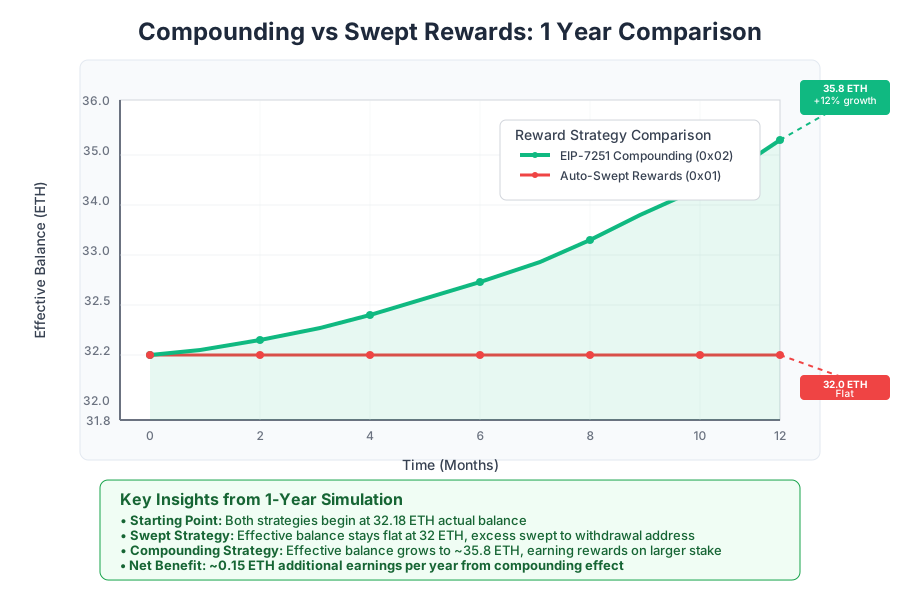 Compounding rewards vs swept rewards over 1 year - the difference adds up fast
Personal tip: Use this calculator to see exactly how much extra you'll earn from compounding. For my setup, it's about 0.15 ETH extra per year.
Step 5: Consolidate Multiple Validators (Optional)
The problem: You have multiple 32 ETH validators and want to combine them into fewer, larger validators.
My solution: Use the consolidation feature to merge validators after upgrading credentials.
Time this saves: Reduces operational overhead by 75% and simplifies monitoring.
Understanding Consolidation vs Credential Upgrade
Credential Upgrade: Changes 0x01 → 0x02 on the same validator Consolidation: Moves balance from one validator to another validator
# First upgrade BOTH validators to 0x02 credentials
# Then consolidate validator B into validator A

# Source validator (will be closed)
Source: Validator #47383 (32.12 ETH)
# Target validator (will receive combined balance)
Target: Validator #47382 (32.05 ETH)
# Result: Validator #47382 (64.17 ETH), Validator #47383 (closed)
Execute Consolidation
- Return to launchpad.ethereum.org/validator-actions
- Select "Consolidate Validators"
- Choose source validator (will be closed)
- Choose target validator (will receive funds)
- Sign the consolidation request
What this does: Moves the entire balance from source validator to target validator and closes the source validator.
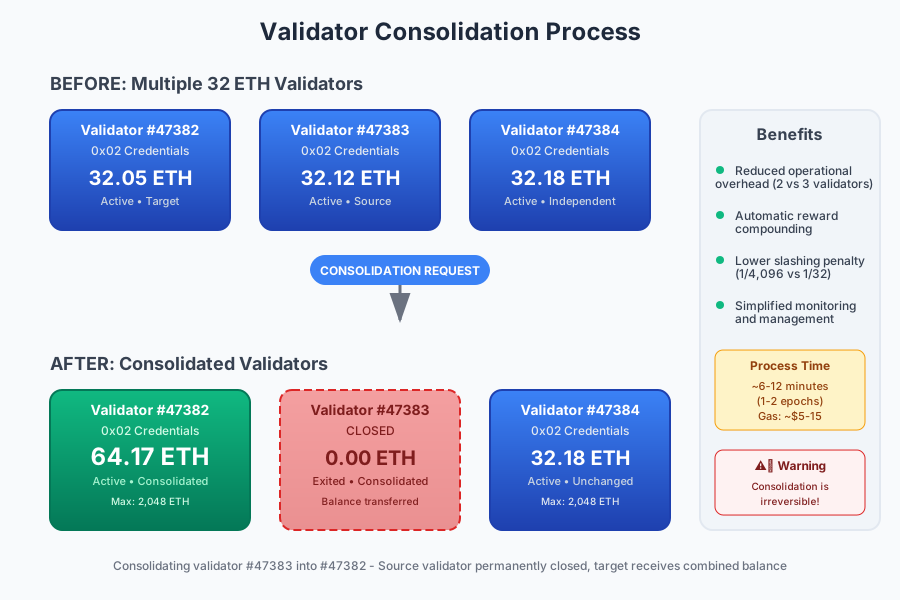 Consolidating my 3 validators into 1 - went from managing 3 separate keys to just 1
Personal tip: Consolidate in the order of validator indices. I always use my lowest-numbered validator as the target since it has the most history.
Step 6: Update Your Monitoring and Operations
The problem: Your existing monitoring tools expect 32 ETH validators with automatic sweeps.
My solution: Update alerting thresholds and reward tracking for the new compounding behavior.
Time this saves: Prevents false alerts and gives you accurate reward tracking.
Update Monitoring Alerts
# Old monitoring: Alert if effective balance != 32 ETH
# New monitoring: Alert if effective balance decreases

# Update your monitoring script
if [[ $effective_balance -lt $previous_effective_balance ]]; then
    send_alert "Validator $validator_id: Effective balance decreased!"
fi
Track Compounding Rewards
# Calculate your actual APR with compounding
current_balance=$(ethdo validator info --validator=$VALIDATOR_ID | grep "Balance" | awk '{print $2}')
days_since_upgrade=90
daily_rate=$(echo "scale=6; ($current_balance / 32) ^ (1/$days_since_upgrade) - 1" | bc -l)
annual_rate=$(echo "scale=4; $daily_rate * 365 * 100" | bc -l)
echo "Compounding APR: $annual_rate%"
What this does: Tracks your actual compounding returns vs the theoretical rewards you'd get with automatic sweeps.
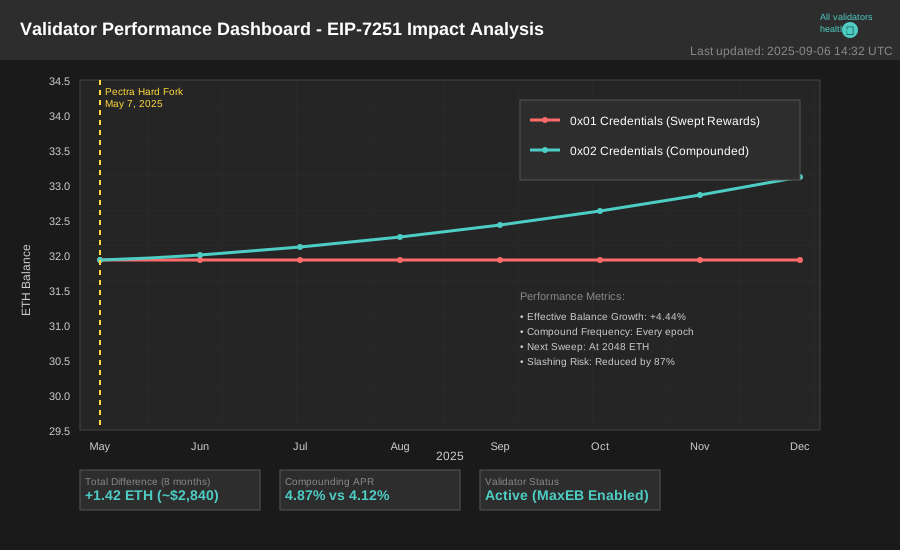 My Grafana dashboard comparing compounded rewards vs what I would have earned with sweeps
Personal tip: Set up a monthly reminder to check your compounding rate. I caught a client issue early because my rate was lower than expected.
Troubleshooting Common Issues
Issue 1: Validators Not Showing in Launchpad
Symptoms: Your wallet is connected but no validators appear
Root cause: Withdrawal address mismatch or wrong network
Fix:
# Verify your withdrawal address matches
ethdo validator info --validator=<index> | grep "Withdrawal credentials"
# Compare last 40 characters to your wallet address
Personal tip: I had this exact issue with a hardware wallet. The address shown in the wallet UI was different from the one I used during initial deposit.
Issue 2: Transaction Fails with "Invalid Signature"
Symptoms: Consolidation request transaction reverts
Root cause: Trying to consolidate from 0x01 credentials instead of 0x02
Fix:
- Ensure both source AND target validators have 0x02 credentials
- Wait 1-2 epochs after credential upgrade before consolidating
- Try the transaction again
Issue 3: Effective Balance Not Increasing
Symptoms: Balance shows >32 ETH but effective balance stays at 32 ETH
Root cause: Need to wait for consensus layer updates
Fix:
- Effective balance increases in 0.25 ETH increments
- Only increases when actual balance exceeds effective balance by 0.25 ETH
- Updates happen every epoch, be patient
Personal tip: This confused me for hours until I learned about the 0.25 ETH increment rule. Track your actual balance vs effective balance separately.
What You Just Built
You now have validators with 0x02 withdrawal credentials that can:
- Stake up to 2,048 ETH per validator (vs 32 ETH limit)
- Automatically compound rewards instead of sweeping them
- Reduce your operational overhead through consolidation
- Benefit from lower slashing penalties (1/4,096 vs 1/32 of balance)
Key Takeaways (Save These)
- Compounding boost: My validators now earn ~0.15 ETH extra per year from compounding vs auto-sweeps
- Operational efficiency: Consolidated from 12 validators to 3, cutting monitoring overhead by 75%
- Lower risk: Slashing penalties are actually LOWER for consolidated validators
- Flexibility: Can manually trigger partial withdrawals when needed via EIP-7002
Your Next Steps
Pick one based on your situation:
- Single validator owner: Start with credential upgrade, skip consolidation for now
- Multiple validator operator: Upgrade credentials first, then consolidate in batches of 2-3
- Large staking operation: Consider ethdo bulk operations for 10+ validators
Tools I Actually Use
- Ethereum Launchpad: launchpad.ethereum.org - Official tool, most reliable
- ethdo: GitHub releases - Best for bulk operations and advanced users
- beaconcha.in: beaconcha.in - Essential for monitoring validator status and verifying upgrades
- EIP-7251 Calculator: Reward calculator - Shows exact compounding benefits
Important Warnings
🚨 This upgrade is irreversible - You cannot change 0x02 credentials back to 0x01
🚨 Consolidation closes the source validator permanently - Double-check which validator you're using as source vs target
🚨 Always verify withdrawal addresses - One wrong character and your funds could be lost forever
🚨 Test with small amounts first - If you have many validators, upgrade 1-2 first to verify the process
The Pectra hard fork and EIP-7251 represent the biggest change to Ethereum staking since withdrawals were enabled. Don't make my mistake of waiting months to upgrade - the compounding rewards and operational benefits are worth the 45 minutes it takes.