Problem: Getting Production-Quality Multilingual Audio from Code
You need voiceovers for multiple languages — Spanish, Japanese, German — and the free TTS tools sound robotic. ElevenLabs v2 solves this, but the API docs skip the gotchas that cost you credits.
You'll learn:
- How to authenticate and call the ElevenLabs v2
/text-to-speechendpoint - How to pick the right model for multilingual output
- How to handle language detection vs. explicit language codes
- How to stream audio to file without buffering the full response
Time: 20 min | Level: Intermediate
Why This Happens
ElevenLabs has two model families: eleven_monolingual_v1 (English only) and eleven_multilingual_v2 (29 languages). Most tutorials show the monolingual model. If you call it with non-English text, you get garbled output or silence.
Common symptoms:
- Non-English text sounds like English phonemes mispronounced
- Audio generates but the accent is wrong
- Latency spikes on long texts — no streaming configured
Solution
Step 1: Install the SDK and Get Your API Key
pip install elevenlabs
Grab your API key from elevenlabs.io/app/settings/api-keys. Store it as an environment variable — never hardcode it.
export ELEVENLABS_API_KEY="your_key_here"
Step 2: Generate Your First Multilingual Audio
import os
from elevenlabs.client import ElevenLabs
from elevenlabs import save

client = ElevenLabs(api_key=os.environ["ELEVENLABS_API_KEY"])

audio = client.text_to_speech.convert(
    voice_id="JBFqnCBsd6RMkjVDRZzb",  # "George" — works well across languages
    text="Hola, este es un ejemplo de voz realista en español.",
    model_id="eleven_multilingual_v2",  # Critical: use v2 for non-English
    output_format="mp3_44100_128",      # 44.1kHz, 128kbps — good quality/size balance
)

save(audio, "output.mp3")
print("Saved to output.mp3")
Expected: A ~200KB MP3 file with natural-sounding Spanish audio.
If it fails:
- 401 Unauthorized: Check your
ELEVENLABS_API_KEYenv variable is exported voice_idnot found: Run the voice listing snippet below to get valid IDs
# List available voices
voices = client.voices.get_all()
for v in voices.voices:
    print(v.voice_id, v.name)
 Your available voices — IDs vary by account
Step 3: Switch Languages in One Request
ElevenLabs v2 detects language automatically from the text. You can mix languages in a single call using SSML-style breaks or just switch text mid-script.
# Multilingual script — auto-detected per sentence
multilingual_text = """
Welcome to our platform.
Bienvenido a nuestra plataforma.
Bienvenue sur notre plateforme.
Willkommen auf unserer Plattform.
"""

audio = client.text_to_speech.convert(
    voice_id="JBFqnCBsd6RMkjVDRZzb",
    text=multilingual_text,
    model_id="eleven_multilingual_v2",
    output_format="mp3_44100_128",
    voice_settings={
        "stability": 0.5,        # 0.0 = more expressive, 1.0 = more consistent
        "similarity_boost": 0.8, # How closely to match the original voice
        "style": 0.2,            # Stylization — keep low for neutral voiceovers
        "use_speaker_boost": True
    }
)

save(audio, "multilingual_demo.mp3")
Why stability: 0.5 works here: Higher stability prevents accent drift between language switches. Below 0.3 and transitions can sound inconsistent.
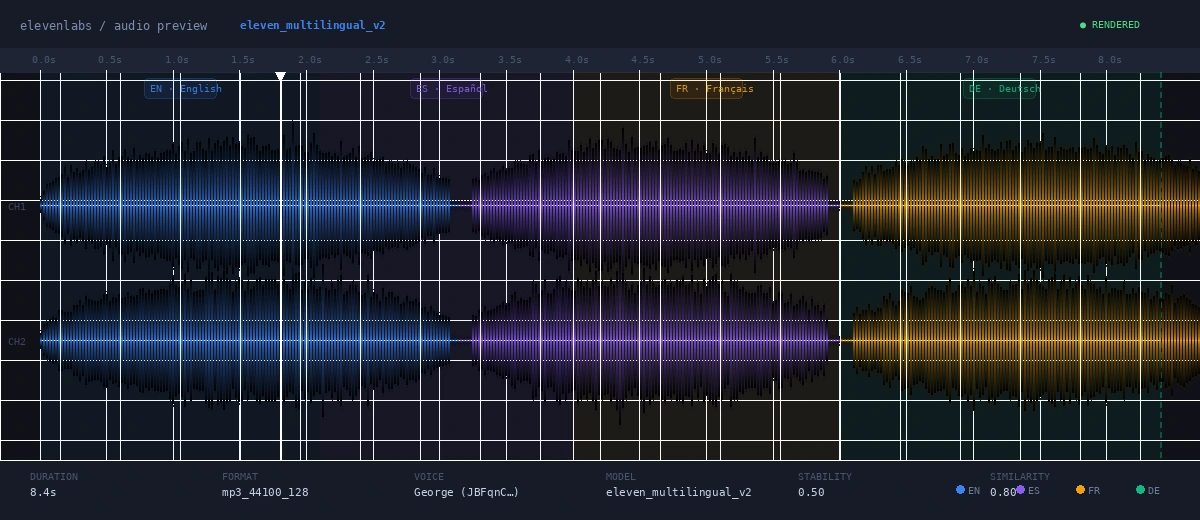 Each language segment maintains consistent voice character
Step 4: Stream Long-Form Audio (Avoid Timeouts)
For scripts over ~500 words, streaming prevents timeout errors and lets you write audio as it arrives.
import os
from elevenlabs.client import ElevenLabs

client = ElevenLabs(api_key=os.environ["ELEVENLABS_API_KEY"])

def stream_voiceover(text: str, output_path: str, voice_id: str = "JBFqnCBsd6RMkjVDRZzb"):
    """Stream audio to file — handles long-form content without buffering."""

    audio_stream = client.text_to_speech.convert_as_stream(
        voice_id=voice_id,
        text=text,
        model_id="eleven_multilingual_v2",
        output_format="mp3_44100_128",
    )

    with open(output_path, "wb") as f:
        for chunk in audio_stream:
            if chunk:  # Stream can emit empty chunks — skip them
                f.write(chunk)

    print(f"Streamed to {output_path}")

# Usage
long_script = open("script.txt").read()
stream_voiceover(long_script, "voiceover_final.mp3")
If it fails:
AttributeError: convert_as_stream: Update toelevenlabs>=1.0.0— streaming was added in 1.x- Empty output file: Add
if chunk:guard — the stream emitsNoneat completion
Step 5: Clone a Voice for Brand Consistency
If you need a specific voice (your own, a brand voice), instant voice cloning takes under a minute.
from elevenlabs.client import ElevenLabs

client = ElevenLabs(api_key=os.environ["ELEVENLABS_API_KEY"])

# Provide 1–5 clean audio samples (WAV or MP3, 30s–3min each)
with open("sample_voice.mp3", "rb") as f:
    voice = client.clone(
        name="Brand Voice",
        description="Neutral American English, mid-30s",
        files=[f],
    )

print("Cloned voice ID:", voice.voice_id)  # Save this — reuse across requests
Then pass voice.voice_id into any convert() call above.
Tip: 2–3 samples outperform 1 sample significantly. Use clean recordings — background noise degrades cloning quality.
Verification
# Check file was created and has content
ls -lh output.mp3
# Expected: file > 50KB

# Play it (macOS)
afplay output.mp3

# Play it (Linux)
mpg123 output.mp3
You should see: File size between 50KB–2MB depending on text length, and natural-sounding audio in the target language.
 File size confirms audio was generated — not an empty response
What You Learned
eleven_multilingual_v2is required for any non-English output — the monolingual model will not work- Language detection is automatic; no language codes needed unless you need pinpoint control
- Streaming (
convert_as_stream) is essential for scripts over ~500 words to avoid gateway timeouts stability: 0.5keeps accent consistency across language switches
Limitation: ElevenLabs v2 has a 5,000-character limit per request on most plans. Split longer scripts into chunks at sentence boundaries.
When NOT to use this: If you need real-time TTS (< 300ms latency), use eleven_turbo_v2 instead — it trades some quality for speed. Multilingual v2 averages 800ms–2s generation time.
Tested on elevenlabs SDK 1.9.0, Python 3.12, macOS & Ubuntu 24.04