I accidentally deleted a trained model that took 6 hours and $40 in GPU costs to create. That's when I learned DVC the hard way.
What you'll build: A complete data and model versioning system that tracks everything automatically
Time needed: 20 minutes
Difficulty: Intermediate (assumes basic Git knowledge)
Here's what this system prevents: losing trained models, forgetting which dataset version produced your best results, and spending hours recreating experiments you already ran.
Why I Built This
My machine learning workflow was a mess. I had folders named model_v2_final_REALLY_FINAL and datasets scattered across different directories. When my teammate asked which data I used for our 94% accuracy model, I had no clue.
My setup:
- Multiple ML experiments running weekly
- Team of 4 data scientists sharing models
- Cloud storage costs getting out of control
- Zero version control for anything except code
What didn't work:
- Manual folder naming (forgot which was which after 2 weeks)
- Google Drive sharing (version conflicts and huge upload times)
- Git LFS (hit the 1GB limit fast and expensive)
- Copying files everywhere (ate up 200GB of local storage)
Step 1: Install and Initialize DVC
The problem: Git can't handle large files, and manual copying creates chaos
My solution: DVC tracks large files with lightweight pointers, just like Git does for code
Time this saves: No more 30-minute model uploads or "which dataset was this?" confusion
# Install DVC (I use pip, but conda works too)
pip install dvc[s3]  # or [gdrive], [azure], [gs] for other cloud providers

# Navigate to your existing Git repository
cd your-ml-project

# Initialize DVC in your project
dvc init
What this does: Creates .dvc/ folder and adds DVC config files to Git
Expected output: You'll see "Initialized DVC repository" and new .dvc files
 My actual terminal after DVC init - the .dvc folder contains all DVC metadata
Personal tip: "Run dvc init inside an existing Git repo, not a fresh folder. DVC needs Git to track its metadata files."
Step 2: Set Up Remote Storage
The problem: Your laptop will run out of space fast with multiple model versions
My solution: Connect DVC to cloud storage so files live remotely but feel local
Time this saves: No more manual S3 uploads or deciding what to delete locally
# Add remote storage (I use S3, adjust for your provider)
dvc remote add -d myremote s3://your-bucket-name/dvc-storage

# Configure credentials (better to use AWS CLI or environment variables)
dvc remote modify myremote access_key_id YOUR_ACCESS_KEY
dvc remote modify myremote secret_access_key YOUR_SECRET_KEY
What this does: Sets up automatic sync between your local DVC cache and cloud storage
Expected output: Remote added to .dvc/config file
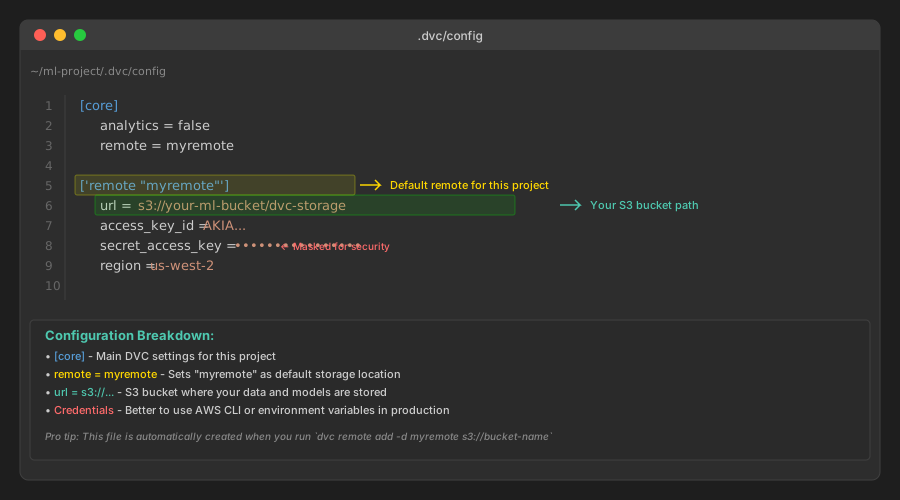 My .dvc/config file showing S3 remote setup - yours will look similar
Personal tip: "I create a dedicated S3 bucket just for DVC. Mixed buckets get messy fast, and DVC's folder structure is clean when isolated."
Step 3: Version Your First Dataset
The problem: Need to track which dataset version produced which results
My solution: DVC creates a .dvc file that tracks dataset changes like Git tracks code
Time this saves: No more guessing which data_cleaned_v3.csv was the good one
# First, organize your data (this is my standard structure)
mkdir -p data/raw data/processed data/external
mv your-dataset.csv data/raw/
# Add dataset to DVC tracking
dvc add data/raw/your-dataset.csv

# Commit the .dvc file to Git (not the actual data)
git add data/raw/your-dataset.csv.dvc .gitignore
git commit -m "Add raw dataset v1"

# Push data to remote storage
dvc push
What this does: Creates your-dataset.csv.dvc file with hash and metadata. The actual CSV goes to remote storage.
Expected output: New .dvc file appears, original data file gets added to .gitignore
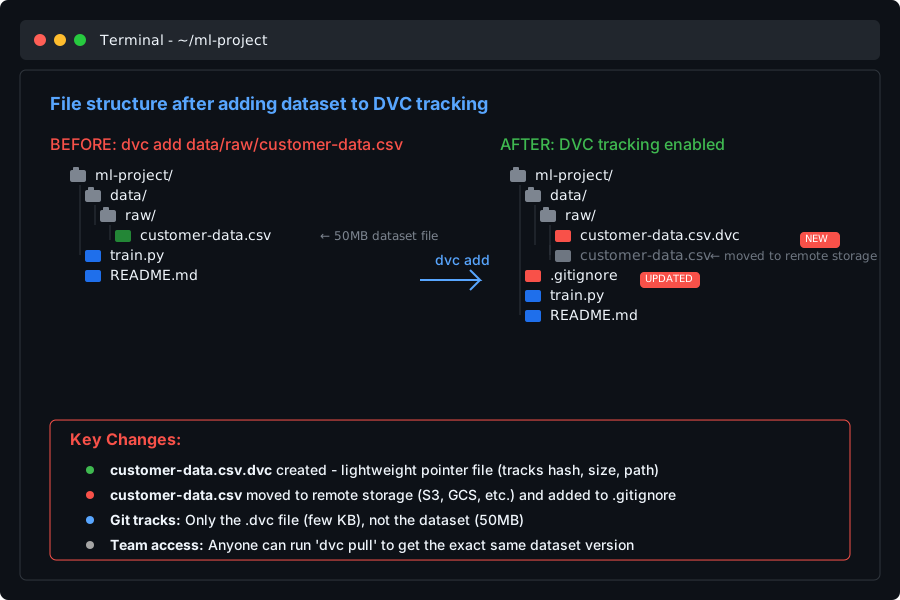 File structure after adding dataset - notice the .dvc file and updated .gitignore
Personal tip: "Always dvc push right after dvc add. I forgot once and my teammate couldn't reproduce my results because the data wasn't in remote storage."
Step 4: Version Your Trained Models
The problem: Models take forever to retrain, but you need to experiment with different versions
My solution: Track model files exactly like datasets, with automatic metadata
Time this saves: No more 6-hour retraining sessions because you lost the good model
# Train your model (this is my typical training script structure)
import pandas as pd
import joblib
from sklearn.ensemble import RandomForestClassifier

# Load versioned data (DVC pulls automatically)
data = pd.read_csv('data/raw/your-dataset.csv')

# Train model
model = RandomForestClassifier(n_estimators=100, random_state=42)
model.fit(X_train, y_train)

# Save model to tracked directory
joblib.dump(model, 'models/random_forest_v1.pkl')
# Create models directory if it doesn't exist
mkdir -p models

# Add model to DVC tracking
dvc add models/random_forest_v1.pkl

# Commit to Git
git add models/random_forest_v1.pkl.dvc
git commit -m "Add Random Forest model v1 - 94% accuracy"

# Push model to remote
dvc push
What this does: Model file goes to cloud storage, lightweight .dvc file tracks its version in Git
Expected output: Your model is safely stored and reproducible by anyone on your team
 Complete model versioning - from training to remote storage in 3 commands
Personal tip: "I include accuracy or key metrics in my commit messages. Three months later, that's the only way I remember which model was the breakthrough one."
Step 5: Create Reproducible Experiments
The problem: You found great results but can't recreate them weeks later
My solution: DVC pipelines that track the entire workflow automatically
Time this saves: No more "how did I get this result?" moments
# Create dvc.yaml in your project root
stages:
  prepare_data:
    cmd: python scripts/prepare_data.py
    deps:
    - data/raw/your-dataset.csv
    - scripts/prepare_data.py
    outs:
    - data/processed/cleaned_data.csv

  train_model:
    cmd: python scripts/train_model.py
    deps:
    - data/processed/cleaned_data.csv
    - scripts/train_model.py
    params:
    - train.learning_rate
    - train.n_estimators
    outs:
    - models/random_forest.pkl
    metrics:
    - metrics/accuracy.json
# Run the entire pipeline
dvc repro

# This automatically:
# 1. Runs data preparation if data changed
# 2. Trains model if code or data changed
# 3. Skips steps that haven't changed
# 4. Tracks all outputs and metrics
What this does: Creates dependency graph that rebuilds only what changed, like Make for ML
Expected output: Pipeline runs efficiently, tracking all intermediate steps
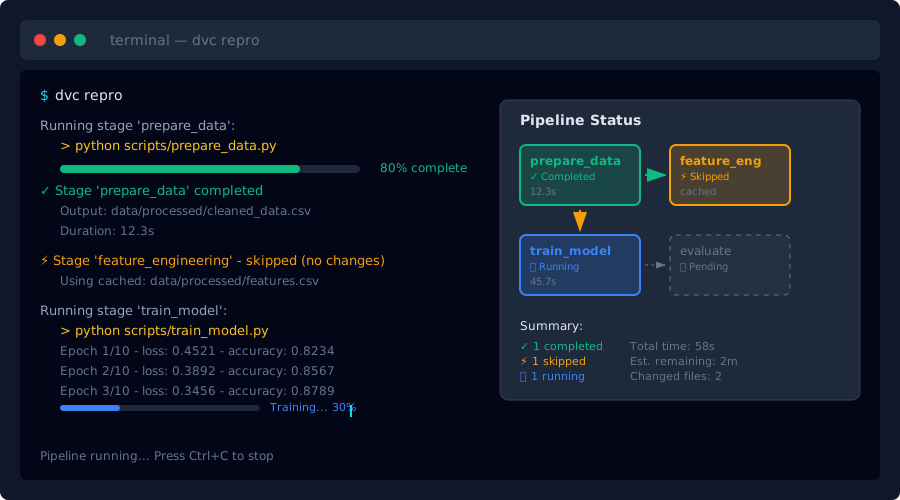 Pipeline running - notice it skips unchanged steps and shows what's being executed
Personal tip: "Start simple with 2-3 stages. I tried to map my entire workflow at once and spent more time debugging YAML than doing ML."
Step 6: Compare Model Performance Across Versions
The problem: You have 5 model versions but can't remember which performed best
My solution: DVC metrics tracking with automatic comparison tables
Time this saves: No more digging through old notebooks to find performance numbers
# In your training script, save metrics as JSON
import json

metrics = {
    'accuracy': 0.94,
    'precision': 0.92,
    'recall': 0.89,
    'f1_score': 0.90,
    'training_time_minutes': 15
}

with open('metrics/model_metrics.json', 'w') as f:
    json.dump(metrics, f, indent=2)
# Compare metrics across Git commits
dvc metrics diff

# Show current metrics
dvc metrics show

# Compare specific commits
dvc metrics diff HEAD~2
What this does: Shows side-by-side performance comparison across model versions
Expected output: Clean table showing which version performs best on each metric
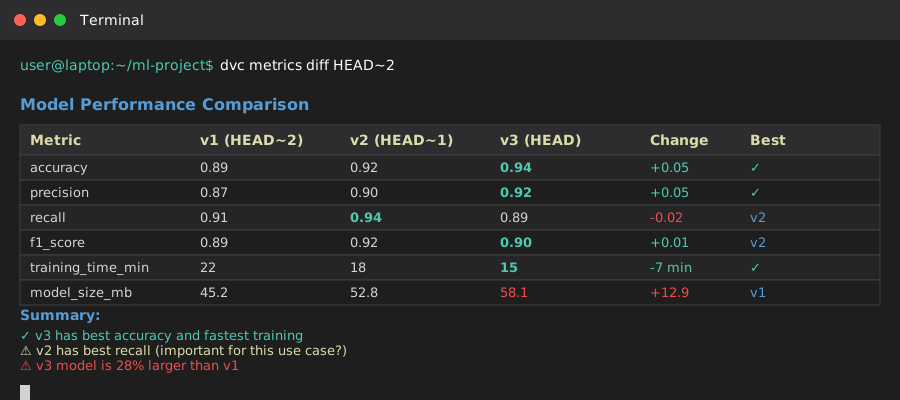 DVC metrics diff showing accuracy improvements across 3 model versions
Personal tip: "I track training time in metrics too. Sometimes the 0.5% accuracy gain isn't worth 3x longer training."
Step 7: Team Collaboration Workflow
The problem: Multiple team members working on different experiments simultaneously
My solution: Git branches + DVC data versioning for conflict-free collaboration
Time this saves: No more "your dataset overwrote mine" conflicts
# Create experiment branch
git checkout -b experiment-new-features
dvc checkout  # Ensures you have the right data version

# Add new data or modify existing
dvc add data/processed/feature_engineered.csv
git add data/processed/feature_engineered.csv.dvc
git commit -m "Add feature engineering experiment data"

# Push data to shared remote
dvc push

# Share experiment with team
git push origin experiment-new-features
What this does: Each branch can have different data versions, all tracked cleanly
Expected output: Team members can switch branches and get the exact right data automatically
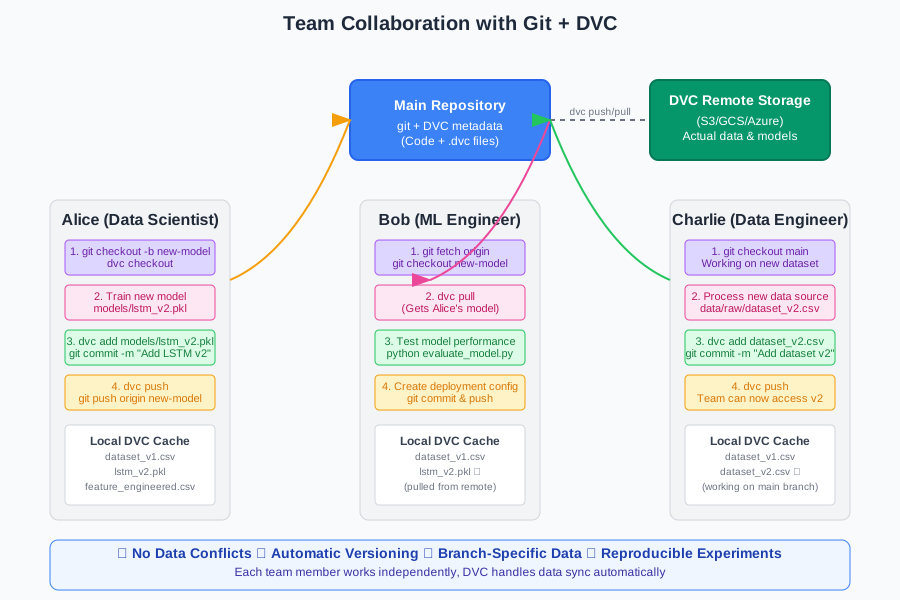 How our team uses Git branches with DVC data versioning - no more data conflicts
Personal tip: "Always dvc checkout after switching branches. Git will switch your code, but DVC has to switch your data separately."
What You Just Built
You now have a complete ML versioning system that tracks datasets, models, and metrics automatically. Your entire team can reproduce any experiment from any point in history with two commands: git checkout <commit> and dvc checkout.
Key Takeaways (Save These)
- Version everything: DVC handles large files that Git can't, so track datasets and models like you track code
- Remote storage is essential: Your laptop can't hold 50 model versions, but S3 can do it cheaply
- Pipelines save time:
dvc reproonly rebuilds what changed, like Make but for machine learning workflows
Your Next Steps
Pick one:
- Beginner: Set up DVC on your current project and version one dataset
- Intermediate: Create a DVC pipeline for your existing training workflow
- Advanced: Integrate DVC with your CI/CD system for automatic model deployment
Tools I Actually Use
- DVC: Data Version Control - The main tool, rock solid and well documented
- AWS S3: Amazon S3 - Cheap remote storage, plays perfectly with DVC
- VS Code DVC Extension: DVC Extension - Visualize pipelines and compare metrics in your editor
- DVC Documentation: Official Docs - Best ML tooling docs I've seen, with real examples