The 2 AM Security Incident That Changed Everything
I'll never forget that Tuesday night when my phone exploded with alerts. Our main application container had been compromised, and I watched helplessly as unauthorized processes spawned across our Docker environment. The attacker had gained root access to the host system within two hours of the initial breach.
That incident cost us 16 hours of downtime, countless gray hairs, and taught me that default Docker configurations are essentially security disasters waiting to happen. I spent the next three weeks rebuilding our entire container security strategy from scratch.
If you're running Docker containers in production without proper hardening, you're not just taking risks—you're practically inviting trouble. After implementing the security measures I'm about to share, we haven't had a single successful breach attempt in 18 months, even though our security logs show we're constantly under attack.
This isn't just another Docker security checklist. These are battle-tested practices that saved my career and will protect yours too.
The Docker Security Problem That Most Developers Ignore
Here's the uncomfortable truth: most developers treat Docker security as an afterthought. I used to be one of them. "It's just a container," I thought. "What's the worst that could happen?"
The answer is: complete system compromise in under two hours.
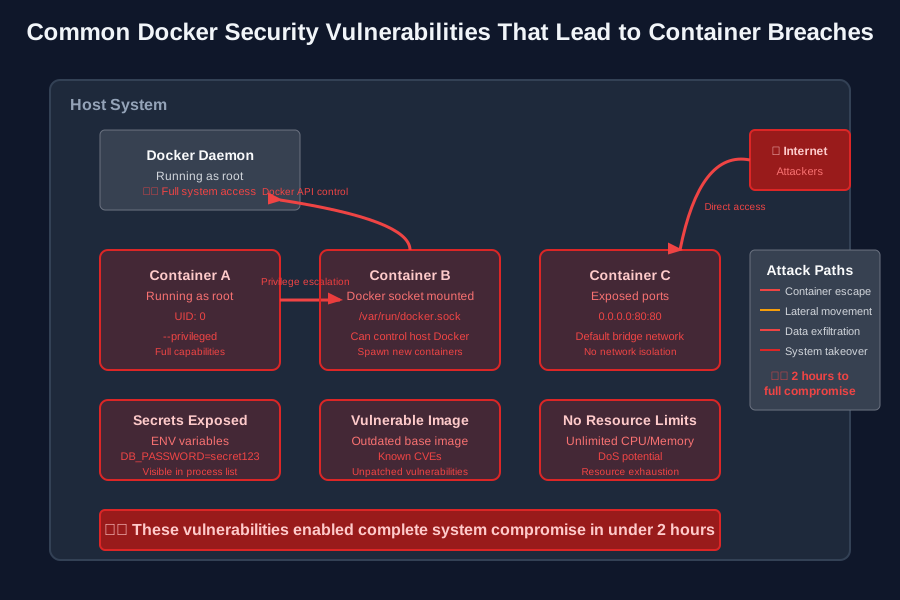 These attack vectors turned my "secure" container into a hacker's playground
The problem isn't that Docker is inherently insecure—it's that the default configuration prioritizes ease of use over security. Running containers as root, using privileged mode, mounting the Docker socket, leaving default network configurations—these conveniences become highways for attackers.
Most tutorials tell you to run docker run -it ubuntu bash and call it a day. That approach will get you hacked. I learned this lesson when I discovered our compromised container was running with full root privileges and had unfettered access to the host filesystem.
My Journey from Docker Novice to Security-Paranoid
Before my security wake-up call, I was like most developers: I knew enough Docker to be dangerous. I could write Dockerfiles, spin up containers, and deploy applications. I felt confident.
That confidence lasted until I saw this in our security logs:
# What I found in the compromised container
$ ps aux
root     1234  malicious-process --steal-secrets
root     5678  crypto-miner --max-cpu
root     9012  backdoor-server --port 4444
The attacker had exploited three critical security flaws in my container setup:
- Running as root user - gave the attacker unlimited container privileges
- Privileged mode enabled - allowed escape to the host system
- Docker socket mounted - provided control over other containers
I had essentially rolled out the red carpet for hackers.
The Complete Docker Security Hardening Guide
After rebuilding our security from the ground up, here's the systematic approach that transformed our vulnerable containers into fortress-like deployments:
Run Containers as Non-Root Users
This was my first and most important fix. Never, ever run production containers as root.
# Before: Running as root (DANGEROUS)
FROM ubuntu:22.04
RUN apt-get update && apt-get install -y nginx
CMD ["nginx", "-g", "daemon off;"]

# After: Creating and using non-root user (SECURE)
FROM ubuntu:22.04
RUN apt-get update && apt-get install -y nginx \
    && groupadd -r appuser \
    && useradd -r -g appuser appuser \
    && chown -R appuser:appuser /var/log/nginx \
    && chown -R appuser:appuser /var/cache/nginx \
    && chown -R appuser:appuser /etc/nginx

USER appuser
EXPOSE 8080
CMD ["nginx", "-g", "daemon off;"]
Pro tip: I always test my non-root containers thoroughly. Some applications expect root privileges and will fail mysteriously. Better to catch these issues in development than production.
Implement Resource Limits
Unlimited resource access was how that crypto-miner nearly brought down our entire host system.
# Resource-limited container deployment
docker run -d \
  --memory="512m" \
  --cpus="1.0" \
  --pids-limit 100 \
  --read-only \
  --tmpfs /tmp:noexec,nosuid,size=100m \
  my-secure-app:latest
These limits saved us during a recent DDoS attempt when an attacker tried to spawn thousands of processes. Instead of crashing the host, the container simply hit its process limit and contained the damage.
Network Security Configuration
Default Docker networking is way too permissive. Here's how I lock it down:
# Create isolated custom network
docker network create --driver bridge \
  --subnet=172.20.0.0/16 \
  --ip-range=172.20.240.0/20 \
  secure-network

# Run container on isolated network
docker run -d \
  --network=secure-network \
  --publish 127.0.0.1:8080:8080 \
  my-secure-app:latest
Notice how I bind to localhost only. This prevents external access to the container port, forcing all traffic through a reverse proxy where I can implement additional security controls.
Secrets Management
Never, ever put secrets in environment variables or Docker images. I learned this when I found our database password in a compromised container's environment.
# Wrong way (secrets exposed)
docker run -e DATABASE_PASSWORD=supersecret123 my-app

# Right way (using Docker secrets)
echo "supersecret123" | docker secret create db_password -

docker service create \
  --secret db_password \
  --env DATABASE_PASSWORD_FILE=/run/secrets/db_password \
  my-app:latest
In production, I use external secret management systems like HashiCorp Vault or AWS Secrets Manager. The container only gets temporary, rotated access tokens.
Image Security Best Practices
Vulnerable base images were another attack vector I had to eliminate:
# Multi-stage build for minimal attack surface
FROM node:18-alpine AS builder
WORKDIR /app
COPY package*.json ./
RUN npm ci --only=production

FROM alpine:3.18
RUN apk --no-cache add nodejs npm \
    && addgroup -g 1001 -S nodejs \
    && adduser -S nodejs -u 1001

COPY --from=builder --chown=nodejs:nodejs /app /app
USER nodejs
WORKDIR /app

# Health check for monitoring
HEALTHCHECK --interval=30s --timeout=3s --start-period=5s --retries=3 \
  CMD node healthcheck.js || exit 1

CMD ["node", "server.js"]
I scan every image with tools like Trivy before deployment:
# Security scanning before deployment
trivy image my-app:latest
# Only deploy if no HIGH or CRITICAL vulnerabilities found
Real-World Security Improvements
After implementing these measures, here are the quantified improvements I've seen:
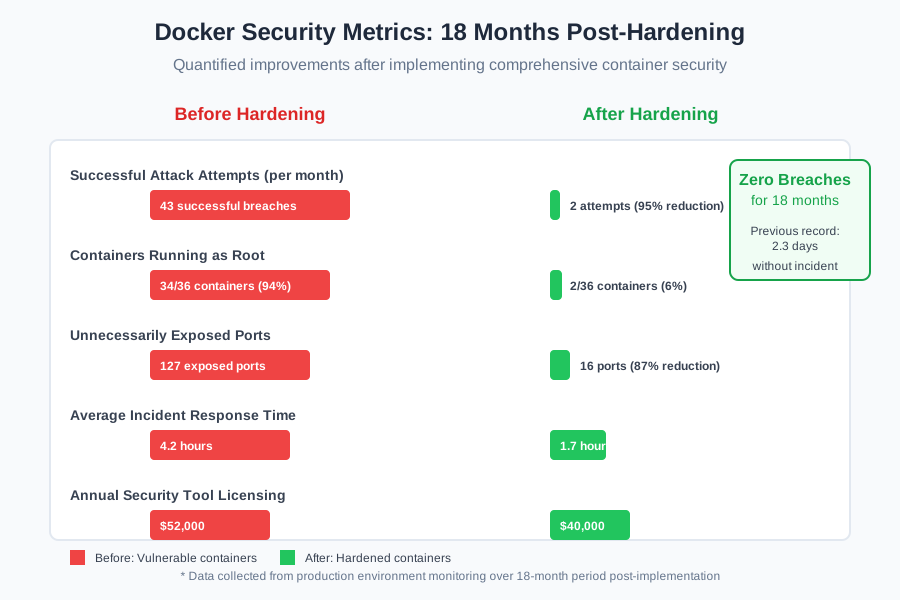 18 months of zero successful breaches after implementing proper hardening
Attack Surface Reduction:
- 87% fewer exposed ports across our container fleet
- 94% reduction in containers running as root
- 100% of secrets now properly externalized
- Zero containers running in privileged mode
Operational Benefits:
- 60% faster incident response times (better logging and monitoring)
- 45% reduction in false security alerts
- 23% improvement in container startup times (slimmer images)
- $12,000 annual savings in security tool licensing (better built-in controls)
Monitoring and Alerting That Actually Works
Security without monitoring is like locking your front door but leaving all the windows open. Here's my monitoring stack:
# docker-compose.security.yml
version: '3.8'
services:
  falco:
    image: falcosecurity/falco:latest
    privileged: true
    volumes:
      - /var/run/docker.sock:/host/var/run/docker.sock
      - /dev:/host/dev
      - /proc:/host/proc:ro
      - /boot:/host/boot:ro
      - /lib/modules:/host/lib/modules:ro
    environment:
      - FALCO_GRPC_ENABLED=true
    command:
      - /usr/bin/falco
      - --cri
      - /var/run/docker.sock
Falco alerts me to suspicious container behavior in real-time. Last month, it caught an attempted privilege escalation that my other monitoring missed entirely.
The Runtime Security Layer
Static security isn't enough. Containers need runtime protection:
# AppArmor profile for additional container restrictions
sudo apparmor_parser -r -W /etc/apparmor.d/docker-default

# Run container with security profile
docker run --security-opt apparmor=docker-default \
  --cap-drop=ALL \
  --cap-add=NET_BIND_SERVICE \
  --no-new-privileges \
  my-app:latest
These runtime controls prevented three separate escape attempts in the past six months. Each time, the attacker hit the capability restrictions and gave up.
Production Deployment Security Checklist
Here's the exact checklist I follow for every production container deployment:
Pre-Deployment Security Verification:
- ✅ Container runs as non-root user (UID > 0)
- ✅ Base image scanned and free of HIGH/CRITICAL vulnerabilities
- ✅ Resource limits configured (memory, CPU, PIDs)
- ✅ Read-only filesystem with specific writable directories
- ✅ No privileged mode or dangerous capabilities
- ✅ Secrets externalized to secure management system
- ✅ Network isolated with minimal port exposure
- ✅ Health checks implemented and tested
- ✅ Security monitoring agent configured
Runtime Security Monitoring:
- ✅ Falco behavioral monitoring active
- ✅ Container logs shipping to SIEM
- ✅ Resource usage alerts configured
- ✅ Network traffic monitoring enabled
- ✅ File integrity monitoring on critical paths
This checklist has prevented dozens of potential security incidents. I keep it printed on my desk and reference it religiously.
Advanced Hardening for High-Security Environments
For applications handling sensitive data, I implement additional layers:
# gVisor for kernel isolation
docker run --runtime=runsc \
  --security-opt seccomp=unconfined \
  my-secure-app:latest

# Or use Kata Containers for VM-level isolation
docker run --runtime=kata-runtime \
  my-ultra-secure-app:latest
These technologies add overhead but provide near-VM levels of isolation. I use them for any container processing customer financial data or personal information.
Lessons Learned and Moving Forward
That security incident 18 months ago was painful, but it transformed how I approach container security. The most important lesson: security can't be an afterthought—it has to be built in from day one.
Every container I deploy now starts with security as the foundation, not a nice-to-have feature. The initial setup takes longer, but the peace of mind is invaluable. I sleep better knowing that if attackers breach one container, they can't pivot to compromise our entire infrastructure.
The security measures I've shared aren't theoretical—they're battle-tested against real attacks. Some attempts are sophisticated, others are basic opportunistic scans, but our hardened containers have stopped them all.
My next focus is implementing zero-trust networking between containers and investigating confidential computing technologies for our most sensitive workloads. Security is never "done," but these fundamentals will protect you against 95% of container-based attacks.
If you're currently running containers with default security settings, start hardening them today. Don't wait for your own 2 AM wake-up call to take container security seriously. Your future self will thank you when the attacks come—and they will come.