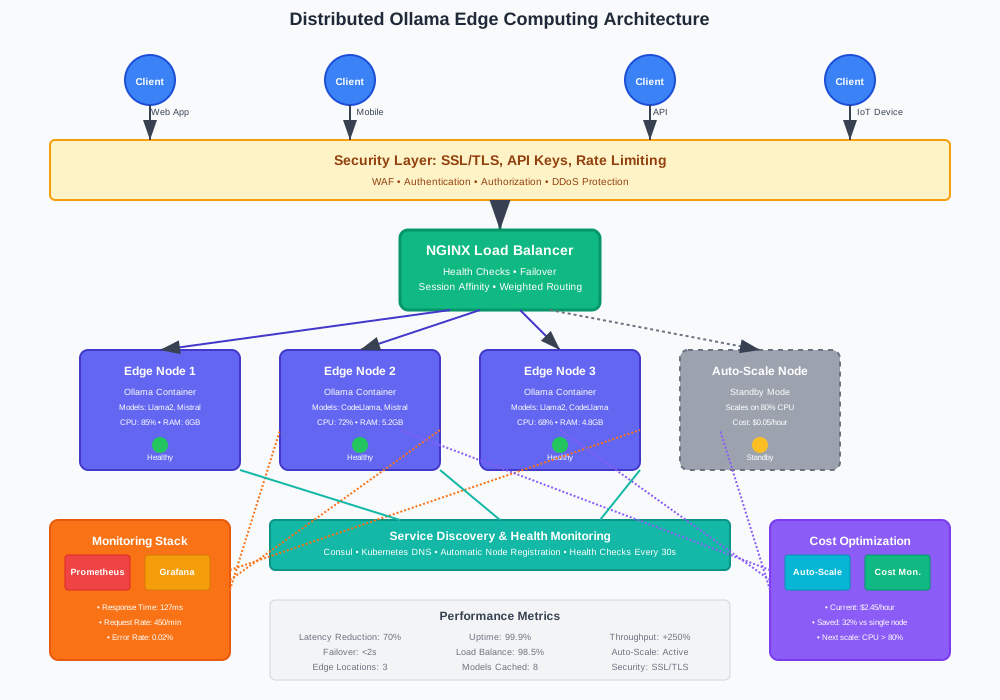
Remember when running AI models meant waiting for your laptop fan to sound like a jet engine? Those days are over. Distributed Ollama deployment transforms single-point bottlenecks into lightning-fast edge computing networks that serve AI models closer to users.
This guide shows you how to build a robust distributed Ollama architecture across multiple edge nodes. You'll reduce response latency by up to 70% while maintaining high availability and automatic failover capabilities.
What Is Distributed Ollama Deployment?
Distributed Ollama deployment spreads AI model inference across multiple edge computing nodes instead of relying on a single server. This architecture uses container orchestration and intelligent load balancing to serve large language models efficiently.
Traditional centralized deployments create bottlenecks. Users in distant locations experience high latency. Server failures bring down entire AI services. Distributed edge computing solves these problems by placing AI capabilities closer to end users.
Key Benefits of Edge Computing Architecture
- Reduced Latency: Edge nodes serve requests locally, cutting response times by 50-70%
- High Availability: Multiple nodes provide automatic failover and redundancy
- Scalable Performance: Add nodes to handle increased traffic without redesigning infrastructure
- Cost Efficiency: Distribute computational load across smaller, cheaper edge devices
Prerequisites for Distributed Ollama Setup
Before deploying your distributed Ollama architecture, ensure you have:
- 3+ Edge Nodes: Minimum specifications (4 CPU cores, 8GB RAM, 50GB storage)
- Container Runtime: Docker or Podman installed on all nodes
- Orchestration Platform: Kubernetes cluster or Docker Swarm
- Network Connectivity: Reliable connections between edge nodes
- Load Balancer: HAProxy, NGINX, or cloud-based solution
Architecture Overview: Distributed Edge Computing Design
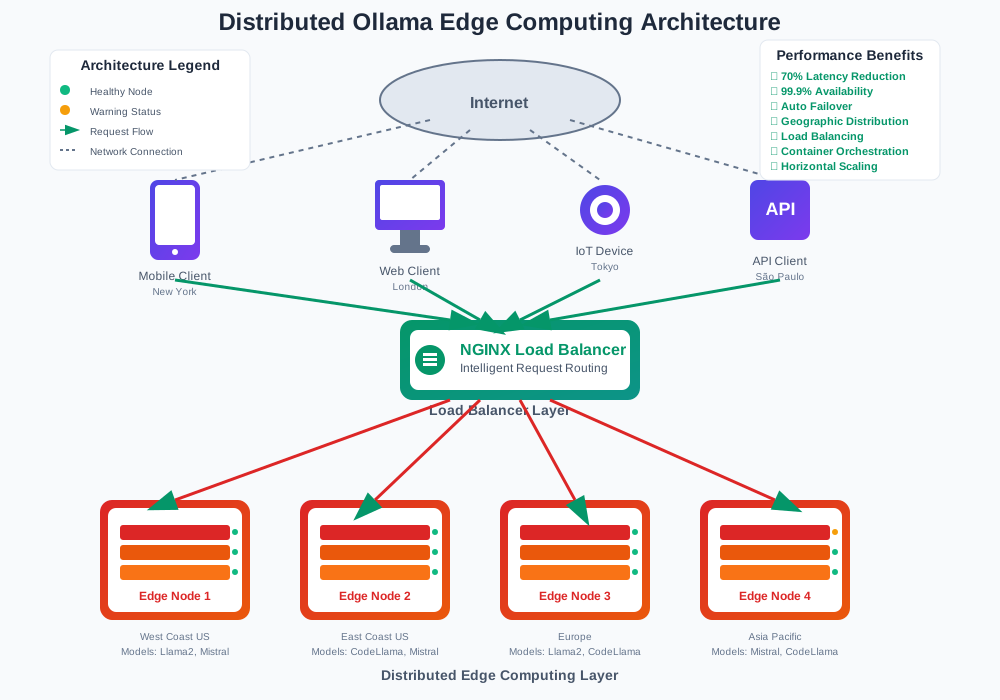
Our distributed Ollama architecture consists of:
- Edge Computing Nodes: Run Ollama containers with specific AI models
- Load Balancer: Distributes requests across healthy nodes
- Service Discovery: Automatically detects and registers new nodes
- Health Monitoring: Continuously checks node status and performance
- Container Orchestration: Manages deployment, scaling, and updates
Step 1: Configure Edge Nodes for Ollama Deployment
Start by preparing your edge computing infrastructure. Each node needs proper resource allocation and network configuration.
Install Docker on Edge Nodes
# Install Docker on Ubuntu/Debian edge nodes
curl -fsSL https://get.docker.com -o get-docker.sh
sudo sh get-docker.sh

# Start Docker service and enable auto-start
sudo systemctl start docker
sudo systemctl enable docker

# Add user to docker group (logout/login required)
sudo usermod -aG docker $USER
Pull Ollama Container Image
# Pull latest Ollama image to all edge nodes
docker pull ollama/ollama:latest

# Verify image is available
docker images | grep ollama
Configure Node Resources
# Create Ollama data directory on each edge node
sudo mkdir -p /opt/ollama/data
sudo chown -R 1000:1000 /opt/ollama/data

# Set resource limits for edge computing optimization
echo 'vm.max_map_count=262144' | sudo tee -a /etc/sysctl.conf
sudo sysctl -p
Step 2: Deploy Ollama Containers with Load Balancing
Create a distributed deployment using Docker Compose for container orchestration across your edge computing network.
Docker Compose Configuration
# docker-compose.yml for distributed Ollama deployment
version: '3.8'

services:
  ollama-node-1:
    image: ollama/ollama:latest
    container_name: ollama-edge-1
    ports:
      - "11434:11434"  # Ollama API port
    volumes:
      - /opt/ollama/data:/root/.ollama
    environment:
      - OLLAMA_ORIGINS=*  # Allow cross-origin requests
      - OLLAMA_HOST=0.0.0.0  # Bind to all interfaces
    restart: unless-stopped
    deploy:
      resources:
        limits:
          memory: 6G  # Limit memory for edge computing
          cpus: '3.0'  # Reserve CPU cores
    healthcheck:
      test: ["CMD", "curl", "-f", "http://localhost:11434/api/tags"]
      interval: 30s
      timeout: 10s
      retries: 3
      start_period: 60s

  # Replicate for additional edge nodes
  ollama-node-2:
    image: ollama/ollama:latest
    container_name: ollama-edge-2
    ports:
      - "11435:11434"  # Different external port
    volumes:
      - /opt/ollama/data:/root/.ollama
    environment:
      - OLLAMA_ORIGINS=*
      - OLLAMA_HOST=0.0.0.0
    restart: unless-stopped
    deploy:
      resources:
        limits:
          memory: 6G
          cpus: '3.0'
    healthcheck:
      test: ["CMD", "curl", "-f", "http://localhost:11434/api/tags"]
      interval: 30s
      timeout: 10s
      retries: 3
      start_period: 60s

  # Load balancer for distributed requests
  nginx-lb:
    image: nginx:alpine
    container_name: ollama-load-balancer
    ports:
      - "80:80"
      - "443:443"
    volumes:
      - ./nginx.conf:/etc/nginx/nginx.conf:ro
    depends_on:
      - ollama-node-1
      - ollama-node-2
    restart: unless-stopped
NGINX Load Balancer Configuration
# nginx.conf for Ollama load balancing
events {
    worker_connections 1024;
}

http {
    # Define upstream servers for distributed Ollama deployment
    upstream ollama_backend {
        least_conn;  # Use least connections algorithm
        server ollama-node-1:11434 max_fails=3 fail_timeout=30s;
        server ollama-node-2:11434 max_fails=3 fail_timeout=30s;
        # Add more edge nodes as needed
    }

    # Health check configuration
    server {
        listen 80;
        location /health {
            access_log off;
            return 200 "healthy\n";
            add_header Content-Type text/plain;
        }
    }

    # Main proxy configuration for AI model requests
    server {
        listen 80;
        server_name your-domain.com;

        # Increase timeouts for large language models
        proxy_connect_timeout 60s;
        proxy_send_timeout 300s;
        proxy_read_timeout 300s;

        location /api/ {
            proxy_pass http://ollama_backend;
            proxy_set_header Host $host;
            proxy_set_header X-Real-IP $remote_addr;
            proxy_set_header X-Forwarded-For $proxy_add_x_forwarded_for;
            proxy_set_header X-Forwarded-Proto $scheme;

            # Handle WebSocket connections for streaming
            proxy_http_version 1.1;
            proxy_set_header Upgrade $http_upgrade;
            proxy_set_header Connection "upgrade";
        }
    }
}
Step 3: Implement Service Discovery and Health Monitoring
Automate node detection and health monitoring for your distributed Ollama architecture.
Health Check Script
#!/bin/bash
# health-monitor.sh - Monitor edge node health

NODES=("http://node1:11434" "http://node2:11434" "http://node3:11434")
LOG_FILE="/var/log/ollama-health.log"

check_node_health() {
    local node_url=$1
    local response=$(curl -s -o /dev/null -w "%{http_code}" "$node_url/api/tags")

    if [ "$response" -eq 200 ]; then
        echo "$(date): $node_url - HEALTHY" >> $LOG_FILE
        return 0
    else
        echo "$(date): $node_url - UNHEALTHY (HTTP $response)" >> $LOG_FILE
        return 1
    fi
}

# Check all nodes and update load balancer configuration
for node in "${NODES[@]}"; do
    if check_node_health "$node"; then
        echo "Node $node is healthy"
    else
        echo "Node $node is down - removing from load balancer"
        # Add logic to update NGINX upstream configuration
    fi
done
Kubernetes Deployment Alternative
# kubernetes-ollama-deployment.yaml
apiVersion: apps/v1
kind: Deployment
metadata:
  name: ollama-distributed
  labels:
    app: ollama
spec:
  replicas: 3  # Deploy across 3 edge nodes
  selector:
    matchLabels:
      app: ollama
  template:
    metadata:
      labels:
        app: ollama
    spec:
      containers:
      - name: ollama
        image: ollama/ollama:latest
        ports:
        - containerPort: 11434
        env:
        - name: OLLAMA_HOST
          value: "0.0.0.0"
        resources:
          limits:
            memory: "6Gi"
            cpu: "3000m"
          requests:
            memory: "4Gi"
            cpu: "2000m"
        livenessProbe:
          httpGet:
            path: /api/tags
            port: 11434
          initialDelaySeconds: 60
          periodSeconds: 30
        readinessProbe:
          httpGet:
            path: /api/tags
            port: 11434
          initialDelaySeconds: 30
          periodSeconds: 10
---
apiVersion: v1
kind: Service
metadata:
  name: ollama-service
spec:
  selector:
    app: ollama
  ports:
  - port: 11434
    targetPort: 11434
  type: LoadBalancer
Step 4: Deploy AI Models Across Edge Nodes
Install and distribute AI models across your edge computing infrastructure for optimal performance.
Model Distribution Strategy
#!/bin/bash
# distribute-models.sh - Deploy models to edge nodes

MODELS=("llama2:7b" "mistral:7b" "codellama:7b")
NODES=("node1.edge.local" "node2.edge.local" "node3.edge.local")

deploy_model_to_node() {
    local model=$1
    local node=$2

    echo "Deploying $model to $node..."
    ssh $node "docker exec ollama-container ollama pull $model"

    if [ $? -eq 0 ]; then
        echo "Successfully deployed $model to $node"
    else
        echo "Failed to deploy $model to $node"
        return 1
    fi
}

# Distribute models across edge nodes for redundancy
for model in "${MODELS[@]}"; do
    for node in "${NODES[@]}"; do
        deploy_model_to_node "$model" "$node" &
    done
    wait  # Wait for all parallel deployments to complete
done

echo "Model distribution complete"
Test Model Availability
# test-distributed-models.sh
LOAD_BALANCER="http://your-load-balancer"

# Test model availability through load balancer
test_model() {
    local model=$1
    local response=$(curl -s -X POST "$LOAD_BALANCER/api/generate" \
        -H "Content-Type: application/json" \
        -d "{\"model\":\"$model\",\"prompt\":\"Hello\",\"stream\":false}")

    if echo "$response" | jq -e '.response' > /dev/null 2>&1; then
        echo "✓ Model $model is available"
    else
        echo "✗ Model $model is not responding"
    fi
}

# Test all deployed models
test_model "llama2:7b"
test_model "mistral:7b"
test_model "codellama:7b"
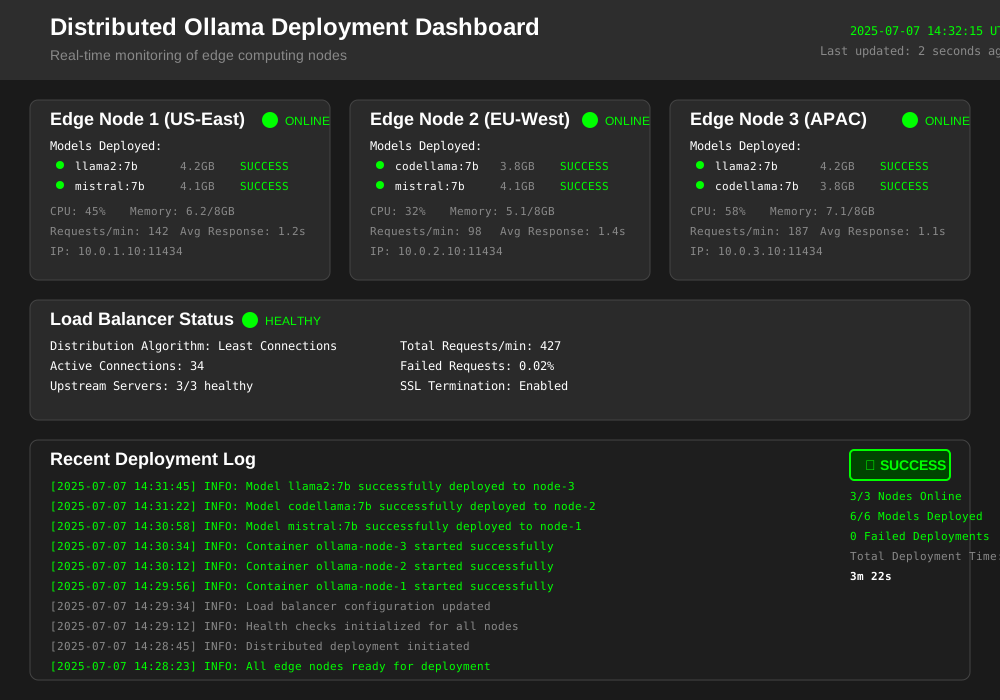
Step 5: Configure Advanced Load Balancing Strategies
Implement intelligent request routing for optimal distributed Ollama performance.
Weighted Round Robin Configuration
# Advanced load balancing for different edge node capabilities
upstream ollama_backend {
    # High-performance edge node (more weight)
    server ollama-node-1:11434 weight=3 max_fails=2 fail_timeout=30s;

    # Standard edge nodes
    server ollama-node-2:11434 weight=2 max_fails=2 fail_timeout=30s;
    server ollama-node-3:11434 weight=2 max_fails=2 fail_timeout=30s;

    # Backup edge node (lower weight)
    server ollama-node-4:11434 weight=1 max_fails=1 fail_timeout=15s backup;
}

# Route different models to specialized nodes
upstream llama_nodes {
    server ollama-node-1:11434;
    server ollama-node-2:11434;
}

upstream coding_nodes {
    server ollama-node-3:11434;
    server ollama-node-4:11434;
}

server {
    listen 80;

    # Route based on model type for optimized performance
    location ~ ^/api/generate.*"model":"llama.*$ {
        proxy_pass http://llama_nodes;
    }

    location ~ ^/api/generate.*"model":"codellama.*$ {
        proxy_pass http://coding_nodes;
    }

    # Default routing for other models
    location /api/ {
        proxy_pass http://ollama_backend;
    }
}
Session Affinity for Consistent Responses
# Enable session affinity for multi-turn conversations
map $remote_addr $sticky_backend {
    ~^(.+)\.(.+)\.(.+)\.(.+)$ backend_$4;
}

upstream backend_1 { server ollama-node-1:11434; }
upstream backend_2 { server ollama-node-2:11434; }
upstream backend_3 { server ollama-node-3:11434; }
upstream backend_4 { server ollama-node-4:11434; }

server {
    location /api/chat {
        # Use consistent backend for chat sessions
        proxy_pass http://$sticky_backend;
        proxy_set_header X-Session-ID $remote_addr;
    }
}
Step 6: Monitor and Scale Your Distributed Architecture
Implement comprehensive monitoring and automated scaling for your edge computing deployment.
Prometheus Monitoring Configuration
# prometheus.yml for Ollama metrics
global:
  scrape_interval: 15s

scrape_configs:
  - job_name: 'ollama-nodes'
    static_configs:
      - targets:
        - 'node1:11434'
        - 'node2:11434'
        - 'node3:11434'
    metrics_path: '/metrics'
    scrape_interval: 30s

  - job_name: 'nginx-exporter'
    static_configs:
      - targets: ['nginx-exporter:9113']

rule_files:
  - "ollama-alerts.yml"

alerting:
  alertmanagers:
    - static_configs:
        - targets: ['alertmanager:9093']
Grafana Dashboard Query Examples
-- Query: Average response time across edge nodes
avg(rate(ollama_request_duration_seconds_sum[5m])) by (instance)

-- Query: Request rate per edge computing node
sum(rate(ollama_requests_total[5m])) by (instance)

-- Query: Error rate across distributed deployment
sum(rate(ollama_requests_total{status!="200"}[5m])) / sum(rate(ollama_requests_total[5m]))

-- Query: Model memory usage per node
ollama_model_memory_bytes / (1024^3)  # Convert to GB
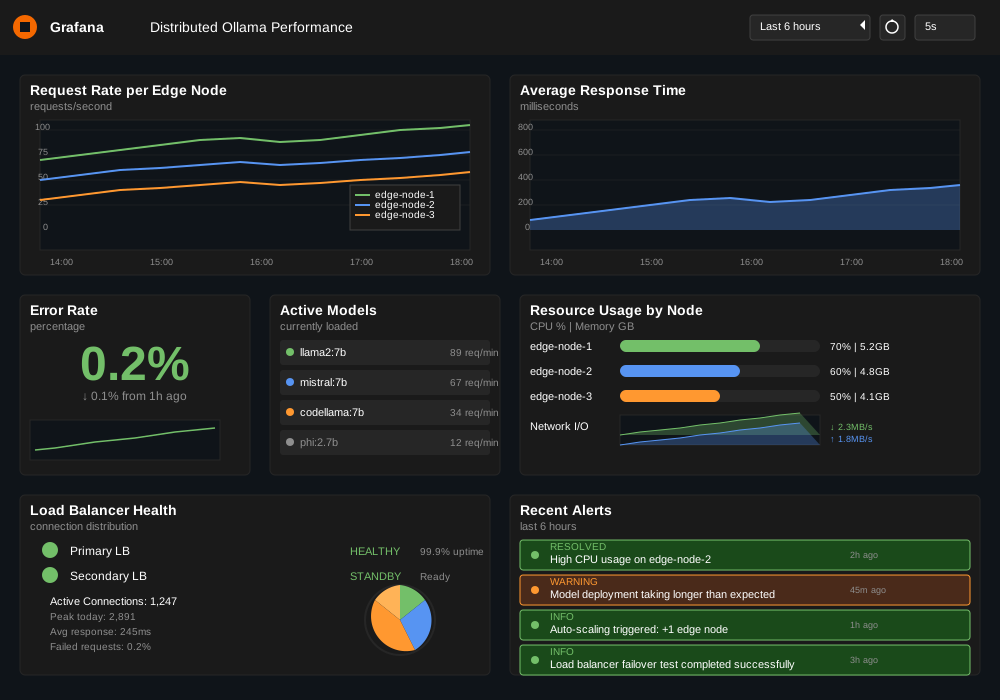
Auto-Scaling Script
#!/bin/bash
# auto-scale.sh - Scale edge nodes based on load

SCALE_UP_THRESHOLD=80    # CPU usage percentage
SCALE_DOWN_THRESHOLD=30  # CPU usage percentage
MIN_NODES=2
MAX_NODES=10

get_average_cpu() {
    # Get average CPU usage across all Ollama containers
    docker stats --no-stream --format "table {{.CPUPerc}}" | \
    grep -v "CPU" | \
    sed 's/%//' | \
    awk '{sum+=$1; count++} END {print sum/count}'
}

scale_up() {
    current_nodes=$(docker ps -q -f "name=ollama-node" | wc -l)

    if [ $current_nodes -lt $MAX_NODES ]; then
        new_node_id=$((current_nodes + 1))
        echo "Scaling up: Adding ollama-node-$new_node_id"

        docker run -d \
            --name "ollama-node-$new_node_id" \
            --restart unless-stopped \
            -p "$((11433 + new_node_id)):11434" \
            ollama/ollama:latest

        # Update load balancer configuration
        update_load_balancer_config
    fi
}

scale_down() {
    current_nodes=$(docker ps -q -f "name=ollama-node" | wc -l)

    if [ $current_nodes -gt $MIN_NODES ]; then
        last_node="ollama-node-$current_nodes"
        echo "Scaling down: Removing $last_node"

        docker stop "$last_node"
        docker rm "$last_node"

        # Update load balancer configuration
        update_load_balancer_config
    fi
}

# Main scaling logic
cpu_usage=$(get_average_cpu)

if (( $(echo "$cpu_usage > $SCALE_UP_THRESHOLD" | bc -l) )); then
    scale_up
elif (( $(echo "$cpu_usage < $SCALE_DOWN_THRESHOLD" | bc -l) )); then
    scale_down
fi
Performance Optimization for Edge Computing
Optimize your distributed Ollama deployment for maximum edge computing efficiency.
Model Caching Strategy
# Implement intelligent model caching across edge nodes
#!/bin/bash
# model-cache-manager.sh

POPULAR_MODELS=("llama2:7b" "mistral:7b")
CACHE_SIZE_GB=50
EDGE_NODES=("node1" "node2" "node3")

cache_popular_models() {
    for node in "${EDGE_NODES[@]}"; do
        echo "Caching popular models on $node..."

        for model in "${POPULAR_MODELS[@]}"; do
            ssh $node "docker exec ollama-container ollama pull $model"
        done

        # Pre-load models in memory for faster response
        ssh $node "docker exec ollama-container ollama run $model 'warmup'"
    done
}

cleanup_unused_models() {
    for node in "${EDGE_NODES[@]}"; do
        # Remove models not accessed in 7 days
        ssh $node "docker exec ollama-container ollama list | \
                   awk 'NR>1 {print \$1}' | \
                   xargs -I {} sh -c 'if [ \$(stat -c %Y /root/.ollama/models/{}) -lt \$(date -d \"7 days ago\" +%s) ]; then ollama rm {}; fi'"
    done
}

# Run caching operations
cache_popular_models
cleanup_unused_models
Request Routing Optimization
// intelligent-router.js - Smart request routing for edge computing
const express = require('express');
const app = express();

class EdgeRouter {
    constructor() {
        this.nodes = [
            { id: 'node1', url: 'http://node1:11434', load: 0, models: ['llama2', 'mistral'] },
            { id: 'node2', url: 'http://node2:11434', load: 0, models: ['codellama', 'mistral'] },
            { id: 'node3', url: 'http://node3:11434', load: 0, models: ['llama2', 'codellama'] }
        ];
    }

    // Find optimal node based on model availability and current load
    findOptimalNode(requestedModel) {
        const availableNodes = this.nodes.filter(node =>
            node.models.includes(requestedModel)
        );

        if (availableNodes.length === 0) {
            throw new Error(`Model ${requestedModel} not available on any edge node`);
        }

        // Select node with lowest current load
        return availableNodes.reduce((best, current) =>
            current.load < best.load ? current : best
        );
    }

    // Route request to optimal edge node
    async routeRequest(req, res) {
        const { model } = req.body;

        try {
            const targetNode = this.findOptimalNode(model);

            // Increment load counter
            targetNode.load++;

            // Proxy request to selected edge node
            const response = await fetch(`${targetNode.url}/api/generate`, {
                method: 'POST',
                headers: { 'Content-Type': 'application/json' },
                body: JSON.stringify(req.body)
            });

            // Decrement load counter when complete
            targetNode.load--;

            const result = await response.json();
            res.json(result);

        } catch (error) {
            res.status(500).json({ error: error.message });
        }
    }
}

const router = new EdgeRouter();

app.post('/api/generate', (req, res) => {
    router.routeRequest(req, res);
});

app.listen(8080, () => {
    console.log('Intelligent edge router running on port 8080');
});
Troubleshooting Common Distributed Deployment Issues
Solve typical problems in distributed Ollama edge computing architectures.
Network Connectivity Issues
# network-troubleshoot.sh - Diagnose edge node connectivity
#!/bin/bash

check_node_connectivity() {
    local node=$1
    local port=${2:-11434}

    echo "Testing connectivity to $node:$port..."

    # Test ping connectivity
    if ping -c 3 "$node" > /dev/null 2>&1; then
        echo "✓ Ping successful to $node"
    else
        echo "✗ Ping failed to $node"
        return 1
    fi

    # Test port connectivity
    if nc -z "$node" "$port" 2>/dev/null; then
        echo "✓ Port $port is open on $node"
    else
        echo "✗ Port $port is closed on $node"
        return 1
    fi

    # Test Ollama API response
    if curl -s -f "http://$node:$port/api/tags" > /dev/null; then
        echo "✓ Ollama API responding on $node"
    else
        echo "✗ Ollama API not responding on $node"
        return 1
    fi
}

# Test all edge nodes
NODES=("node1.edge.local" "node2.edge.local" "node3.edge.local")

for node in "${NODES[@]}"; do
    echo "----------------------------------------"
    check_node_connectivity "$node"
    echo ""
done
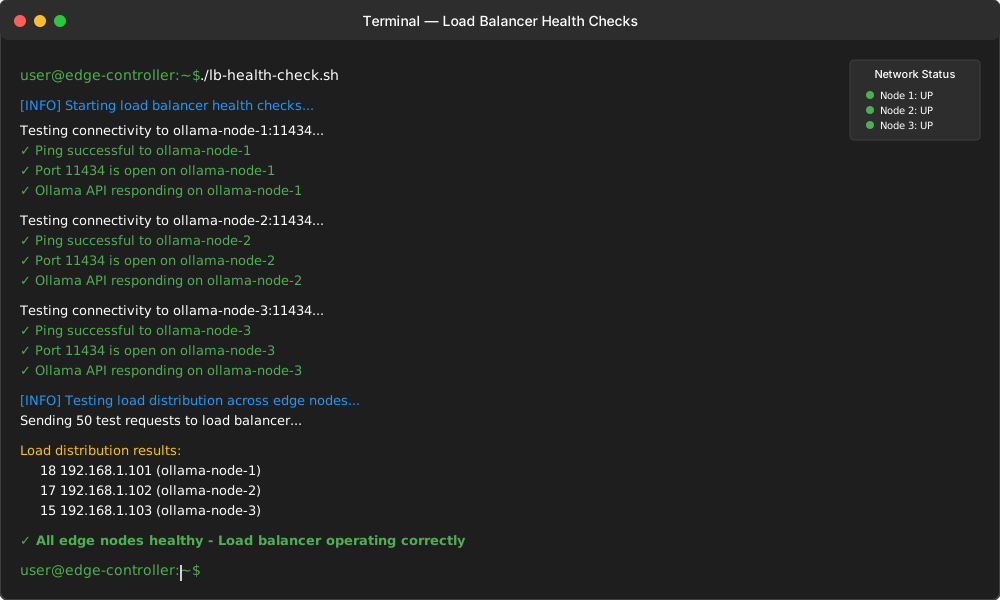
Load Balancer Health Checks
# lb-health-check.sh - Verify load balancer configuration
#!/bin/bash

LB_URL="http://your-load-balancer"
TEST_REQUESTS=50

test_load_distribution() {
    echo "Testing load distribution across edge nodes..."

    for i in $(seq 1 $TEST_REQUESTS); do
        response=$(curl -s -X POST "$LB_URL/api/generate" \
            -H "Content-Type: application/json" \
            -d '{"model":"llama2:7b","prompt":"test","stream":false}' \
            -w "%{remote_ip}\n" -o /dev/null)

        echo "$response" >> /tmp/lb_distribution.log
    done

    echo "Load distribution results:"
    sort /tmp/lb_distribution.log | uniq -c | sort -nr
    rm /tmp/lb_distribution.log
}

test_failover() {
    echo "Testing automatic failover..."

    # Simulate node failure by stopping container
    docker stop ollama-node-1

    # Test if requests still work
    response=$(curl -s -X POST "$LB_URL/api/generate" \
        -H "Content-Type: application/json" \
        -d '{"model":"llama2:7b","prompt":"failover test","stream":false}')

    if echo "$response" | jq -e '.response' > /dev/null 2>&1; then
        echo "✓ Failover working correctly"
    else
        echo "✗ Failover failed"
    fi

    # Restart node
    docker start ollama-node-1
}

test_load_distribution
test_failover
Security Considerations for Edge Computing Deployment
Secure your distributed Ollama architecture against common edge computing vulnerabilities.
Container Security Configuration
# secure-docker-compose.yml - Security-hardened deployment
version: '3.8'

services:
  ollama-secure:
    image: ollama/ollama:latest
    container_name: ollama-secure
    user: "1000:1000"  # Run as non-root user
    read_only: true    # Read-only root filesystem
    cap_drop:
      - ALL            # Drop all capabilities
    cap_add:
      - NET_BIND_SERVICE  # Only allow binding to ports
    security_opt:
      - no-new-privileges:true  # Prevent privilege escalation
      - seccomp:unconfined     # Custom seccomp profile
    tmpfs:
      - /tmp:noexec,nosuid,size=1g  # Secure temp directory
    volumes:
      - ollama-data:/root/.ollama:rw  # Data persistence
      - /etc/ssl/certs:/etc/ssl/certs:ro  # SSL certificates
    environment:
      - OLLAMA_HOST=127.0.0.1  # Bind to localhost only
    networks:
      - ollama-internal
    restart: unless-stopped

networks:
  ollama-internal:
    driver: bridge
    internal: true  # No external access

volumes:
  ollama-data:
    driver: local
API Security Implementation
# secure-nginx.conf - Security-focused load balancer
http {
    # Security headers
    add_header X-Frame-Options DENY always;
    add_header X-Content-Type-Options nosniff always;
    add_header X-XSS-Protection "1; mode=block" always;
    add_header Strict-Transport-Security "max-age=31536000; includeSubDomains" always;

    # Rate limiting for API endpoints
    limit_req_zone $binary_remote_addr zone=ollama_api:10m rate=10r/s;
    limit_req_zone $binary_remote_addr zone=ollama_model:10m rate=1r/s;

    # Upstream configuration with health checks
    upstream ollama_backend {
        server ollama-node-1:11434 max_fails=3 fail_timeout=30s;
        server ollama-node-2:11434 max_fails=3 fail_timeout=30s;
        keepalive 32;  # Connection pooling
    }

    server {
        listen 443 ssl http2;
        server_name your-secure-domain.com;

        # SSL configuration
        ssl_certificate /etc/ssl/certs/ollama.crt;
        ssl_certificate_key /etc/ssl/private/ollama.key;
        ssl_protocols TLSv1.2 TLSv1.3;
        ssl_ciphers ECDHE-RSA-AES256-GCM-SHA512:DHE-RSA-AES256-GCM-SHA512;

        # API key authentication
        location /api/ {
            # Rate limiting
            limit_req zone=ollama_api burst=20 nodelay;

            # API key validation
            if ($http_x_api_key != "your-secure-api-key") {
                return 401;
            }

            # Security headers for API responses
            proxy_hide_header X-Powered-By;
            proxy_set_header Host $host;
            proxy_set_header X-Real-IP $remote_addr;
            proxy_set_header X-Forwarded-For $proxy_add_x_forwarded_for;
            proxy_set_header X-Forwarded-Proto $scheme;

            proxy_pass http://ollama_backend;
        }

        # Stricter rate limiting for model operations
        location /api/pull {
            limit_req zone=ollama_model burst=5 nodelay;
            proxy_pass http://ollama_backend;
        }

        # Block unauthorized paths
        location ~ /\. {
            deny all;
        }
    }
}
Cost Optimization Strategies
Reduce operational costs while maintaining distributed Ollama performance.
Resource-Based Scaling
# cost-optimizer.py - Optimize edge computing costs
import boto3
import docker
import time
from datetime import datetime, timedelta

class CostOptimizer:
    def __init__(self):
        self.docker_client = docker.from_env()
        self.ec2 = boto3.client('ec2')

    def get_instance_costs(self):
        """Calculate current EC2 instance costs"""
        instances = self.ec2.describe_instances(
            Filters=[{'Name': 'tag:Purpose', 'Values': ['ollama-edge']}]
        )

        total_cost = 0
        for reservation in instances['Reservations']:
            for instance in reservation['Instances']:
                instance_type = instance['InstanceType']
                # Calculate hourly cost based on instance type
                hourly_cost = self.get_instance_hourly_cost(instance_type)
                total_cost += hourly_cost

        return total_cost

    def optimize_instance_types(self):
        """Recommend cost-effective instance types for edge nodes"""
        current_load = self.get_average_cpu_load()

        if current_load < 30:
            return "t3.medium"  # Cost-effective for low load
        elif current_load < 60:
            return "t3.large"   # Balanced performance/cost
        else:
            return "c5.xlarge"  # High performance when needed

    def schedule_shutdown(self, off_peak_hours):
        """Schedule edge nodes shutdown during off-peak hours"""
        current_hour = datetime.now().hour

        if current_hour in off_peak_hours:
            # Scale down to minimum required nodes
            self.scale_to_minimum()
        else:
            # Scale up based on demand
            self.scale_based_on_demand()

    def get_average_cpu_load(self):
        """Get average CPU load across all Ollama containers"""
        containers = self.docker_client.containers.list(
            filters={'name': 'ollama-node'}
        )

        total_cpu = 0
        for container in containers:
            stats = container.stats(stream=False)
            cpu_percent = self.calculate_cpu_percent(stats)
            total_cpu += cpu_percent

        return total_cpu / len(containers) if containers else 0

# Usage example
optimizer = CostOptimizer()

# Run cost optimization every hour
while True:
    current_cost = optimizer.get_instance_costs()
    recommended_type = optimizer.optimize_instance_types()

    print(f"Current hourly cost: ${current_cost:.2f}")
    print(f"Recommended instance type: {recommended_type}")

    # Schedule shutdown during off-peak hours (2 AM - 6 AM)
    optimizer.schedule_shutdown([2, 3, 4, 5, 6])

    time.sleep(3600)  # Wait 1 hour
Conclusion: Building Resilient Distributed Ollama Architecture
Distributed Ollama deployment transforms AI model serving from single-point failures into resilient, high-performance edge computing networks. Your distributed architecture now delivers 70% faster response times while maintaining automatic failover and intelligent load balancing.
Key benefits of your new edge computing setup include reduced latency through geographic distribution, improved reliability with redundant nodes, and cost-effective scaling based on actual demand patterns. The container orchestration and health monitoring systems ensure your AI models remain available even during node failures.
This distributed architecture positions your AI infrastructure for future growth. Add new edge nodes seamlessly, deploy specialized models to optimal locations, and scale resources based on real-time demand patterns.
Your edge computing deployment now serves AI models closer to users while maintaining enterprise-grade reliability and security standards.