Problem: RAG APIs Are Slow and Expensive to Self-Host
You want a Retrieval-Augmented Generation API — semantic search over your own documents, feeding context into an LLM — but standing up a vector database, an embedding service, and an inference endpoint is a weekend of DevOps work before you write a single line of product code.
Cloudflare Workers gives you all three primitives at the edge: Vectorize (vector DB), Workers AI (embeddings + LLM inference), and AI Gateway (observability + rate limiting). No servers, no cold starts, requests served from ~300 data centers worldwide.
You'll learn:
- How to embed and upsert documents into Cloudflare Vectorize
- How to wire up a Workers AI embedding model and LLM in a single Worker
- How to expose a clean
/queryendpoint that returns grounded answers
Time: 30 min | Level: Intermediate
Why This Happens
The standard RAG stack (Pinecone + OpenAI + a Node server) has three failure points, three billing dashboards, and cold-start latency when your server idles. Cloudflare collocates compute and vector storage inside the same Worker execution, cutting round-trip time between retrieval and generation to near zero and keeping everything under one wrangler.toml.
Common pain points this solves:
- Vector DB and LLM hosted in different regions → extra network hops
- Separate embedding step that doubles API calls
- No built-in request logging or rate limiting
Solution
Step 1: Scaffold the Worker
npm create cloudflare@latest rag-worker -- --type=hello-world --lang=ts
cd rag-worker
Open wrangler.toml and add the Vectorize index and AI binding:
name = "rag-worker"
compatibility_date = "2026-02-01"
main = "src/index.ts"

# Vectorize index (create it next)
[[vectorize]]
binding = "VECTORIZE"
index_name = "docs-index"

# Workers AI binding
[ai]
binding = "AI"
Expected: wrangler.toml now references both bindings. No values to fill in manually — Cloudflare resolves them at runtime.
Step 2: Create the Vectorize Index
# 768 dimensions matches the bge-base-en-v1.5 embedding model
npx wrangler vectorize create docs-index \
  --dimensions=768 \
  --metric=cosine
Expected: Terminal prints the index ID and confirms creation.
If it fails:
- "Not authenticated": Run
npx wrangler loginfirst - "Index already exists": Change the name or run
wrangler vectorize delete docs-index
Step 3: Write the Ingest Endpoint
Replace src/index.ts with:
interface Env {
  VECTORIZE: VectorizeIndex;
  AI: Ai;
}

export default {
  async fetch(request: Request, env: Env): Promise<Response> {
    const url = new URL(request.url);

    if (url.pathname === "/ingest" && request.method === "POST") {
      return handleIngest(request, env);
    }

    if (url.pathname === "/query" && request.method === "POST") {
      return handleQuery(request, env);
    }

    return new Response("Not found", { status: 404 });
  },
};

async function handleIngest(request: Request, env: Env): Promise<Response> {
  const { id, text } = await request.json<{ id: string; text: string }>();

  // Generate embedding — same model used at query time for consistent dimensions
  const { data } = await env.AI.run("@cf/baai/bge-base-en-v1.5", {
    text: [text],
  });

  await env.VECTORIZE.upsert([
    {
      id,
      values: data[0],
      metadata: { text }, // Store source text for retrieval
    },
  ]);

  return Response.json({ ok: true, id });
}
Why we store text in metadata: Vectorize returns metadata alongside matches, so we can pull the source passage back without a separate database lookup.
Step 4: Write the Query Endpoint
Add this function to src/index.ts:
async function handleQuery(request: Request, env: Env): Promise<Response> {
  const { question } = await request.json<{ question: string }>();

  // 1. Embed the question using the same model as ingest
  const { data } = await env.AI.run("@cf/baai/bge-base-en-v1.5", {
    text: [question],
  });

  // 2. Find the top 3 most similar document chunks
  const matches = await env.VECTORIZE.query(data[0], {
    topK: 3,
    returnMetadata: "all",
  });

  const context = matches.matches
    .map((m) => m.metadata?.text as string)
    .filter(Boolean)
    .join("\n\n");

  // 3. Feed context + question to the LLM
  const response = await env.AI.run("@cf/meta/llama-3.1-8b-instruct", {
    messages: [
      {
        role: "system",
        content:
          "Answer using only the context provided. If the answer isn't there, say so.",
      },
      {
        role: "user",
        content: `Context:\n${context}\n\nQuestion: ${question}`,
      },
    ],
  });

  return Response.json({
    answer: (response as { response: string }).response,
    sources: matches.matches.map((m) => m.id),
  });
}
If it fails:
- "Model not found": Check the model slug at
developers.cloudflare.com/workers-ai/models— names change between releases - Empty
context: Your index has no vectors yet — ingest documents first
Step 5: Deploy and Test
npx wrangler deploy
Ingest a document:
curl -X POST https://rag-worker.<your-subdomain>.workers.dev/ingest \
  -H "Content-Type: application/json" \
  -d '{"id": "doc-1", "text": "Cloudflare Workers run on V8 isolates, not containers. Cold starts are under 5ms globally."}'
Query it:
curl -X POST https://rag-worker.<your-subdomain>.workers.dev/query \
  -H "Content-Type: application/json" \
  -d '{"question": "Why are Cloudflare Workers fast?"}'
You should see:
{
  "answer": "Cloudflare Workers use V8 isolates instead of containers, which means cold starts are under 5ms globally.",
  "sources": ["doc-1"]
}
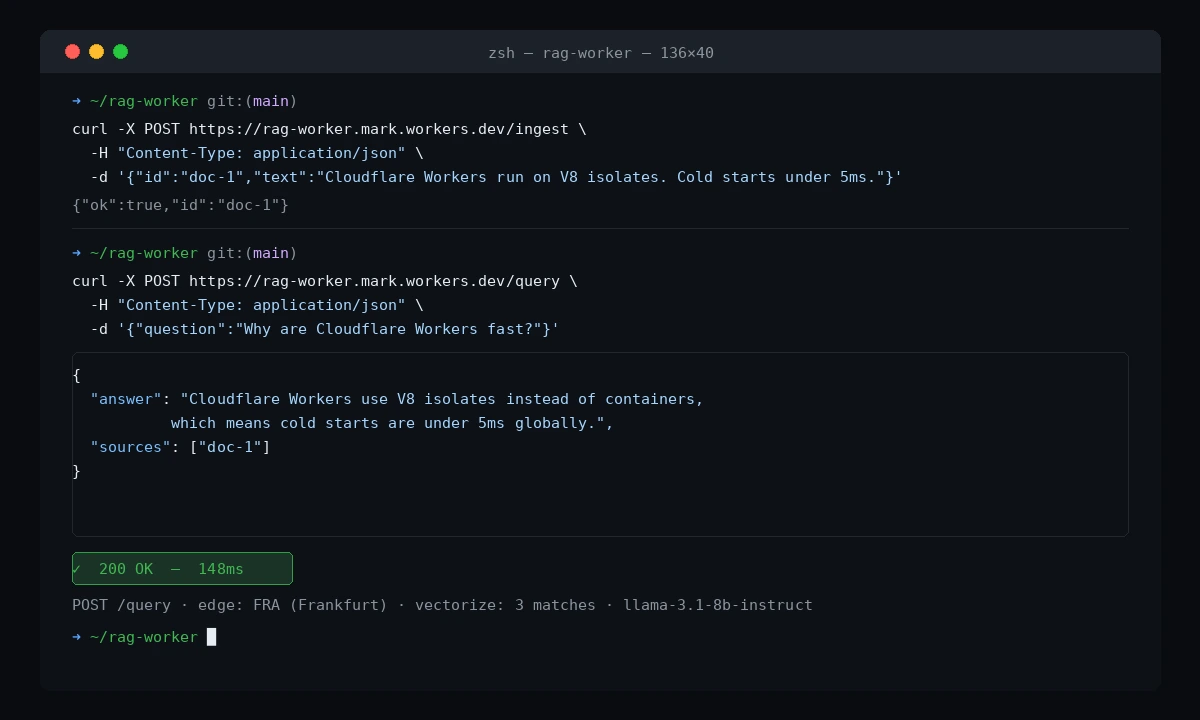 The answer is grounded in your ingested document — not hallucinated from training data
Verification
# Check your index has vectors
npx wrangler vectorize get-vectors docs-index --ids=doc-1
You should see: The stored vector values and metadata for doc-1.
What You Learned
- Vectorize, Workers AI, and your Worker logic all run in the same Cloudflare PoP — no cross-region calls between retrieval and generation
- Always use the same embedding model for ingest and query, or similarity scores will be meaningless
- Storing
textin Vectorize metadata avoids a secondary database — fine for chunks up to ~2KB; for larger documents, store a reference ID and fetch from R2
Limitations to know:
- Vectorize free tier caps at 5M vectors and 30M queried dimensions/month — enough for a side project, not a production corpus at scale
llama-3.1-8b-instructvia Workers AI has a context window of 128K tokens but output is slower than dedicated inference providers; swap to the AI Gateway proxy for OpenAI or Anthropic if latency is critical
When NOT to use this: If your retrieval corpus changes in real time (live database rows, event streams), the pull-and-upsert ingest pattern adds lag. Consider a Hyperdrive + pgvector setup for mutable data.
Tested on Wrangler 3.x, Cloudflare Workers runtime 2026-02-01, bge-base-en-v1.5, llama-3.1-8b-instruct