Problem: Running Open-Source Models Without Managing GPUs
Replicate API lets you deploy and call open-source models — Llama 3.3, SDXL, Whisper, and 50,000+ others — without provisioning a single GPU. You hit an endpoint, you get a result. No CUDA driver hell.
The catch: the docs scatter Python, Node.js, and webhook examples across three pages, and cold-start behavior surprises developers on the free tier. This guide consolidates everything.
You'll learn:
- Authenticate and make your first Replicate API call in under 5 minutes
- Run text, image, and audio models with Python and Node.js
- Handle async predictions and webhooks for production workloads
- Control cost with model versions and USD pricing tiers
Time: 20 min | Difficulty: Intermediate
Why Replicate Exists
Self-hosting a 70B parameter model costs $2–4/hour on a dedicated A100. Most apps don't need dedicated uptime — they need burst inference on demand. Replicate solves this with serverless GPU execution: you pay per second of compute, billed in USD, and the infrastructure scales to zero when idle.
Every model on Replicate runs inside a Cog container — a Docker-based packaging format that pins model weights, Python version, and CUDA version together. This means the model version you call today behaves identically in six months.
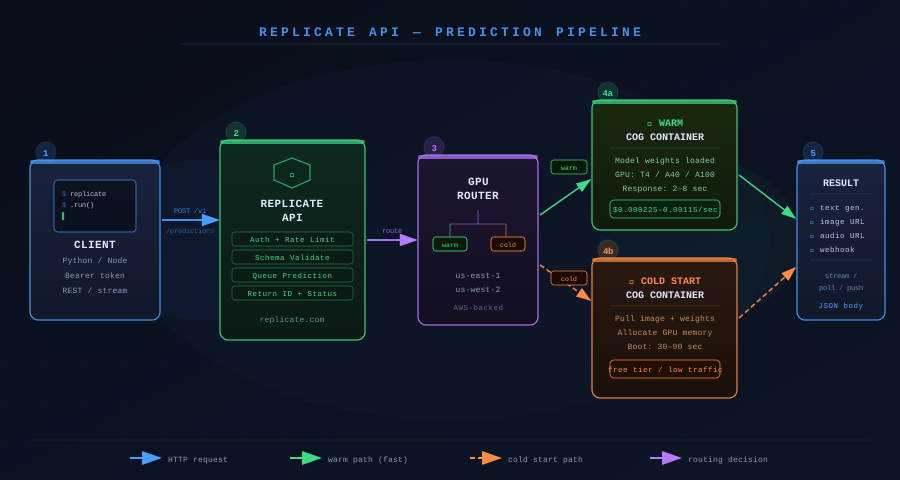 Replicate's prediction pipeline: your request routes to a warm or cold Cog container; results stream back or post to a webhook.
Prerequisites
- Python 3.11+ or Node.js 20+
- A Replicate account — free tier includes $0.005 in compute credit on signup
REPLICATE_API_TOKENfrom replicate.com/account/api-tokens
Solution
Step 1: Install the Client
Python (using uv — recommended):
uv add replicate
Python (pip fallback):
pip install replicate
Node.js:
npm install replicate
Set your token as an environment variable — never hardcode it:
export REPLICATE_API_TOKEN=r8_your_token_here
Expected output: No output. Confirm with echo $REPLICATE_API_TOKEN.
Step 2: Run Your First Model (Llama 3.3 70B)
The replicate.run() call is synchronous and blocks until the prediction completes. Use it for scripts and quick tests.
Python:
import replicate

output = replicate.run(
    # Pin the exact version hash — prevents surprise behavior from upstream updates
    "meta/meta-llama-3-70b-instruct",
    input={
        "prompt": "Explain transformer attention in one paragraph.",
        "max_new_tokens": 256,
        "temperature": 0.7,
    }
)

# output is a generator — join chunks as they stream
print("".join(output))
Node.js:
import Replicate from "replicate";

const replicate = new Replicate();

const output = await replicate.run(
  "meta/meta-llama-3-70b-instruct",
  {
    input: {
      prompt: "Explain transformer attention in one paragraph.",
      max_new_tokens: 256,
      temperature: 0.7,
    },
  }
);

// Node client returns an async iterator
for await (const chunk of output) {
  process.stdout.write(chunk);
}
Expected output: Streamed text in your terminal within 2–8 seconds on a warm container.
If it fails:
401 Unauthorized→REPLICATE_API_TOKENnot exported in the current shell session. Runexportagain.422 Unprocessable Entity→ Invalid input key. Check the model's input schema atreplicate.com/meta/meta-llama-3-70b-instruct/api.Model is bootingin the response → Cold start. The free tier can take 30–90 seconds on first call. Retry after the boot completes.
Step 3: Pin a Model Version
Model names like "meta/meta-llama-3-70b-instruct" always resolve to the latest version. In production, pin the version SHA to lock behavior:
output = replicate.run(
    # SHA from the model's "Versions" tab on replicate.com
    "meta/meta-llama-3-70b-instruct:dp-cf05cc8e6e5b3c0bc6e1b6c9f5e4a2d8",
    input={"prompt": "..."}
)
Find any model's version SHA under the Versions tab on its Replicate page.
Step 4: Run an Image Generation Model (SDXL)
Image models return a list of file URLs, not text. The URL expires after 1 hour — download immediately if you need to persist it.
import replicate
import httpx
from pathlib import Path

output = replicate.run(
    "stability-ai/sdxl:7762fd07cf82c948538e41f63f77d685e02b063e37291ef63919ea9f8f6e9b5",
    input={
        "prompt": "A neon-lit Tokyo alley at midnight, cinematic, 8k",
        "negative_prompt": "blurry, low quality, watermark",
        "width": 1024,
        "height": 1024,
        "num_inference_steps": 30,  # 20–30 steps balances quality and cost
        "guidance_scale": 7.5,
    }
)

# output[0] is the image URL
image_url = output[0]
image_bytes = httpx.get(image_url).content
Path("output.png").write_bytes(image_bytes)
print(f"Saved to output.png — source URL expires in 1hr: {image_url}")
Expected output: output.png written to disk, ~2–4 MB WebP or PNG.
Step 5: Run an Audio Model (Whisper)
File inputs use the replicate.files.create() helper or accept a public URL directly:
import replicate

# Option A — pass a public URL (fastest)
output = replicate.run(
    "openai/whisper:4d50797290df275329f202e48c76360b3f22b08d28c196cbc54600319435f8d",
    input={
        "audio": "https://upload.wikimedia.org/wikipedia/commons/7/7c/Agwanta.ogg",
        "model": "large-v3",
        "language": "en",
        "transcription": "plain text",
    }
)
print(output["transcription"])

# Option B — upload a local file
with open("my_audio.mp3", "rb") as f:
    audio_file = replicate.files.create(f)

output = replicate.run(
    "openai/whisper:4d50797290df275329f202e48c76360b3f22b08d28c196cbc54600319435f8d",
    input={"audio": audio_file.urls["get"], "model": "large-v3"}
)
Step 6: Async Predictions for Production
replicate.run() blocks the calling thread — bad for web servers. Use predictions.create() instead and poll or handle via webhook.
Create and poll:
import replicate
import time

prediction = replicate.predictions.create(
    model="meta/meta-llama-3-70b-instruct",
    input={"prompt": "Summarize the Replicate API in 3 bullets."},
)

print(f"Prediction ID: {prediction.id} — Status: {prediction.status}")

# Poll until terminal state
while prediction.status not in ("succeeded", "failed", "canceled"):
    time.sleep(1)
    prediction.reload()

if prediction.status == "succeeded":
    print("".join(prediction.output))
else:
    print(f"Failed: {prediction.error}")
Webhook (recommended for production):
prediction = replicate.predictions.create(
    model="meta/meta-llama-3-70b-instruct",
    input={"prompt": "Write a FastAPI health check endpoint."},
    # Replicate POSTs the completed prediction JSON to this URL
    webhook="https://your-api.us-east-1.example.com/webhooks/replicate",
    webhook_events_filter=["completed"],  # only fire on terminal state
)
print(f"Queued: {prediction.id}")
Your webhook handler receives a JSON body with status, output, error, and metrics (including predict_time in seconds for cost calculation).
Step 7: Build a Minimal FastAPI Endpoint
Wrap Replicate in a FastAPI route for a production-ready inference microservice:
from fastapi import FastAPI, BackgroundTasks, HTTPException
from pydantic import BaseModel
import replicate

app = FastAPI()

class InferRequest(BaseModel):
    prompt: str
    max_tokens: int = 512

class InferResponse(BaseModel):
    prediction_id: str
    status: str

@app.post("/infer", response_model=InferResponse)
async def create_inference(req: InferRequest):
    try:
        prediction = replicate.predictions.create(
            model="meta/meta-llama-3-70b-instruct",
            input={
                "prompt": req.prompt,
                "max_new_tokens": req.max_tokens,
            },
            webhook="https://your-api.us-east-1.example.com/webhooks/replicate",
            webhook_events_filter=["completed"],
        )
        return InferResponse(prediction_id=prediction.id, status=prediction.status)
    except replicate.exceptions.ReplicateError as e:
        raise HTTPException(status_code=502, detail=str(e))
Run with: uvicorn main:app --host 0.0.0.0 --port 8000
Verification
Test your setup end-to-end with this one-liner:
python -c "
import replicate
out = replicate.run('meta/meta-llama-3-70b-instruct', input={'prompt': 'Say OK', 'max_new_tokens': 5})
print(''.join(out))
"
You should see: OK or similar within 5–10 seconds on a warm container.
Check your prediction history and cost at replicate.com/account.
Pricing Reference (USD)
| Model tier | GPU | Cost per second |
|---|---|---|
| Small (Llama 3 8B, Whisper) | Nvidia T4 | ~$0.000225/sec |
| Medium (Llama 3 70B, SDXL) | Nvidia A40 | ~$0.000725/sec |
| Large (Llama 3.3 405B) | Nvidia A100 | ~$0.001150/sec |
A typical Llama 3 70B response (2–4 seconds of compute) costs $0.001–$0.003 USD. SDXL image generation at 30 steps runs 8 seconds → **$0.006 USD per image**. The free tier includes $0.005 credit. Paid plans start at pay-as-you-go with no monthly minimum.
US developers: Replicate infrastructure runs in AWS us-east-1 and us-west-2 by default. Latency from the US East Coast is typically 60–120ms to first token on warm containers.
What You Learned
replicate.run()is synchronous and ideal for scripts; usepredictions.create()with webhooks for web services- Pin version SHAs in production — model names without SHAs silently upgrade
- Image and audio models return URLs, not bytes — download within 1 hour before they expire
- Cold starts on free tier can take 30–90 seconds; dedicated deployments at $0.000725/sec eliminate this
- Replicate's Cog format guarantees reproducible model behavior across Python and CUDA versions
Tested on Replicate Python client v0.31, Python 3.12, Node.js 22 LTS, macOS Sequoia & Ubuntu 24.04
FAQ
Q: Does Replicate work without a credit card? A: Yes. The free tier gives $0.005 in compute on signup with no card required. Add a card to increase rate limits and access larger models.
Q: What is the difference between replicate.run() and predictions.create()?
A: run() blocks synchronously until the prediction finishes — simple but ties up your thread. predictions.create() returns immediately with a prediction ID and lets you poll or receive a webhook, which is the right pattern for API servers.
Q: How much VRAM does Replicate use for Llama 3 70B? A: You don't manage VRAM — Replicate provisions the right GPU (A40, 48GB VRAM) automatically based on the model's Cog config. You pay per second of GPU time.
Q: Can I run a private or fine-tuned model on Replicate?
A: Yes. Push a Cog container with cog push and your model appears as a private model in your account. Fine-tuned versions of supported base models (like Llama 3) can be created via Replicate's training API — fine-tune runs start at $0.00115/sec on A100.
Q: Does Replicate support streaming output?
A: Yes. Both replicate.run() and predictions.create() support streaming. The Python client returns a generator; iterate it to print tokens as they arrive without waiting for the full response.