Problem: Shipping ML Models to Production Is Still Too Hard
BentoML 1.4 ml model serving cuts the gap between a working notebook and a production REST API to under 30 minutes — no Kubernetes expertise required.
Most teams spend weeks hand-rolling Flask wrappers, wiring Docker builds, and debugging inconsistent environments. BentoML 1.4 replaces all of that with a single Python decorator and one CLI command.
You'll learn:
- How to wrap any model (PyTorch, scikit-learn, HuggingFace, XGBoost) in a BentoML
Service - How to build a self-contained Docker image with
bentoml buildandbentoml containerize - How to enable batching, async inference, and GPU scheduling for production throughput
Time: 20 min | Difficulty: Intermediate
Why BentoML 1.4 Changes the Serving Workflow
BentoML 1.3 introduced the @bentoml.service decorator. Version 1.4 — released February 2026 — ships three meaningful improvements:
- Adaptive batching v2 — dynamic batch sizes with per-request timeout control
- Runner isolation — each model runner spawns in its own subprocess, so a GPU OOM in one runner doesn't kill your API
- Native OpenTelemetry traces — plug into Grafana, Datadog, or AWS X-Ray with zero config
Symptoms of the old approach:
- Flask/FastAPI glue code duplicated across every model project
- Docker images that differ between dev and prod because the build steps live in a Makefile
- No built-in batching, so GPU sits at 12% utilization during peak traffic
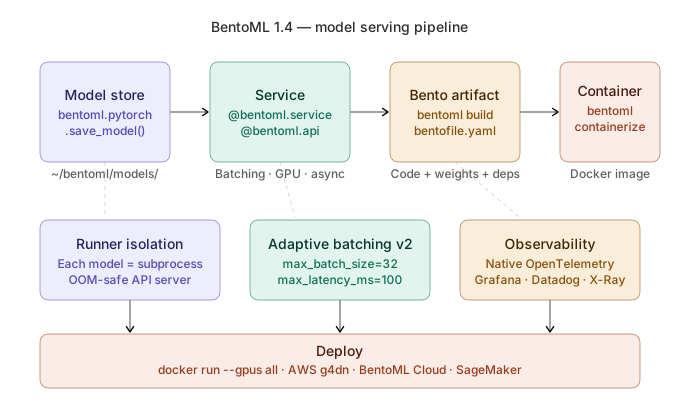 BentoML 1.4 flow: save model → define Service → build Bento → containerize → deploy. Each stage is a single CLI command.
Solution
Step 1: Install BentoML 1.4 into a Clean Environment
Use uv for reproducible installs — it's 10–100× faster than pip on CI.
# uv resolves the full dependency graph before touching disk
uv venv .venv --python 3.12
source .venv/bin/activate
uv pip install "bentoml>=1.4.0" torch torchvision
Verify the install:
bentoml --version
# BentoML version: 1.4.x
If you see command not found: your .venv/bin is not on PATH. Run export PATH="$PWD/.venv/bin:$PATH".
Step 2: Save Your Model to the BentoML Model Store
BentoML tracks models in a local store at ~/bentoml/models/. Every saved model gets a versioned tag.
# save_model.py
import bentoml
import torch
from torchvision.models import resnet50, ResNet50_Weights

model = resnet50(weights=ResNet50_Weights.IMAGENET1K_V2)
model.eval()

# bentoml.pytorch.save_model handles serialization and metadata together
bento_model = bentoml.pytorch.save_model(
    "resnet50",
    model,
    signatures={"__call__": {"batchable": True, "batch_dim": 0}},
)

print(f"Saved: {bento_model.tag}")
# Saved: resnet50:a1b2c3d4e5f6
python save_model.py
bentoml models list
# Name       Version       Size    Creation Time
# resnet50   a1b2c3d4e5f6  98 MB   2026-03-12 ...
Expected output: model tag printed and visible in bentoml models list.
Step 3: Define the BentoML Service
The @bentoml.service decorator is the single source of truth for resources, batching config, and API shape.
# service.py
from __future__ import annotations

import bentoml
import torch
import numpy as np
from PIL import Image
from torchvision import transforms

IMAGENET_LABELS_URL = "https://raw.githubusercontent.com/anishathalye/imagenet-simple-labels/master/imagenet-simple-labels.json"

@bentoml.service(
    resources={"gpu": 1, "memory": "4Gi"},
    traffic={"timeout": 30},
)
class ImageClassifier:
    # bentoml.models.get() pins the exact version — no "latest" drift in prod
    bento_model = bentoml.models.get("resnet50:latest")

    def __init__(self) -> None:
        self.model = self.bento_model.load_model()
        self.model.eval()
        if torch.cuda.is_available():
            self.model = self.model.cuda()

        self.transform = transforms.Compose([
            transforms.Resize(256),
            transforms.CenterCrop(224),
            transforms.ToTensor(),
            transforms.Normalize(
                mean=[0.485, 0.456, 0.406],
                std=[0.229, 0.224, 0.225],
            ),
        ])

        import json, urllib.request
        with urllib.request.urlopen(IMAGENET_LABELS_URL) as r:
            self.labels = json.loads(r.read())

    @bentoml.api(batchable=True, max_batch_size=32, max_latency_ms=100)
    async def classify(self, images: list[Image.Image]) -> list[str]:
        # batch_dim=0 means BentoML stacks images along axis 0 before passing here
        tensors = torch.stack([self.transform(img) for img in images])
        if torch.cuda.is_available():
            tensors = tensors.cuda()

        with torch.no_grad():
            logits = self.model(tensors)

        indices = logits.argmax(dim=1).cpu().tolist()
        return [self.labels[i] for i in indices]
Key decisions:
resources={"gpu": 1}tells BentoML to schedule this runner only on GPU nodes — prevents silent CPU fallback in prodmax_batch_size=32caps GPU memory per batch;max_latency_ms=100forces flush even if the batch isn't full — keeps p99 latency boundedasync deflets the event loop handle I/O (image decoding, label fetch) without blocking the runner process
Step 4: Serve Locally and Test
# --development reloads on file save — never use in prod
bentoml serve service:ImageClassifier --development
In a second terminal:
curl -X POST http://localhost:3000/classify \
  -H "Content-Type: multipart/form-data" \
  -F "images=@./test_dog.jpg"
# ["golden retriever"]
You should see: the ImageNet label for your test image returned in under 200 ms on first warm request.
If it fails:
RuntimeError: CUDA out of memory→ reducemax_batch_sizeto 8 or 16404 Not Found→ check the route is/classify, matching the method name exactly
Step 5: Build and Containerize the Bento
A Bento bundles your service code, model weights, and Python dependencies into one artifact.
# bentofile.yaml tells bentoml build what to include
cat > bentofile.yaml << 'EOF'
service: "service:ImageClassifier"
include:
  - "service.py"
python:
  packages:
    - torch==2.3.0
    - torchvision==0.18.0
    - pillow>=10.0
docker:
  python_version: "3.12"
  cuda_version: "12.1"
  system_packages:
    - libglib2.0-0   # required by Pillow on Ubuntu
EOF

bentoml build
# Successfully built Bento: imageclassifier:xyz123
Then produce the Docker image — no Dockerfile needed:
# bentoml containerize writes a multi-stage Dockerfile internally
bentoml containerize imageclassifier:latest \
  --image-tag myrepo/imageclassifier:1.4.0

docker push myrepo/imageclassifier:1.4.0
Expected output: image pushed and visible in your registry. Typical image size is 4–6 GB for a PyTorch + CUDA 12 stack.
Step 6: Run in Production (Docker)
docker run --gpus all \
  -p 3000:3000 \
  -e BENTOML_NUM_RUNNERS=2 \  # two runner processes share the GPU
  myrepo/imageclassifier:1.4.0
For AWS deployments, use g4dn.xlarge (NVIDIA T4, ~$0.526/hr on-demand us-east-1) as your baseline GPU instance. BentoML's runner isolation means you can saturate the T4 without a single OOM bringing down the HTTP server.
Verification
# Run a quick load test — 50 concurrent requests
pip install httpx --break-system-packages
python - <<'EOF'
import asyncio, httpx, time

async def classify(client, path):
    with open(path, "rb") as f:
        r = await client.post(
            "http://localhost:3000/classify",
            files={"images": f},
        )
    return r.json()

async def main():
    async with httpx.AsyncClient(timeout=30) as client:
        start = time.perf_counter()
        results = await asyncio.gather(*[classify(client, "test_dog.jpg") for _ in range(50)])
        elapsed = time.perf_counter() - start
    print(f"50 requests in {elapsed:.2f}s → {50/elapsed:.1f} req/s")
    print("Sample:", results[0])

asyncio.run(main())
EOF
You should see: 40–120 req/s on a T4, depending on image size. Batching kicks in visibly — throughput jumps when multiple requests land within the max_latency_ms window.
BentoML vs TorchServe vs Triton Inference Server
| BentoML 1.4 | TorchServe 0.10 | Triton Inference Server 24.x | |
|---|---|---|---|
| Framework support | Any (PyTorch, SKLearn, XGBoost, HF…) | PyTorch only | TensorRT, ONNX, PyTorch, TF |
| Setup complexity | Low — Python decorator | Medium — .mar archive | High — model repository + config.pbtxt |
| Adaptive batching | ✅ Built-in v2 | ✅ Basic | ✅ Dynamic |
| Multi-model serving | ✅ Compose Services | ❌ | ✅ |
| Docker build | bentoml containerize | Manual | Manual |
| Observability | OpenTelemetry native | Metrics via JMX | Prometheus metrics |
| Best for | Teams shipping fast, multi-framework | Pure PyTorch, existing TorchServe infra | Maximum throughput, TensorRT optimization |
Choose BentoML if: you need to move from model to API in a day, or your team uses more than one ML framework. Choose Triton if: you've already converted your models to TensorRT and need the last 20% of GPU throughput.
What You Learned
@bentoml.serviceis the single config point for resources, batching, and API shape — no separate YAML, no Dockerfilebentoml build+bentoml containerizeproduce a reproducible image from the same spec every time- Runner isolation in 1.4 means GPU OOM in one model path won't crash your entire API
- Adaptive batching v2 with
max_latency_mskeeps GPU utilization high without blowing p99 latency
Tested on BentoML 1.4.0, Python 3.12, PyTorch 2.3.0, CUDA 12.1, Ubuntu 22.04 and macOS Sonoma (CPU)
FAQ
Q: Does BentoML work without a GPU?
A: Yes. Remove "gpu": 1 from resources and BentoML falls back to CPU. Throughput drops significantly for large models, but the API contract is identical.
Q: Can I serve multiple models in one BentoML service?
A: Yes — define multiple @bentoml.api methods on the same Service class, each calling a different bento_model. Each model gets its own runner subprocess.
Q: What's the minimum RAM to run BentoML in production? A: 2 GB for the API server process. Add your model's in-memory size on top — ResNet-50 needs ~400 MB, LLaMA 3 8B in fp16 needs ~16 GB.
Q: Can BentoML deploy to AWS SageMaker or GCP Vertex AI? A: BentoML Cloud supports one-command deploy to managed infrastructure. For SageMaker, containerize your Bento and push the image to ECR — SageMaker treats it as a custom container with no additional changes needed.
Q: How does BentoML handle model versioning across environments?
A: Each saved model has a content-addressed tag (e.g. resnet50:a1b2c3d4e5f6). Pin this tag in bentofile.yaml to guarantee dev and prod use the exact same weights.