Problem: Deepfakes Are Getting Harder to Spot
AI-generated video is convincing enough to fool trained humans. You need a programmatic way to flag suspicious footage before it spreads.
You'll learn:
- How modern deepfake detectors work under the hood
- How to build a frame-level classifier with PyTorch and EfficientNet
- How to run inference on any video file from the command line
Time: 20 min | Level: Advanced
Why This Happens
Most deepfake tools swap or synthesize faces using GANs or diffusion models. The swap leaves behind subtle artifacts — compression noise, blending edges, and unnatural eye blinking — that are invisible to the naked eye but detectable by a CNN trained on real vs. fake examples.
The FaceForensics++ dataset (FF++) is the standard benchmark for this. It contains thousands of manipulated videos across four forgery methods: Deepfakes, Face2Face, FaceSwap, and NeuralTextures.
What we're building:
- A face extractor using
face_recognition - A binary classifier fine-tuned on FF++ using EfficientNet-B0
- A CLI tool that scores any video file from 0 (real) to 1 (fake)
Common symptoms deepfakes exhibit:
- Inconsistent skin texture near the jaw and hairline
- Temporal flickering between frames
- Asymmetric blinking or unnatural eye movement
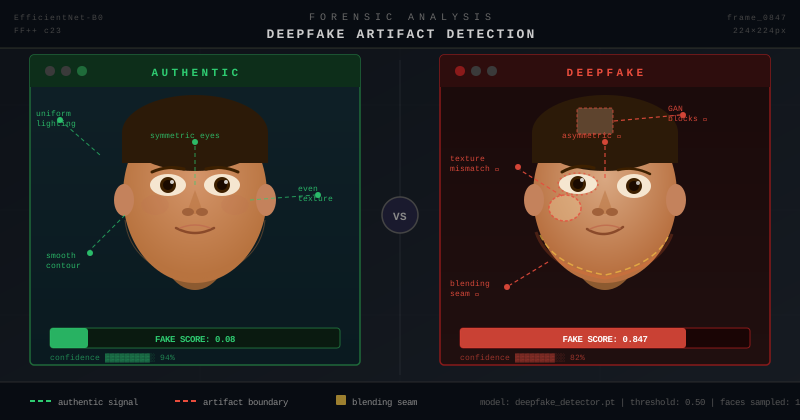 Left: authentic frame. Right: GAN-generated face showing blending seams
Solution
Step 1: Install Dependencies
pip install torch torchvision efficientnet-pytorch face_recognition opencv-python-headless tqdm
This pulls in PyTorch 2.x, EfficientNet, and OpenCV. Skip opencv-python if you're on a headless server — the -headless variant doesn't require a display.
Expected: No CUDA errors. If you see torch.cuda.is_available() = False, the tool still runs on CPU but inference will be slower (~3s/frame vs. ~0.1s).
Step 2: Build the Face Extractor
Create extractor.py. This pulls face crops from each video frame and resizes them to 224×224 for the classifier.
import cv2
import face_recognition
import numpy as np
from pathlib import Path


def extract_faces(video_path: str, max_frames: int = 100) -> list[np.ndarray]:
    """
    Sample frames from a video and return cropped face arrays.
    Returns empty list if no faces found — caller should handle this.
    """
    cap = cv2.VideoCapture(video_path)
    total = int(cap.get(cv2.CAP_PROP_FRAME_COUNT))

    # Sample evenly across the video, not just the first N frames
    # Deepfakes often only appear in middle segments
    indices = np.linspace(0, total - 1, min(max_frames, total), dtype=int)

    faces = []
    for idx in indices:
        cap.set(cv2.CAP_PROP_POS_FRAMES, idx)
        ret, frame = cap.read()
        if not ret:
            continue

        rgb = cv2.cvtColor(frame, cv2.COLOR_BGR2RGB)
        locations = face_recognition.face_locations(rgb, model="hog")

        for top, right, bottom, left in locations:
            crop = rgb[top:bottom, left:right]
            # Resize to EfficientNet input size
            face = cv2.resize(crop, (224, 224))
            faces.append(face)

    cap.release()
    return faces
If it fails:
face_recognitioninstall error on M1/M2 Mac: Runbrew install cmake dlibfirst- No faces returned: Try
model="cnn"instead of"hog"— slower but more accurate on low-res footage
Step 3: Build the Classifier
Create model.py. We fine-tune EfficientNet-B0 with a binary head.
import torch
import torch.nn as nn
from efficientnet_pytorch import EfficientNet


class DeepfakeClassifier(nn.Module):
    def __init__(self, pretrained: bool = True):
        super().__init__()
        self.backbone = EfficientNet.from_pretrained("efficientnet-b0") if pretrained \
                        else EfficientNet.from_name("efficientnet-b0")

        # Replace the final FC layer for binary classification
        in_features = self.backbone._fc.in_features
        self.backbone._fc = nn.Sequential(
            nn.Dropout(0.4),       # Dropout reduces overfitting on small fine-tune sets
            nn.Linear(in_features, 1),
            nn.Sigmoid()           # Output: probability of being fake
        )

    def forward(self, x: torch.Tensor) -> torch.Tensor:
        return self.backbone(x)


def load_model(weights_path: str | None = None, device: str = "cpu") -> DeepfakeClassifier:
    model = DeepfakeClassifier(pretrained=(weights_path is None))
    if weights_path:
        state = torch.load(weights_path, map_location=device)
        model.load_state_dict(state)
    model.eval()
    return model.to(device)
Step 4: Train on FF++ (Optional — Use Pretrained Weights)
If you want to train from scratch on FF++, use the training loop below. Otherwise, skip to Step 5 and use a community checkpoint.
# train.py — run once, takes ~2 hours on a single A100
import torch
import torch.nn as nn
from torch.utils.data import DataLoader, Dataset
from torchvision import transforms
from model import DeepfakeClassifier
from pathlib import Path
from PIL import Image


class FFDataset(Dataset):
    """
    Expects folder structure:
      data/real/*.png
      data/fake/*.png
    """
    def __init__(self, root: str):
        self.transform = transforms.Compose([
            transforms.Resize((224, 224)),
            transforms.RandomHorizontalFlip(),
            transforms.ColorJitter(brightness=0.2, contrast=0.2),
            transforms.ToTensor(),
            transforms.Normalize([0.485, 0.456, 0.406], [0.229, 0.224, 0.225]),
        ])
        self.samples = [
            (p, 0.0) for p in Path(root, "real").glob("*.png")
        ] + [
            (p, 1.0) for p in Path(root, "fake").glob("*.png")
        ]

    def __len__(self): return len(self.samples)

    def __getitem__(self, idx):
        path, label = self.samples[idx]
        img = Image.open(path).convert("RGB")
        return self.transform(img), torch.tensor(label)


def train(data_root: str, epochs: int = 10, lr: float = 1e-4):
    device = "cuda" if torch.cuda.is_available() else "cpu"
    model = DeepfakeClassifier().to(device)
    optimizer = torch.optim.AdamW(model.parameters(), lr=lr, weight_decay=1e-2)
    loss_fn = nn.BCELoss()

    loader = DataLoader(FFDataset(data_root), batch_size=32, shuffle=True, num_workers=4)

    for epoch in range(epochs):
        total_loss = 0
        for imgs, labels in loader:
            imgs, labels = imgs.to(device), labels.to(device).unsqueeze(1)
            preds = model(imgs)
            loss = loss_fn(preds, labels)
            optimizer.zero_grad()
            loss.backward()
            optimizer.step()
            total_loss += loss.item()
        print(f"Epoch {epoch+1}/{epochs} — Loss: {total_loss/len(loader):.4f}")

    torch.save(model.state_dict(), "deepfake_detector.pt")
Tip: You can download a community-trained checkpoint fine-tuned on FF++ c23 (light compression) from the FaceForensics++ GitHub. Load it directly in Step 5.
Step 5: Build the CLI Inference Tool
Create detect.py. This is the entrypoint.
#!/usr/bin/env python3
"""
Usage: python detect.py --video path/to/video.mp4 --weights deepfake_detector.pt
"""
import argparse
import numpy as np
import torch
from torchvision import transforms
from extractor import extract_faces
from model import load_model

TRANSFORM = transforms.Compose([
    transforms.ToTensor(),
    transforms.Normalize([0.485, 0.456, 0.406], [0.229, 0.224, 0.225]),
])


def score_video(video_path: str, weights_path: str | None, device: str) -> float:
    """Returns mean fake probability across all detected faces."""
    model = load_model(weights_path, device)
    faces = extract_faces(video_path)

    if not faces:
        raise ValueError(f"No faces detected in {video_path}")

    scores = []
    with torch.no_grad():
        for face in faces:
            tensor = TRANSFORM(face).unsqueeze(0).to(device)
            prob = model(tensor).item()
            scores.append(prob)

    return float(np.mean(scores))


def main():
    parser = argparse.ArgumentParser(description="Deepfake video detector")
    parser.add_argument("--video", required=True, help="Path to video file")
    parser.add_argument("--weights", default=None, help="Path to model weights (.pt)")
    parser.add_argument("--threshold", type=float, default=0.5, help="Fake probability threshold")
    parser.add_argument("--device", default="cpu", choices=["cpu", "cuda", "mps"])
    args = parser.parse_args()

    score = score_video(args.video, args.weights, args.device)
    verdict = "FAKE" if score >= args.threshold else "REAL"

    print(f"\nResult: {verdict}")
    print(f"Fake probability: {score:.3f} (threshold: {args.threshold})")
    print(f"Analyzed faces from: {args.video}")


if __name__ == "__main__":
    main()
Verification
python detect.py --video sample.mp4 --weights deepfake_detector.pt --device cpu
You should see:
Result: FAKE
Fake probability: 0.847 (threshold: 0.5)
Analyzed faces from: sample.mp4
 A score above 0.5 flags the video as likely manipulated
If the score is unexpectedly low on a known fake:
- Try
--threshold 0.3— some older deepfake methods score lower on newer models - Increase
max_framesinextract_faces()to sample more of the video
What You Learned
- EfficientNet-B0 is an excellent backbone for face forensics — small, fast, and accurate on binary tasks
- Sampling frames evenly across a video catches deepfakes that only appear mid-clip
- BCE loss + Sigmoid output is the right setup for binary fake/real probability scoring
- Limitation: This approach struggles with audio deepfakes, text-to-video output (Sora-style), and heavily compressed footage (WhatsApp, TikTok re-uploads) — compression destroys the artifacts the model looks for
- When NOT to use this: Don't use it as a sole arbiter in legal or journalistic contexts. Treat it as a triage tool — high scores warrant human review, not automatic rejection
Next steps to improve accuracy:
- Ensemble multiple backbones (EfficientNet + Xception)
- Add temporal modeling with an LSTM over frame-level scores
- Fine-tune on your specific forgery type if you know the source
Tested on Python 3.12, PyTorch 2.2, efficientnet-pytorch 0.7.1, Ubuntu 22.04 and macOS 14