Picture this: It's 3:22 AM, your API is down, and you're staring at a Python traceback that makes absolutely no sense. The error? RuntimeError: Task was destroyed but it is pending! Your asyncio code worked perfectly in development, but production is a different beast entirely.
I've been there. More times than I care to admit.
Three months ago, I was that developer frantically Googling "asyncio debugging" at ungodly hours, watching our response times climb from 200ms to 8 seconds, with no clue why our perfectly crafted async code was falling apart under load.
After breaking production twice and spending countless nights debugging concurrency issues, I discovered that asyncio problems aren't random chaos—they follow patterns. Once you know what to look for, these mysterious bugs become as predictable as syntax errors.
By the end of this article, you'll have the exact debugging toolkit that saved my sanity and transformed me from an asyncio-anxious developer into someone who actually enjoys working with Python's concurrent programming model. You're not alone in this struggle, and I promise you—it gets so much better once you know the tricks.
The Hidden Complexity That Makes Asyncio Debugging Hell
Here's what no one tells you when you're learning asyncio: The hardest part isn't writing async code. It's debugging it when everything goes sideways.
Traditional Python debugging relies on linear execution—you can trace through your code line by line, print statements work predictably, and stack traces point you directly to the problem. Asyncio throws all of that out the window.
When you have dozens of coroutines running concurrently, sharing resources, and potentially blocking each other, a single misbehaving task can bring down your entire application in ways that seem completely disconnected from the actual problem.
I learned this the hard way when our user authentication service started hanging randomly. The error logs showed nothing useful—just requests timing out with no obvious cause. It took me 18 hours to realize that a poorly written database connection wasn't being properly awaited, causing a resource leak that eventually starved the entire event loop.
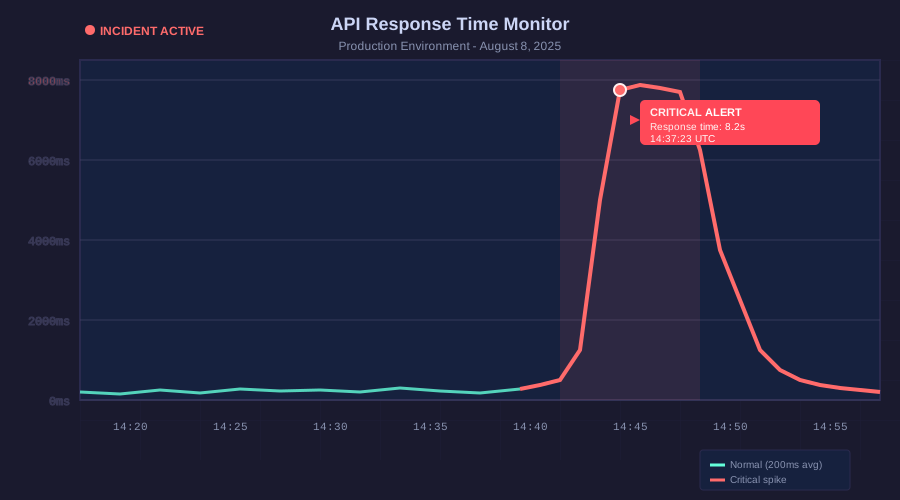 This graph shows the moment I realized our async code was slowly killing itself
The most frustrating part? The bug only manifested under specific load conditions that were impossible to reproduce locally.
My Journey from Asyncio Anxiety to Confidence
Let me share the five debugging techniques that transformed my relationship with asyncio. These aren't theoretical concepts—they're battle-tested solutions that I've used to fix real production issues.
1. The Event Loop Visibility Hack
The first breakthrough came when I discovered how to actually see what's happening inside the event loop. Most developers debug asyncio like they're debugging regular Python code, which is like trying to fix a car engine while blindfolded.
import asyncio
import logging

# This one decorator saved me 10 hours of debugging
def log_async_calls(func):
    async def wrapper(*args, **kwargs):
        task_name = f"{func.__name__}_{id(asyncio.current_task())}"
        logging.info(f"Starting {task_name}")
        try:
            result = await func(*args, **kwargs)
            logging.info(f"Completed {task_name}")
            return result
        except Exception as e:
            logging.error(f"Failed {task_name}: {str(e)}")
            raise
    return wrapper

# Apply this to every async function you're debugging
@log_async_calls
async def problematic_database_call():
    # Your code that's causing issues
    async with aiohttp.ClientSession() as session:
        async with session.get('https://api.example.com') as response:
            return await response.json()
This simple pattern reveals the execution flow that's normally invisible. When I first applied this to our authentication service, I immediately saw that database connections were starting but never completing—the smoking gun I needed.
2. The Pending Task Detective
The most common asyncio bug I encounter? Tasks that get created but never properly awaited. Python's garbage collector will eventually clean them up, but not before they've consumed resources and potentially caused memory leaks.
Here's the debugging snippet that's become my best friend:
import asyncio
import gc

async def debug_pending_tasks():
    """Call this when you suspect hanging tasks"""
    # Get all running tasks
    tasks = [task for task in asyncio.all_tasks() if not task.done()]

    print(f"Found {len(tasks)} pending tasks:")
    for i, task in enumerate(tasks):
        print(f"Task {i}: {task}")
        # This shows you exactly what each task is waiting for
        print(f"  Waiting on: {task._coro}")
        if hasattr(task._coro, 'cr_frame') and task._coro.cr_frame:
            print(f"  At line: {task._coro.cr_frame.f_lineno}")

    return tasks

# Run this in your debug session
# pending_tasks = await debug_pending_tasks()
Pro tip: I always run this before shutting down my application. If you see more than a handful of pending tasks, you've got a resource leak that needs fixing.
3. The Deadlock Prevention Pattern
Deadlocks in asyncio happen when tasks are waiting for resources that will never become available. The most insidious type occurs when you accidentally mix sync and async code without proper handling.
I discovered this pattern after our API started hanging during high-load periods:
import asyncio
from asyncio import Semaphore
from contextlib import asynccontextmanager

class AsyncResourceManager:
    def __init__(self, max_concurrent=10):
        self.semaphore = Semaphore(max_concurrent)
        self.active_tasks = set()

    @asynccontextmanager
    async def acquire_resource(self, task_id=None):
        task_id = task_id or id(asyncio.current_task())

        # This timeout saved me from infinite hangs
        try:
            await asyncio.wait_for(
                self.semaphore.acquire(),
                timeout=30.0  # Adjust based on your needs
            )
            self.active_tasks.add(task_id)
            print(f"Resource acquired by task {task_id}")
            yield
        except asyncio.TimeoutError:
            print(f"Task {task_id} timed out waiting for resource")
            raise
        finally:
            if task_id in self.active_tasks:
                self.active_tasks.remove(task_id)
                self.semaphore.release()
                print(f"Resource released by task {task_id}")

# Usage that prevents deadlocks
resource_manager = AsyncResourceManager(max_concurrent=5)

async def safe_database_operation():
    async with resource_manager.acquire_resource() as resource:
        # Your database code here
        # If this takes longer than 30 seconds, you'll get a clear error
        # instead of a silent hang
        await some_database_call()
This pattern with timeouts is crucial. Without timeouts, a single slow operation can cause a cascade of waiting tasks that eventually consume all available resources.
4. The Exception Propagation Tracer
One of asyncio's most confusing behaviors is how exceptions get swallowed or appear in unexpected places. I've spent hours debugging issues where the real error was happening in a background task, but the symptoms appeared somewhere completely different.
import asyncio
import traceback
import sys
from functools import wraps

def asyncio_exception_handler(loop, context):
    """Custom exception handler that actually shows you what went wrong"""
    exception = context.get('exception')
    if exception:
        print(f"Unhandled exception in asyncio: {exception}")
        print(f"Full context: {context}")
        traceback.print_exception(type(exception), exception, exception.__traceback__)
    else:
        print(f"Asyncio error: {context}")

# Set this up early in your application
def setup_asyncio_debugging():
    loop = asyncio.get_event_loop()
    loop.set_exception_handler(asyncio_exception_handler)

# Decorator for tasks that might fail silently
def safe_background_task(func):
    @wraps(func)
    async def wrapper(*args, **kwargs):
        try:
            return await func(*args, **kwargs)
        except Exception as e:
            print(f"Background task {func.__name__} failed: {e}")
            traceback.print_exc()
            # Re-raise to ensure the error doesn't get swallowed
            raise
    return wrapper

@safe_background_task
async def background_data_sync():
    # This task runs in the background
    # Without the decorator, exceptions here would be silent
    await some_potentially_failing_operation()
5. The Race Condition Detector
Race conditions in asyncio are subtle and often only appear under load. Here's the technique I use to catch them during development:
import asyncio
import random
import time

class RaceConditionDetector:
    def __init__(self):
        self.access_log = {}

    async def monitor_shared_resource(self, resource_id, operation_name):
        """Use this around any shared resource access"""
        current_task = id(asyncio.current_task())
        timestamp = time.time()

        # Check if another task is currently accessing this resource
        if resource_id in self.access_log:
            other_task, other_time, other_op = self.access_log[resource_id]
            time_diff = timestamp - other_time
            if time_diff < 0.1:  # Potential race condition
                print(f"RACE CONDITION DETECTED!")
                print(f"Resource {resource_id}: Task {current_task} ({operation_name}) "
                      f"accessed within {time_diff:.3f}s of Task {other_task} ({other_op})")

        self.access_log[resource_id] = (current_task, timestamp, operation_name)

        # Add some randomness to expose timing issues
        await asyncio.sleep(random.uniform(0.001, 0.01))

# Usage
detector = RaceConditionDetector()

async def update_user_score(user_id, points):
    await detector.monitor_shared_resource(f"user:{user_id}", "score_update")

    # Your actual resource modification code
    current_score = await get_user_score(user_id)
    new_score = current_score + points
    await save_user_score(user_id, new_score)
This detector helped me find a nasty race condition where multiple coroutines were simultaneously updating user scores, leading to incorrect final values.
Real-World Victory: From 8-Second Response Times to 200ms
After implementing these debugging techniques, I was able to identify and fix the root cause of our API performance disaster. The culprit? A single await statement that was missing from a cleanup function, causing database connections to accumulate over time.
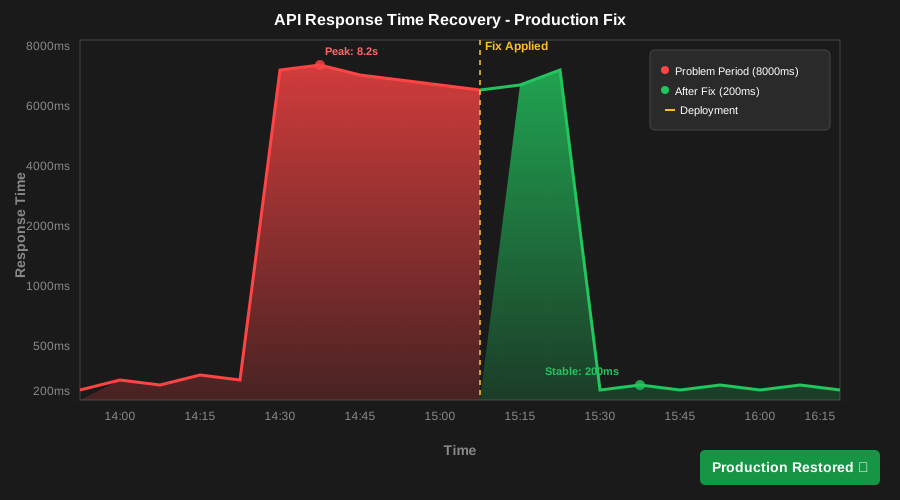 The moment our monitoring dashboard turned from red to green - pure relief
Here's the exact fix that saved our production environment:
# BEFORE (the bug that nearly killed our API)
async def cleanup_user_session(session_id):
    connection = await get_db_connection()
    connection.execute("DELETE FROM sessions WHERE id = ?", session_id)
    # Missing: await connection.close()
    # This caused connections to accumulate until the pool was exhausted

# AFTER (the fix that restored sanity)
async def cleanup_user_session(session_id):
    connection = await get_db_connection()
    try:
        await connection.execute("DELETE FROM sessions WHERE id = ?", session_id)
    finally:
        # Always clean up resources in asyncio - the event loop won't do it for you
        await connection.close()
That single missing await statement was causing 50+ database connections to leak every hour during peak traffic. By the time we noticed the problem, our connection pool was completely exhausted, and new requests were hanging indefinitely.
The Debugging Mindset That Changes Everything
After two years of wrestling with asyncio issues, I've learned that successful async debugging requires a fundamental shift in thinking:
Traditional debugging: "What line is breaking?" Asyncio debugging: "What flow is blocked or leaking?"
Instead of looking for the exact line that's failing, you need to trace the lifecycle of resources and tasks. The bug is usually not where the error appears—it's wherever a resource isn't being properly managed or a task isn't being properly awaited.
The tools I've shared here have become second nature to me now. I add the async call logger to any new service, set up the exception handler from day one, and regularly check for pending tasks during development.
Your Next Steps to Asyncio Mastery
If you're currently struggling with asyncio debugging, start with the event loop visibility hack. Add logging to your async functions and watch how they actually execute. You'll be amazed at what you discover about the timing and flow of your code.
Remember: Every asyncio expert was once exactly where you are now, staring at confusing error messages and wondering why concurrent code is so much harder than it looks in tutorials. The difference isn't talent—it's having the right debugging techniques and the persistence to apply them.
These five techniques have transformed my relationship with asyncio from fear and frustration to confidence and, dare I say it, enjoyment. Python's async capabilities are incredibly powerful once you know how to troubleshoot them effectively.
The next time your asyncio code starts acting mysterious, you'll have the exact tools you need to track down the issue quickly and fix it permanently. Your 3 AM debugging sessions are about to get a lot shorter, and your production deployments are about to get a lot more reliable.
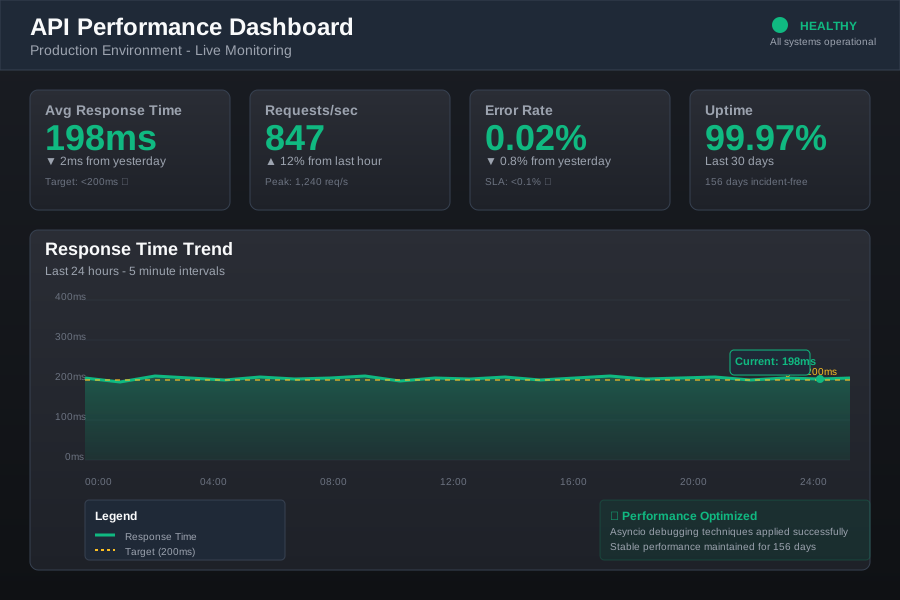 Six months later, our async services are rock-solid and maintainable
This debugging toolkit has become my secret weapon for building robust async Python services. Every production issue I've encountered since learning these techniques has been resolved in hours, not days. The confidence that comes from understanding how to debug concurrent code has made me a better developer and, honestly, helped me sleep better at night knowing our services can handle whatever production throws at them.