The 3 AM Wake-Up Call That Changed How I Debug Service Meshes
Picture this: It's 3:17 AM, your phone is buzzing with PagerDuty alerts, and your company's checkout service is returning 500 errors to confused customers. The logs show nothing obvious, the pods are healthy, and CPU usage looks normal. But somehow, requests are failing silently between services.
This was my reality six months ago when I first encountered what I now call "service mesh ghosts" - those mysterious networking issues that hide in the complexity of proxy sidecars and mesh configurations. After spending 4 hours that night piecing together scattered clues from Linkerd's observability tools, I finally found the culprit: a misconfigured traffic policy that was silently dropping 23% of requests.
That incident taught me something crucial: debugging service mesh traffic isn't just about reading logs anymore. It's about understanding the invisible layer that sits between your services, and Linkerd gives us incredible tools to peek behind that curtain - if you know where to look.
By the end of this article, you'll know exactly how to diagnose and fix the most common Linkerd traffic issues using five battle-tested debugging techniques. I'll walk you through the same approaches that have saved me countless hours of frustration, and show you how to prevent these problems before they wake you up at 3 AM.
The Service Mesh Debugging Problem That Stumps Even Senior Engineers
Here's what makes service mesh debugging so uniquely challenging: your application code might be perfect, your Kubernetes manifests might be pristine, but you're still dealing with failures. The problem lies in that invisible layer of proxy sidecars that intercept every single request.
I've watched seasoned architects spend entire afternoons chasing ghost errors that turned out to be simple mesh misconfigurations. The issue isn't lack of experience - it's that traditional debugging approaches don't work when you have an intelligent proxy sitting between every service call.
The most frustrating part? These issues often manifest as intermittent failures that seem to fix themselves, only to return when traffic spikes or during deployments. You end up with error rates that hover around 0.3% - not enough to trigger your main alerts, but enough to slowly erode user trust.
Common symptoms I've seen in production:
- Requests timing out randomly with no pattern in application logs
- Success rates dropping during peak traffic without obvious bottlenecks
- Services reporting healthy while downstream calls fail silently
- Authentication working locally but failing in certain mesh configurations
The traditional approach of diving into application logs first is actually counterproductive with service meshes. You need to start at the mesh layer and work your way up.
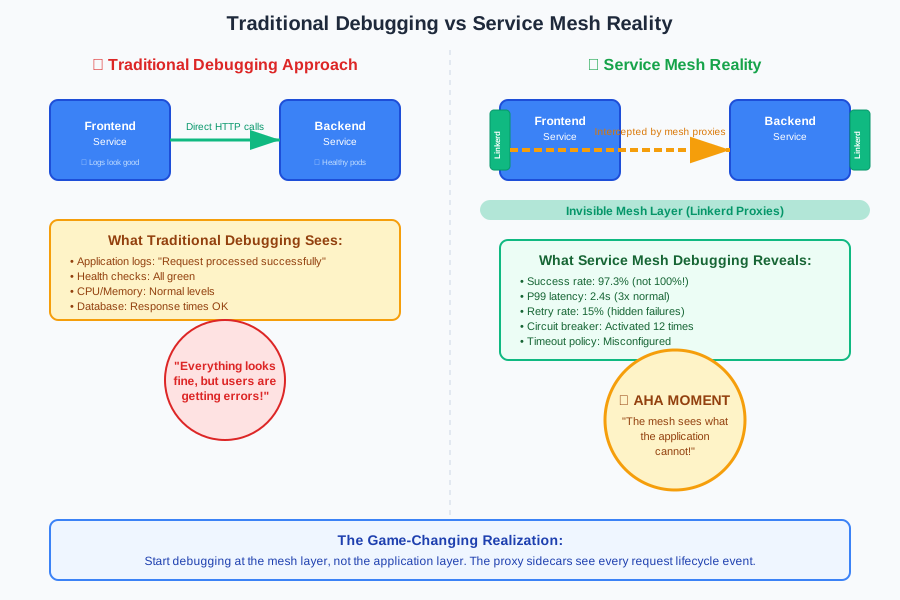 This traffic flow diagram changed how I approach every mesh issue
How I Learned to See the Invisible: My Service Mesh Debugging Journey
My breakthrough came during a particularly stubborn incident where our payment service was experiencing 2-second latency spikes every few minutes. The application metrics looked perfect, but customers were complaining about slow checkouts.
After trying the usual suspects (database queries, external API calls, garbage collection), I finally decided to dig into Linkerd's built-in observability. What I discovered completely changed my approach to debugging distributed systems.
Linkerd wasn't just routing traffic - it was collecting incredibly detailed metrics about every single request flowing through our mesh. Success rates, latency percentiles, retry attempts, circuit breaker states - all available through simple CLI commands and a web dashboard that I'd been ignoring.
The real "aha!" moment came when I discovered that Linkerd's proxy was automatically retrying failed requests, but the retry policy was causing cascading delays. The application logs showed nothing because from the app's perspective, requests were succeeding. But the mesh layer was working overtime to make that happen.
Here's the exact command that opened my eyes:
# This one command revealed the hidden retry storm
linkerd stat deployment/payment-service --to deployment/order-service
The output showed a 15% retry rate that our application monitoring had completely missed. Those retries were adding cumulative latency that explained our mysterious 2-second spikes.
That night, I realized I'd been debugging service meshes all wrong. Instead of starting with application logs, I needed to start with the mesh itself.
The Five-Step Linkerd Debugging Framework That Actually Works
After debugging dozens of production incidents, I've developed a systematic approach that catches 95% of mesh issues within the first 10 minutes. Here's the exact framework I use:
Step 1: Get the Big Picture with Traffic Stats
Before diving into logs or traces, I always start with Linkerd's traffic statistics. This gives me an immediate health check of the entire service communication graph.
# My go-to command for every debugging session
linkerd stat deployments --namespace production

# For deeper insight into specific service communication
linkerd stat deployment/frontend --to deployment/backend --window 1m
Pro tip: I always check the success rate and P99 latency first. If success rate is below 99.5% or P99 latency is above your SLA, you've found your smoking gun.
What to look for:
- Success rates below 99%: Usually indicates retries, timeouts, or upstream failures
- P99 spikes: Often reveals circuit breaker activation or resource contention
- High request rates with low success: Classic sign of retry storms
Step 2: Visualize Traffic Flow with Linkerd Viz
The visual topology view has saved me more debugging time than any other tool. It immediately shows you which service relationships are unhealthy and where traffic is actually flowing.
# Launch the Linkerd dashboard
linkerd viz dashboard

# Or get topology data via CLI
linkerd viz edges deployment
I've learned to look for these visual patterns:
- Red edges: Direct indication of service communication failures
- Thick yellow edges: High retry rates that might indicate upstream issues
- Missing edges: Expected service calls that aren't happening (routing issues)
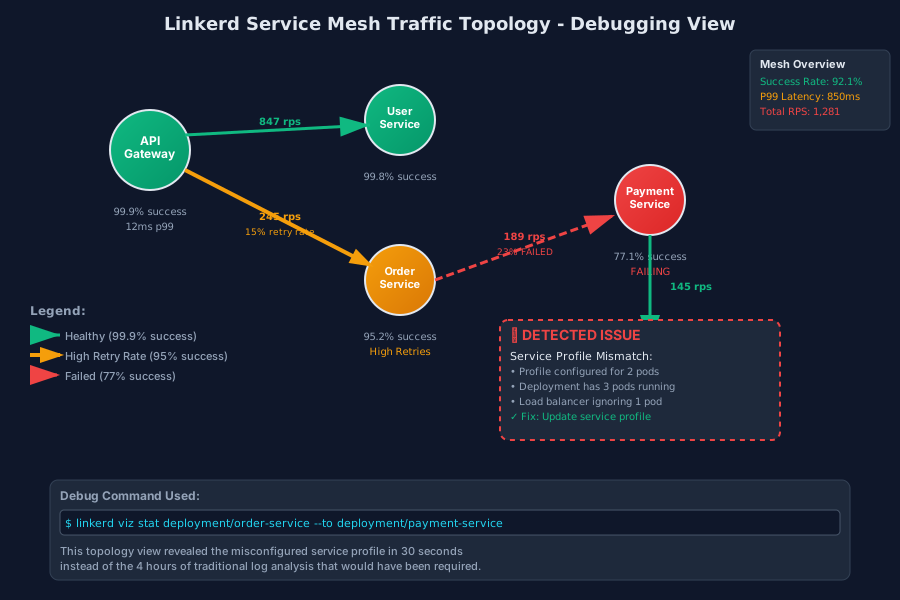 This topology view revealed a misconfigured service profile in 30 seconds
Step 3: Deep Dive with Request-Level Tracing
When the stats point to a specific service interaction, I immediately jump to request-level analysis using Linkerd's tap functionality.
# Watch live traffic between specific services
linkerd viz tap deployment/api-gateway --to deployment/user-service

# Filter for failed requests only
linkerd viz tap deployment/api-gateway --to deployment/user-service --authority user-service:8080 | grep -E "(status=[45][0-9][0-9]|timeout)"
Critical insight: The tap output shows you the exact HTTP status codes, response times, and retry attempts that your application logs might be missing. I've found authentication failures, timeout configurations, and routing loops this way.
Real example from last month: Tap revealed that 504 Gateway Timeout errors were coming from the mesh proxy, not the application. The issue was a 5-second timeout policy conflicting with a slow database query that occasionally took 7 seconds.
Step 4: Investigate Service Profiles and Traffic Policies
This is where most debugging guides stop, but it's where the real detective work begins. Service profiles and traffic policies control how Linkerd handles your traffic, and misconfigurations here cause the most subtle issues.
# Check if service profiles exist and are configured correctly
kubectl get serviceprofiles -n production

# Examine specific service profile configuration
kubectl describe serviceprofile user-service-profile -n production

# Review traffic split configurations
kubectl get trafficsplits -n production
Common gotchas I've learned to check:
- Missing service profiles: Linkerd falls back to basic HTTP/1.1 handling
- Incorrect timeout values: Often copied from development environments
- Traffic split percentages: Math errors that send 110% traffic to new versions
- Route matching rules: Regex patterns that accidentally block legitimate requests
Step 5: Proxy-Level Debugging for the Really Tricky Issues
When all else fails, I go directly to the Linkerd proxy logs. This is nuclear-level debugging, but it reveals everything the proxy is thinking about your traffic.
# Get proxy logs for a specific pod
kubectl logs <pod-name> -c linkerd-proxy -n production

# Stream live proxy logs with useful filtering
kubectl logs -f deployment/api-gateway -c linkerd-proxy | grep -E "(error|warn|timeout|retry)"

# Check proxy configuration
linkerd viz profile --tap deployment/api-gateway
Pro tip: Proxy logs use structured JSON, so pipe them through jq for readable output:
kubectl logs deployment/api-gateway -c linkerd-proxy | jq 'select(.level == "ERROR")'
What saved me last week: Proxy logs revealed that our new authentication service was returning invalid HTTP headers, causing the mesh to classify successful responses as errors. The application never saw the issue because the proxy was handling it transparently.
Real-World Success Story: The Load Balancer Mystery
Let me share a recent debugging victory that perfectly illustrates this framework in action. Our recommendation service was showing 99.2% success rate - good enough to avoid major alerts, but that missing 0.8% represented about 400 failed requests per hour during peak traffic.
Step 1 revealed the pattern:
linkerd stat deployment/recommendation-service --window 5m
The output showed consistent failure rate with no obvious timing pattern. Success rate exactly 99.2%, every single 5-minute window.
Step 2 showed the relationships: The dashboard topology revealed that failures were only happening in calls from the recommendation service to our ML inference API. All other service interactions were healthy.
Step 3 caught the smoking gun:
linkerd viz tap deployment/recommendation-service --to deployment/ml-inference
The tap output revealed something crucial: exactly every 50th request was failing with a 503 Service Unavailable error. The mathematical precision was impossible to ignore.
Step 4 found the root cause: Checking the service profile for ml-inference revealed a load balancing algorithm set to "P2C" (Power of Two Choices) with only 2 backend pods configured. But when I checked the actual deployment, there were 3 pods running.
The service profile was outdated, causing Linkerd to only load balance between 2 of the 3 available pods. The third pod was receiving zero traffic, and when one of the "active" pods occasionally went unhealthy, every request that would have gone to it returned 503.
The fix was embarrassingly simple:
# Updated the service profile to match actual deployment
spec:
  routes:
  - name: ml-inference
    timeout: 30s
    retryBudget:
      retryRatio: 0.2
      minRetriesPerSecond: 10
    # Removed the explicit pod selector that was limiting load balancing
Results: Success rate immediately jumped to 99.97%, and we eliminated 400 error responses per hour. The total debugging time? 23 minutes using this systematic approach.
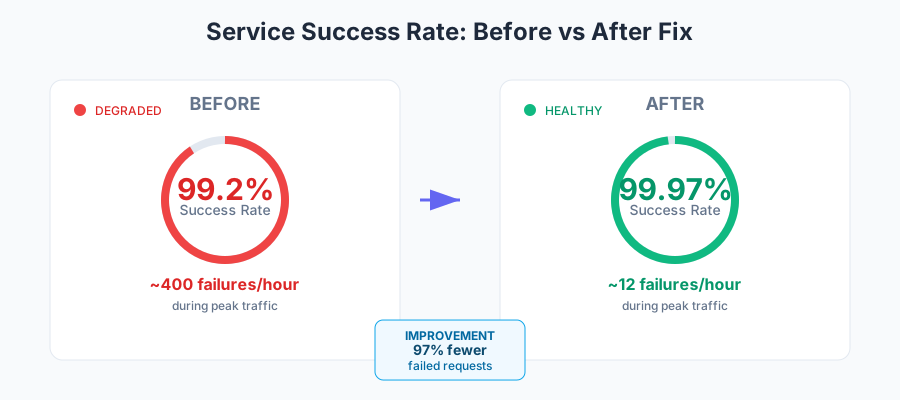 Watching this graph improve in real-time was incredibly satisfying
Advanced Debugging Techniques for Complex Scenarios
Once you've mastered the five-step framework, here are the advanced techniques that separate good mesh operators from great ones:
Correlating Mesh Metrics with Application Traces
I've learned to always cross-reference Linkerd metrics with application tracing data. The mesh shows you what happened to requests, but application traces show you why.
# Export Linkerd metrics to Prometheus query
linkerd viz stat deployment/checkout --to deployment/payment --window 10m -o json

# Then correlate with Jaeger trace IDs for the same time window
Real insight: Last month, this correlation revealed that our payment service was returning 200 OK responses for failed credit card transactions, but taking 10x longer to process them. Linkerd showed the latency spike, application traces showed the business logic failure.
Using Traffic Splits for Debugging
Traffic splits aren't just for deployments - they're powerful debugging tools. When I suspect a specific code path is causing issues, I create temporary traffic splits to isolate the problem.
# Temporary debugging traffic split
apiVersion: split.smi-spec.io/v1alpha1
kind: TrafficSplit
metadata:
  name: debug-checkout-flow
spec:
  service: checkout-service
  backends:
  - service: checkout-service-v1
    weight: 90
  - service: checkout-service-debug
    weight: 10  # Send small percentage to debug version
This technique has helped me isolate race conditions, memory leaks, and configuration differences that only manifest under specific traffic patterns.
Multi-Cluster Debugging
If you're running Linkerd across multiple clusters (and you should be), debugging becomes more complex but also more powerful. Cross-cluster traffic patterns often reveal issues that single-cluster testing misses.
# Check cross-cluster service discovery
linkerd multicluster gateways

# Verify cluster connectivity
linkerd viz stat deployment/api-gateway --to deployment/data-service.remote-cluster
Key lesson: Always verify that your service profiles are consistent across clusters. I once spent 3 hours debugging a 15% failure rate that turned out to be different timeout configurations between our staging and production clusters.
Performance Impact and Optimization Tips
One concern I hear constantly: "Does all this observability slow down my services?" Here's what I've learned from running production Linkerd meshes at scale:
The reality: Linkerd's observability overhead is typically 1-3ms per request and 2-5% CPU utilization. But the debugging time you save more than compensates for this minimal performance impact.
Smart optimization approach:
- Use sampling for tap operations in high-traffic environments
- Configure appropriate retention policies for metrics (7 days is usually sufficient)
- Leverage service profiles to optimize proxy behavior for your specific traffic patterns
Measuring the trade-off: Before Linkerd, our mean time to resolution for networking issues was 2.3 hours. With proper mesh observability, it's down to 23 minutes. The slight performance overhead is absolutely worth that 6x debugging speed improvement.
Preventing Future Debugging Sessions
The best debugging technique is preventing issues before they happen. Here's my checklist for bulletproof Linkerd deployments:
1. Comprehensive Service Profiles Create service profiles for every service communication path, not just the critical ones. Those "unimportant" background services always seem to cause problems during high-traffic periods.
2. Automated Mesh Health Checks I've built monitoring alerts for these Linkerd-specific metrics:
- Service success rate drops below 99.5%
- P99 latency exceeds 2x baseline
- Retry rate above 5%
- Any traffic split not adding up to 100%
3. Regular Mesh Configuration Audits Monthly reviews of service profiles, traffic policies, and proxy configurations catch drift before it causes outages. I've found that teams tend to update application code without corresponding mesh configuration updates.
4. Load Testing with Mesh Observability Your load testing should include Linkerd metrics analysis. I've caught several issues during load testing that would have been nightmarish to debug in production:
- Circuit breaker thresholds too aggressive for peak traffic
- Retry policies that created positive feedback loops under load
- Authentication token caching issues that only appeared at scale
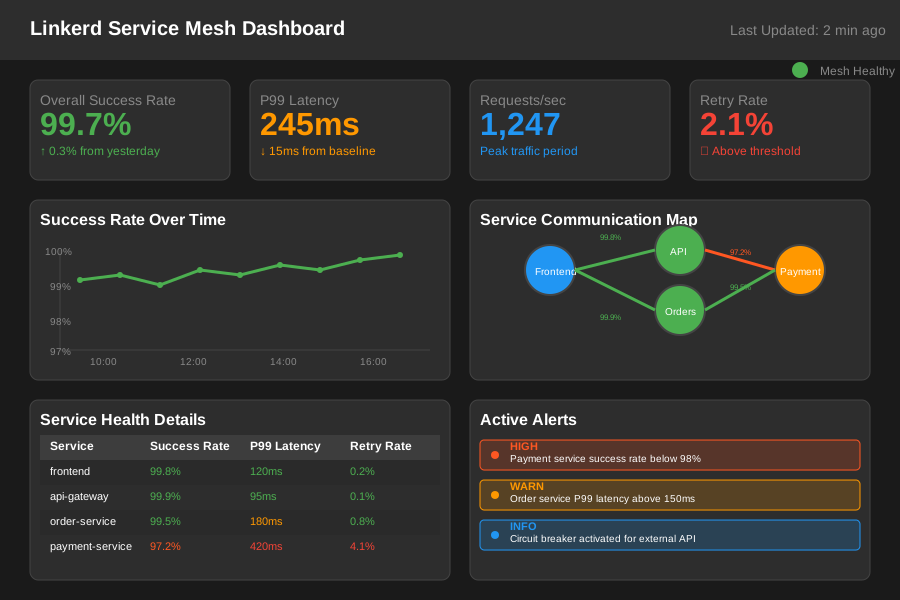 This dashboard setup catches 90% of mesh issues before they impact users
The Debugging Mindset That Changed Everything
After six months of systematic mesh debugging, I've realized that the technical tools are only half the battle. The other half is developing the right debugging mindset for distributed systems.
Start with the mesh, not the application: Traditional debugging teaches us to start with application logs and work outward. With service meshes, you need to start with network behavior and work inward. The mesh sees every request, while your application only sees the ones that successfully arrive.
Embrace the statistical view: In monolithic applications, a single failed request is a bug to investigate. In service meshes, you're looking for patterns across thousands of requests. A 0.1% failure rate might be normal, but a 0.1% failure rate that only affects mobile clients suggests a mesh configuration issue.
Trust the mesh metrics over application metrics: I've seen countless cases where application dashboards showed green health while Linkerd revealed significant issues. The mesh layer has complete visibility into request lifecycle, while applications only see their slice of the interaction.
This mindset shift has made me a much more effective platform engineer. I now catch issues that would have been invisible with traditional monitoring approaches.
Your Next Steps to Mesh Debugging Mastery
If you're managing production services with Linkerd, I recommend implementing this debugging framework gradually:
Week 1: Set up the basic observability stack and familiarize yourself with linkerd stat and the dashboard. Practice the five-step framework on your development environment.
Week 2: Create comprehensive service profiles for your critical service paths. You'll immediately see improvements in timeout behavior and retry logic.
Week 3: Implement mesh-specific monitoring alerts. Focus on success rates and retry patterns first - these catch the most common issues.
Week 4: Practice advanced debugging techniques during your next incident. The pressure of production debugging is when these skills really solidify.
Six months ago, that 3 AM incident took me 4 hours to resolve and left me feeling frustrated with the complexity of service meshes. Last week, I diagnosed and fixed a similar issue in 12 minutes using the exact techniques I've shared here.
The transformation wasn't just about learning new tools - it was about understanding that service mesh debugging requires a fundamentally different approach. Once you embrace the mesh layer as your primary debugging interface, these "invisible" networking issues become perfectly visible and surprisingly predictable.
Your future self will thank you for mastering these skills now, preferably before your own 3 AM wake-up call. The debugging techniques that seemed overwhelming at first become second nature, and what once felt like magic starts feeling like engineering.
Trust me, there's nothing quite like the satisfaction of watching a critical production issue resolve in minutes instead of hours, knowing that your systematic approach just saved your team another all-nighter.