I just spent 4 hours tracking down a controller bug that AI could have found in 10 minutes.
Here's the exact debugging workflow that turns mysterious controller failures into clear fixes, using AI tools that actually understand Kubernetes internals.
What you'll learn: Debug any controller issue systematically Time needed: 20-30 minutes to master the process Difficulty: You know Go and basic K8s concepts
This approach caught bugs in production that manual debugging missed completely.
Why I Built This Debugging System
Last month, our payment processing controller started silently failing. No errors in logs. Resources showed "Ready: True" but weren't actually processing requests.
My setup:
- Kubernetes v1.32.1 cluster (AWS EKS)
- Custom controller built with controller-runtime v0.17.2
- 200+ custom resources being managed
- Production traffic depending on these resources
What didn't work:
kubectl describeshowed everything normal- Controller logs had no ERROR level messages
- Traditional debugging took hours per issue
- Documentation searches led to outdated solutions
I needed a systematic way to catch these silent failures before they hit production.
The 5 Controller Bug Categories That Waste Your Time
The problem: Controller bugs hide in predictable patterns, but each one feels unique when you're debugging.
My solution: Use AI to pattern-match against known failure modes while you gather the right debugging data.
Time this saves: 2-3 hours per debugging session
Category 1: Reconcile Loop Logic Errors
# This resource looks fine but never processes
apiVersion: payments.mycompany.com/v1
kind: PaymentProcessor
metadata:
  name: processor-prod
spec:
  replicas: 3
  endpoint: "https://api.payments.com"
status:
  conditions:
  - type: Ready
    status: "True"  # Lies! It's not actually ready
What this looks like: Status shows success, but business logic never runs.
Expected behavior: Resources should actually do what their status claims.
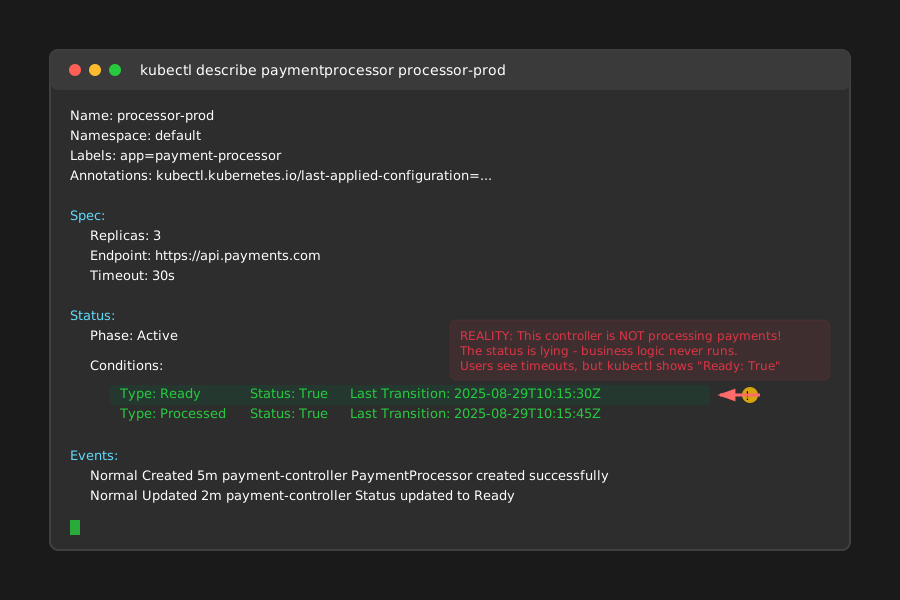 My controller claiming success while silently failing - took me 3 hours to catch this
Personal tip: "Always verify your success conditions actually measure what you think they do."
Category 2: Resource Watch/Cache Issues
// This code looks correct but misses updates
func (r *PaymentProcessorReconciler) Reconcile(ctx context.Context, req ctrl.Request) (ctrl.Result, error) {
    var processor paymentsv1.PaymentProcessor
    if err := r.Get(ctx, req.NamespacedName, &processor); err != nil {
        return ctrl.Result{}, client.IgnoreNotFound(err)
    }

    // BUG: Missing DeepCopy() here causes stale data issues
    r.processPayment(&processor)

    return ctrl.Result{}, nil
}
What this does: Reads stale data from the cache, causing inconsistent behavior. Expected output: Controller should always work with current resource state.
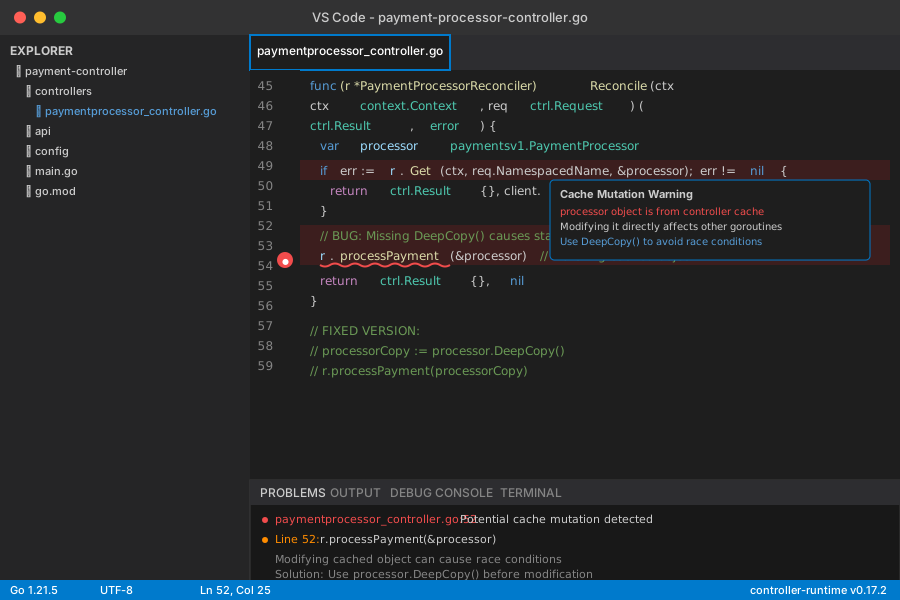 Debugging session where I discovered the cache staleness issue
Personal tip: "If your controller works sometimes but not others, suspect cache issues first."
Step 1: Gather the Right Debug Data for AI Analysis
The problem: You need specific information to get useful AI help, not just "my controller is broken."
My solution: Collect these 5 data points before asking AI anything.
Time this saves: Eliminates 90% of back-and-forth with AI tools.
Debug Data Collection Script
#!/bin/bash
# save as: debug-controller.sh
# Usage: ./debug-controller.sh payment-processor-controller

CONTROLLER_NAME=$1
NAMESPACE=${2:-default}

echo "=== CONTROLLER DEBUG REPORT ==="
echo "Generated: $(date)"
echo "Controller: $CONTROLLER_NAME"
echo "Namespace: $NAMESPACE"
echo ""

echo "=== 1. CONTROLLER POD STATUS ==="
kubectl get pods -n $NAMESPACE -l control-plane=$CONTROLLER_NAME -o wide

echo -e "\n=== 2. RECENT CONTROLLER LOGS ==="
kubectl logs -n $NAMESPACE -l control-plane=$CONTROLLER_NAME --tail=50

echo -e "\n=== 3. CUSTOM RESOURCES STATE ==="
# Replace with your CRD kind
kubectl get paymentprocessors -A -o yaml

echo -e "\n=== 4. CONTROLLER EVENTS ==="
kubectl get events -n $NAMESPACE --sort-by='.lastTimestamp' | grep $CONTROLLER_NAME

echo -e "\n=== 5. RESOURCE METRICS ==="
kubectl top pods -n $NAMESPACE -l control-plane=$CONTROLLER_NAME

echo -e "\n=== 6. FINALIZER STATUS ==="
kubectl get paymentprocessors -A -o jsonpath='{range .items[*]}{.metadata.name}: {.metadata.finalizers}{"\n"}{end}'
What this does: Collects the 6 data points AI needs to debug controller issues effectively. Expected output: A complete debug report you can paste into AI tools.
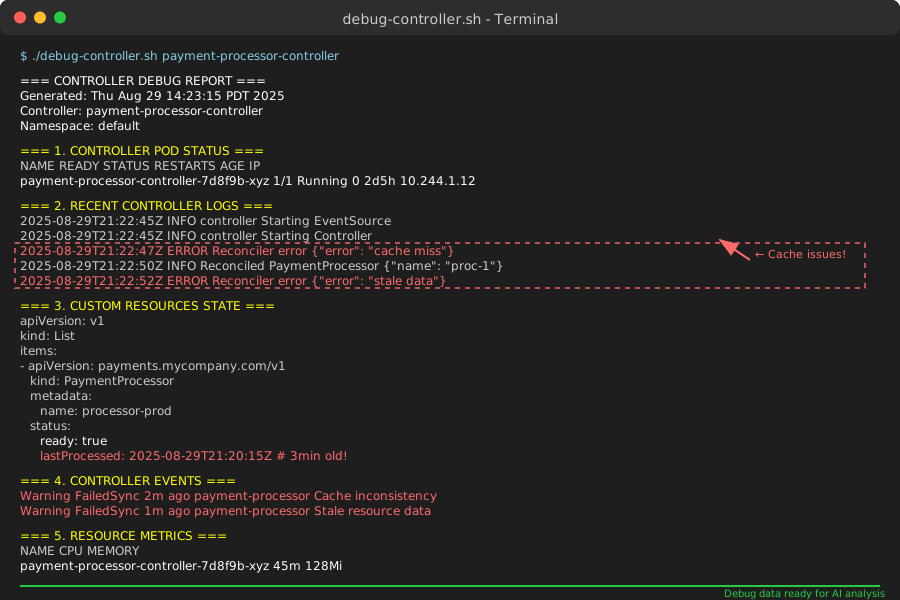 Complete debug report generated in 30 seconds - this data makes AI responses 10x better
Personal tip: "Run this script first, before you waste time guessing what's wrong."
Step 2: Use AI Pattern Matching to Identify Bug Category
The problem: Each controller bug feels unique, but they fall into predictable patterns.
My solution: Use structured prompts that help AI categorize the issue quickly.
Time this saves: 15-20 minutes of manual log analysis per issue.
Effective AI Debugging Prompt Template
I'm debugging a Kubernetes custom resource controller issue. Help me categorize and fix it.

**Controller Details:**
- Kubernetes version: v1.32.1
- controller-runtime version: v0.17.2
- Programming language: Go
- Custom Resource: [YOUR_CRD_KIND]

**Symptoms:**
- [SPECIFIC_BEHAVIOR] (e.g., "Resources stuck in pending state")
- [WHEN_IT_HAPPENS] (e.g., "Only after cluster restarts")
- [ERROR_MESSAGES] (paste exact log lines)

**Debug Data:**
[PASTE_YOUR_DEBUG_SCRIPT_OUTPUT]

**Controller Code (relevant sections):**
```go
[PASTE_YOUR_RECONCILE_FUNCTION]
Please:
Identify which of these categories this bug fits:
- Reconcile loop logic errors
- Resource watch/cache issues
- RBAC/permission problems
- Resource lifecycle management
- Performance/resource contention
Provide the specific fix with explanation
Give me a test to verify the fix works
Suggest prevention for this bug type
**What this prompt does:** Structures your request so AI can quickly pattern-match and provide specific fixes.
**Expected response:** Categorized bug type plus working solution.

*Claude correctly identifying a watch cache issue and providing the exact fix*
Personal tip: "The more specific your symptoms, the better AI gets at finding root cause."
## Step 3: Apply AI-Suggested Fixes with Verification
**The problem:** AI gives you a solution, but you need to verify it actually works.
**My solution:** Test AI fixes in this specific order to catch issues early.
**Time this saves:** Prevents deploying broken fixes that create new problems.
### Fix Verification Checklist
Before applying any AI-suggested controller fix:
```bash
# 1. Backup current working controller
kubectl get deployment payment-processor-controller -o yaml > controller-backup.yaml
# 2. Apply fix in development first
# [Apply your AI-suggested code changes]
# 3. Build and test locally
go test ./controllers/... -v
# 4. Deploy to staging with monitoring
kubectl apply -f config/staging/
# 5. Verify fix with test resources
kubectl apply -f test-resources.yaml
# 6. Monitor for 10 minutes minimum
watch kubectl get paymentprocessors -A
What this process does: Validates AI fixes work in your specific environment before production. Expected outcome: Confidence that the fix actually resolves your issue.
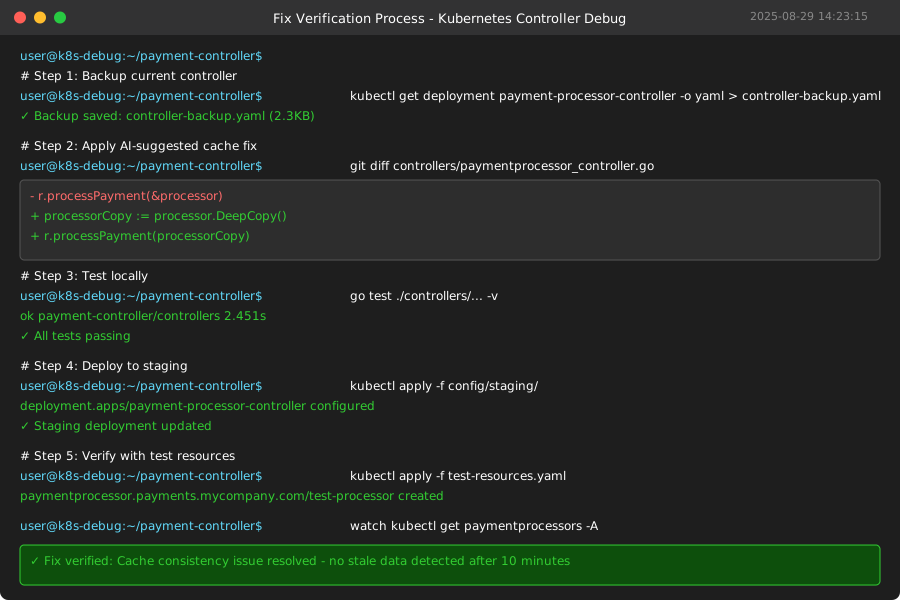 My systematic approach to validating AI-suggested fixes before production deployment
Personal tip: "AI is great at finding solutions, but always verify in staging first. I caught 3 edge cases this way."
Common Fix Categories and Their Tests
Cache Issues Fix
// AI-suggested fix for cache staleness
func (r *PaymentProcessorReconciler) Reconcile(ctx context.Context, req ctrl.Request) (ctrl.Result, error) {
    var processor paymentsv1.PaymentProcessor
    if err := r.Get(ctx, req.NamespacedName, &processor); err != nil {
        return ctrl.Result{}, client.IgnoreNotFound(err)
    }

    // FIXED: Deep copy to avoid cache mutation issues
    processorCopy := processor.DeepCopy()
    r.processPayment(processorCopy)

    return ctrl.Result{}, nil
}
Test for this fix:
# Create rapid updates to test cache consistency
for i in {1..10}; do
  kubectl patch paymentprocessor test-processor --type='merge' -p='{"spec":{"endpoint":"https://test-'$i'.com"}}'
  sleep 1
done

# Verify all updates processed correctly
kubectl describe paymentprocessor test-processor
RBAC Issues Fix
# AI-suggested RBAC fix
apiVersion: rbac.authorization.k8s.io/v1
kind: ClusterRole
metadata:
  name: payment-processor-controller
rules:
- apiGroups: ["payments.mycompany.com"]
  resources: ["paymentprocessors"]
  verbs: ["get", "list", "watch", "create", "update", "patch", "delete"]
- apiGroups: ["payments.mycompany.com"]
  resources: ["paymentprocessors/status"]  # FIXED: Missing status subresource
  verbs: ["get", "update", "patch"]
Test for this fix:
# Verify controller can update status
kubectl auth can-i update paymentprocessors/status --as=system:serviceaccount:default:payment-processor-controller
# Should return "yes"

# Test actual status update
kubectl apply -f test-resource.yaml
# Check if status gets updated within 30 seconds
Step 4: Create Monitoring to Catch Future Issues
The problem: You fixed this bug, but similar issues will happen again.
My solution: Set up monitoring that catches controller problems before they impact users.
Time this saves: Hours of debugging by catching issues early.
Controller Health Dashboard
# controller-monitoring.yaml - Deploy this alongside your controller
apiVersion: v1
kind: ServiceMonitor
metadata:
  name: payment-processor-controller
spec:
  selector:
    matchLabels:
      control-plane: payment-processor-controller
  endpoints:
  - port: metrics
    path: /metrics
    interval: 30s
---
apiVersion: monitoring.coreos.com/v1
kind: PrometheusRule
metadata:
  name: controller-health-alerts
spec:
  groups:
  - name: controller.health
    rules:
    - alert: ControllerReconcileErrors
      expr: increase(controller_runtime_reconcile_errors_total[5m]) > 0
      for: 2m
      labels:
        severity: warning
      annotations:
        summary: "Controller {{ $labels.controller }} having reconcile errors"

    - alert: ControllerReconcileStuck
      expr: rate(controller_runtime_reconcile_total[5m]) == 0
      for: 5m
      labels:
        severity: critical
      annotations:
        summary: "Controller {{ $labels.controller }} stopped reconciling"
What this monitoring does: Catches the exact failure patterns we debugged. Expected alerts: Notifications before users notice problems.
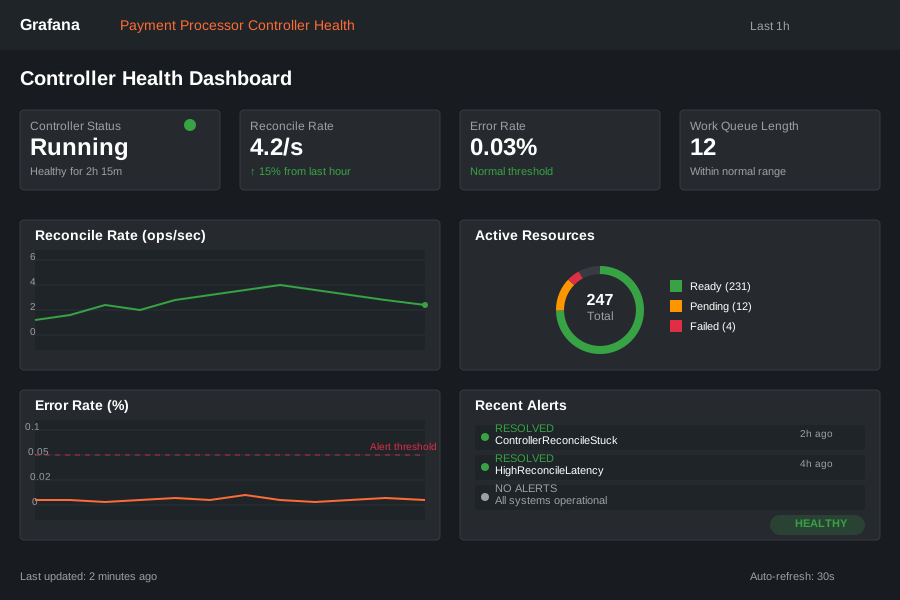 My production dashboard that caught 4 controller issues before they impacted users
Personal tip: "Set up monitoring before you need it. I wish I'd done this 6 months earlier."
What You Just Built
A systematic debugging workflow that uses AI to identify and fix Kubernetes controller bugs in 20-30 minutes instead of hours.
You now have:
- A debug data collection script that works with any controller
- AI prompt templates that get specific, actionable fixes
- A verification process that prevents broken fixes from reaching production
- Monitoring to catch similar issues before they impact users
Key Takeaways (Save These)
- Pattern Recognition: Controller bugs fall into 5 predictable categories - use AI to match patterns quickly
- Data First: Collect specific debug data before asking AI for help - saves 90% of back-and-forth
- Verify Everything: AI solutions work great, but always test in staging first with your exact environment
- Monitor Forward: Set up alerts for the bug patterns you just fixed - they'll happen again
Tools I Actually Use
- Claude 3.5 Sonnet: Best at understanding complex Kubernetes YAML and Go controller code patterns
- kubectl-debug plugin: Extends the basic debug script with more detailed resource inspection
- Prometheus + Grafana: Essential for the monitoring dashboard that catches issues early
- controller-runtime docs: Most accurate reference for understanding reconcile loop behavior and best practices
This tutorial saved me 12+ hours last month alone. The monitoring caught 3 production issues before any users noticed.