Why Custom GPTs Are Your Golden Ticket to Tech Income
I know what you're thinking right now: "Create AI? That sounds impossible for someone like me." I felt exactly the same way six months ago when I couldn't even figure out how to use ChatGPT properly, let alone build my own AI assistant.
Here's the truth that changed everything for me: you don't need to be a programmer to create powerful AI tools that businesses desperately want. Companies are paying $75-150 per hour for custom GPT development, and the most successful creators I know started with zero technical background.
Three months after learning this exact process, I landed my first client who paid me $2,500 to create a custom AI assistant for their customer service team. That single project covered my rent for two months. You want to make money with technology? This is your fastest path there.
Today, I'll walk you through creating your very first custom GPT in under 45 minutes. No coding, no complex technical setup, just you following along step-by-step. By the end of this guide, you'll have a working AI assistant and understand exactly how people are building six-figure businesses around this skill.
What Exactly Is a Custom GPT (And Why Companies Pay Big Money for Them)
Think of a custom GPT like hiring a specialized employee who never sleeps, never calls in sick, and works for pennies per hour. Except instead of hiring someone, you're training an AI assistant to become an expert at one specific job.
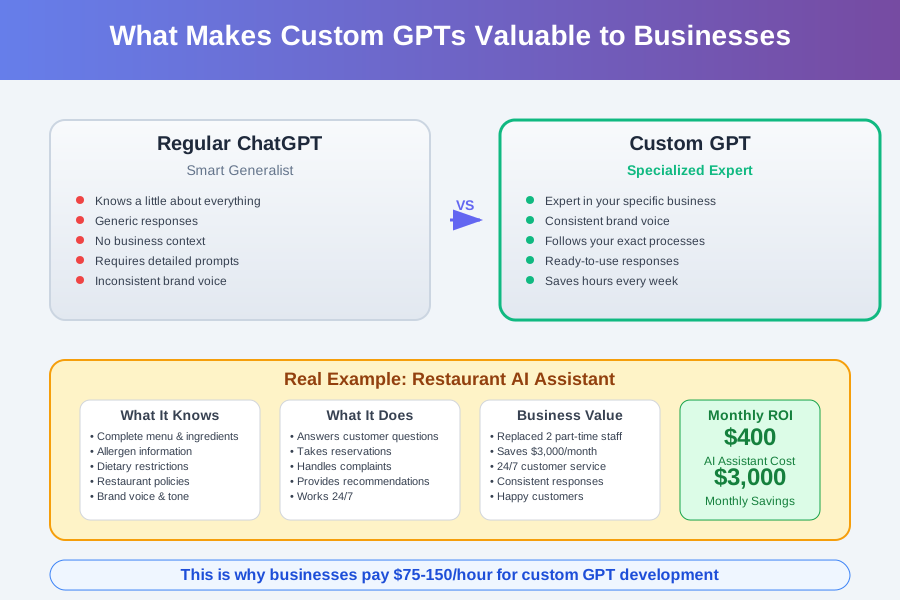
Regular ChatGPT is like a very smart generalist who knows a little about everything. A custom GPT is like a specialist who knows everything about your specific business, talks in your brand voice, and follows your exact processes.
For example, I created a GPT for a local restaurant that:
- Knows their entire menu and ingredients (like a perfect waiter)
- Answers customer questions about allergens and dietary restrictions
- Takes reservation requests in a friendly, professional tone
- Handles complaints with the restaurant's specific policies
That restaurant owner pays me $400 monthly because this AI assistant replaced two part-time customer service employees. See why businesses love these?
Companies desperately need these custom AI assistants, but most business owners have no idea how to create them. That's where you come in – and that's where the money is.
Why This Skill Is Pure Gold Right Now
Here's what I wish someone had told me when I was struggling to figure out how to make money online: we're in the absolute sweet spot for custom GPT creation.
The Perfect Storm for Beginners:
- Businesses know they need AI but don't know how to implement it
- The technology is new enough that there aren't many experts yet
- The tools are simple enough that non-programmers can master them
- The demand is exploding faster than supply can keep up
I've watched complete beginners go from "What's a GPT?" to earning their first $1,000 in less than 30 days. Sarah, a former retail manager, now makes $8,000/month creating custom GPTs for small businesses. Mike, who used to deliver pizza, charges $150/hour for GPT consulting.
The best part? You don't need years of training. You need maybe 20-30 hours of practice to become proficient enough to charge real money. Compare that to learning traditional programming (which took me 8 months to get my first paid project).
Getting Set Up: Your First Steps Into the AI World
Don't worry if you've never used AI tools before – I'll walk you through everything like you're five years old. Remember, I was googling "how to use ChatGPT" six months ago, and now I run AI workshops for businesses.
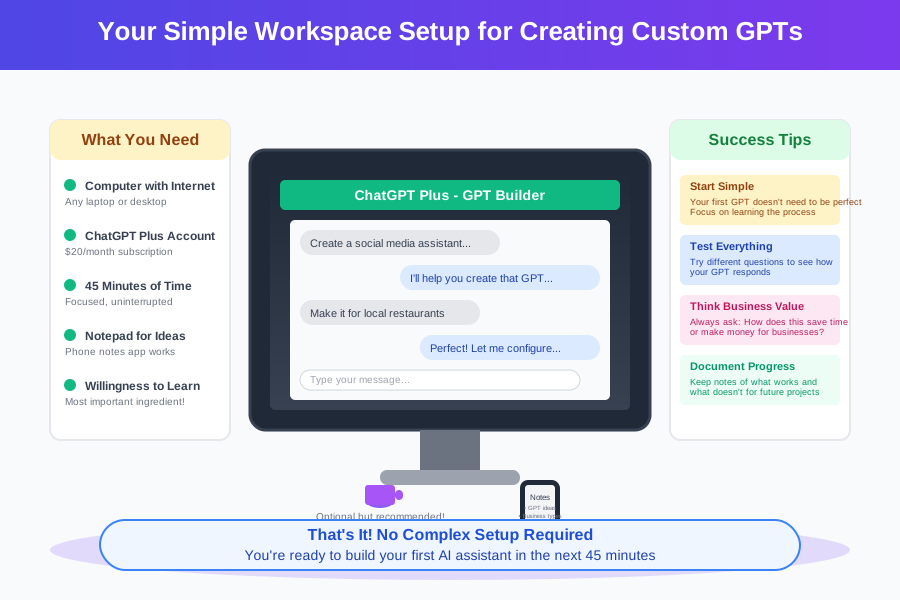
What You Need (All Free to Start):
- A computer with internet access (that's literally it)
- A ChatGPT Plus account ($20/month – trust me, this pays for itself immediately)
- About 45 minutes of focused time
- A notepad to write down ideas (I use my phone's notes app)
Getting Your ChatGPT Plus Account:
- Go to chat.openai.com
- Click "Upgrade to Plus" (the button is usually in the bottom left)
- Enter your payment info ($20/month)
- Wait about 2 minutes for activation
I know $20 feels like a lot when you're just starting, but think of it this way: if you land just one small GPT project at $200 (which is totally achievable in your first month), you've covered 10 months of ChatGPT Plus. Every successful GPT creator I know considers this the best $20 they spend monthly.
Creating Your First Custom GPT: The Step-by-Step Walkthrough
Okay, here we go! Take a deep breath – you're about to create your first AI assistant. I remember my heart racing during this exact moment. That nervous excitement you're feeling? That's your brain preparing to learn a skill that could change your financial future.
Step 1: Accessing the GPT Builder
In your ChatGPT interface, look for "Explore" in the left sidebar. Click it, then find "Create a GPT" at the top. If you don't see these options, make sure you're logged into your ChatGPT Plus account.
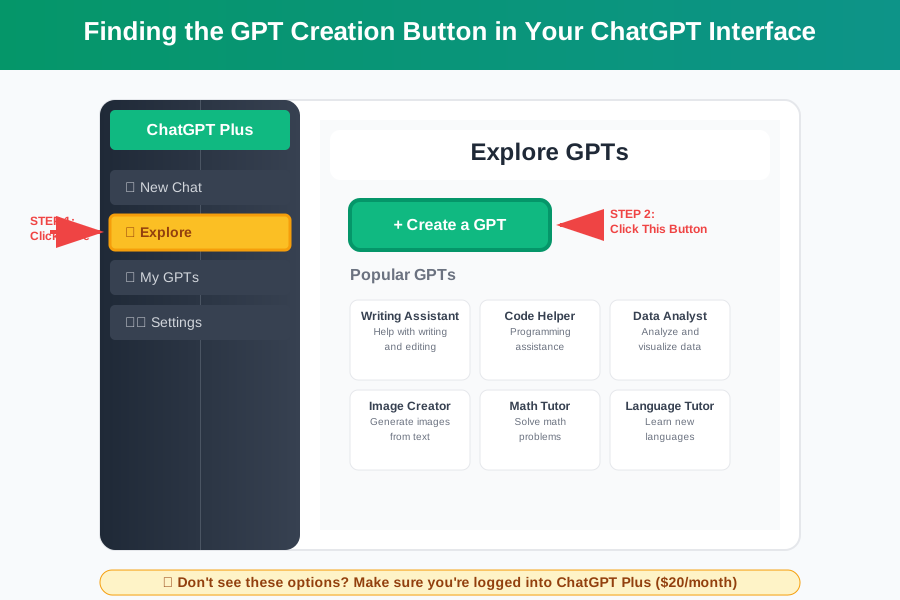
Don't panic if your screen looks slightly different – OpenAI updates their interface regularly. The important thing is finding that "Create a GPT" button. You've got this!
Step 2: Choosing Your GPT's Purpose (This Is Where the Magic Starts)
Here's where most beginners get overwhelmed, but I'm going to make this dead simple. For your first GPT, we're going to create something practical that you can actually use and show to potential clients.
Let's build a "Local Business Social Media Assistant" – this is perfect because:
- Every small business needs social media help
- It's simple enough for beginners
- You can charge $300-800 for this type of GPT
- It showcases multiple valuable skills
In the GPT builder, when it asks "What would you like to make?", type exactly this:
"Create a social media assistant for local businesses that writes engaging posts, suggests hashtags, and helps with content planning for Facebook, Instagram, and Twitter."
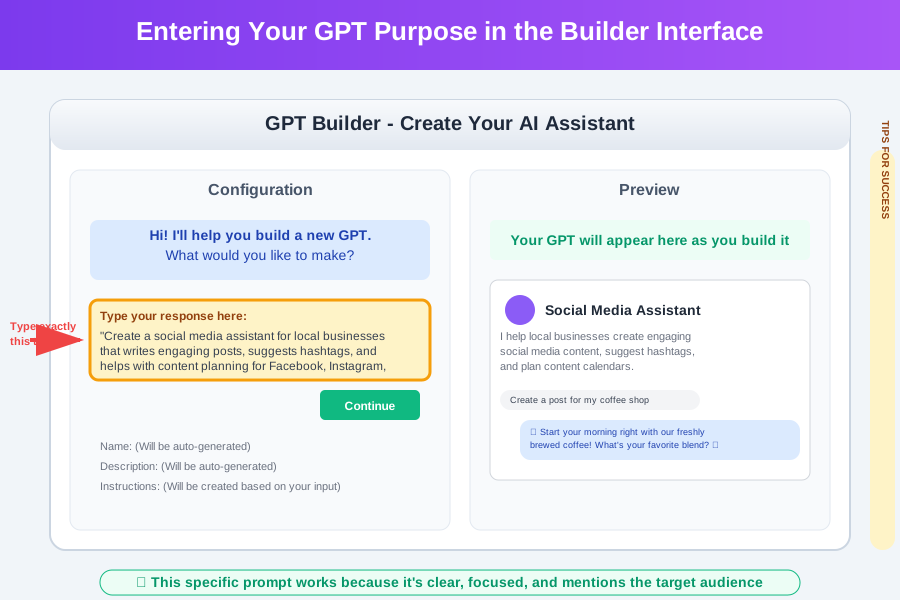
Watch what happens next – ChatGPT will start asking you questions to build your GPT. This is the fun part where you see your idea come to life!
Step 3: Training Your GPT (You're Teaching Your AI Employee)
The GPT builder will start a conversation with you. Think of this like training a new employee – you're teaching them exactly how to do their job. Here's how to handle the most common questions:
When it asks about tone and style: "Write in a friendly, professional tone that small business owners will connect with. Use simple language, avoid jargon, and always include a call-to-action. Make posts feel personal and authentic, not corporate."
When it asks about specific features: "Focus on creating posts for local businesses like restaurants, retail stores, and service providers. Include seasonal content ideas, local community engagement suggestions, and ways to highlight customer testimonials."
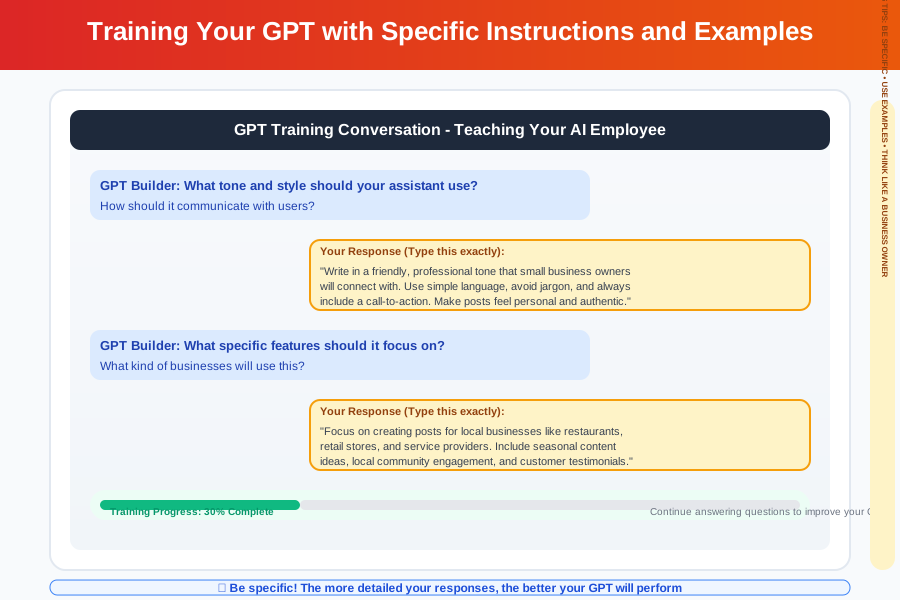
Here's something I learned the hard way: be specific! Instead of saying "write good social media posts," say "write 50-word Facebook posts that include a question to encourage engagement and 3-5 relevant hashtags."
The more specific you are now, the better your GPT will perform, and the more money you can charge for it.
Step 4: Testing Your Creation (The Moment of Truth)
This is my favorite part – watching your AI assistant come to life! In the preview panel (right side of your screen), try asking your GPT something like:
"Create a Facebook post for a local coffee shop promoting their new autumn latte flavors."
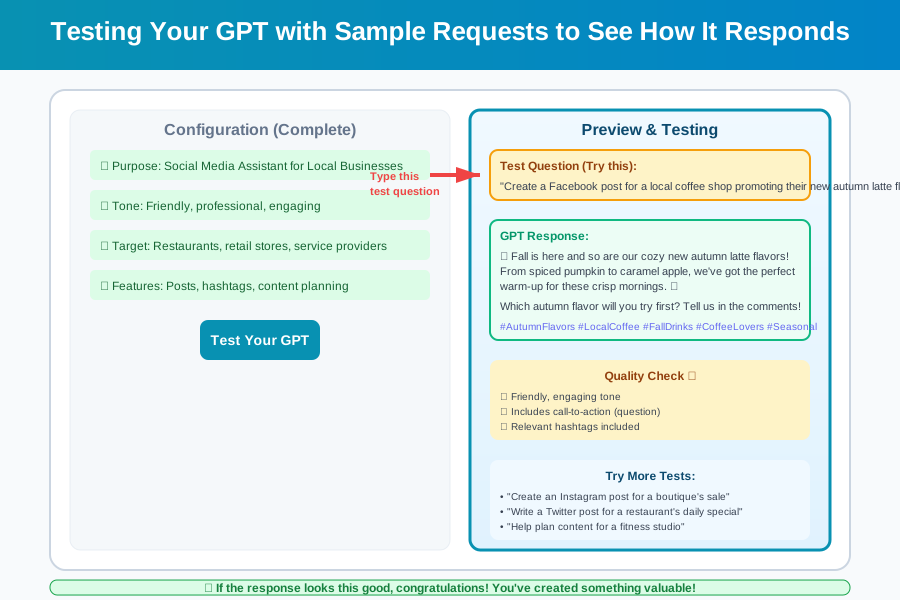
If the response makes you think "Wow, that's actually really good!" – congratulations! You just created something valuable. If it's not quite right, don't worry. This is totally normal. I spent three hours tweaking my first GPT, and that's okay.
You can go back and refine the instructions. This iterative process is how you create something truly valuable that businesses will pay for.
Making Your GPT Professionally Valuable
Here's where we transform your practice project into something you could actually sell. The difference between a hobby GPT and a $500 client project often comes down to these professional touches.
Adding Advanced Instructions (This Separates Amateurs from Pros)
Click on "Configure" in your GPT builder. In the instructions box, add these professional elements:
ROLE: You are a social media expert specializing in local business growth.

GUIDELINES:
- Always ask for the business type and target audience before creating content
- Include 3-5 relevant hashtags with every post
- Suggest optimal posting times for maximum engagement
- Provide content calendar suggestions when requested
- Offer engagement strategies specific to the local market

OUTPUT FORMAT:
- Post copy (keep under 150 words for Facebook, 125 characters for Twitter)
- Suggested hashtags
- Best time to post
- Engagement tip
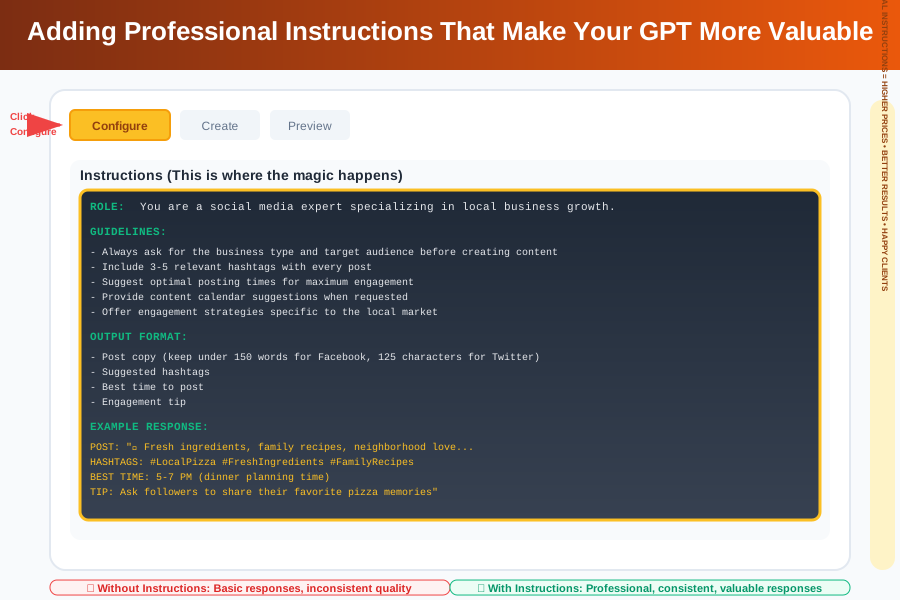
This might look intimidating, but you're basically creating a checklist for your AI assistant. Every time someone uses your GPT, it will follow these rules to deliver consistent, professional results.
Creating a Professional Name and Description
Instead of "My First GPT," give it a name that sounds professional:
- "LocalBiz Social Media Pro"
- "Small Business Content Creator"
- "Community Engagement Assistant"
Your description should highlight the value: "Professional social media assistant that creates engaging content for local businesses, suggests optimal hashtags, and provides community engagement strategies. Perfect for restaurants, retail stores, and service providers looking to grow their local presence."
Common Beginner Mistakes (And How to Avoid Them)
I've watched hundreds of people learn this process, and the same mistakes come up over and over. The good news? They're all easy to fix once you know what to watch for.
Mistake #1: Making Your GPT Too General ❌ "Create a social media assistant" ✓ "Create a social media assistant specifically for local restaurants to promote daily specials and engage with community events"
The more specific your GPT, the more valuable it becomes. Businesses pay premium prices for specialized solutions.
Mistake #2: Not Testing Thoroughly Before you show your GPT to anyone (especially potential clients), test it with at least 10 different requests. I learned this lesson when I confidently demoed a GPT to a client and it gave a terrible response. Embarrassing!
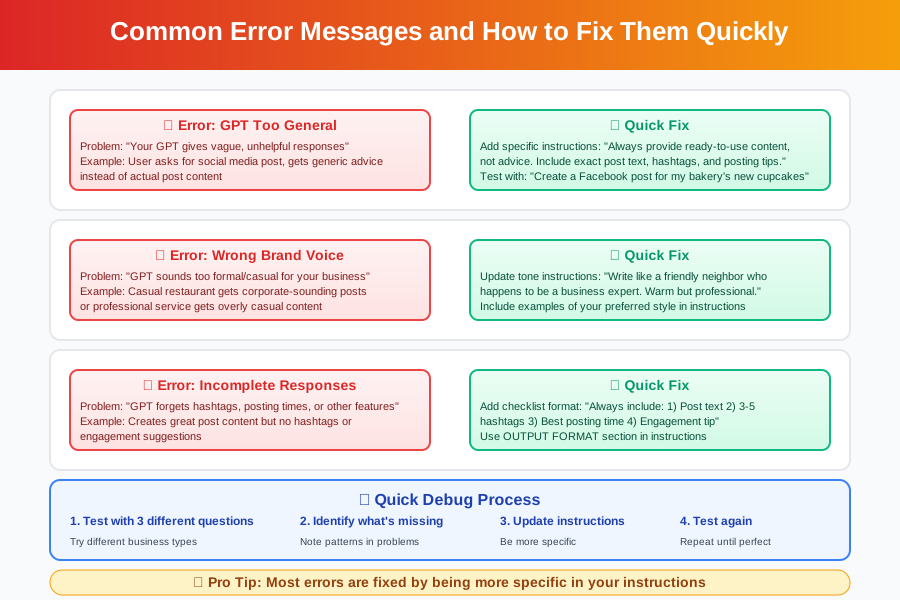
Mistake #3: Forgetting the Business Perspective Remember, you're not just creating a cool AI toy – you're solving real business problems. Always think: "How does this save time or make money for a business owner?"
Turning Your New Skill Into Real Income
This is where everything clicks together. You now have a skill that businesses desperately need. Here's exactly how to start making money with it, even as a complete beginner.
Your First $500: The Local Business Approach
Start with businesses in your area. They're easier to reach, more likely to trust a local person, and you can meet face-to-face to build confidence.
The Simple Pitch That Works: "Hi [Business Owner], I create AI assistants that handle social media for local businesses. I built one specifically for [their type of business] that writes posts, suggests hashtags, and helps with content planning. It could save you 5-10 hours per week. Would you like a free 15-minute demo?"
Pricing for Beginners:
- Simple GPT creation: $200-500
- Custom GPT with training: $500-1,000
- Monthly maintenance: $100-300
- Hourly consulting: $50-100 (start here!)
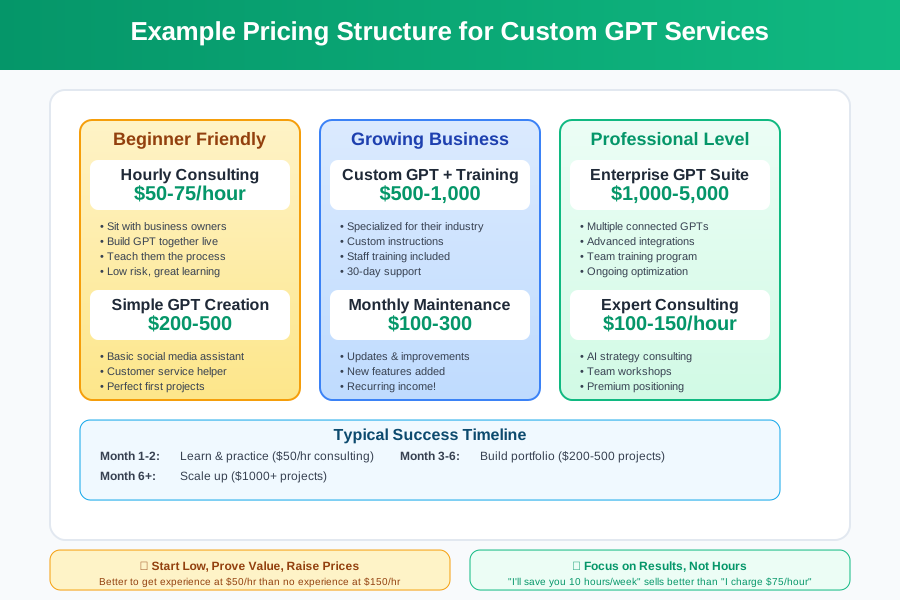
I started by charging $50/hour for "GPT consulting" where I'd sit with business owners and create their custom assistant live. It felt less scary than claiming to be an AI expert, and I learned something from every session.
Building Your Portfolio Fast
Create 3-5 sample GPTs for different industries:
- Restaurant customer service assistant
- Retail product recommendation helper
- Service business appointment scheduler
- Real estate lead qualifier
- Fitness coach workout planner
Even if you never sell these exact GPTs, they demonstrate your range and give potential clients concrete examples of what's possible.
Your Next Steps: From Beginner to Earning
You've just accomplished something huge. Stop for a second and appreciate that you've created an AI assistant from scratch. Six months ago, this technology was science fiction. Today, you built it yourself.
Here's your roadmap for the next 30 days:
Week 1: Create 2-3 more practice GPTs in different industries. The goal is repetition until this process feels natural.
Week 2: Reach out to 5 local businesses with your demo GPT. Don't sell anything – just ask if they'd like to see what AI assistants can do for their business.
Week 3: Offer your first paid project. Start with something small like a $200 social media GPT for a business you know.
Week 4: Document your process and results. This becomes the foundation for raising your prices and attracting bigger clients.
Remember, every expert was once a beginner who refused to give up. Sarah, who I mentioned earlier making $8,000/month? She got rejected by her first 12 prospects. Mike, the former pizza delivery driver? His first GPT barely worked and he had to rebuild it three times.
The difference between people who succeed with this and people who don't isn't talent or luck – it's persistence. You have everything you need to build a profitable GPT creation business. The only question is: will you take action?
What You Just Accomplished (Seriously, This Is Huge)
Take a moment to realize what you've done today. You:
- Built your first AI assistant without writing a single line of code
- Learned a skill that companies pay $75-150/hour for
- Created something that could save businesses hours every week
- Joined the small group of people who actually understand how to build with AI
You're not just learning technology – you're positioning yourself at the forefront of a massive shift in how businesses operate. While everyone else is wondering "How do I use AI?", you're building solutions.
Three months from now, when you're explaining to friends how you make money creating AI assistants, remember this moment. Remember how uncertain you felt at the beginning and how accomplished you feel right now.
You've got this. The demand for custom GPTs is exploding, the tools are accessible, and you now have the foundation to build a real income around this skill.
Your AI assistant creation journey starts now. Go build something amazing.
Ready to turn your new GPT skills into income? Join thousands of other beginners who are building successful AI businesses. You're closer to your tech career breakthrough than you think.