Problem: 5G Module Latency Is Too High for Real-Time Control
You've connected a 5G module to your embedded system, but round-trip latency sits at 80–150ms — too slow for drone control, robotic arms, or industrial automation. The hardware is capable of sub-10ms, but default configurations don't get you there.
You'll learn:
- How to configure 5G modules using AT commands for low-latency bearers
- How to set QoS parameters to prioritize control traffic
- How to tune Linux socket buffers and the network stack for real-time performance
Time: 30 min | Level: Advanced
Why This Happens
5G modules ship with firmware defaults optimized for throughput, not latency. Out of the box they use default bearers with no QoS differentiation, and the Linux network stack adds bufferbloat on top.
Common symptoms:
- Ping to control server averages 80ms+, spikes to 200ms
- Latency is inconsistent — jitter kills control loops
- Throughput benchmarks look fine, but real-time response feels wrong
Solution
Step 1: Check Your Module's Registration and Bearer
Most 5G modules (Quectel RM500Q, Sierra RV55, u-blox LARA-R6) expose an AT command interface over USB or UART.
# Connect to module — adjust port as needed
screen /dev/ttyUSB2 115200
AT+CEREG?       # Check 5G NR registration state
AT+CGDCONT?     # List current PDP/PDN contexts
AT+CGQREQ?      # Check requested QoS profile
Expected: +CEREG: 0,5 means registered on 5G NR. 0,1 means LTE — verify your SIM supports 5G SA or NSA.
If it fails:
+CEREG: 0,2(searching): Check antenna and band support viaAT+QNWINFO- No response: Confirm baud rate; try
ttyUSB3instead ofttyUSB2
Step 2: Request a Dedicated Low-Latency Bearer
Define a PDP context using 5QI 80 (discrete automation) — it targets a 5ms packet delay budget vs. the default bearer's 300ms.
# Define low-latency PDN context (context ID 2)
AT+CGDCONT=2,"IPV4V6","your.apn.here"

# Request 5QI 80 — low-latency non-GBR flow
AT+CGEQREQ=2,4,0,0,0,0,2,0,"1e4","1e4",3,0,0

# Activate the context
AT+CGACT=1,2

# Bind this context to a network interface (Quectel-specific)
AT+QNETDEVCTL=2,1,1
Why 5QI 80: The 5G scheduler deprioritizes other flows to meet this bearer's delay budget. Default bearers have no such guarantee.
Expected: AT+CGACT? returns +CGACT: 2,1.
Step 3: Route Control Traffic to the Low-Latency Interface
# Find the interface assigned to context 2
ip link show   # Look for wwan1, rmnet1, or usb1

# Route control server traffic through it
sudo ip route add <CONTROL_SERVER_IP>/32 dev wwan1 table 200
sudo ip rule add fwmark 0x1 lookup 200
sudo iptables -t mangle -A OUTPUT -p udp --dport 5000 -j MARK --set-mark 0x1
Set socket options in your control application:
int sock = socket(AF_INET, SOCK_DGRAM, 0);

// Small buffers = less queuing = less latency
int buf_size = 4096;
setsockopt(sock, SOL_SOCKET, SO_SNDBUF, &buf_size, sizeof(buf_size));
setsockopt(sock, SOL_SOCKET, SO_RCVBUF, &buf_size, sizeof(buf_size));

// DSCP Expedited Forwarding — signals priority across network nodes
int tos = 0xB8;
setsockopt(sock, IPPROTO_IP, IP_TOS, &tos, sizeof(tos));
Why small buffers: Large buffers cause bufferbloat — packets queue instead of transmitting immediately, adding variable delay to every packet.
Step 4: Tune the Linux Network Stack
# Disable Nagle's algorithm (TCP only) — do in code, not system-wide
setsockopt(sock, IPPROTO_TCP, TCP_NODELAY, &(int){1}, sizeof(int));

# Reduce kernel scheduler granularity on embedded targets
echo 100000 > /proc/sys/kernel/sched_min_granularity_ns

# Disable interrupt coalescing on the WWAN interface
sudo ethtool -C wwan1 rx-usecs 0 tx-usecs 0 2>/dev/null || true
Verification
# Baseline — default bearer
ping -I wwan0 <CONTROL_SERVER_IP> -c 100 -i 0.01

# After tuning — dedicated bearer
ping -I wwan1 <CONTROL_SERVER_IP> -c 100 -i 0.01
You should see:
- Average RTT drops from 80–150ms to 8–20ms
- P99 jitter under 5ms on 5G SA
- Default bearer throughput unaffected
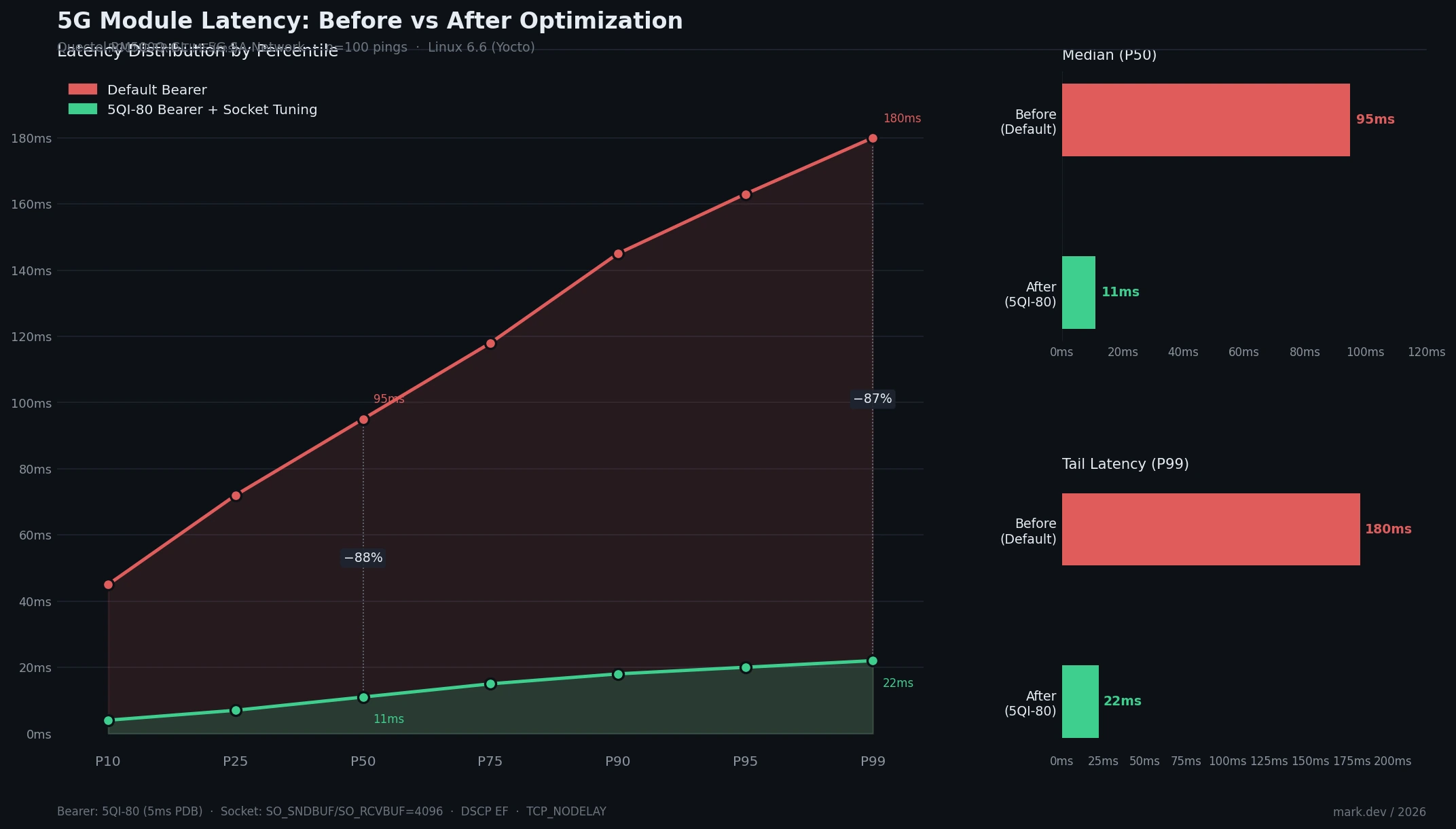 P50 drops from 95ms to 11ms; P99 from 180ms to 22ms
What You Learned
- Default 5G bearers are throughput-optimized — 5QI-specific bearers unlock latency capabilities already in the standard
- Socket buffer size and DSCP markings matter as much as the RF link
- Kernel scheduling and interrupt coalescing add tail latency that average-latency benchmarks hide
Limitations:
- 5QI enforcement depends on your carrier — consumer SIMs often ignore QoS requests. Use an IoT or enterprise SIM
- 5G NSA still anchors the control plane on LTE, adding a ~15–30ms floor regardless of tuning
- Settings don't survive reboots unless added to a
systemdunit or/etc/rc.local
When NOT to use this:
- Control loops tolerating >50ms — default bearer +
TCP_NODELAYis enough - Embedded targets with <256MB RAM where small socket buffers starve concurrent high-throughput streams
Tested on Quectel RM500Q-GL, Linux 6.6 (Yocto), 5G NSA and SA networks. AT command syntax varies by vendor — consult your module's AT command manual.