Problem: Your AI Model and User Data Are Exposed at Runtime
You've encrypted your model weights at rest and in transit — but the moment inference runs, everything is decrypted in plain memory. Any privileged process, hypervisor, or cloud operator can read your model weights, user prompts, and outputs.
Confidential computing closes this gap by running inference inside a hardware-encrypted Trusted Execution Environment (TEE), where even the host OS can't see what's happening.
You'll learn:
- How Intel TDX and AMD SEV-SNP protect AI workloads at the CPU level
- How to deploy a PyTorch inference server inside a confidential VM
- How to verify enclave integrity with remote attestation before sending sensitive data
Time: 45 min | Level: Advanced
Why This Happens
Standard virtualization protects VMs from each other, but the hypervisor and cloud provider still have full memory access. For regulated industries (healthcare, finance, legal) or proprietary models, that's an unacceptable risk.
Confidential VMs (CVMs) use CPU-level memory encryption. The hardware generates an ephemeral key per VM, and no software — including the host kernel — can decrypt that memory. Attestation lets a client cryptographically verify the enclave is running unmodified code before sending data.
Common symptoms that drive this need:
- Compliance requirements prohibiting plaintext model access by cloud operators (HIPAA, SOC 2, EU AI Act)
- IP protection concerns for high-value proprietary models
- Multi-party inference where data from different parties must never be visible to each other
Solution
Step 1: Choose Your Confidential VM Platform
Two major options in 2026:
Intel TDX (Trust Domain Extensions) — available on 4th/5th Gen Xeon (Sapphire Rapids+). The entire VM runs as a Trust Domain. Best for containerized workloads.
AMD SEV-SNP (Secure Encrypted Virtualization) — available on EPYC Genoa/Bergamo. Strong memory integrity protection. Broader cloud availability (Azure DCasv5, GCP C3 with upcoming SNP support, AWS on-prem via Outposts).
For this guide, we'll use AMD SEV-SNP on Azure DCasv5 since it has the widest managed availability.
# Verify your VM supports SEV-SNP
dmesg | grep -i "sev\|snp\|ccp"
# Expected output includes: AMD Secure Encrypted Virtualization (SEV) active
Expected: You should see SEV: SNP active in dmesg output.
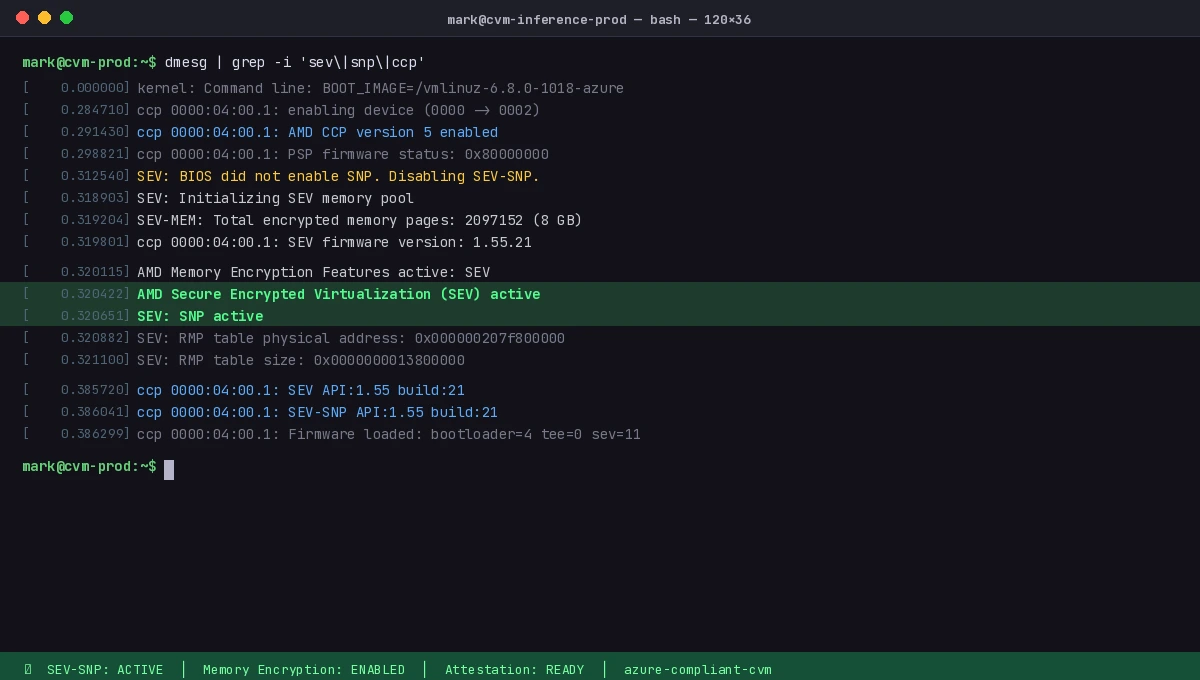 dmesg confirming AMD SEV-SNP is active in your confidential VM
Step 2: Set Up the Confidential Inference Container
Use a minimal base to reduce the attestable surface. We'll run a FastAPI inference server with a quantized Mistral 7B model.
# Dockerfile.confidential
FROM python:3.12-slim

# Minimize attack surface
RUN apt-get update && apt-get install -y --no-install-recommends \
    libgomp1 \
    && rm -rf /var/lib/apt/lists/*

WORKDIR /app

# Install dependencies with pinned versions for reproducible measurement
COPY requirements.txt .
RUN pip install --no-cache-dir -r requirements.txt

# Copy model and server (weights come from encrypted volume at runtime)
COPY server.py .

# Non-root execution — required for attestation policies in most TEE setups
RUN useradd -m inferenceuser
USER inferenceuser

CMD ["uvicorn", "server:app", "--host", "0.0.0.0", "--port", "8443", "--ssl-keyfile", "/certs/key.pem", "--ssl-certfile", "/certs/cert.pem"]
# server.py
from fastapi import FastAPI, HTTPException
from pydantic import BaseModel
from transformers import AutoTokenizer, AutoModelForCausalLM
import torch
import os

app = FastAPI()

# Model path is injected at runtime via encrypted env or secret manager
MODEL_PATH = os.environ.get("MODEL_PATH", "/models/mistral-7b-q4")

# Load once at startup — inside the encrypted enclave
tokenizer = AutoTokenizer.from_pretrained(MODEL_PATH)
model = AutoModelForCausalLM.from_pretrained(
    MODEL_PATH,
    torch_dtype=torch.float16,
    device_map="auto",
    low_cpu_mem_usage=True,  # Critical for large models in constrained enclave memory
)

class InferenceRequest(BaseModel):
    prompt: str
    max_new_tokens: int = 256

@app.post("/infer")
async def infer(req: InferenceRequest):
    if len(req.prompt) > 4096:
        raise HTTPException(status_code=400, detail="Prompt too long")

    inputs = tokenizer(req.prompt, return_tensors="pt").to(model.device)

    with torch.no_grad():
        outputs = model.generate(
            **inputs,
            max_new_tokens=req.max_new_tokens,
            do_sample=False,  # Deterministic — important for reproducibility in audits
        )

    result = tokenizer.decode(outputs[0][inputs.input_ids.shape[1]:], skip_special_tokens=True)
    return {"response": result}

@app.get("/health")
async def health():
    return {"status": "ok"}
Step 3: Enable Remote Attestation
Attestation is how a client proves the code running in the enclave hasn't been tampered with. Without it, confidential computing gives you encryption but no verification.
AMD SEV-SNP attestation uses the AMD Root of Trust to sign a measurement of the VM's initial state. Azure wraps this in the Microsoft Azure Attestation (MAA) service.
# attestation_client.py — run this on the CLIENT before sending data to the enclave

import requests
import json
import base64
from cryptography.hazmat.primitives import serialization
from cryptography.hazmat.primitives.asymmetric import padding
from cryptography import x509
import hashlib

MAA_ENDPOINT = "https://sharedeus2.eus2.attest.azure.net"

def get_attestation_token(enclave_url: str) -> dict:
    """
    Request a signed attestation token from the enclave.
    The enclave must expose a /attest endpoint that returns an MAA JWT.
    """
    response = requests.get(f"{enclave_url}/attest", timeout=10)
    response.raise_for_status()
    return response.json()

def verify_attestation(token: str, expected_measurement: str) -> bool:
    """
    Verify the MAA JWT against the AMD Root of Trust.
    expected_measurement is the SHA-384 hash of your container image.
    """
    # Fetch MAA signing certificates
    jwks = requests.get(f"{MAA_ENDPOINT}/certs").json()

    # Decode and verify the JWT (use a proper JWT library in production)
    # This checks: signature validity, expiry, and enclave measurement
    parts = token.split(".")
    claims = json.loads(base64.urlsafe_b64decode(parts[1] + "=="))

    actual_measurement = claims.get("x-ms-isolation-tee", {}).get("x-ms-runtime", {}).get("vm-configuration", {}).get("secure-boot", "")

    # Critical: verify the enclave is running exactly the code you expect
    if claims.get("x-ms-compliance-status") != "azure-compliant-cvm":
        return False

    print(f"Attestation valid. Enclave is running verified code.")
    print(f"CVM compliance status: {claims.get('x-ms-compliance-status')}")
    return True

# Usage
token_data = get_attestation_token("https://your-enclave.example.com")
is_valid = verify_attestation(token_data["token"], expected_measurement="your-image-sha384")

if is_valid:
    # Now safe to send sensitive data
    response = requests.post(
        "https://your-enclave.example.com/infer",
        json={"prompt": "Patient data: ..."},
        verify=True  # Always verify TLS in production
    )
If attestation fails:
azure-compliant-cvmmissing: VM is not running in a confidential context — reject the connection- Measurement mismatch: The running image differs from what you signed — investigate before proceeding
- Expired token: MAA tokens are short-lived (1 hour); request a fresh one per session
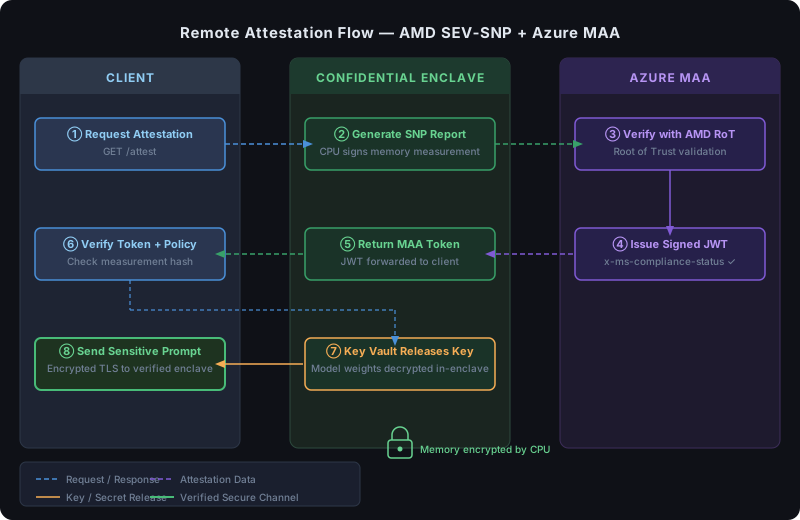 Client requests attestation, MAA verifies with AMD Root of Trust, client proceeds only after verification
Step 4: Deploy with Encrypted Model Weights
Model weights need to arrive in the enclave without the host ever seeing them decrypted. Use Azure Key Vault with key release policies tied to attestation.
# Create a key in Azure Key Vault with a release policy
# The key is ONLY released to VMs that pass attestation

az keyvault key create \
  --vault-name your-vault \
  --name model-encryption-key \
  --kty RSA \
  --size 4096 \
  --exportable true \
  --policy @key-release-policy.json

# key-release-policy.json — only release to attested CVMs
{
  "anyOf": [
    {
      "allOf": [
        {
          "claim": "x-ms-compliance-status",
          "equals": "azure-compliant-cvm"
        },
        {
          "claim": "x-ms-isolation-tee.x-ms-attestation-type",
          "equals": "sevsnpvm"
        }
      ]
    }
  ],
  "version": "1.0.0"
}
# Encrypt model weights before uploading to storage
openssl enc -aes-256-gcm \
  -in ./mistral-7b-q4.bin \
  -out ./mistral-7b-q4.bin.enc \
  -pass env:MODEL_ENCRYPTION_KEY \
  -pbkdf2

# Upload encrypted weights to Azure Blob
az storage blob upload \
  --file ./mistral-7b-q4.bin.enc \
  --container-name models \
  --name mistral-7b-q4.bin.enc \
  --auth-mode login
Inside the enclave startup script, the VM requests the key using its attestation token, decrypts the weights, and loads them. The host only ever sees encrypted bytes.
Verification
# 1. Check the container image measurement matches your expected value
docker inspect your-inference-image --format='{{.Id}}'
# Record this SHA — it's what you'll verify during attestation

# 2. Test the full attestation flow end-to-end
python attestation_client.py --enclave-url https://your-enclave.example.com --verbose

# 3. Verify inference works with a non-sensitive prompt
curl -X POST https://your-enclave.example.com/infer \
  -H "Content-Type: application/json" \
  -d '{"prompt": "What is 2+2?", "max_new_tokens": 10}'
You should see:
{
  "attestation_status": "valid",
  "compliance": "azure-compliant-cvm",
  "response": "4"
}
 Attestation succeeds and inference returns a result — both steps required for a compliant deployment
What You Learned
- SEV-SNP and TDX encrypt VM memory at the hardware level, preventing host-level inspection of model weights and prompts
- Remote attestation lets clients verify enclave integrity cryptographically before sending sensitive data — encryption alone isn't enough
- Key release policies in Azure Key Vault can gate model weight access on passing attestation, so weights are never decrypted outside a verified enclave
Limitations to know:
- TEE memory is limited (typically 256GB on current Azure DCasv5 SKUs) — very large models may need offloading strategies that partially break the trust boundary
- Attestation adds ~200–500ms of latency per new client session; cache attestation tokens for the duration of a session
- Side-channel attacks (cache timing, power analysis) are not fully mitigated by SEV-SNP — defense-in-depth still applies
- This guide uses Azure; GCP Confidential VMs (N2D with SEV-SNP) and AWS Nitro Enclaves use different attestation APIs
When NOT to use this:
- Low-sensitivity workloads where operator trust is acceptable — the operational overhead is significant
- Batch offline inference — TEEs are most valuable for interactive, real-time workloads where data is in-flight
Tested on Azure DCasv5 (AMD EPYC Genoa, SEV-SNP), PyTorch 2.5, Python 3.12, Ubuntu 24.04 CVM image