Compiling llama.cpp from source gives you full control over which acceleration backend runs your models — CPU-only for portability, CUDA for NVIDIA GPUs, or Metal for Apple Silicon. Pre-built binaries often lag behind releases by days and can miss hardware-specific tuning flags.
You'll learn:
- Build llama.cpp on Ubuntu 24, Windows 11, and macOS (M1–M4)
- Enable CUDA on NVIDIA cards and Metal on Apple Silicon
- Verify each backend is actually being used, not silently falling back to CPU
Time: 25 min | Difficulty: Intermediate
Why Build From Source?
Pre-built releases ship with conservative defaults. CUDA builds require matching your local CUDA toolkit version. Metal builds for Apple Silicon need the right macOS SDK. Getting either wrong at runtime means silent CPU fallback — full 8-bit inference at 3 tokens/sec instead of 60.
Symptoms of a misconfigured build:
ggml_cuda_init: no CUDA devices foundin logs despite a working GPUllama_new_context_with_model: n_ctx_per_seq (512) < n_ctx (4096)with no GPU layers loadedmetal: GPU not supportedon M-series Mac running a non-Metal binary- Token generation speed under 5 t/s on hardware that should do 40+
Backend Overview
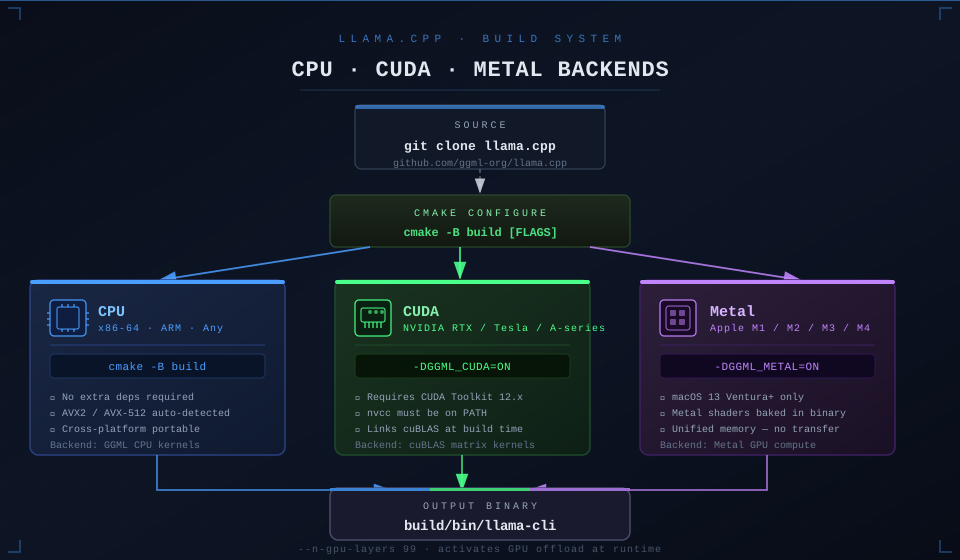 llama.cpp build paths: each CMake flag activates a different GGML compute backend at link time
| Backend | Flag | Hardware | Platform |
|---|---|---|---|
| CPU (default) | (none needed) | Any x86-64 / ARM | Linux, Windows, macOS |
| CUDA | -DGGML_CUDA=ON | NVIDIA RTX / Tesla / A-series | Linux, Windows |
| Metal | -DGGML_METAL=ON | Apple M1 / M2 / M3 / M4 | macOS 13+ |
| Vulkan | -DGGML_VULKAN=ON | AMD / Intel Arc | Linux, Windows |
| ROCm | -DGGML_HIPBLAS=ON | AMD RX 7000-series | Linux |
This guide covers CPU, CUDA, and Metal. Vulkan and ROCm follow the same CMake pattern — swap the flag.
Prerequisites
All Platforms
git2.40+cmake3.21+- C++17-capable compiler: GCC 12+ (Linux), MSVC 2022+ (Windows), Clang 15+ (macOS)
CUDA (Linux / Windows)
- NVIDIA driver 525+ — check with
nvidia-smi - CUDA Toolkit 12.x — download from developer.nvidia.com (free, no account needed for toolkit)
nvcconPATH— verify withnvcc --version
Metal (macOS)
- macOS 13 Ventura or newer
- Xcode Command Line Tools:
xcode-select --install - No extra GPU SDK needed — Metal is bundled with macOS
Step 1: Clone the Repository
# Always clone the main branch — tagged releases lag behind CUDA/Metal fixes
git clone https://github.com/ggml-org/llama.cpp
cd llama.cpp
Check the latest commit date:
git log --oneline -5
Expected output: Five recent commits with dates within the last few days. If you see months-old hashes, you have a stale mirror — re-clone from the canonical URL above.
Step 2: CPU-Only Build (All Platforms)
CPU build compiles everywhere with zero extra dependencies. Use this to verify your toolchain before adding GPU flags.
Linux / macOS
cmake -B build \
  -DCMAKE_BUILD_TYPE=Release    # Release applies -O3; Debug is 4–5× slower
cmake --build build --config Release -j$(nproc)
Windows (PowerShell)
cmake -B build -DCMAKE_BUILD_TYPE=Release
cmake --build build --config Release -j $env:NUMBER_OF_PROCESSORS
Expected output (last lines):
[100%] Linking CXX executable llama-cli
[100%] Built target llama-cli
Binaries land in build/bin/. Run a quick sanity check:
./build/bin/llama-cli --version
Step 3: CUDA Build (NVIDIA GPUs — Linux / Windows)
Verify CUDA Toolkit First
nvcc --version
# nvcc: NVIDIA (R) Cuda compiler driver, release 12.4
nvidia-smi --query-gpu=name,driver_version,memory.total --format=csv,noheader
# NVIDIA GeForce RTX 4090, 551.23, 24564 MiB
If nvcc is missing, install the CUDA Toolkit. On Ubuntu 24:
# CUDA 12.4 on Ubuntu 24 — match your driver's max supported CUDA version
wget https://developer.download.nvidia.com/compute/cuda/repos/ubuntu2404/x86_64/cuda-keyring_1.1-1_all.deb
sudo dpkg -i cuda-keyring_1.1-1_all.deb
sudo apt-get update
sudo apt-get install -y cuda-toolkit-12-4
echo 'export PATH=/usr/local/cuda-12.4/bin:$PATH' >> ~/.bashrc
source ~/.bashrc
Build with CUDA
cmake -B build \
  -DCMAKE_BUILD_TYPE=Release \
  -DGGML_CUDA=ON               # Main flag — activates cuBLAS matrix multiply kernels
cmake --build build --config Release -j$(nproc)
Optional CUDA tuning flags:
cmake -B build \
  -DCMAKE_BUILD_TYPE=Release \
  -DGGML_CUDA=ON \
  -DGGML_CUDA_F16=ON \          # Half-precision — 15–20% faster on Ampere+ (RTX 30/40-series)
  -DCMAKE_CUDA_ARCHITECTURES="89"  # sm_89 = RTX 40-series; skip older arch JIT compilation
CUDA architecture codes: 75 = Turing (RTX 20xx) · 86 = Ampere (RTX 30xx) · 89 = Ada Lovelace (RTX 40xx) · 90 = Hopper (H100).
Expected build output includes:
-- CUDA found
-- cuBLAS found
-- Using CUDA architectures: 89
Verify GPU is Being Used
./build/bin/llama-cli \
  -m path/to/model.gguf \
  -p "Hello" \
  -n 10 \
  --n-gpu-layers 99   # Offload all layers to GPU; reduce if OOM
Look for this in the output:
llm_load_tensors: offloaded 32/32 layers to GPU
llm_load_tensors: VRAM used: 7842 MiB
If you see offloaded 0/32, the binary was linked without CUDA — rebuild from a clean build/ directory:
rm -rf build && cmake -B build -DGGML_CUDA=ON ...
Step 4: Metal Build (Apple Silicon — macOS)
Metal is the default on macOS when building with Clang. You still need to pass the flag explicitly on macOS 13+ to ensure the Metal shader cache is compiled at build time rather than lazily at first run.
cmake -B build \
  -DCMAKE_BUILD_TYPE=Release \
  -DGGML_METAL=ON              # Compiles Metal shaders into the binary at build time
cmake --build build --config Release -j$(sysctl -n hw.logicalcpu)
Expected output includes:
-- Metal framework found
-- Using Metal
Verify Metal GPU Usage
./build/bin/llama-cli \
  -m path/to/model.gguf \
  -p "Hello" \
  -n 10 \
  --n-gpu-layers 1   # Start with 1 layer to confirm Metal path activates
Look for:
ggml_metal_init: GPU name: Apple M3 Pro
ggml_metal_init: recommendedMaxWorkingSetSize = 18.00 GB
llm_load_tensors: offloaded 1/32 layers to GPU
Then raise --n-gpu-layers 99 to offload the full model. M2 Pro with 16GB unified memory can offload a full Llama 3.2 8B Q4_K_M (≈4.9 GB) with headroom to spare.
Step 5: Run a Model End-to-End
Download a small model to verify your build:
# Llama 3.2 1B — 800 MB, fast to download, good smoke test
wget https://huggingface.co/bartowski/Llama-3.2-1B-Instruct-GGUF/resolve/main/Llama-3.2-1B-Instruct-Q4_K_M.gguf
Run inference:
./build/bin/llama-cli \
  -m Llama-3.2-1B-Instruct-Q4_K_M.gguf \
  -p "Explain what llama.cpp does in two sentences." \
  -n 80 \
  --n-gpu-layers 99 \
  --threads 8          # CPU threads for layers not on GPU; match physical core count
Benchmark your build:
./build/bin/llama-bench \
  -m Llama-3.2-1B-Instruct-Q4_K_M.gguf \
  --n-gpu-layers 99
Expected throughput ballpark (prompt processing / generation):
| Hardware | Prompt t/s | Generation t/s |
|---|---|---|
| RTX 4090 (CUDA, Q4_K_M 8B) | ~3800 | ~120 |
| M3 Pro 18GB (Metal, Q4_K_M 8B) | ~900 | ~65 |
| Ryzen 9 7950X (CPU-only, Q4_K_M 8B) | ~180 | ~12 |
What You Learned
cmake -B buildseparates source and build directories — always use this over in-source builds-DGGML_CUDA=ONlinks cuBLAS; without it the binary silently uses CPU even on a GPU machine--n-gpu-layers 99is how you actually push layers to GPU at runtime — the build flag enables the capability, the CLI flag uses it- Clean the
build/directory when switching backends — CMake caches flags and a partial CUDA cache causes subtle failures
Tested on llama.cpp b5150, Ubuntu 24.04 + CUDA 12.4 + RTX 4080, macOS 14.4 + M3 Pro, Windows 11 + CUDA 12.4 + RTX 4070 Ti
FAQ
Q: Do I need to rebuild if I update llama.cpp with git pull?
A: Yes. Run cmake --build build --config Release -j$(nproc) again from the repo root. CMake only recompiles changed files, so incremental builds are fast — usually under 90 seconds.
Q: What's the difference between -DGGML_CUDA=ON and -DLLAMA_CUBLAS=ON?
A: LLAMA_CUBLAS was the old flag used before the codebase was restructured to ggml in late 2024. It no longer works on b4000+. Always use -DGGML_CUDA=ON on current builds.
Q: How much VRAM do I need to offload a full 7B model?
A: A Q4_K_M quantized 7B model needs roughly 4.5–5 GB of VRAM. An 8 GB card (RTX 3070, RTX 4060) fits it with room for context. Use --n-gpu-layers 20 to partially offload if you're short on VRAM.
Q: Can I build CUDA and Metal into the same binary? A: No. They are mutually exclusive backends. Build separate binaries and use whichever matches the machine you're running on.
Q: Does the CPU build use AVX2/AVX-512 automatically?
A: Yes — llama.cpp's CMake detects your host CPU features at configure time and enables AVX2 or AVX-512 VNNI where available. You can override with -DGGML_AVX2=OFF if cross-compiling for older hardware.