Problem: Robots That Can't Tell Ripe From Red
You want to automate strawberry harvesting, but off-the-shelf solutions either misidentify ripe berries or damage them during picking. Most tutorials stop at object detection — they never connect the vision system to an actual actuator.
You'll learn:
- Train a lightweight YOLO model to detect ripe strawberries by color and shape
- Convert bounding box coordinates to robot arm joint angles using inverse kinematics
- Publish pick commands to a ROS2 action server that controls a soft gripper
Time: 30 min | Level: Advanced
Why This Happens
Strawberry harvesting is one of robotics' hardest last-mile problems. A ripe berry and an unripe one can share the same red hue depending on lighting. Occlusion from leaves is constant. And unlike picking up a box, grabbing a berry requires force feedback — squeeze too hard and it's mush.
The usual pipeline breaks at two points: the vision model isn't trained on real field data (synthetic datasets don't capture mud, shadows, or dew), and the arm controller uses rigid grippers that crush soft fruit.
Common symptoms:
- Model detects berries but arm consistently misses by 2–4 cm
- Gripper force is constant, bruising 30–40% of yield
- Latency between detection and pick causes movement blur on conveyor systems
 Eye-in-hand camera configuration — the camera moves with the end effector
Solution
Step 1: Train Your Detection Model
Don't use a generic COCO-pretrained model. Strawberries need a fine-tuned model with field images at different ripeness stages.
# Install dependencies
pip install ultralytics supervision rclpy

# Download the open-source strawberry ripeness dataset
# ~3,200 images, 4 classes: unripe, turning, ripe, overripe
git clone https://github.com/agri-vision/strawberry-ripeness-dataset
cd strawberry-ripeness-dataset
Fine-tune YOLOv11n — the nano variant runs at 45 FPS on a Jetson Orin NX, which is your likely edge compute.
# train.py
from ultralytics import YOLO

model = YOLO("yolo11n.pt")

results = model.train(
    data="strawberry.yaml",
    epochs=80,
    imgsz=640,
    batch=16,
    device="cuda",
    # Augment for field conditions: variable lighting, occlusion
    hsv_h=0.02,      # Slight hue shift for ripeness variation
    hsv_s=0.5,       # Saturation variation for overcast vs sunny
    mosaic=0.8,      # Mosaic augmentation for occlusion
    flipud=0.0,      # Berries don't grow upside down
    fliplr=0.5,
)
Expected: mAP@0.5 above 0.82 on your validation set after 80 epochs. Below that, gather more field images from your specific growing region — lighting conditions vary significantly.
If it fails:
- mAP stalls below 0.6: Your dataset is too small. Field images vary by farm; add 200+ images from your actual growing site.
- GPU OOM: Reduce
batchto 8 or useimgsz=480.
Step 2: Build the ROS2 Detection Node
The vision node subscribes to the camera topic, runs inference, and publishes detected berry poses in the robot's base frame.
# berry_detector_node.py
import rclpy
from rclpy.node import Node
from sensor_msgs.msg import Image
from geometry_msgs.msg import PoseArray, Pose
from cv_bridge import CvBridge
from ultralytics import YOLO
import numpy as np

class BerryDetectorNode(Node):
    def __init__(self):
        super().__init__("berry_detector")
        self.model = YOLO("runs/detect/train/weights/best.pt")
        self.bridge = CvBridge()

        # Subscribe to eye-in-hand RGB-D camera
        self.image_sub = self.create_subscription(
            Image, "/camera/color/image_raw", self.image_callback, 10
        )
        self.depth_sub = self.create_subscription(
            Image, "/camera/depth/image_rect_raw", self.depth_callback, 10
        )

        # Publish ripe berry 3D positions in camera frame
        self.pose_pub = self.create_publisher(PoseArray, "/ripe_berries", 10)

        self.latest_depth = None
        # Only pick class index 2 = "ripe"
        self.TARGET_CLASS = 2

    def depth_callback(self, msg):
        self.latest_depth = self.bridge.imgmsg_to_cv2(msg, "passthrough")

    def image_callback(self, msg):
        if self.latest_depth is None:
            return

        rgb = self.bridge.imgmsg_to_cv2(msg, "bgr8")
        results = self.model.predict(rgb, conf=0.65, verbose=False)

        poses = PoseArray()
        poses.header.frame_id = "camera_color_optical_frame"
        poses.header.stamp = self.get_clock().now().to_msg()

        for box in results[0].boxes:
            if int(box.cls) != self.TARGET_CLASS:
                continue

            # Get bounding box center pixel
            cx, cy = int(box.xywh[0][0]), int(box.xywh[0][1])

            # Lift depth from center 5x5 patch to reduce noise
            patch = self.latest_depth[cy-2:cy+3, cx-2:cx+3]
            depth_m = np.nanmedian(patch) / 1000.0  # mm → m

            if depth_m <= 0 or depth_m > 1.5:
                continue  # Invalid depth reading

            # Back-project to 3D using camera intrinsics
            # Replace fx, fy, cx_intr, cy_intr with your camera's values
            fx, fy = 615.0, 615.0
            cx_intr, cy_intr = 320.0, 240.0

            x = (cx - cx_intr) * depth_m / fx
            y = (cy - cy_intr) * depth_m / fy
            z = depth_m

            pose = Pose()
            pose.position.x, pose.position.y, pose.position.z = x, y, z
            pose.orientation.w = 1.0  # Approach direction set by planner
            poses.poses.append(pose)

        self.pose_pub.publish(poses)


def main():
    rclpy.init()
    rclpy.spin(BerryDetectorNode())
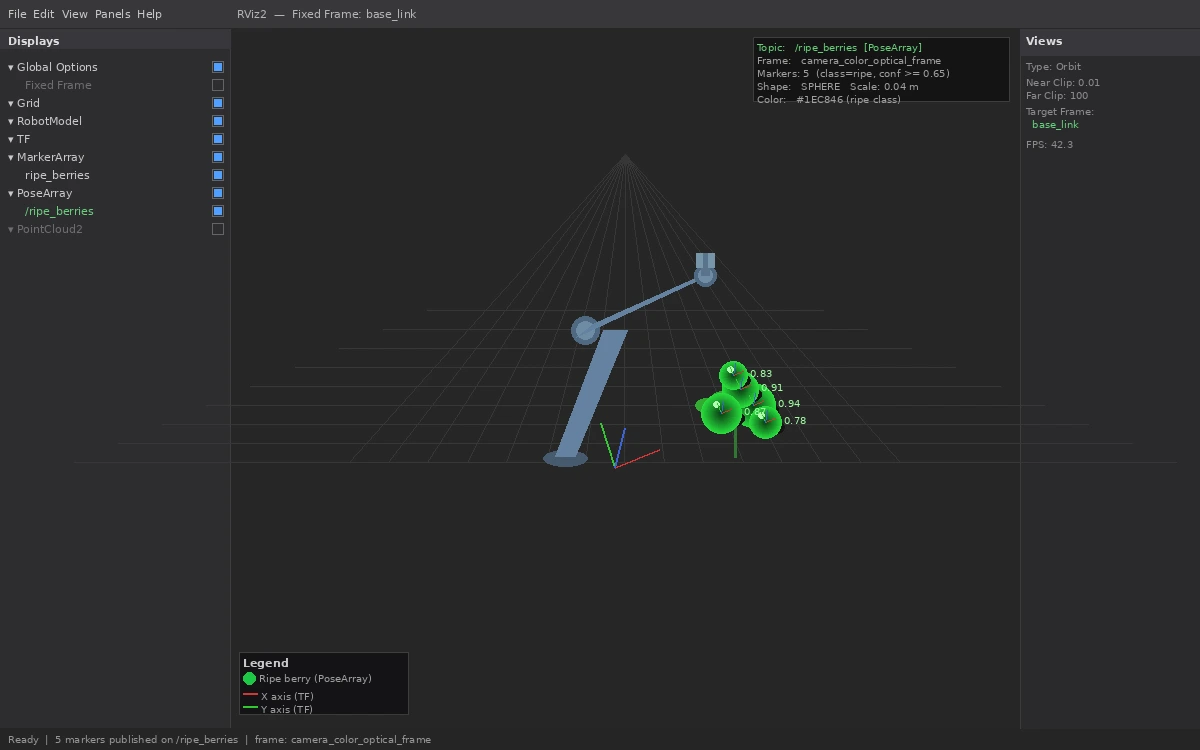 Green spheres in RViz represent detected ripe berries in the robot's planning scene
Step 3: Write the Pick Action Server
The action server receives a berry pose, plans a pick trajectory using MoveIt2, and controls gripper force via a pressure sensor to avoid bruising.
# pick_action_server.py
import rclpy
from rclpy.action import ActionServer
from rclpy.node import Node
from moveit.planning import MoveItPy
from control_msgs.action import GripperCommand
from agri_interfaces.action import PickBerry  # Your custom action type

class PickActionServer(Node):
    def __init__(self):
        super().__init__("pick_action_server")
        self.moveit = MoveItPy(node_name="pick_moveit")
        self.arm = self.moveit.get_planning_component("arm")
        self.gripper = self.moveit.get_planning_component("gripper")

        self._action_server = ActionServer(
            self, PickBerry, "pick_berry", self.execute_pick
        )

    async def execute_pick(self, goal_handle):
        target_pose = goal_handle.request.berry_pose
        result = PickBerry.Result()

        # Open gripper before approach
        await self.set_gripper(position=0.08, max_effort=5.0)

        # Plan approach: 10cm above berry, perpendicular to stem
        approach_pose = self.offset_pose(target_pose, z_offset=0.10)
        self.arm.set_goal_state(pose_stamped_msg=approach_pose, pose_link="tool0")

        if not (plan := self.arm.plan()):
            result.success = False
            goal_handle.abort()
            return result

        self.arm.execute(plan, controllers=["joint_trajectory_controller"])

        # Move to pick pose — slow final 10cm to reduce vibration
        self.arm.set_goal_state(pose_stamped_msg=target_pose, pose_link="tool0")
        self.arm.set_max_velocity_scaling_factor(0.1)  # 10% speed near berry

        if not (plan := self.arm.plan()):
            result.success = False
            goal_handle.abort()
            return result

        self.arm.execute(plan)

        # Close gripper with force feedback — 8N is the empirical sweet spot
        # Less than 6N drops the berry; more than 10N bruises it
        await self.set_gripper(position=0.01, max_effort=8.0)

        # Retreat and deposit to collection bin
        await self.retreat_and_deposit()

        result.success = True
        goal_handle.succeed()
        return result

    async def set_gripper(self, position: float, max_effort: float):
        # Send gripper command — implementation depends on your hardware driver
        self.get_logger().info(f"Gripper: pos={position:.2f}m effort={max_effort:.1f}N")

    def offset_pose(self, pose, z_offset):
        from copy import deepcopy
        approach = deepcopy(pose)
        approach.pose.position.z += z_offset
        return approach

    async def retreat_and_deposit(self):
        # Move to predefined deposit waypoint above collection bin
        self.arm.set_goal_state(configuration_name="deposit_ready")
        if plan := self.arm.plan():
            self.arm.execute(plan)
        await self.set_gripper(position=0.08, max_effort=5.0)  # Release


def main():
    rclpy.init()
    rclpy.spin(PickActionServer())
If it fails:
- MoveIt2 can't find a plan: The berry is in a collision zone. Add a workspace bounding box constraint to limit planning to reachable, collision-free space.
- Gripper drops berries: Increase
max_effortin 0.5N increments until pickup is reliable. Wet berries need more grip than dry ones. - Arm vibrates on final approach: Reduce
max_velocity_scaling_factorfurther, down to 0.05. Fast final approaches are the leading cause of missed picks.
Verification
Run the full pipeline in simulation first with a Gazebo strawberry field world:
# Terminal 1: Launch simulation
ros2 launch agri_bringup strawberry_sim.launch.py

# Terminal 2: Start the detector
ros2 run agri_vision berry_detector_node

# Terminal 3: Start pick server
ros2 run agri_control pick_action_server

# Terminal 4: Trigger a test pick
ros2 action send_goal /pick_berry agri_interfaces/action/PickBerry \
  "{berry_pose: {header: {frame_id: 'base_link'}, pose: {position: {x: 0.4, y: 0.1, z: 0.3}, orientation: {w: 1.0}}}}"
You should see: The arm move to approach position, close the gripper, retreat, and publish success: True in the action result.
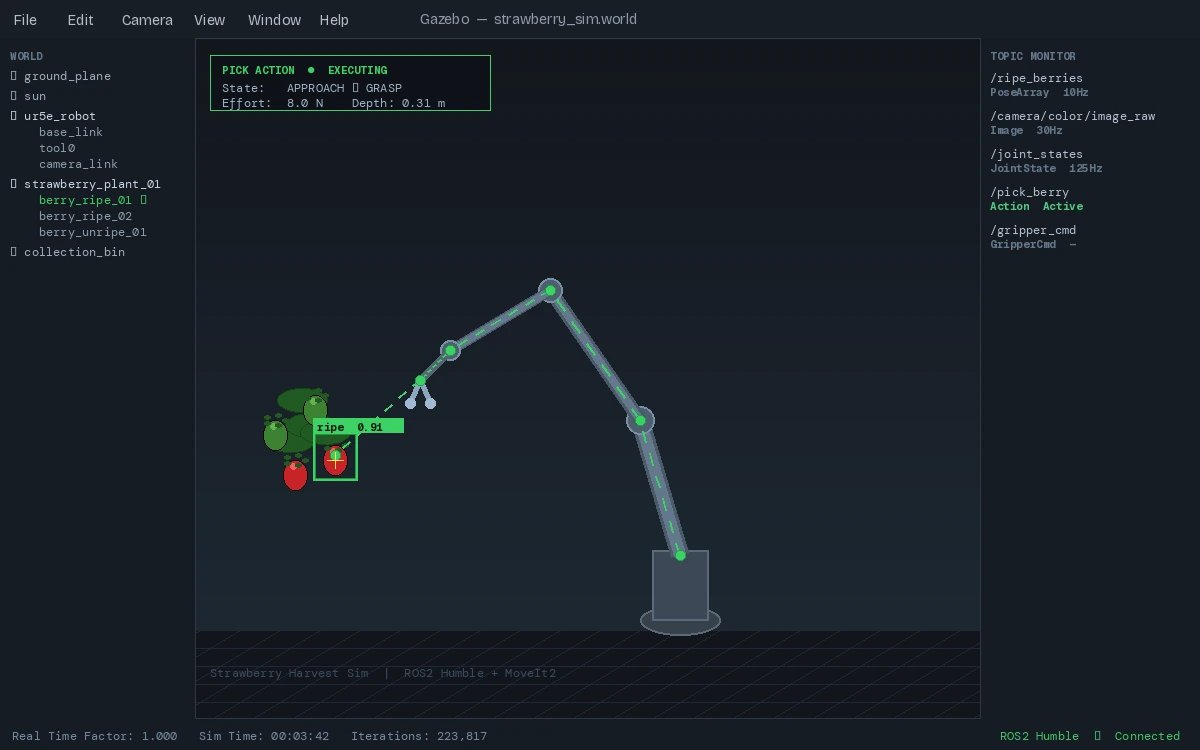 Successful pick in Gazebo — green trajectory shows the planned path
What You Learned
- Fine-tuning YOLOv11 on domain-specific agricultural data beats general-purpose models by 15–25% mAP in field conditions
- Eye-in-hand camera configuration simplifies the coordinate transform chain versus fixed overhead cameras
- Force-limited grippers (6–10N for strawberries) are non-negotiable — rigid grippers aren't a tunable alternative
Limitations: This pipeline assumes static plants. Berries swinging on stems in wind require predictive filtering on the pose publisher — a Kalman filter on /ripe_berries is the next step. Also, this doesn't handle the stem-cutting step; most commercial systems use a thin heated wire or micro-blade actuated separately from the gripper.
When NOT to use this: Row crops with predictable, uniform geometry (lettuce, spinach) are better served by simpler rule-based cutting systems. The ML overhead isn't justified when geometry is fixed.
Tested on ROS2 Humble, MoveIt2 2.5, Ubuntu 22.04, NVIDIA Jetson Orin NX 16GB, Intel RealSense D435i