Problem: Claude Code Forgets Your Project Every Session
Claude Code project memory resets between sessions by default — no stack knowledge, no conventions, no commands. Every new chat, you're re-explaining the same architecture.
You'll learn:
- How
.claude/directory structure controls persistent memory - How to write a
CLAUDE.mdthat actually changes Claude's behavior - How to add custom slash commands and project-level settings
Time: 15 min | Difficulty: Intermediate
Why This Happens
Claude Code is stateless at the model level. Each session starts fresh. The .claude/ directory is the escape hatch — it injects context automatically at session start without any user prompt.
Symptoms:
- Claude ignores your preferred stack (e.g., keeps suggesting
npmwhen you usebun) - Repeats mistakes you've already corrected in past sessions
- Asks about project structure you've explained three times
How .claude Files Work
Claude Code reads three sources of persistent context before your first message:
CLAUDE.md— free-form markdown injected as system context.claude/settings.json— structured config for model params, permissions, and hooks.claude/commands/— custom slash commands as.mdfiles
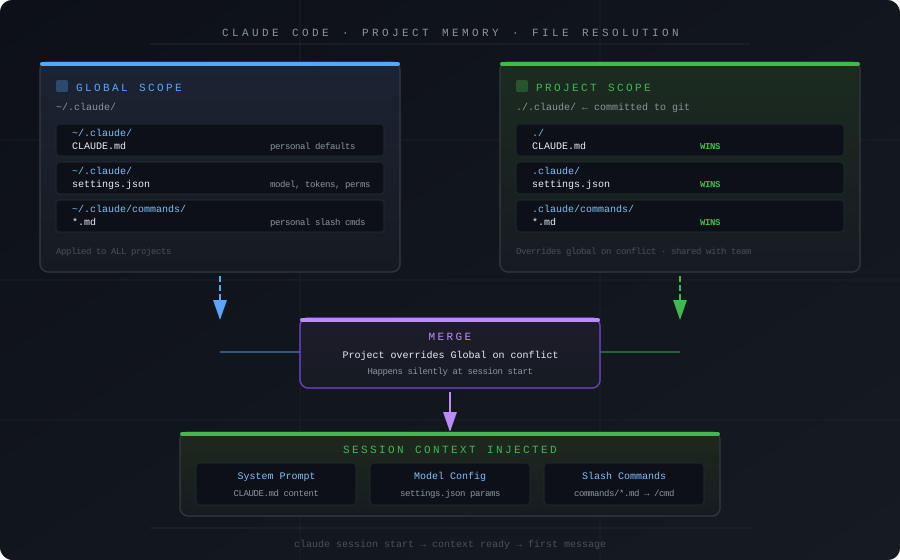 How Claude Code resolves .claude files: global (~/.claude) merges with project-level (.claude/) at session start
There are two scopes:
| Scope | Location | Use for |
|---|---|---|
| Global | ~/.claude/ | Your personal defaults across all projects |
| Project | ./.claude/ | Team-shared conventions, stack rules, commands |
Project-level always wins on conflict.
Solution
Step 1: Initialize the .claude Directory
# From your project root
mkdir -p .claude/commands

# Verify Claude Code picks it up
claude --version  # Requires Claude Code >= 1.0.0
Expected output: No error — Claude Code silently reads .claude/ at launch.
If it fails:
command not found: claude→ Install vianpm i -g @anthropic-ai/claude-code
Step 2: Write an Effective CLAUDE.md
CLAUDE.md is injected verbatim into the system prompt. Keep it under 800 tokens — every token here costs inference time on every message.
# Project: [Your App Name]

## Stack
- Runtime: Bun 1.1 (never suggest npm or yarn)
- Framework: Hono on Bun
- DB: PostgreSQL 16 via Drizzle ORM
- Infra: Docker + fly.io (us-east region)

## Conventions
- All new files: TypeScript strict mode
- Error handling: always use Result<T, E> pattern, never throw
- Tests: Vitest, colocated with source files as `*.test.ts`
- Commits: conventional commits — feat/fix/chore/docs

## Commands
- `bun dev` — starts dev server on :3000
- `bun test` — runs Vitest
- `bun db:migrate` — runs Drizzle migrations

## Do Not
- Suggest React or Next.js — this is a pure API project
- Use `any` type — use `unknown` and narrow
- Add new dependencies without mentioning the bundle size impact
The three sections that matter most: Stack block eliminates wrong framework suggestions. Do Not block is where most teams get ROI — list your most common Claude mistakes from past sessions. Commands block lets Claude run them directly without guessing variants.
Step 3: Add Project-Level Settings
.claude/settings.json controls behavior beyond the prompt:
{
  "model": "claude-sonnet-4-20250514",
  "max_tokens": 8192,
  "permissions": {
    "allow_file_write": true,
    "allow_shell_exec": true,
    "shell_exec_allowlist": ["bun", "docker", "git", "psql"]
  },
  "hooks": {
    "pre_tool_use": "echo '[claude] tool: $TOOL_NAME'"
  }
}
| Key | Value | Why |
|---|---|---|
model | claude-sonnet-4-20250514 | Sonnet balances speed and quality for code |
max_tokens | 8192 | Enough for full file rewrites; 16k slows response |
shell_exec_allowlist | ["bun", "git"] | Prevents destructive shell variants |
allow_file_write | true | Required for autonomous edits |
Step 4: Create Custom Slash Commands
Slash commands live in .claude/commands/*.md. The filename becomes the command name.
.claude/commands/review.md:
Review the diff of the current branch against main.

Check for:
1. TypeScript strict violations (no implicit any, no non-null assertions)
2. Missing error handling — all async functions must handle rejection
3. N+1 query patterns in Drizzle ORM calls
4. Hardcoded secrets or API keys

Output format:
- One line per issue
- Severity: [critical | warning | suggestion]
- File and line number if applicable
Use it in session:
/review
/migrate add users.subscription_tier column as enum
Expected output: Claude executes the command definition with your full project context already loaded.
Step 5: Commit .claude Selectively
# .gitignore
.claude/settings.local.json   # personal API key overrides
.claude/.session_*            # session cache files
git add .claude/commands/ CLAUDE.md .claude/settings.json
git commit -m "chore: add claude code project memory config"
Every teammate now gets the same Claude behavior on git pull.
Verification
claude
> What stack is this project using?
You should see: Claude names Bun, Hono, Drizzle, and PostgreSQL without prompting. If it hedges, the CLAUDE.md path or content is wrong.
What You Learned
.claude/is read at session start — project scope overrides globalCLAUDE.mdunder 800 tokens is injected as system context on every messageshell_exec_allowlistinsettings.jsonis your safety net for autonomous shell use- Slash commands in
.claude/commands/turn repeated prompts into one-word calls - Committing
.claude/(minus local overrides) standardizes AI behavior across the team
Tested on Claude Code 1.x, Node 22, macOS 15 & Ubuntu 24.04
FAQ
Q: Does CLAUDE.md work in Claude.ai web, or only Claude Code CLI?
A: Only Claude Code CLI reads .claude/ automatically. In Claude.ai web, use a Project with custom instructions instead.
Q: How large can CLAUDE.md get before it hurts performance? A: Keep it under 800 tokens (~600 words). Split larger content into slash commands that load on demand.
Q: Can I have multiple CLAUDE.md files in subdirectories?
A: Yes — Claude Code merges them. Useful for monorepos where packages/api/CLAUDE.md has different rules than packages/web/CLAUDE.md.
Q: What's the difference between settings.json and settings.local.json?
A: settings.json is committed to git for the team. settings.local.json overrides it locally for personal API keys or higher token limits on your machine.