Problem: Refactoring Across Files Without Breaking Everything
Claude Code multi-file refactoring lets you restructure an entire codebase in one agentic session — renaming modules, splitting god classes, and updating every import in one shot.
The catch: most developers run it wrong and end up with half-applied changes, broken imports, or a diff they can't review.
You'll learn:
- How to plan a multi-file refactor so Claude Code doesn't miss a file
- How to stage, verify, and roll back changes safely with Git
- Real patterns that work — extracted from refactoring a 4,000-line Python service
Time: 20 min | Difficulty: Intermediate
Why Multi-File Refactoring Is Hard for AI Agents
Claude Code is an agentic CLI tool — it reads, edits, and runs code directly in your terminal. Unlike inline copilots, it holds the full task context and can touch dozens of files in one session.
That power creates a specific failure mode: the model applies early changes and then loses track of downstream files that also need updating. The result is a partially refactored codebase that compiles but fails at runtime.
Symptoms of a bad multi-file refactor:
ImportError: cannot import name 'X' from 'Y'after renaming a module- Tests pass locally but CI fails because an env-specific import path wasn't updated
- Type errors that appear only after you run the full type-checker, not file-by-file
Understanding this failure mode is the whole game. Every step below is designed to prevent it.
Architecture: How Claude Code Executes Agentic Edits
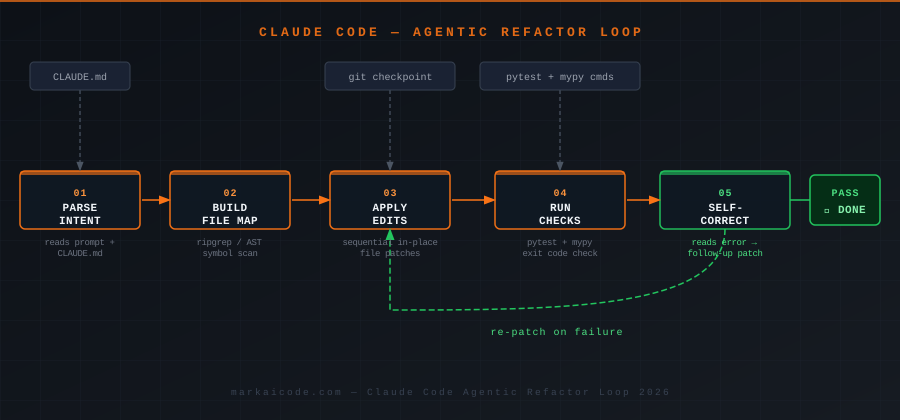 Claude Code's agentic loop: parse intent → build file map → apply edits → run checks → self-correct
Claude Code runs a loop internally:
- Parse intent — reads your prompt and identifies scope (which files, which symbols)
- Build a file map — uses
grep,ripgrep, or AST tools to find every occurrence - Apply edits — patches files sequentially using its built-in editor
- Run checks — executes lint, type-check, or test commands you specify
- Self-correct — if a check fails, it reads the error and applies a follow-up patch
The loop breaks when all checks pass or when it hits a permission wall. Step 4 is where most developers lose control — skipping checks means step 5 never fires.
Solution
Step 1: Commit Everything Before You Start
Before you invoke Claude Code, your working tree must be clean. This is non-negotiable.
# Verify clean state — no output means you're good
git status --short

# If dirty, stash or commit
git add -A && git commit -m "chore: pre-refactor checkpoint"
Why: Claude Code applies edits in-place. If something goes wrong mid-session, git diff is your only clean rollback path. Starting dirty means you can't tell which changes are yours and which are the agent's.
Step 2: Write a Scoped Refactor Plan in CLAUDE.md
Claude Code reads CLAUDE.md at the project root as persistent context. Put your refactor plan there — not in the CLI prompt.
touch CLAUDE.md
# Refactor Plan: Split UserService

## Goal
Split `src/services/user_service.py` (1,200 lines) into:
- `src/services/user_auth.py` — authentication methods only
- `src/services/user_profile.py` — profile CRUD methods only
- `src/services/user_notifications.py` — notification dispatch only

## Rules
- Do NOT change method signatures
- Update every import in `src/`, `tests/`, and `scripts/`
- Run `pytest tests/` after each file split — do not proceed if tests fail
- Use relative imports inside `src/services/`

## Out of Scope
- No changes to `src/models/`
- No changes to API route handlers
Why CLAUDE.md instead of a prompt: The plan persists across the entire session. A CLI prompt gets truncated from context as the session grows. CLAUDE.md does not.
Step 3: Run Claude Code with Explicit Check Commands
# Start Claude Code in your project root
claude

# Inside the session, give this as your first message:
Read CLAUDE.md and execute the refactor plan.

After each file split, run:
  pytest tests/unit/test_user_service.py -x -q
  mypy src/services/ --ignore-missing-imports

Do not move to the next split until both commands exit 0.
Report which files you changed after each step.
Expected output after Step 1 of the refactor:
✔ Created src/services/user_auth.py (14 methods moved)
✔ Updated imports in: api/routes/auth.py, tests/unit/test_user_service.py (3 refs)
✔ pytest: 42 passed in 1.8s
✔ mypy: Success: no issues found
Proceeding to step 2...
If it fails:
ImportErroron pytest run → Claude Code will self-correct; if it doesn't in 2 attempts, typestopand checkgit diffmanuallymypy: error: Module has no attribute→ Your__init__.pyprobably needs a re-export; tell Claude Code:Update src/services/__init__.py to re-export all public symbols from the new modules
Step 4: Review the Diff Before You Accept
Claude Code stages edits live — your files change on disk as it works. After it reports completion, review everything before running your full test suite.
# See every file touched
git diff --stat HEAD

# Review a specific file
git diff HEAD src/services/user_auth.py

# Scan for any remaining references to the old monolith
rg "from src.services.user_service import" --type py
You should see: zero results from the rg command. Any remaining reference is a missed import — fix it before proceeding.
# If clean, run full test suite
pytest tests/ -x --tb=short

# And type-check the whole project
mypy src/ --ignore-missing-imports
Step 5: Handle the --dangerously-skip-permissions Flag Correctly
You'll see advice online to run Claude Code with --dangerously-skip-permissions. Here's when it's appropriate and when it isn't.
# Only use this in isolated environments — CI containers, Docker, sandboxes
claude --dangerously-skip-permissions
Use it when:
- Running inside a Docker container with no credentials mounted
- CI pipeline with a throwaway environment
- You've already reviewed the CLAUDE.md plan and trust the scope
Never use it when:
- Your shell has AWS, GCP, or GitHub tokens in env vars
- You're working in a shared dev environment
- You haven't committed a clean checkpoint (Step 1)
The flag removes all permission prompts — including ones that would stop Claude Code from running shell commands you didn't intend.
Verification
# Full verification sequence
pytest tests/ --tb=short -q
mypy src/ --ignore-missing-imports
rg "user_service" src/ --type py   # Should only match the new split files, not the old monolith name
git diff --stat HEAD                # Review total change surface
You should see:
- All tests passing
- mypy:
Success: no issues found(or same error count as before the refactor — not higher) - No stray references to deleted modules
Tool Comparison: Claude Code vs Copilot for Large Refactors
| Claude Code | GitHub Copilot (Agent) | |
|---|---|---|
| Multi-file edits in one session | ✅ Native | ✅ Via Copilot Workspace |
| Runs tests automatically | ✅ Yes | ⚠️ Limited |
| Reads CLAUDE.md / persistent plan | ✅ Yes | ❌ No equivalent |
| Self-corrects on test failure | ✅ Yes | ❌ Manual |
| Pricing (USD) | Free tier + $20/mo Pro | $10/mo individual / $19/mo business |
| Best for | Agentic CLI, large codebase | IDE inline suggestions |
Use Claude Code if you're restructuring more than 5 files and want automated verification. Use Copilot if you want inline suggestions while you write code file-by-file.
What You Learned
- A clean Git checkpoint before every agentic session is mandatory — not optional
CLAUDE.mdgives Claude Code a persistent plan that survives long context windows- Pairing refactor steps with explicit test and type-check commands activates Claude Code's self-correction loop
--dangerously-skip-permissionsis only safe in isolated, credential-free environments- Verify with
rgafter completion — CI catches what you miss in manual review
Tested on Claude Code 1.x, Python 3.12, Node 22, macOS Sequoia & Ubuntu 24.04
FAQ
Q: Can Claude Code refactor TypeScript monorepos with multiple packages?
A: Yes. Specify the scope in CLAUDE.md: list each package directory and tell it to run tsc --noEmit per package after edits. Without scope constraints it may edit packages you didn't intend.
Q: How many files can Claude Code handle in one session before it loses context? A: In practice, 20–40 files is reliable. Beyond that, split the refactor into phases in CLAUDE.md and run them as separate sessions with a commit between each.
Q: What is the minimum Node version required to run Claude Code?
A: Node 18 is the minimum; Node 22 LTS is recommended. Claude Code uses the fetch API and structured clone — both require Node 18+.
Q: Does Claude Code work without an internet connection? A: No. It requires an active connection to the Anthropic API. For air-gapped environments, you'll need to proxy requests through an allowed endpoint.