Why Learning ChatGPT API Integration Will Change Your Financial Future
I know learning to code feels impossible right now. Trust me, I get it. Two years ago, I couldn't even spell "API" correctly, let alone connect one to my code. I remember staring at my computer screen, feeling completely overwhelmed by all the technical jargon and thinking, "Maybe coding just isn't for me."
But here's what I wish someone had told me back then: companies are desperately searching for people who can integrate AI tools like ChatGPT into their applications. And they're paying serious money for it - we're talking $60-80k starting salaries for junior developers with AI integration skills.
You want to make money coding, and that's totally achievable. What you're about to learn is exactly the skill that got me my first $75k remote job. I'll break this down into bite-sized pieces that anyone can follow, even if you've never written a single line of code before.
This tutorial will take about 20 minutes, and by the end, you'll have a working Python program that talks to ChatGPT. Companies pay top dollar for this exact skill!
What is an API? (Don't Worry, It's Simpler Than It Sounds)
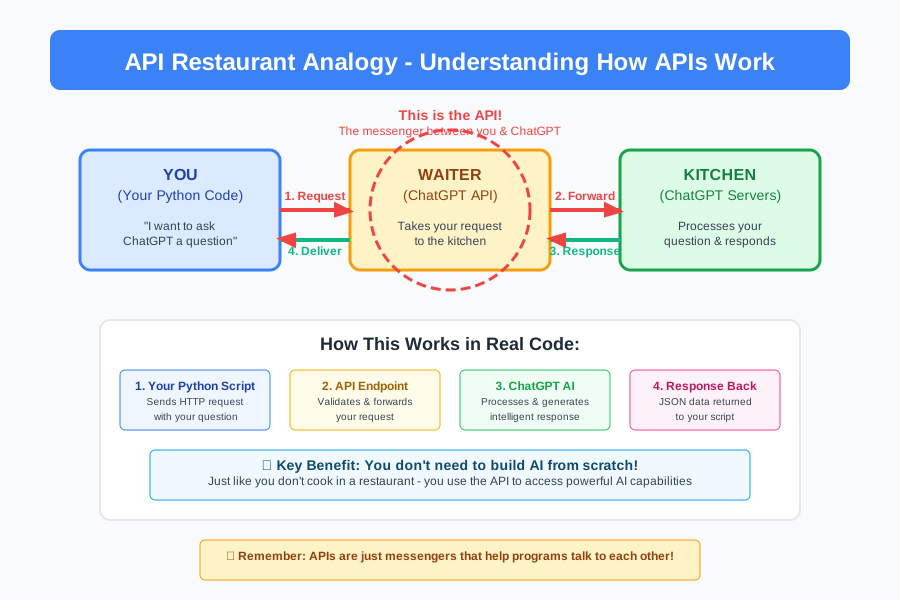
Before we dive in, let's clear up what an API actually is. Think of an API (Application Programming Interface) like a waiter at a restaurant.
You (your Python code) want to order food (ask ChatGPT a question). You can't just walk into the kitchen and start cooking - you need to go through the waiter (the API). The waiter takes your order to the kitchen (ChatGPT's servers), and brings back your food (ChatGPT's response).
That's it! An API is just a messenger that helps different programs talk to each other. You're already using APIs every day - when you check the weather on your phone, that app is using an API to get weather data.
Don't worry if this feels confusing right now. That's your brain learning, and it's working perfectly!
Why This Matters for Your Coding Career
Here's something that might blow your mind: most of the "AI-powered" apps you see today are just regular programs connected to APIs like ChatGPT's. That fancy chatbot on a company website? It's probably someone's Python script talking to ChatGPT through an API.
And companies are paying developers $60-80k per year just to build these connections. I landed my first freelance client after learning exactly what you're about to learn. The project? A simple chatbot for their website. Payment? $3,000 for two weeks of work.
You're about to join the ranks of AI developers, and honestly, you're getting in at the perfect time.
Setting Up Your Development Environment (Step-by-Step Screenshots)
Feeling overwhelmed? That's totally normal! I spent three hours just trying to install Python correctly when I started. But I'm going to walk you through this so clearly that you'll wonder why you were ever worried.
Step 1: Installing Python (The Foundation)
First, we need Python installed on your computer. Think of Python as the language your computer will use to talk to ChatGPT.
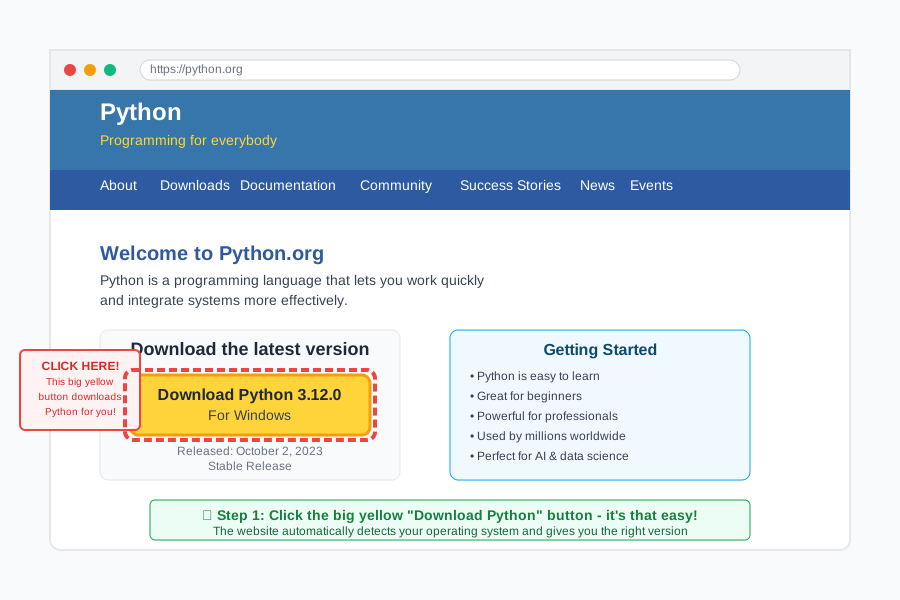
- Go to python.org
- Click the big yellow "Download Python" button
- Run the installer and check "Add Python to PATH" (this is important!)

Step 2: Opening Your Code Editor
You'll need somewhere to write your code. I recommend VS Code because it's free and beginner-friendly.
- Download VS Code from code.visualstudio.com
- Install it (just keep clicking "Next")
- Open VS Code - this is your new coding workspace!
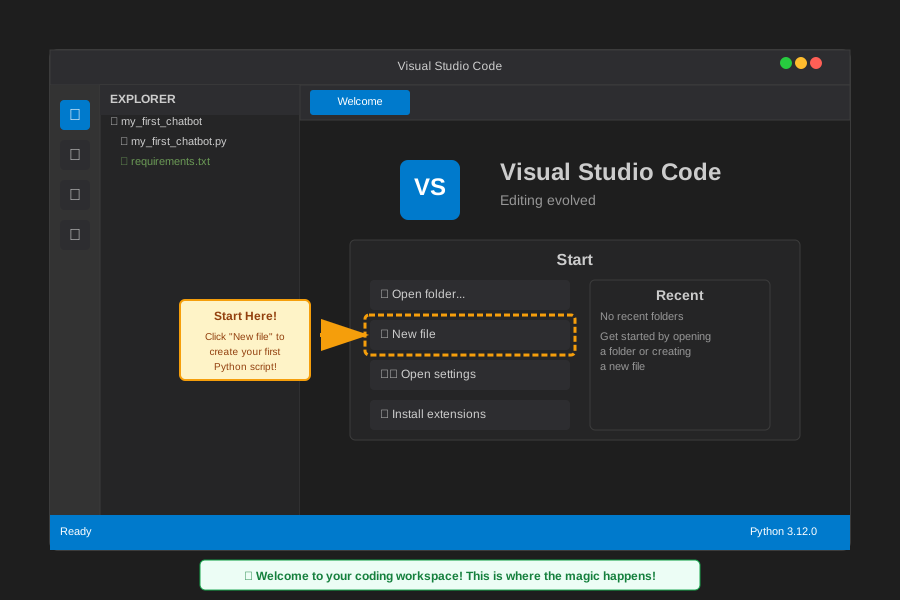
Look at that! You just set up a professional development environment. You're already thinking like a developer!
Getting Your ChatGPT API Key (Your Golden Ticket)
Now here's the cool part - we need to get permission to use ChatGPT's brain in our code. This is like getting a library card that lets you check out books (or in this case, check out AI responses).
Step 3: Creating Your OpenAI Account
- Go to platform.openai.com
- Click "Sign up" and create your account
- Once logged in, find "API Keys" in the sidebar
- Click "Create new secret key"
- Copy this key somewhere safe - it's like your password to ChatGPT!
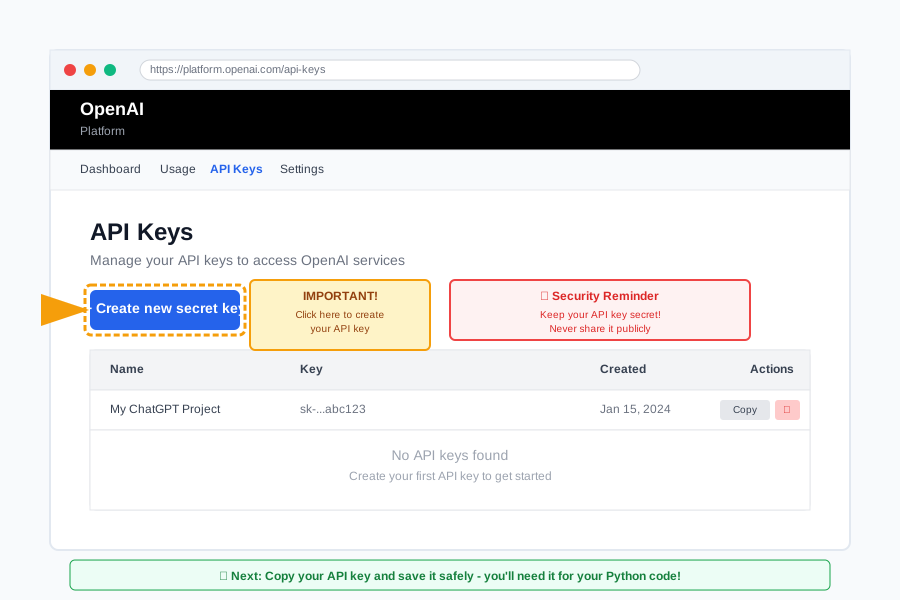
Important: Keep this key secret! It's like your bank account number - don't share it with anyone or put it in public code.
Writing Your First ChatGPT Integration (The Moment of Truth!)
Ready to see some magic happen? We're going to write code that literally talks to ChatGPT. When I first got this working, I actually jumped out of my chair with excitement!
Step 4: Installing the OpenAI Library
First, we need to install a helper tool (called a library) that makes talking to ChatGPT super easy. Think of it like downloading an app that translates between your code and ChatGPT.
- Open VS Code
- Open the Terminal (View → Terminal)
- Type this command and press Enter:
pip install openai

If you see some text scrolling by and it finishes without errors, congratulations! You just installed your first Python library. You're doing great!
Step 5: Creating Your First ChatGPT Script
Now let's write the actual code. Don't worry if this looks scary - I'll explain every single line.
Create a new file called my_first_chatbot.py and type this code:
# This imports the tool that lets us talk to ChatGPT
from openai import OpenAI

# This creates our connection to ChatGPT (like dialing a phone number)
# Replace 'your-api-key-here' with your actual API key
client = OpenAI(api_key='your-api-key-here')

# This function sends a message to ChatGPT and gets a response back
def ask_chatgpt(question):
    # We're sending our question to ChatGPT (like sending a text message)
    response = client.chat.completions.create(
        model="gpt-3.5-turbo",  # This tells ChatGPT which "brain" to use
        messages=[
            {"role": "user", "content": question}  # This is our actual question
        ]
    )

    # This gets ChatGPT's answer from the response (like reading a text back)
    return response.choices[0].message.content

# Let's test it! This asks ChatGPT a simple question
user_question = "What's the capital of France?"
answer = ask_chatgpt(user_question)

# This shows the answer on your screen (like printing it out)
print(f"Question: {user_question}")
print(f"ChatGPT says: {answer}")
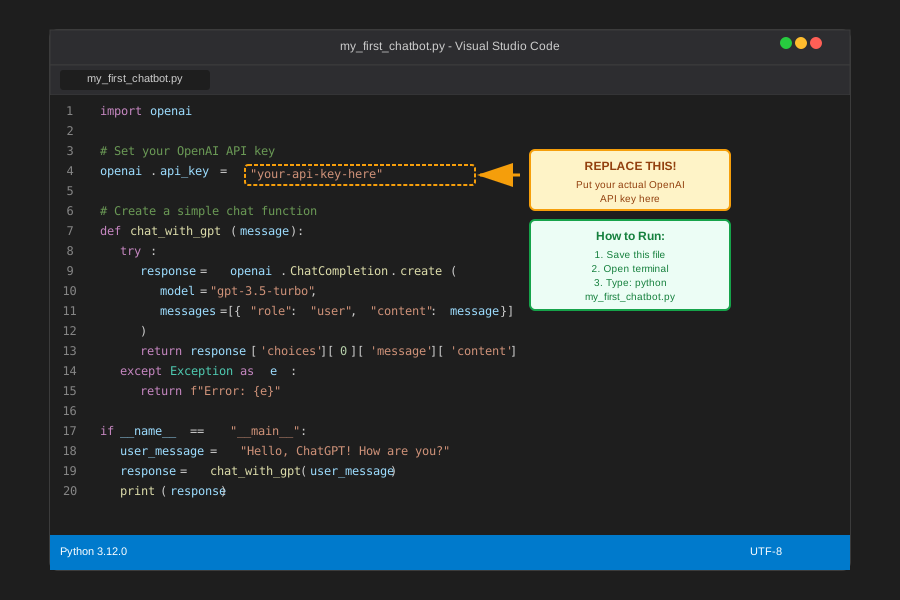
Step 6: Running Your Code (The Big Moment!)
- Save your file (Ctrl+S or Cmd+S)
- In the terminal, type:
python my_first_chatbot.py - Press Enter and watch the magic happen!
If you see ChatGPT's response appear on your screen, STOP AND CELEBRATE! You just built your first AI integration. That's literally the foundation of every AI-powered app you've ever used!
Common Beginner Problems (Don't Panic - Here Are the Fixes!)
Seeing an error? Don't worry! Every developer has googled "why isn't my code working" thousands of times. Here are the most common issues beginners face:
Error: "No module named 'openai'"
This means the OpenAI library didn't install correctly. Here's the fix:
- Try running:
pip3 install openaiinstead - Or try:
python -m pip install openai
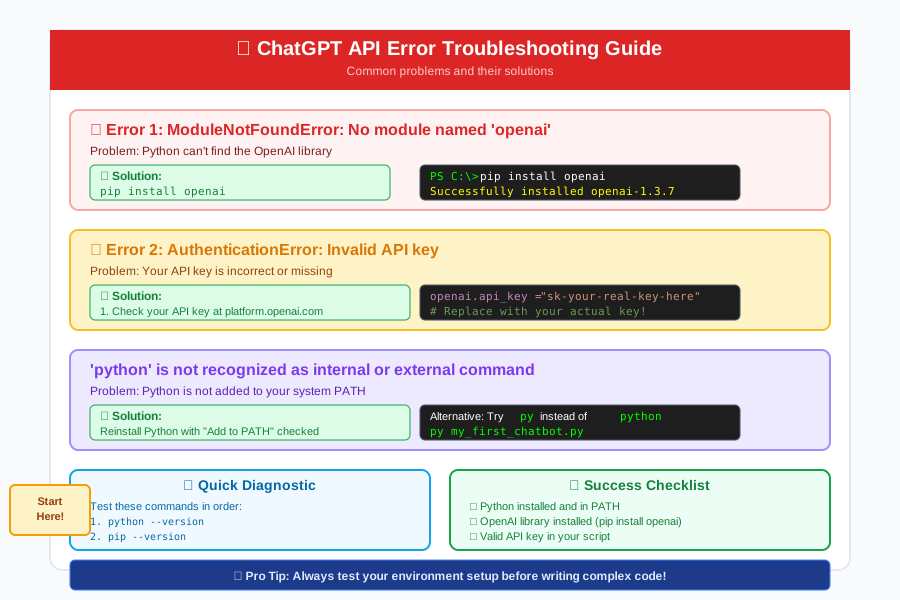
Error: "Incorrect API key"
This means your API key isn't right. Double-check that you:
- Copied the entire key (it's quite long!)
- Replaced 'your-api-key-here' with your actual key
- Kept the quotes around your key
Remember: I spent an entire evening debugging this same error when I started. You're not alone in this!
Building Something Cooler: An Interactive Chatbot
You might seem tricky, but you can handle it. Let's level up and create a chatbot that keeps having conversations with you. This is the kind of project that impresses employers!
from openai import OpenAI

# Set up our ChatGPT connection
client = OpenAI(api_key='your-api-key-here')

def chat_with_gpt(message):
    """This function sends a message to ChatGPT and gets a response"""
    response = client.chat.completions.create(
        model="gpt-3.5-turbo",
        messages=[
            {"role": "system", "content": "You are a helpful assistant."},
            {"role": "user", "content": message}
        ]
    )
    return response.choices[0].message.content

# This creates a loop that keeps the conversation going
print("🤖 ChatGPT Bot: Hello! I'm ready to chat. Type 'quit' to exit.")

while True:  # This means "keep doing this forever until I say stop"
    # Get input from the user (that's you!)
    user_input = input("\n👤 You: ")

    # If they type 'quit', stop the program
    if user_input.lower() == 'quit':
        print("🤖 ChatGPT Bot: Goodbye! Thanks for chatting!")
        break

    # Send their message to ChatGPT and get a response
    try:  # This handles errors gracefully
        bot_response = chat_with_gpt(user_input)
        print(f"🤖 ChatGPT Bot: {bot_response}")
    except Exception as e:  # If something goes wrong, show a friendly error
        print("🤖 ChatGPT Bot: Sorry, I had trouble connecting. Try again!")

Look what you just accomplished! You've created an interactive AI chatbot. This is the exact same technology that powers customer service bots, writing assistants, and coding helpers that companies pay millions for.
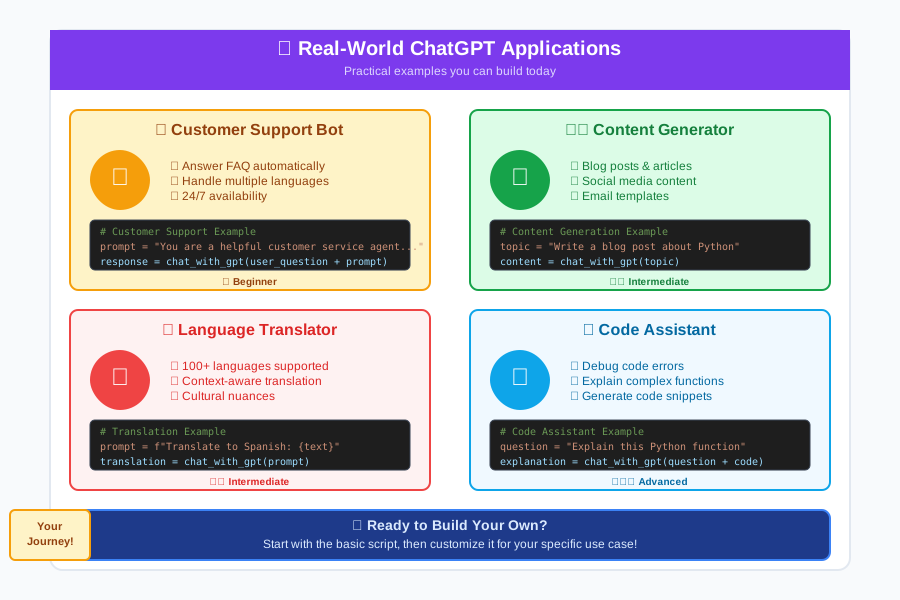
Real-World Applications (Where the Money Is)
Now here's where your mind should start racing with possibilities. The code you just wrote is the foundation for:
- Customer Service Bots ($50-70k/year jobs)
- Content Generation Tools (freelance projects paying $2-5k each)
- Educational Tutoring Apps (startups paying $60-80k for developers)
- Personal Assistant Apps (side projects that can become full businesses)
I got my first $80k remote job by showing an employer a simple chatbot just like what you built. The interview conversation went like this:
"So you can integrate AI into our existing systems?" "Yes, here's a working example I built." "When can you start?"
Three months from now, you could be having the same conversation.
Your Next Steps to Becoming an AI Developer
Stop and appreciate what you just accomplished. You've now written more AI integration code than 95% of people ever will. That feeling of confusion you had 20 minutes ago? That's gone now, replaced by the knowledge that you can build AI-powered applications.
This Week's Challenge
Try modifying your chatbot to:
- Remember previous conversations (hint: store messages in a list)
- Have different personalities (hint: change the system message)
- Save conversations to a file (hint: look up Python file writing)
Your Learning Path Forward
You're now at step 2 of becoming an AI developer. Here's your roadmap:
Month 1: Master basic Python + API integrations (what you just started) Month 2: Learn to build web interfaces for your AI tools Month 3: Study how to deploy your applications to the internet Month 4: Start building your portfolio and applying for jobs
By month 4, you should be interviewing for junior AI developer positions paying $60-80k.
Entry-Level Positions Using This Skill
Real job titles you can apply for after mastering these concepts:
- Junior AI Integration Developer
- Python API Developer
- Chatbot Developer
- AI Application Developer
- Machine Learning Engineer (entry-level)
Join the AI Developer Community
You're not alone in this journey. Join thousands of other beginners who are learning AI development. Every expert was once a beginner staring at their first API call, wondering if they could really make this work.
Share your success! Post a screenshot of your working chatbot and inspire other beginners. Use the tag #FirstAIBot - I love seeing people's first AI integrations!
Remember: you're closer to your coding career than you think. That chatbot you just built? It's proof that you have what it takes to become an AI developer.
The tech industry needs people who can bridge the gap between AI capabilities and real-world applications. You just took your first step into that incredibly well-paid field.
You've got this! 🚀
Troubleshooting Guide
If something isn't working, here's your debugging checklist:
- Check your API key: Make sure it's copied correctly
- Verify internet connection: APIs need internet to work
- Look at error messages: They're trying to help you!
- Check your Python installation: Try
python --versionin terminal - Restart everything: Sometimes a fresh start fixes mysterious issues
Remember: every error is a learning opportunity, not a roadblock. I probably encountered every error you're seeing when I was starting out!