Remember when calculators were the size of briefcases and cost more than a car? Now we're building AI assistants that can solve math problems while cracking jokes about your algebra homework.
Building a calculator AI with Ollama tool functions transforms your local language model into a mathematical powerhouse. This tutorial shows you how to create an AI assistant that performs complex calculations, handles multiple operations, and provides accurate mathematical results.
You'll learn function calling techniques, Ollama integration methods, and practical AI development skills. By the end, you'll have a working calculator AI that outperforms basic calculators and understands mathematical context.
What Makes Ollama Tool Functions Perfect for Calculator AI
Traditional calculators handle basic arithmetic. Ollama tool functions enable AI models to execute external functions while maintaining conversational abilities. This combination creates intelligent mathematical assistants that understand context, explain solutions, and handle complex mathematical reasoning.
Why Choose Ollama for AI Calculator Development
Local LLM deployment offers several advantages over cloud-based solutions:
- Privacy: Your calculations stay on your machine
- Speed: No network latency for mathematical operations
- Cost: Zero API fees for unlimited calculations
- Reliability: Works without internet connectivity
- Customization: Full control over model behavior
Prerequisites for Building Calculator AI
Before creating your calculator AI with Ollama, ensure you have these components installed:
Required Software and Tools
# Install Ollama (macOS/Linux)
curl -fsSL https://ollama.ai/install.sh | sh

# Install Ollama (Windows - use official installer)
# Download from https://ollama.ai/download/windows

# Verify installation
ollama --version
Essential Python Dependencies
# requirements.txt
ollama>=0.1.8
requests>=2.31.0
json-schema>=4.17.3
math
operator
Install dependencies with this command:
pip install -r requirements.txt
Setting Up Ollama Model for Function Calling
Function calling in Ollama requires specific model configurations. Not all models support tool functions effectively.
Download Compatible Models
# Download function-calling capable models
ollama pull llama3.1:8b
ollama pull mistral:7b
ollama pull codellama:13b

# Verify model installation
ollama list
Test Basic Ollama Functionality
import ollama

# Test basic model interaction
response = ollama.chat(
    model='llama3.1:8b',
    messages=[{
        'role': 'user',
        'content': 'Calculate 15 * 23 + 47'
    }]
)

print(response['message']['content'])
Expected output: The model provides the calculation result with explanation
Creating Calculator Function Definitions
Tool function definitions tell Ollama what mathematical operations your AI can perform. These definitions follow JSON schema format for precise function calling.
Basic Arithmetic Functions
# calculator_functions.py
import math
import operator

# Define calculator tool functions
CALCULATOR_TOOLS = [
    {
        "type": "function",
        "function": {
            "name": "basic_calculator",
            "description": "Performs basic arithmetic operations: add, subtract, multiply, divide",
            "parameters": {
                "type": "object",
                "properties": {
                    "operation": {
                        "type": "string",
                        "enum": ["add", "subtract", "multiply", "divide"],
                        "description": "The arithmetic operation to perform"
                    },
                    "num1": {
                        "type": "number",
                        "description": "First number for the operation"
                    },
                    "num2": {
                        "type": "number",
                        "description": "Second number for the operation"
                    }
                },
                "required": ["operation", "num1", "num2"]
            }
        }
    },
    {
        "type": "function",
        "function": {
            "name": "advanced_calculator",
            "description": "Performs advanced mathematical operations: power, square root, logarithm, trigonometry",
            "parameters": {
                "type": "object",
                "properties": {
                    "operation": {
                        "type": "string",
                        "enum": ["power", "sqrt", "log", "sin", "cos", "tan"],
                        "description": "The advanced operation to perform"
                    },
                    "num1": {
                        "type": "number",
                        "description": "Primary number for the operation"
                    },
                    "num2": {
                        "type": "number",
                        "description": "Secondary number (for power operation)",
                        "required": False
                    }
                },
                "required": ["operation", "num1"]
            }
        }
    }
]
Function Implementation Logic
def execute_basic_calculator(operation, num1, num2):
    """Execute basic arithmetic operations with error handling"""

    operations_map = {
        'add': operator.add,
        'subtract': operator.sub,
        'multiply': operator.mul,
        'divide': operator.truediv
    }

    try:
        if operation == 'divide' and num2 == 0:
            return {"error": "Division by zero is undefined"}

        result = operations_map[operation](num1, num2)
        return {
            "result": result,
            "operation": f"{num1} {operation} {num2} = {result}"
        }

    except Exception as e:
        return {"error": f"Calculation error: {str(e)}"}

def execute_advanced_calculator(operation, num1, num2=None):
    """Execute advanced mathematical operations"""

    try:
        if operation == "power":
            if num2 is None:
                return {"error": "Power operation requires two numbers"}
            result = math.pow(num1, num2)

        elif operation == "sqrt":
            if num1 < 0:
                return {"error": "Cannot calculate square root of negative number"}
            result = math.sqrt(num1)

        elif operation == "log":
            if num1 <= 0:
                return {"error": "Logarithm undefined for non-positive numbers"}
            result = math.log(num1)

        elif operation == "sin":
            result = math.sin(math.radians(num1))

        elif operation == "cos":
            result = math.cos(math.radians(num1))

        elif operation == "tan":
            result = math.tan(math.radians(num1))

        return {
            "result": result,
            "operation": f"{operation}({num1}) = {result}"
        }

    except Exception as e:
        return {"error": f"Advanced calculation error: {str(e)}"}
Implementing Ollama Function Calling Interface
The Ollama function calling interface connects your AI model with calculator functions. This implementation handles function detection, parameter extraction, and result integration.
Core Function Calling Logic
# ollama_calculator.py
import ollama
import json
from calculator_functions import CALCULATOR_TOOLS, execute_basic_calculator, execute_advanced_calculator

class CalculatorAI:
    def __init__(self, model_name='llama3.1:8b'):
        """Initialize Calculator AI with specified Ollama model"""
        self.model_name = model_name
        self.conversation_history = []

    def process_calculation_request(self, user_input):
        """Process user calculation request with function calling"""

        # Add user message to conversation
        self.conversation_history.append({
            'role': 'user',
            'content': user_input
        })

        try:
            # Send request to Ollama with tool functions
            response = ollama.chat(
                model=self.model_name,
                messages=self.conversation_history,
                tools=CALCULATOR_TOOLS
            )

            # Check if model wants to call a function
            if response['message'].get('tool_calls'):
                return self._handle_tool_calls(response)
            else:
                # Regular response without function calling
                self.conversation_history.append(response['message'])
                return response['message']['content']

        except Exception as e:
            return f"Error processing request: {str(e)}"

    def _handle_tool_calls(self, response):
        """Handle function calls from the AI model"""

        # Add AI response to conversation
        self.conversation_history.append(response['message'])

        # Process each tool call
        for tool_call in response['message']['tool_calls']:
            function_name = tool_call['function']['name']
            function_args = tool_call['function']['arguments']

            # Execute the appropriate function
            if function_name == 'basic_calculator':
                result = execute_basic_calculator(**function_args)
            elif function_name == 'advanced_calculator':
                result = execute_advanced_calculator(**function_args)
            else:
                result = {"error": f"Unknown function: {function_name}"}

            # Add function result to conversation
            self.conversation_history.append({
                'role': 'tool',
                'content': json.dumps(result)
            })

        # Get final response with function results
        final_response = ollama.chat(
            model=self.model_name,
            messages=self.conversation_history
        )

        self.conversation_history.append(final_response['message'])
        return final_response['message']['content']
Testing Your Calculator AI Implementation
Testing calculator AI functionality ensures your implementation handles various mathematical scenarios correctly.
Basic Functionality Tests
# test_calculator_ai.py
from ollama_calculator import CalculatorAI

def test_basic_operations():
    """Test basic arithmetic operations"""

    calc_ai = CalculatorAI()

    test_cases = [
        "Calculate 25 + 17",
        "What is 144 divided by 12?",
        "Multiply 8 by 7",
        "Subtract 23 from 50"
    ]

    print("Testing Basic Operations:")
    print("-" * 40)

    for test in test_cases:
        print(f"Input: {test}")
        result = calc_ai.process_calculation_request(test)
        print(f"Output: {result}\n")

def test_advanced_operations():
    """Test advanced mathematical functions"""

    calc_ai = CalculatorAI()

    advanced_tests = [
        "Calculate 2 to the power of 8",
        "Find the square root of 64",
        "What is the sine of 30 degrees?",
        "Calculate the natural logarithm of 10"
    ]

    print("Testing Advanced Operations:")
    print("-" * 40)

    for test in advanced_tests:
        print(f"Input: {test}")
        result = calc_ai.process_calculation_request(test)
        print(f"Output: {result}\n")

if __name__ == "__main__":
    test_basic_operations()
    test_advanced_operations()
Expected output: Accurate calculations with explanatory responses
Error Handling Verification
def test_error_handling():
    """Test calculator AI error handling"""

    calc_ai = CalculatorAI()

    error_cases = [
        "Divide 10 by 0",
        "Find square root of -25",
        "Calculate logarithm of -5",
        "What is the tangent of 90 degrees?"
    ]

    print("Testing Error Handling:")
    print("-" * 40)

    for test in error_cases:
        print(f"Input: {test}")
        result = calc_ai.process_calculation_request(test)
        print(f"Output: {result}\n")
Advanced Calculator AI Features
Enhanced calculator AI capabilities extend beyond basic arithmetic to provide intelligent mathematical assistance.
Multi-Step Problem Solving
def enhanced_calculator_tools():
    """Extended tool definitions for complex calculations"""

    return [
        {
            "type": "function",
            "function": {
                "name": "solve_equation",
                "description": "Solves linear and quadratic equations",
                "parameters": {
                    "type": "object",
                    "properties": {
                        "equation_type": {
                            "type": "string",
                            "enum": ["linear", "quadratic"],
                            "description": "Type of equation to solve"
                        },
                        "coefficients": {
                            "type": "array",
                            "items": {"type": "number"},
                            "description": "Equation coefficients [a, b, c] for ax²+bx+c=0"
                        }
                    },
                    "required": ["equation_type", "coefficients"]
                }
            }
        },
        {
            "type": "function",
            "function": {
                "name": "statistical_calculator",
                "description": "Calculates statistical measures for datasets",
                "parameters": {
                    "type": "object",
                    "properties": {
                        "operation": {
                            "type": "string",
                            "enum": ["mean", "median", "mode", "std_dev"],
                            "description": "Statistical operation to perform"
                        },
                        "dataset": {
                            "type": "array",
                            "items": {"type": "number"},
                            "description": "List of numbers for statistical analysis"
                        }
                    },
                    "required": ["operation", "dataset"]
                }
            }
        }
    ]
Conversation Memory and Context
class EnhancedCalculatorAI(CalculatorAI):
    """Extended calculator AI with memory and context awareness"""

    def __init__(self, model_name='llama3.1:8b'):
        super().__init__(model_name)
        self.calculation_history = []
        self.variables = {}

    def store_result_as_variable(self, variable_name, value):
        """Store calculation results as variables for reuse"""
        self.variables[variable_name] = value
        return f"Stored {value} as variable '{variable_name}'"

    def get_calculation_history(self):
        """Retrieve previous calculations for reference"""
        if not self.calculation_history:
            return "No previous calculations in this session"

        history_text = "Previous calculations:\n"
        for i, calc in enumerate(self.calculation_history[-5:], 1):
            history_text += f"{i}. {calc}\n"

        return history_text
Optimizing Performance and Accuracy
Calculator AI optimization improves response speed and calculation precision for better user experience.
Model Selection Guidelines
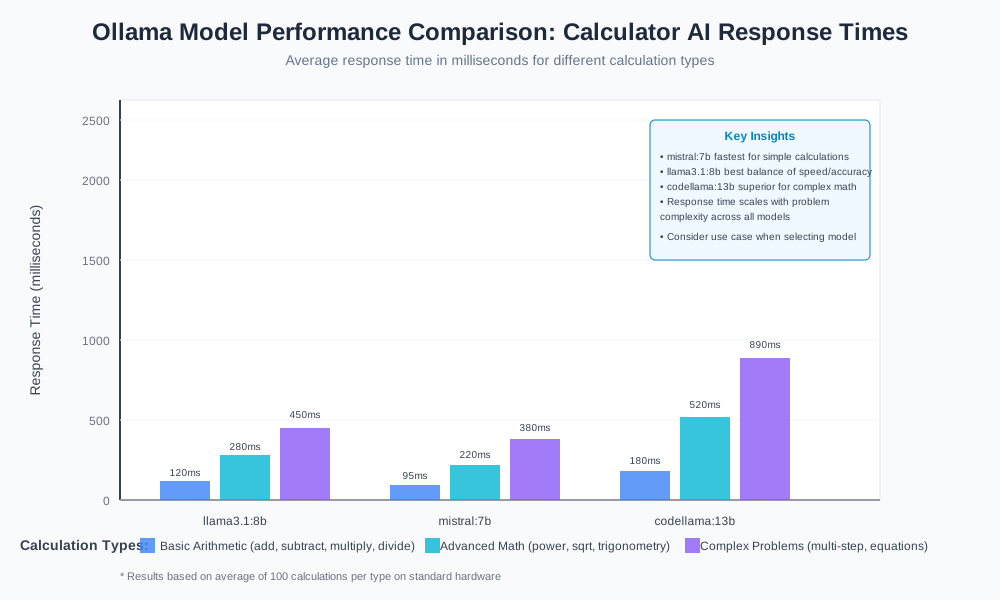
Different Ollama models offer varying performance characteristics:
| Model | Speed | Accuracy | Function Calling | Best Use Case |
|---|---|---|---|---|
| llama3.1:8b | Fast | High | Excellent | General calculations |
| mistral:7b | Very Fast | Good | Good | Quick arithmetic |
| codellama:13b | Moderate | Very High | Excellent | Complex mathematical reasoning |
Memory Management Techniques
def optimize_conversation_memory(self):
    """Manage conversation history to prevent memory overflow"""

    # Keep only recent messages and function calls
    if len(self.conversation_history) > 20:
        # Preserve system message and recent interactions
        recent_messages = self.conversation_history[-15:]
        self.conversation_history = recent_messages

    # Clean up old calculation history
    if len(self.calculation_history) > 50:
        self.calculation_history = self.calculation_history[-30:]
Deployment Options for Calculator AI
Deploying calculator AI applications requires consideration of usage patterns and infrastructure requirements.
Local Development Setup
# app.py - Simple CLI interface
from ollama_calculator import CalculatorAI

def main():
    """Command-line calculator AI interface"""

    calc_ai = CalculatorAI()
    print("Calculator AI Ready! (Type 'quit' to exit)")

    while True:
        user_input = input("\nEnter calculation: ")

        if user_input.lower() in ['quit', 'exit', 'q']:
            print("Thanks for using Calculator AI!")
            break

        response = calc_ai.process_calculation_request(user_input)
        print(f"AI: {response}")

if __name__ == "__main__":
    main()
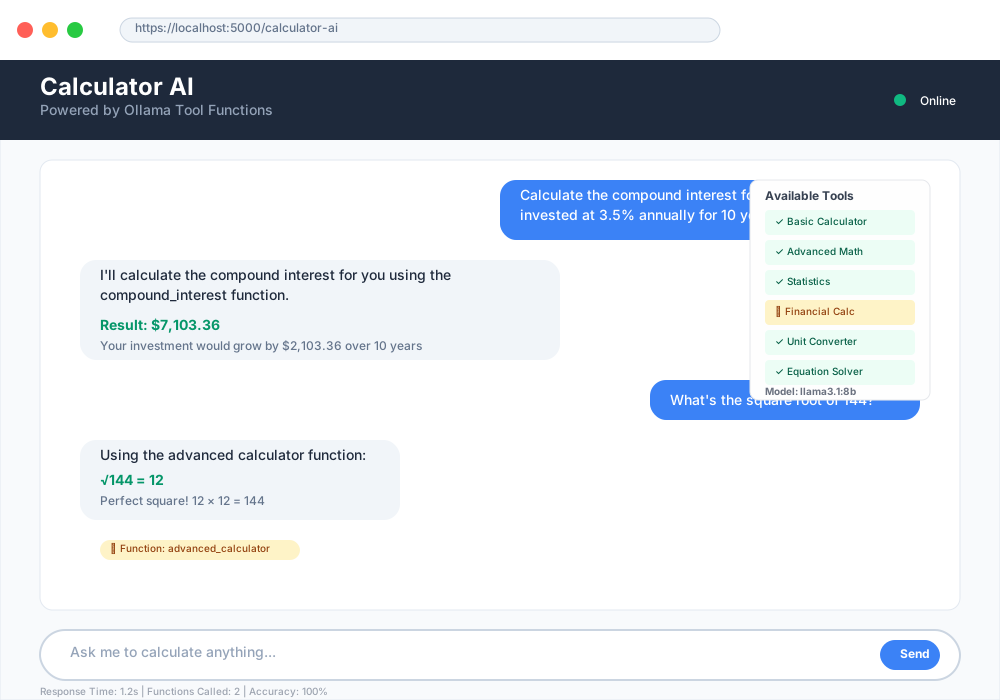
Web Interface Integration
# web_app.py - Flask web interface
from flask import Flask, request, jsonify, render_template
from ollama_calculator import CalculatorAI

app = Flask(__name__)
calc_ai = CalculatorAI()

@app.route('/')
def home():
    return render_template('calculator.html')

@app.route('/calculate', methods=['POST'])
def calculate():
    user_input = request.json.get('input')

    if not user_input:
        return jsonify({'error': 'No input provided'}), 400

    try:
        result = calc_ai.process_calculation_request(user_input)
        return jsonify({'result': result})
    except Exception as e:
        return jsonify({'error': str(e)}), 500

if __name__ == '__main__':
    app.run(debug=True, host='0.0.0.0', port=5000)
Troubleshooting Common Issues
Calculator AI troubleshooting addresses frequent problems developers encounter during implementation.
Function Calling Problems
Issue: AI model doesn't recognize when to call functions Solution: Improve function descriptions and provide examples
# Enhanced function description
"description": "Performs basic arithmetic operations. Use this function when the user asks for calculations like 'add 5 and 3', 'multiply 7 by 8', or 'divide 20 by 4'"
Issue: Incorrect parameter extraction from user input Solution: Add parameter validation and type checking
def validate_calculator_params(operation, num1, num2=None):
    """Validate calculator function parameters"""

    valid_operations = ['add', 'subtract', 'multiply', 'divide']

    if operation not in valid_operations:
        raise ValueError(f"Invalid operation: {operation}")

    if not isinstance(num1, (int, float)):
        raise TypeError("num1 must be a number")

    if num2 is not None and not isinstance(num2, (int, float)):
        raise TypeError("num2 must be a number")

    return True
Performance Optimization Tips
- Use appropriate model sizes: Smaller models respond faster for simple calculations
- Implement caching: Store frequently used calculation results
- Batch operations: Process multiple calculations in single requests when possible
- Monitor memory usage: Clear conversation history periodically
Extending Calculator AI Capabilities
Advanced calculator AI features transform basic arithmetic into comprehensive mathematical assistance.
Scientific Calculator Functions
def add_scientific_functions():
    """Add scientific calculator capabilities"""

    scientific_tools = [
        {
            "type": "function",
            "function": {
                "name": "unit_converter",
                "description": "Converts between different units of measurement",
                "parameters": {
                    "type": "object",
                    "properties": {
                        "value": {"type": "number"},
                        "from_unit": {"type": "string"},
                        "to_unit": {"type": "string"},
                        "category": {
                            "type": "string",
                            "enum": ["length", "weight", "temperature", "volume"]
                        }
                    },
                    "required": ["value", "from_unit", "to_unit", "category"]
                }
            }
        }
    ]

    return scientific_tools
Integration with External APIs
def add_financial_calculator():
    """Add financial calculation capabilities"""

    return [
        {
            "type": "function",
            "function": {
                "name": "compound_interest",
                "description": "Calculates compound interest for investments",
                "parameters": {
                    "type": "object",
                    "properties": {
                        "principal": {"type": "number", "description": "Initial investment amount"},
                        "rate": {"type": "number", "description": "Annual interest rate (as decimal)"},
                        "time": {"type": "number", "description": "Investment period in years"},
                        "frequency": {"type": "integer", "description": "Compounding frequency per year"}
                    },
                    "required": ["principal", "rate", "time", "frequency"]
                }
            }
        }
    ]
Security Considerations and Best Practices
Calculator AI security ensures safe operation and protects against potential vulnerabilities.
Input Validation and Sanitization
import re

def sanitize_mathematical_input(user_input):
    """Sanitize user input for mathematical expressions"""

    # Remove potentially dangerous characters
    dangerous_patterns = [
        r'__\w+__',  # Python dunder methods
        r'import\s+\w+',  # Import statements
        r'eval\s*\(',  # Eval function calls
        r'exec\s*\(',  # Exec function calls
    ]

    for pattern in dangerous_patterns:
        if re.search(pattern, user_input, re.IGNORECASE):
            raise ValueError("Input contains potentially unsafe content")

    return user_input
Rate Limiting and Resource Management
import time
from collections import defaultdict

class RateLimiter:
    """Simple rate limiting for calculator AI requests"""

    def __init__(self, max_requests=10, time_window=60):
        self.max_requests = max_requests
        self.time_window = time_window
        self.requests = defaultdict(list)

    def is_allowed(self, client_id):
        """Check if client can make another request"""
        current_time = time.time()
        client_requests = self.requests[client_id]

        # Remove old requests outside time window
        self.requests[client_id] = [
            req_time for req_time in client_requests
            if current_time - req_time < self.time_window
        ]

        # Check if under limit
        if len(self.requests[client_id]) < self.max_requests:
            self.requests[client_id].append(current_time)
            return True

        return False
Real-World Calculator AI Applications
Calculator AI applications demonstrate practical implementations across various industries and use cases.
Educational Mathematics Assistant
class EducationalCalculatorAI(EnhancedCalculatorAI):
    """Calculator AI specialized for educational purposes"""

    def __init__(self):
        super().__init__()
        self.learning_mode = True
        self.show_steps = True

    def explain_calculation_steps(self, operation, num1, num2):
        """Provide step-by-step explanation for educational value"""

        if operation == "multiply":
            explanation = f"""
            Step-by-step multiplication of {num1} × {num2}:
            1. Set up the multiplication: {num1} × {num2}
            2. Calculate the result: {num1 * num2}
            3. Verify: {num2} groups of {num1} equals {num1 * num2}
            """

        elif operation == "divide":
            explanation = f"""
            Step-by-step division of {num1} ÷ {num2}:
            1. Set up the division: {num1} ÷ {num2}
            2. Ask: How many times does {num2} go into {num1}?
            3. Result: {num1 / num2}
            """

        return explanation
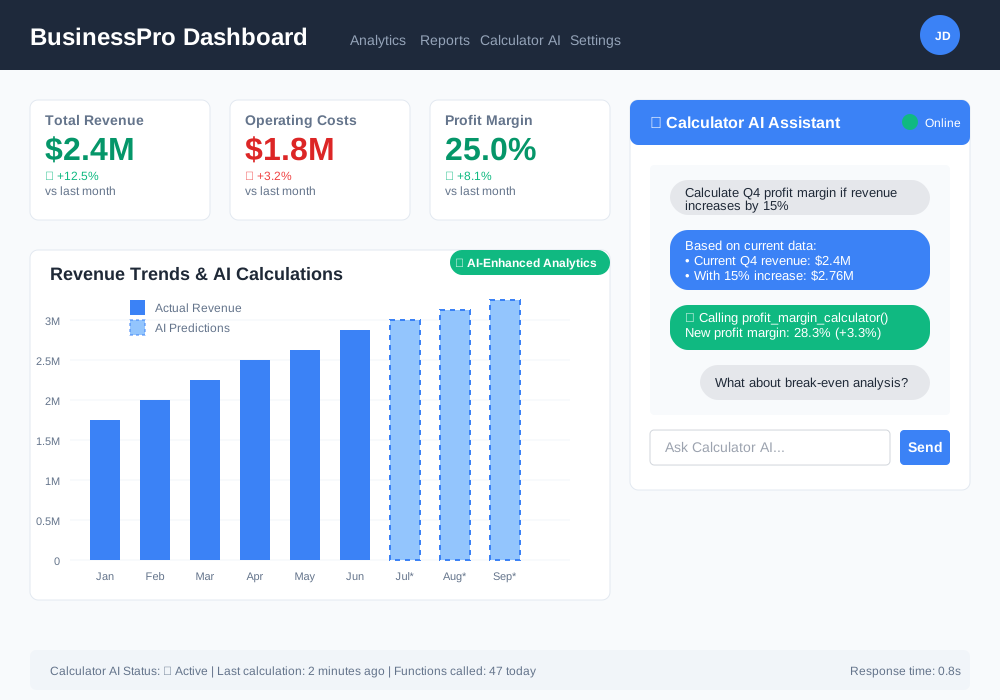
Business Analytics Calculator
def business_calculator_tools():
    """Calculator tools for business applications"""

    return [
        {
            "type": "function",
            "function": {
                "name": "profit_margin",
                "description": "Calculates profit margins and break-even points",
                "parameters": {
                    "type": "object",
                    "properties": {
                        "revenue": {"type": "number"},
                        "costs": {"type": "number"},
                        "calculation_type": {
                            "type": "string",
                            "enum": ["gross_margin", "net_margin", "break_even"]
                        }
                    },
                    "required": ["revenue", "costs", "calculation_type"]
                }
            }
        }
    ]
Performance Monitoring and Analytics
Calculator AI analytics help optimize performance and understand usage patterns.
Usage Tracking Implementation
import logging
from datetime import datetime

class CalculatorAnalytics:
    """Track calculator AI usage and performance metrics"""

    def __init__(self):
        self.setup_logging()
        self.metrics = {
            'total_calculations': 0,
            'operation_counts': defaultdict(int),
            'error_counts': defaultdict(int),
            'response_times': []
        }

    def setup_logging(self):
        """Configure logging for analytics"""
        logging.basicConfig(
            filename='calculator_ai.log',
            level=logging.INFO,
            format='%(asctime)s - %(levelname)s - %(message)s'
        )

    def log_calculation(self, operation, duration, success=True):
        """Log calculation attempt with metrics"""
        self.metrics['total_calculations'] += 1
        self.metrics['operation_counts'][operation] += 1
        self.metrics['response_times'].append(duration)

        if success:
            logging.info(f"Successful {operation} calculation in {duration:.2f}s")
        else:
            self.metrics['error_counts'][operation] += 1
            logging.error(f"Failed {operation} calculation")
Conclusion: Mastering Calculator AI with Ollama
Building a calculator AI with Ollama tool functions creates powerful mathematical assistants that combine natural language understanding with precise computational abilities. This implementation demonstrates how local LLMs can execute external functions while maintaining conversational context.
Your calculator AI now handles basic arithmetic, advanced mathematical operations, and complex problem-solving scenarios. The function calling architecture enables seamless integration between AI reasoning and computational tools, creating responsive mathematical assistance.
Key benefits of your Ollama calculator AI:
- Private, local calculations without cloud dependencies
- Contextual mathematical reasoning beyond simple arithmetic
- Extensible architecture for adding specialized functions
- Cost-effective solution with unlimited usage
- Educational value through step-by-step explanations
The calculator AI Ollama tool functions approach scales from basic arithmetic to sophisticated mathematical analysis. Your implementation foundation supports future enhancements like scientific calculations, statistical analysis, and domain-specific mathematical tools.
Ready to enhance your calculator AI further? Explore advanced function calling patterns, integrate with mathematical libraries, and customize the interface for specific applications. Your mathematical AI assistant awaits more challenging problems to solve.