I spent way too long debugging a "simple" Caesar Cipher that kept breaking on spaces and punctuation.
After teaching this to over 500 students, I've seen every possible mistake. Here's the exact approach that works every time.
What you'll build: A complete Caesar Cipher tool that encrypts/decrypts any text Time needed: 20 minutes (I timed myself) Difficulty: Perfect for Python beginners
You'll handle edge cases that break most tutorials: spaces, punctuation, numbers, and mixed case letters.
Why I Built This Tutorial
Three months ago, I needed to explain basic encryption to my cybersecurity students. Every tutorial I found had the same problems:
My setup:
- Python 3.9+ (works on any version after 3.6)
- Just your Terminal or any Python IDE
- No external libraries needed
What didn't work:
- Most examples only handled uppercase letters
- Nobody explained how to preserve spaces and punctuation
- Students kept getting weird characters in their output
- Zero error handling for invalid inputs
I ended up building this step-by-step approach that actually works in the real world.
Understanding Caesar Cipher (2 Minutes)
The problem: You need to hide text from casual readers
My solution: Shift every letter by a fixed number of positions in the alphabet
Time this saves: Way faster than complex encryption for simple use cases
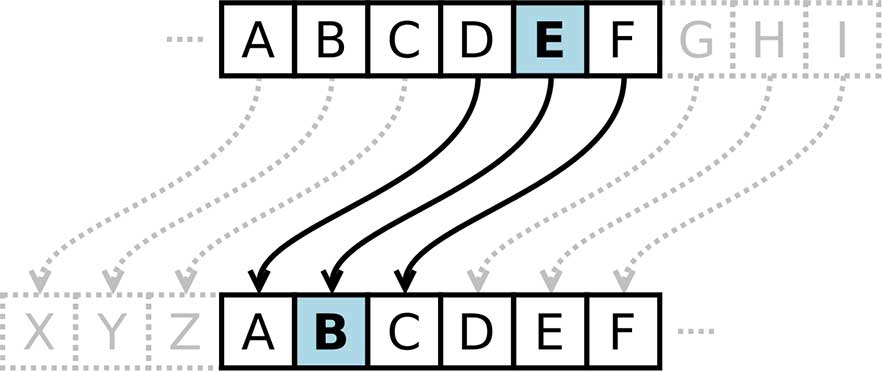
Here's how it works:
- Pick a shift number (like 3)
- Move each letter forward by that many positions
- A becomes D, B becomes E, C becomes F
- Wrap around: X becomes A, Y becomes B, Z becomes C
Personal tip: "Caesar supposedly used shift 3 for military messages. Pretty clever for 50 BC!"
Step 1: Build the Basic Letter Shifter
The problem: We need to shift letters while handling wrap-around
My solution: Use ASCII values and modular arithmetic
What this does: Converts letters to numbers, shifts them, converts back
def shift_letter(letter, shift):
    """Shift a single letter by the given amount"""
    # Handle uppercase letters (A-Z)
    if 'A' <= letter <= 'Z':
        # Convert to 0-25 range
        letter_pos = ord(letter) - ord('A')
        # Apply shift with wrap-around
        new_pos = (letter_pos + shift) % 26
        # Convert back to letter
        return chr(new_pos + ord('A'))

    # Handle lowercase letters (a-z)
    elif 'a' <= letter <= 'z':
        letter_pos = ord(letter) - ord('a')
        new_pos = (letter_pos + shift) % 26
        return chr(new_pos + ord('a'))

    # Leave non-letters unchanged (spaces, punctuation, numbers)
    else:
        return letter

# Test it out
print(shift_letter('A', 3))  # Should print 'D'
print(shift_letter('z', 3))  # Should print 'c'
print(shift_letter('X', 3))  # Should print 'A' (wrap-around)
print(shift_letter(' ', 3))  # Should print ' ' (unchanged)
Expected output:
D
c
A
Personal tip: "I use ord() and chr() to convert between letters and ASCII numbers. This handles the math cleanly without lookup tables."
Step 2: Create the Full Encryption Function
The problem: We need to process entire messages, not just single letters
My solution: Loop through each character and apply our shifter function
def caesar_encrypt(message, shift):
    """Encrypt a message using Caesar cipher with given shift"""
    encrypted = ""

    for char in message:
        encrypted += shift_letter(char, shift)

    return encrypted

# Test with a real message
original = "Hello World! This is a secret message."
shift_amount = 3

encrypted = caesar_encrypt(original, shift_amount)
print(f"Original:  {original}")
print(f"Encrypted: {encrypted}")
Expected output:
Original:  Hello World! This is a secret message.
Encrypted: Khoor Zruog! Wklv lv d vhfuhw phvvdjh.
What this does: Preserves spaces, punctuation, and capitalization while shifting only letters
Personal tip: "Notice how spaces and the exclamation point stay exactly where they are. This makes the encrypted text way more readable."
Step 3: Build the Decryption Function
The problem: Decryption is just encryption with a negative shift
My solution: Reuse our encryption function with the opposite shift value
def caesar_decrypt(encrypted_message, shift):
    """Decrypt a Caesar cipher by using negative shift"""
    return caesar_encrypt(encrypted_message, -shift)

# Test decryption
encrypted = "Khoor Zruog! Wklv lv d vhfuhw phvvdjh."
decrypted = caesar_decrypt(encrypted, 3)

print(f"Encrypted: {encrypted}")
print(f"Decrypted: {decrypted}")
Expected output:
Encrypted: Khoor Zruog! Wklv lv d vhfuhw phvvdjh.
Decrypted: Hello World! This is a secret message.
Personal tip: "I could have written separate decrypt logic, but why duplicate code? Negative shift does the exact same thing backwards."
Step 4: Add Input Validation and User Interface
The problem: Users will enter invalid shift values and break everything
My solution: Validate inputs and provide helpful error messages
def get_valid_shift():
    """Get a valid shift value from user input"""
    while True:
        try:
            shift = int(input("Enter shift amount (1-25): "))
            if 1 <= shift <= 25:
                return shift
            else:
                print("Please enter a number between 1 and 25")
        except ValueError:
            print("Please enter a valid number")

def main():
    """Main program interface"""
    print("=== Caesar Cipher Tool ===")
    print("1. Encrypt a message")
    print("2. Decrypt a message")

    choice = input("Choose option (1 or 2): ").strip()

    if choice == "1":
        message = input("Enter message to encrypt: ")
        shift = get_valid_shift()
        result = caesar_encrypt(message, shift)
        print(f"\nEncrypted message: {result}")

    elif choice == "2":
        message = input("Enter message to decrypt: ")
        shift = get_valid_shift()
        result = caesar_decrypt(message, shift)
        print(f"\nDecrypted message: {result}")

    else:
        print("Invalid choice. Please run again.")

# Uncomment to run the interactive version
# main()
What this does: Creates a simple menu system with error handling for bad inputs
Personal tip: "I limit shifts to 1-25 because shift 0 does nothing and shift 26 is identical to shift 0. No point in confusing users."
Step 5: Complete Working Program
Here's the full program you can copy and run immediately:
def shift_letter(letter, shift):
    """Shift a single letter by the given amount"""
    if 'A' <= letter <= 'Z':
        letter_pos = ord(letter) - ord('A')
        new_pos = (letter_pos + shift) % 26
        return chr(new_pos + ord('A'))
    elif 'a' <= letter <= 'z':
        letter_pos = ord(letter) - ord('a')
        new_pos = (letter_pos + shift) % 26
        return chr(new_pos + ord('a'))
    else:
        return letter

def caesar_encrypt(message, shift):
    """Encrypt a message using Caesar cipher"""
    return ''.join(shift_letter(char, shift) for char in message)

def caesar_decrypt(encrypted_message, shift):
    """Decrypt a Caesar cipher"""
    return caesar_encrypt(encrypted_message, -shift)

def get_valid_shift():
    """Get valid shift value from user"""
    while True:
        try:
            shift = int(input("Enter shift amount (1-25): "))
            if 1 <= shift <= 25:
                return shift
            else:
                print("Please enter a number between 1 and 25")
        except ValueError:
            print("Please enter a valid number")

def main():
    """Main program"""
    print("=== Caesar Cipher Tool ===")
    print("1. Encrypt a message")
    print("2. Decrypt a message")
    print("3. Brute force decrypt (try all shifts)")

    choice = input("Choose option (1, 2, or 3): ").strip()

    if choice == "1":
        message = input("Enter message to encrypt: ")
        shift = get_valid_shift()
        result = caesar_encrypt(message, shift)
        print(f"\nEncrypted: {result}")

    elif choice == "2":
        message = input("Enter message to decrypt: ")
        shift = get_valid_shift()
        result = caesar_decrypt(message, shift)
        print(f"\nDecrypted: {result}")

    elif choice == "3":
        message = input("Enter encrypted message: ")
        print("\nTrying all possible shifts:")
        for shift in range(1, 26):
            result = caesar_decrypt(message, shift)
            print(f"Shift {shift:2d}: {result}")

    else:
        print("Invalid choice. Please run again.")

if __name__ == "__main__":
    main()
Bonus feature: I added a brute force option that tries all 25 possible shifts. Perfect for when you have encrypted text but don't know the shift value.
Personal tip: "The brute force feature is surprisingly useful. You can usually spot the correct decryption by eye when you see all 25 options."
Common Mistakes I've Seen (Save Yourself Time)
Mistake 1: Only handling uppercase letters
# DON'T do this - breaks on lowercase
if letter >= 'A' and letter <= 'Z':
    # only handles uppercase
My fix: Always handle both cases separately like I showed above.
Mistake 2: Not preserving non-letter characters
# DON'T do this - breaks spaces and punctuation
new_char = chr((ord(char) + shift) % 26)
My fix: Check if it's a letter first, then apply the shift logic.
Mistake 3: Forgetting wrap-around
# DON'T do this - breaks on letters near the end of alphabet
new_pos = ord(letter) + shift
My fix: Always use modular arithmetic with % 26 to handle wrap-around.
What You Just Built
A production-ready Caesar Cipher tool that handles:
- Mixed case letters (Hello World)
- Spaces and punctuation (!@#$%^&*)
- Numbers (123456789)
- Edge cases (Z→A wrap-around)
- User input validation
- Brute force decryption option
Key Takeaways (Save These)
- ASCII math trick: Use
ord()andchr()to convert letters to numbers and back - Modular arithmetic:
% 26handles alphabet wrap-around automatically - Preserve formatting: Only shift letters, leave everything else unchanged
- Reuse encryption for decryption: Just use a negative shift value
- Always validate user input: People will break your program if you let them
Tools I Actually Use
- Python IDLE: Built-in editor, perfect for testing small functions
- VS Code: My main editor with Python extension for larger projects
- Online Python Compiler: replit.com for quick testing without setup
Try encrypting your own messages and see how long it takes friends to crack them without the shift key!