Problem: Running RAG Without Sending Data to the Cloud
Local RAG pipeline with Ollama and LangChain — private documents stay on your machine, inference costs $0, and latency drops to milliseconds. The catch: wiring Ollama's embeddings, FAISS, and a retrieval chain in LangChain involves a few non-obvious steps that trip up most setups.
You'll learn:
- Pull and serve an embedding model and an LLM locally with Ollama
- Ingest PDFs and split them into retrieval-ready chunks
- Build a FAISS vector store with
OllamaEmbeddings - Wire a
RetrievalQAchain that never leaves your machine
Time: 25 min | Difficulty: Intermediate
Why This Works (and Where It Usually Breaks)
Most RAG tutorials assume OpenAI for both embeddings and generation. Swapping in Ollama means two separate models: one for embedding documents, one for answering questions. Forgetting to pull the embedding model separately — or pointing LangChain at the wrong Ollama base URL — causes silent errors that look like empty retrievals.
Symptoms of a misconfigured local RAG setup:
- Retriever returns 0 documents despite a loaded vector store
ConnectionRefusedErroron port11434OllamaEmbeddingsreturns random-looking scores — usually a model name typo
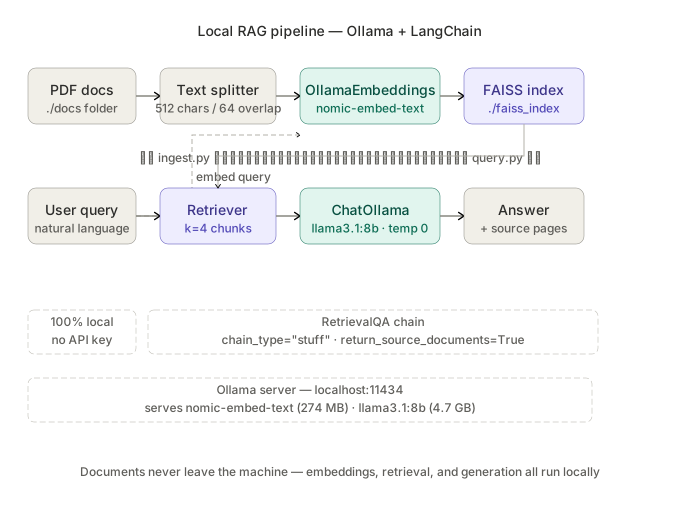 End-to-end flow: documents are embedded locally with nomic-embed-text, stored in FAISS, and queried through a LangChain RetrievalQA chain backed by Llama 3 via Ollama.
Prerequisites
- Ollama installed and running (
ollama serve— defaults tohttp://localhost:11434) - Python 3.11 or 3.12
- 16 GB RAM recommended; 8 GB works with
llama3.2:3bandnomic-embed-text
Solution
Step 1: Pull the Required Models
You need two models — one for embeddings, one for generation. Pull them before touching Python.
# Embedding model — 274 MB, fastest option for local RAG
ollama pull nomic-embed-text

# Generation model — 4.7 GB at Q4_K_M, good on 16 GB RAM
ollama pull llama3.1:8b
Verify both are available:
ollama list
Expected output:
NAME                    ID              SIZE    MODIFIED
llama3.1:8b             42182419e950    4.7 GB  2 minutes ago
nomic-embed-text        0a109f422b47    274 MB  3 minutes ago
If ollama list is empty after pulling: run ollama serve in a separate terminal — the daemon must be running for pulls to persist to the model registry.
Step 2: Install Python Dependencies
# uv is the fastest resolver — swap pip if preferred
uv pip install langchain langchain-community langchain-ollama \
               faiss-cpu pypdf python-dotenv
Pinned versions this was tested against:
langchain==0.3.14langchain-ollama==0.2.3faiss-cpu==1.9.0pypdf==5.1.0
Step 3: Ingest and Chunk Your Documents
Create ingest.py. This loads PDFs from a ./docs folder, splits them into 512-token chunks with 64-token overlap, and builds a FAISS index on disk.
from langchain_community.document_loaders import PyPDFDirectoryLoader
from langchain.text_splitter import RecursiveCharacterTextSplitter
from langchain_ollama import OllamaEmbeddings
from langchain_community.vectorstores import FAISS

# --- Config ---
DOCS_DIR = "./docs"
FAISS_INDEX = "./faiss_index"
EMBED_MODEL = "nomic-embed-text"
OLLAMA_BASE_URL = "http://localhost:11434"

def ingest():
    # Load all PDFs in ./docs
    loader = PyPDFDirectoryLoader(DOCS_DIR)
    raw_docs = loader.load()
    print(f"Loaded {len(raw_docs)} pages from {DOCS_DIR}")

    # Chunk — 512 chars keeps context tight; 64 overlap prevents split-sentence misses
    splitter = RecursiveCharacterTextSplitter(
        chunk_size=512,
        chunk_overlap=64,
        separators=["\n\n", "\n", " ", ""],
    )
    chunks = splitter.split_documents(raw_docs)
    print(f"Split into {len(chunks)} chunks")

    # Embed with Ollama — no API key, no data leaves the machine
    embeddings = OllamaEmbeddings(
        model=EMBED_MODEL,
        base_url=OLLAMA_BASE_URL,
    )

    # Build and persist the FAISS index
    vectorstore = FAISS.from_documents(chunks, embeddings)
    vectorstore.save_local(FAISS_INDEX)
    print(f"FAISS index saved to {FAISS_INDEX}")

if __name__ == "__main__":
    ingest()
Drop one or more PDFs into ./docs/, then run:
python ingest.py
Expected output:
Loaded 42 pages from ./docs
Split into 187 chunks
FAISS index saved to ./faiss_index
If you get ModuleNotFoundError: faiss: install faiss-cpu (not faiss) — the GPU build requires CUDA headers.
Step 4: Build the RetrievalQA Chain
Create query.py. This loads the persisted FAISS index, wires it to a retriever, and runs a RetrievalQA chain with Llama 3 as the generator.
from langchain_ollama import OllamaEmbeddings, ChatOllama
from langchain_community.vectorstores import FAISS
from langchain.chains import RetrievalQA
from langchain.prompts import PromptTemplate

# --- Config ---
FAISS_INDEX = "./faiss_index"
EMBED_MODEL = "nomic-embed-text"
LLM_MODEL = "llama3.1:8b"
OLLAMA_BASE_URL = "http://localhost:11434"

# Prompt keeps the LLM grounded — prevents hallucination outside retrieved context
PROMPT_TEMPLATE = """Use the following context to answer the question.
If the answer is not in the context, say "I don't know based on the provided documents."

Context:
{context}

Question: {question}

Answer:"""

def build_chain():
    embeddings = OllamaEmbeddings(
        model=EMBED_MODEL,
        base_url=OLLAMA_BASE_URL,
    )

    # Load the FAISS index built during ingestion
    vectorstore = FAISS.load_local(
        FAISS_INDEX,
        embeddings,
        allow_dangerous_deserialization=True,  # Safe — we wrote this index ourselves
    )

    # k=4 retrieves 4 chunks; increase to 6–8 for longer documents
    retriever = vectorstore.as_retriever(search_kwargs={"k": 4})

    llm = ChatOllama(
        model=LLM_MODEL,
        base_url=OLLAMA_BASE_URL,
        temperature=0,  # 0 = deterministic; ideal for factual RAG
    )

    prompt = PromptTemplate(
        template=PROMPT_TEMPLATE,
        input_variables=["context", "question"],
    )

    chain = RetrievalQA.from_chain_type(
        llm=llm,
        chain_type="stuff",   # "stuff" = concatenate all chunks into one prompt
        retriever=retriever,
        return_source_documents=True,
        chain_type_kwargs={"prompt": prompt},
    )
    return chain

def main():
    chain = build_chain()
    while True:
        question = input("\nAsk a question (or 'quit'): ").strip()
        if question.lower() == "quit":
            break
        result = chain.invoke({"query": question})
        print(f"\nAnswer: {result['result']}")
        print("\nSources:")
        for doc in result["source_documents"]:
            page = doc.metadata.get("page", "?")
            source = doc.metadata.get("source", "unknown")
            print(f"  - {source} (page {page})")

if __name__ == "__main__":
    main()
Run the query loop:
python query.py
Expected interaction:
Ask a question (or 'quit'): What is the refund policy?

Answer: According to the document, refunds are processed within 5–7 business days...

Sources:
  - ./docs/terms.pdf (page 3)
  - ./docs/terms.pdf (page 4)
Step 5: Re-ingest After Adding Documents
FAISS on disk is static — adding new PDFs requires a fresh index build.
# Drop new PDFs into ./docs/, then:
python ingest.py
For incremental updates without full re-ingestion, switch the vector store to Chroma with persistence (langchain-chroma). FAISS is the faster choice for datasets under ~50k chunks.
Verification
Run both scripts end-to-end and confirm:
# 1. Check Ollama is serving both models
curl http://localhost:11434/api/tags | python -m json.tool | grep name

# 2. Check FAISS index was written
ls -lh ./faiss_index/
You should see:
{"name": "nomic-embed-text:latest"}
{"name": "llama3.1:8b"}
-rw-r--r--  index.faiss
-rw-r--r--  index.pkl
Ollama vs OpenAI for Local RAG
| Ollama (local) | OpenAI API | |
|---|---|---|
| Cost | $0 | ~$0.0001 per 1K tokens (text-embedding-3-small) |
| Privacy | 100% local — no data sent out | Data processed by OpenAI |
| Latency | 10–50 ms on GPU | 100–300 ms network round-trip |
| Embedding quality | nomic-embed-text MTEB score: 62.4 | text-embedding-3-large MTEB: 64.6 |
| Setup complexity | Pull model, run locally | API key, rate limits |
| Best for | Private docs, offline, cost-sensitive | Production SaaS, highest accuracy |
For most private-document RAG use cases, nomic-embed-text is within 3–4% of OpenAI's best embeddings at zero cost.
What You Learned
OllamaEmbeddingsandChatOllamaare separate models — both must be pulled before running- FAISS
allow_dangerous_deserialization=Trueis required when loading a self-written index in LangChain 0.3+ chain_type="stuff"works well for up to ~10 retrieved chunks; switch tomap_reduceif you hit LLM context limitstemperature=0on the LLM prevents creative answers that contradict your documents
Tested on Ollama 0.5.x, LangChain 0.3.14, Python 3.12, Ubuntu 24.04 and macOS Sequoia (M2 Max)
FAQ
Q: Can I use a different embedding model instead of nomic-embed-text?
A: Yes — mxbai-embed-large (334 MB) scores slightly higher on MTEB and uses the same OllamaEmbeddings interface. Just run ollama pull mxbai-embed-large and update EMBED_MODEL.
Q: Does this work on 8 GB RAM?
A: Yes, with llama3.2:3b (2.0 GB) instead of llama3.1:8b. Embedding quality stays the same; generation quality drops slightly on complex reasoning.
Q: What is the difference between FAISS and Chroma for local RAG? A: FAISS is faster for static datasets and has no server process. Chroma supports incremental document addition and has a built-in HTTP server for multi-process access. Use FAISS for single-user pipelines, Chroma for team deployments.
Q: Can I run this pipeline inside Docker?
A: Yes — use Ollama's official Docker image (ollama/ollama) and set OLLAMA_BASE_URL=http://ollama:11434 in your Python container. Make sure both containers are on the same Docker network.
Q: How many documents can this handle before FAISS gets slow?
A: FAISS flat index starts degrading above ~500k chunks. Switch to FAISS.IndexIVFFlat or move to a dedicated vector DB (Qdrant, pgvector) for larger corpora.