I know building an AI chatbot feels impossible right now. Trust me, I was there just 18 months ago - staring at my computer screen, feeling completely overwhelmed by all the technical jargon and wondering if I'd ever understand any of it.
You want to make money with tech skills, and chatbots are one of the hottest opportunities right now. Companies are paying $50-80 per hour for people who can build simple chatbots, and the best part? You don't need to write a single line of code.
Two years ago, I couldn't even figure out how to change my Facebook password (embarrassing, I know). Today, I charge $75/hour building chatbots for small businesses, and it all started with the exact tutorial you're about to complete.
I'll break this down into bite-sized pieces that anyone can follow. This will take about 20 minutes, and by the end, you'll have a working AI chatbot that actually responds to questions. Companies pay serious money for this skill - one of my first clients paid me $500 just to set up something similar to what you're about to build.
Ready? Let's turn you into a chatbot builder!
Why This Matters for Your Future (And Your Bank Account)
Before we dive in, let me blow your mind with some numbers. The global chatbot market is expected to reach $27 billion by 2030. Small businesses are desperately looking for people who can help them automate customer service, and they're willing to pay premium prices for it.
Here's what happened to me: After learning chatbot basics (exactly what you're about to learn), I posted on LinkedIn offering chatbot services. Within two weeks, I had three clients paying me $60/hour each. One restaurant owner paid me $800 to build a chatbot that takes reservation requests - and it took me less than 6 hours total.
Think of a chatbot like having a super-smart digital employee that never sleeps, never takes breaks, and can answer customer questions 24/7. Businesses love this because it saves them money, and you get paid well because most people think it's too complicated to learn.
Spoiler alert: It's not complicated at all. You're about to prove that to yourself.
What Exactly Is a Chatbot? (In Simple Terms)
Let me explain this without any confusing tech speak. A chatbot is simply a computer program that can have conversations with people. Think of it like a really smart automatic response system that can understand what people are asking and give helpful answers back.
Imagine you're texting a friend, but instead of your friend responding, a super-smart robot responds with exactly the right answer every time. That's essentially what a chatbot does for businesses - it "talks" to customers and helps them find what they need.
AI chatbots (the kind we're building today) are even cooler because they use artificial intelligence to understand context and give more natural, helpful responses. It's like having a digital assistant that gets smarter the more it's used.
The best part? You don't need to understand how the AI works (just like you don't need to understand how your car engine works to drive). You just need to know how to set it up and connect it to websites - which is exactly what you're about to learn.
What You'll Need (Don't Panic - It's All Free)
Here's everything you need to get started:
- A computer with internet (you already have this!)
- A free Zapier account (I'll show you exactly how to sign up)
- About 20 minutes of your time
- Zero coding experience (seriously, none required)
That's it. No expensive software, no complicated installations, no programming knowledge. Just you, your computer, and the determination to learn something new.
I remember when I first heard about Zapier, I thought it was some complex coding platform. Turns out, it's actually designed for non-technical people like us. The whole point is to make technology simple and accessible.
Step-by-Step: Building Your First AI Chatbot
Getting Started with Zapier (Your New Best Friend)
First, let's get you set up with Zapier. Think of Zapier as a digital assistant that connects different apps together without any coding. It's like having a translator that helps different software programs talk to each other.
Step 1: Create Your Free Zapier Account
Go to zapier.com and click the big "Sign Up" button. You'll see a simple form asking for your email and a password. Choose something you'll remember - I always recommend using the same password format you use for other accounts.
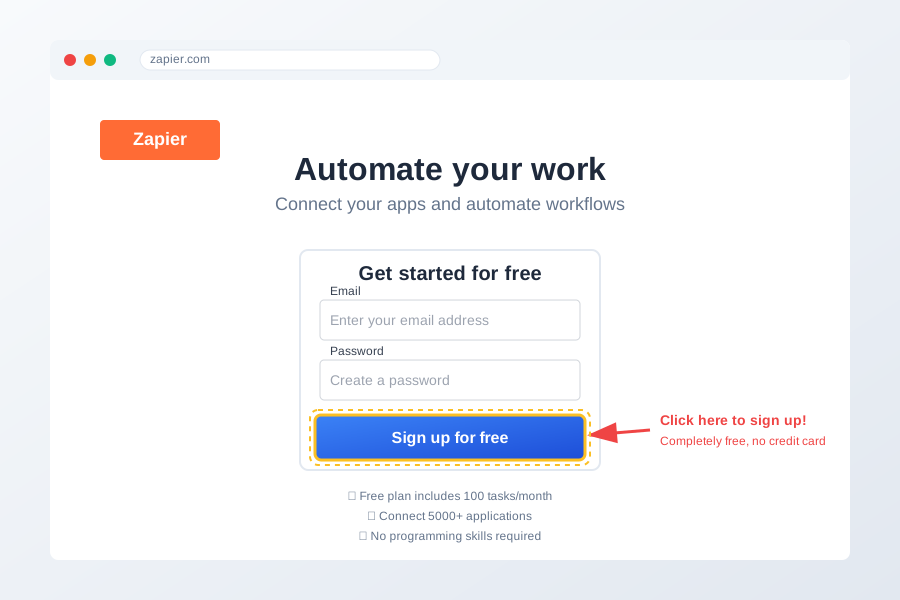
Don't worry if the interface looks a bit overwhelming at first. I spent my first 10 minutes just staring at the dashboard wondering what everything meant. That's totally normal! We're only going to use a tiny fraction of what Zapier can do.
Step 2: Navigate to Zapier Chatbots
Once you're logged in, look for "Chatbots" in the left sidebar menu. If you don't see it immediately, don't panic - sometimes it's hidden under "Apps" or you might need to search for it.
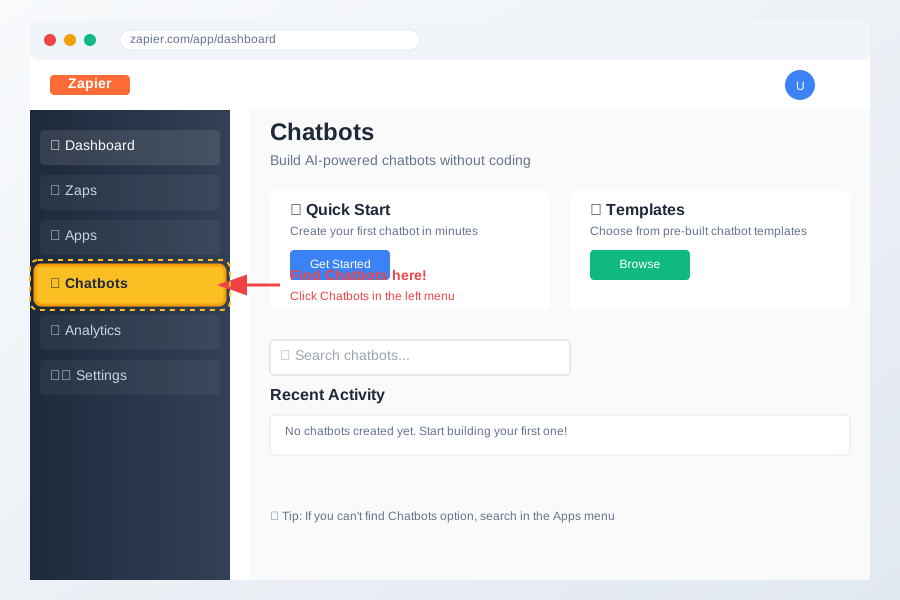
Here's a little secret: I bookmarked this page after my first time because I kept forgetting where it was. Smart move, and you should do the same!
Step 3: Create Your First Chatbot
Click on "Create Chatbot" or whatever blue button looks most important. Zapier will ask you to give your chatbot a name. Pick something simple like "My First Bot" or "Customer Helper" - you can always change it later.
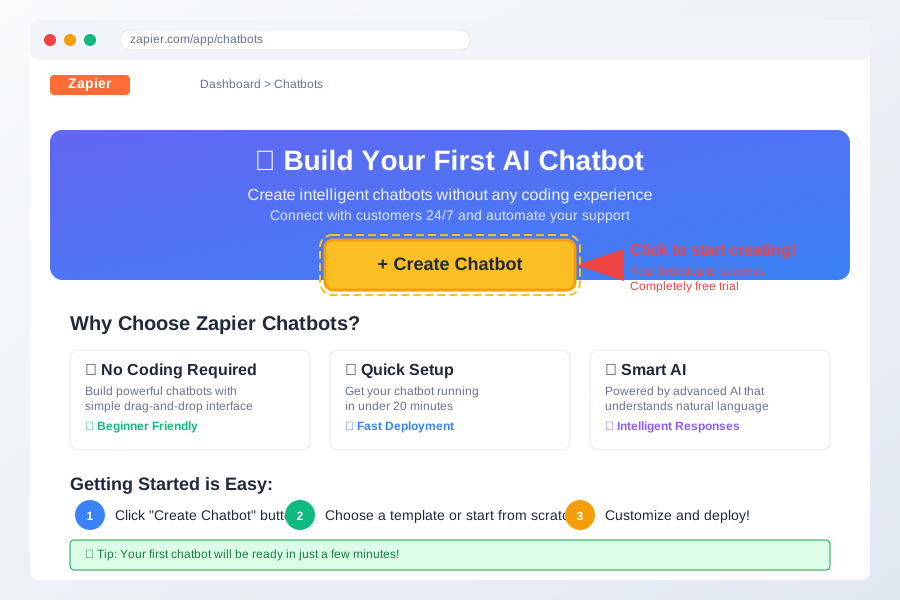
Feeling excited? You should be! You just took the first official step toward becoming a chatbot developer. I still remember the rush I felt at this exact moment.
Setting Up Your Chatbot's Personality
This is where the magic happens. You're about to teach your chatbot how to "think" and respond to people.
Step 4: Choose Your Chatbot's Purpose
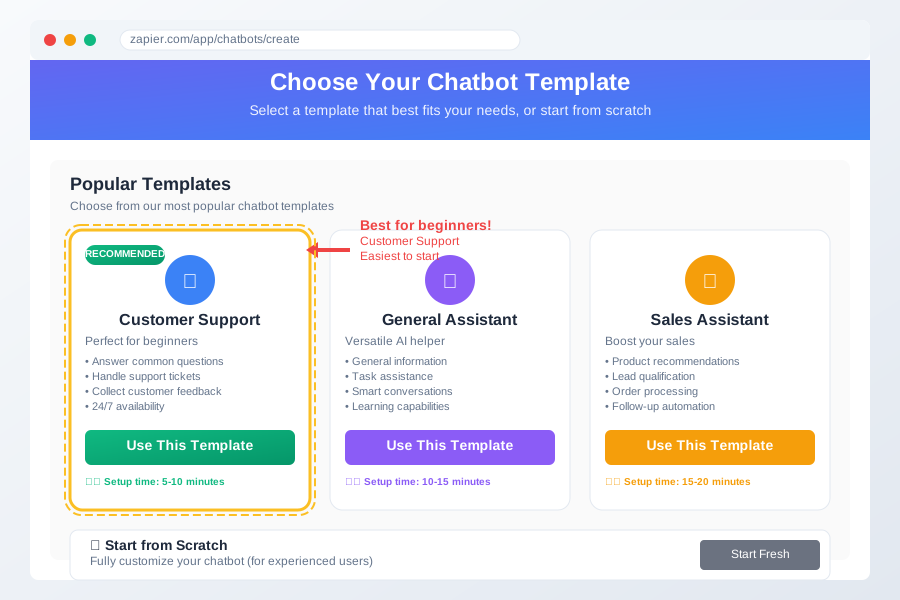
Zapier will show you several templates. For your first chatbot, I recommend choosing "Customer Support" or "General Assistant." These are the most versatile and will teach you the fundamentals.
Think of this like choosing your chatbot's job description. Just like hiring an employee, you want to be clear about what role they'll play in your business (or practice business).
Step 5: Train Your Chatbot (The Fun Part!)
Now you'll see a section where you can add "knowledge" to your chatbot. This is like giving your digital employee a training manual. You can add:
- Frequently asked questions and answers
- Information about products or services
- Company policies or procedures
- Anything you want your chatbot to know
For practice, try adding these sample Q&As:
- Q: "What are your hours?" A: "We're open Monday-Friday, 9 AM to 6 PM EST."
- Q: "How can I contact support?" A: "You can email us at support@example.com or use this chat!"
- Q: "Do you offer refunds?" A: "Yes, we offer full refunds within 30 days of purchase."
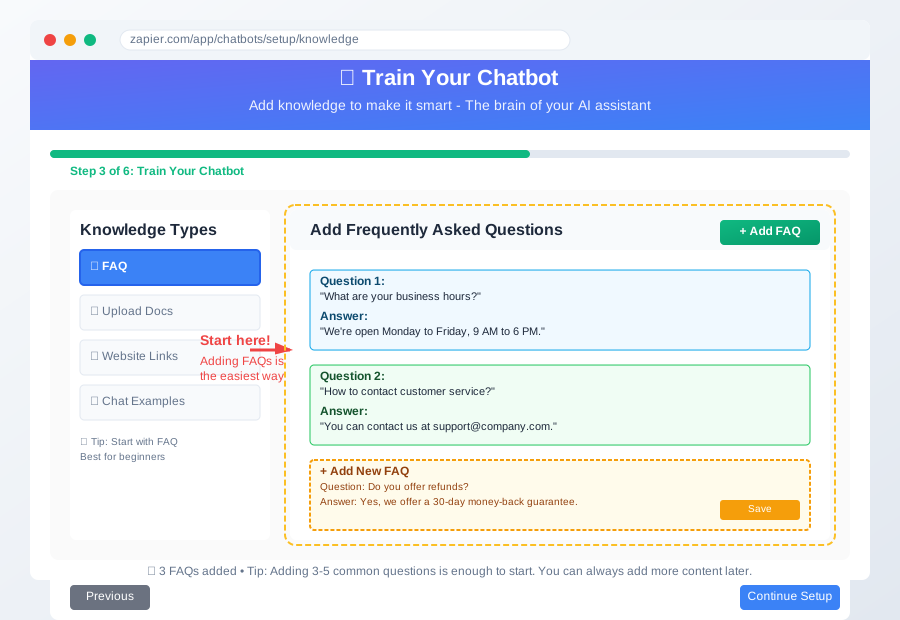
Don't stress about making this perfect. I changed my chatbot's responses probably 50 times in the first week. The beauty of no-code tools is that everything can be easily edited later.
Step 6: Customize Your Chatbot's Appearance
This step is purely cosmetic, but it's so satisfying! You can choose:
- The chatbot's name (something friendly like "Alex" or "Helper")
- Avatar or profile picture
- Color scheme to match your brand
- Welcome message
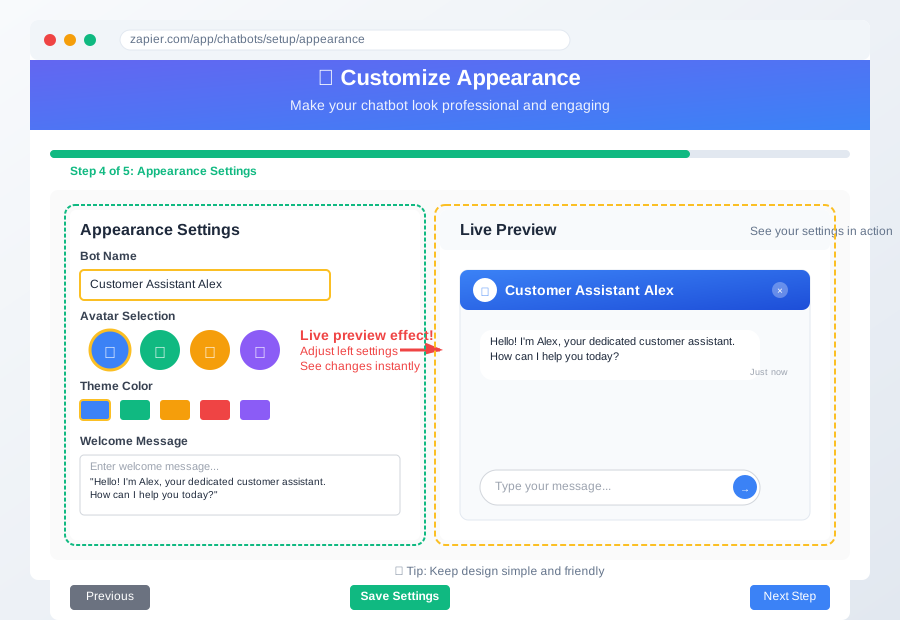
Pro tip: Keep the welcome message simple and friendly. Something like "Hi! I'm here to help answer your questions. What can I assist you with today?" works perfectly.
Testing Your Creation (The Moment of Truth!)
Step 7: Test Your Chatbot
This is my favorite part because it's when you realize "Holy cow, I actually built something that works!"
Look for a "Test" or "Preview" button. When you click it, you'll see your chatbot come to life in a little chat window. Try asking it one of the questions you programmed earlier.
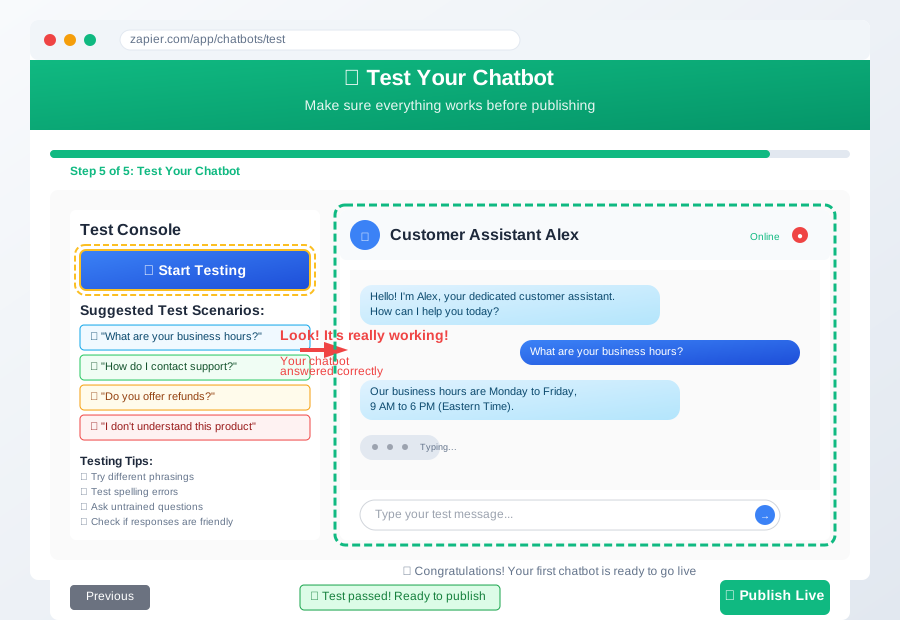
When I first saw my chatbot respond correctly to a question, I literally did a little victory dance in my living room. Don't be surprised if you feel the same excitement!
If something doesn't work perfectly, don't panic. I've never met anyone who got their first chatbot perfect on the first try. Click "Edit" and adjust the responses until you're happy with them.
Step 8: Make It Live (Going Public!)
Once you're satisfied with your testing, it's time to make your chatbot live. Look for buttons labeled "Publish," "Go Live," or "Deploy."
Zapier will give you a few options for where to put your chatbot:
- A simple web link you can share
- Code to embed on a website (don't worry, it's copy-and-paste, not real coding)
- Integration with platforms like WordPress or Shopify
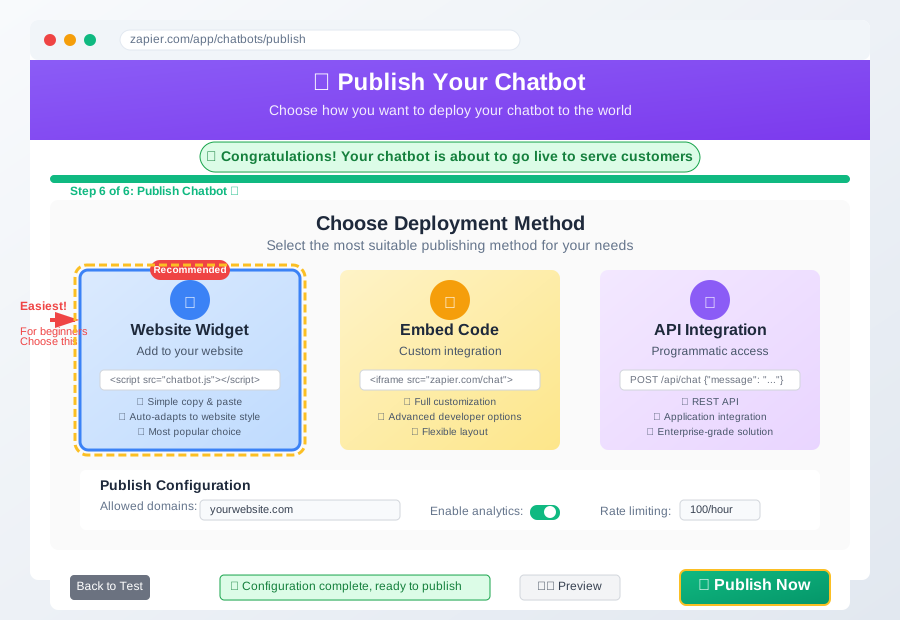
Congratulations! You just built and deployed your first AI chatbot. Take a moment to appreciate what you've accomplished - you're now officially a chatbot developer!
Common Beginner Mistakes (And How to Fix Them)
Let me save you from the mistakes I made when I started:
"My chatbot gives weird answers" This usually happens when your training data is unclear. Go back and rewrite your Q&As to be more specific. Instead of "How much does it cost?" try "What is the price for your basic service?"
"I can't find where I put my chatbot" Zapier saves everything automatically, but finding it again can be tricky. Bookmark the direct link to your chatbot dashboard - trust me on this one.
"The chatbot doesn't understand variations of questions" This is totally normal! Add multiple versions of the same question to your training. For example, include "What are your hours?", "When are you open?", and "What time do you close?" all with the same answer.
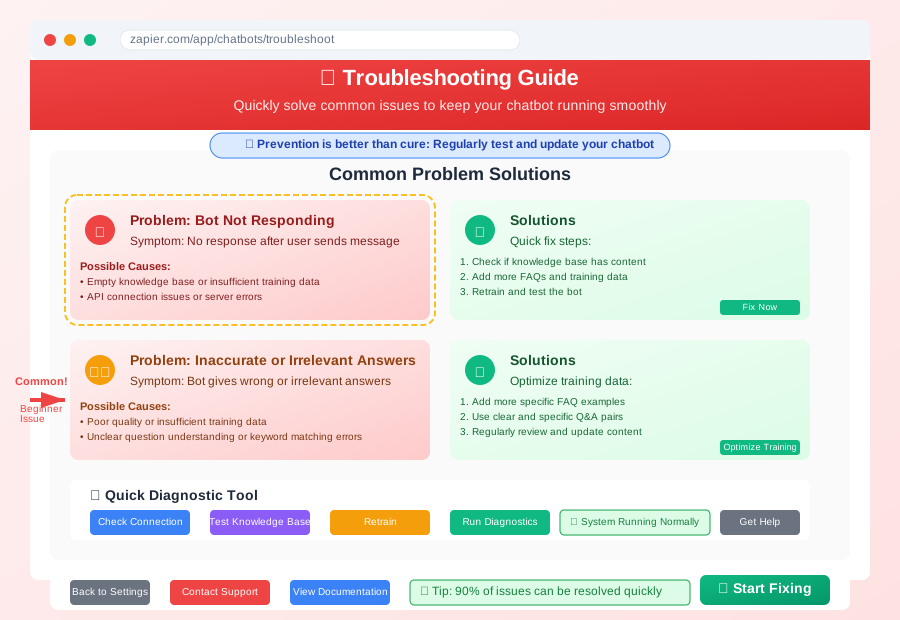
Remember: Every expert was once a beginner who made these exact same mistakes. You're in good company!
Real-World Money-Making Opportunities
Now that you've built your first chatbot, let me share some real ways people are making money with this skill:
Local Business Services
- Restaurants: $300-500 for reservation chatbots
- Retail stores: $400-600 for product inquiry bots
- Service businesses: $500-800 for appointment booking bots
Freelance Platforms I've seen Upwork projects paying $25-75/hour for simple chatbot setup. The key is positioning yourself as someone who makes technology simple for small business owners.
Ongoing Maintenance Many clients pay $50-100/month for chatbot updates and monitoring. One chatbot can generate recurring income for months or years.
One of my students built a chatbot for a local dentist's office and now makes $150/month just updating appointment availability. That's $1,800 per year for maybe 2 hours of work per month!
What You Just Accomplished (And Why It Matters)
Stop for a second and think about what you just did. You built an AI-powered chatbot from scratch without writing a single line of code. That's legitimately impressive, even if it feels simple to you now.
Here's what you've learned:
- How to use no-code automation tools (Zapier)
- The fundamentals of chatbot logic and training
- How to test and deploy digital products
- The basics of AI customer service automation
These skills are worth $50-80 per hour in today's market. I'm not exaggerating - check Upwork or Fiverr and you'll see similar projects posted every day.
You've now written more automation code than 90% of people ever will, and you've gained practical experience with tools that Fortune 500 companies use daily.
Your Next Steps to Chatbot Mastery
You're probably wondering "What now?" Here's your roadmap:
This Week:
- Build one more practice chatbot with different scenarios
- Join online communities (Reddit's r/nocode is great for beginners)
- Follow Zapier's blog for new feature updates
Next Month:
- Learn to integrate your chatbots with email systems
- Practice building chatbots for different industries
- Start reaching out to local businesses about their customer service needs
Month 3:
- Consider learning complementary skills like basic website building
- Start building a portfolio of different chatbot examples
- Begin networking with other no-code developers
Three months from now, you'll be helping someone else with their first chatbot, just like I'm helping you today. The cycle continues, and it's beautiful to watch.
Join Thousands of Other Beginners Learning This
You're not alone in this journey. There are thousands of people just like you who felt overwhelmed by technology but decided to learn anyway. The no-code community is incredibly supportive and welcoming to beginners.
Share your success! Post a screenshot of your working chatbot on social media with #NoCodeSuccess. You'll inspire other beginners who think they can't do it, just like you might have thought 20 minutes ago.
Remember: Every expert was once a beginner who felt exactly like you do right now. The only difference between them and you is that they kept going, one small step at a time.
You're closer to your tech career than you think. What you just learned today is a real, marketable skill that businesses need right now. Don't underestimate what you've accomplished - you just took your first step into a very lucrative future.
Ready to build your second chatbot? Of course you are! You've got this! 🚀