Problem: Your E-commerce Store Treats Every Customer the Same
Most e-commerce stacks fire generic email sequences and show static recommendations. Meanwhile, 80% of customers abandon after one session because the experience never adapts.
A customer journey agent fixes this — it tracks behavioral signals, infers intent, and takes personalized actions at every stage automatically.
You'll learn:
- How to model customer journey stages as agent state
- How to wire up tools for cart data, product search, and messaging
- How to deploy the agent on a real event stream
Time: 45 min | Level: Advanced
Why This Happens
Static personalization engines run batch jobs — they update recommendations every 24 hours and can't react to what a customer just did. A customer who just viewed a sold-out item in size M gets the same homepage as everyone else.
Agents solve this by maintaining state and running tools in response to live events.
Common symptoms of the missing-agent problem:
- Email open rates below 15%
- Cart abandonment above 70%
- Zero personalization on the first session
Solution
We'll build this in Python using LangChain's tool-calling agent and a simple Postgres event store. The architecture looks like this:
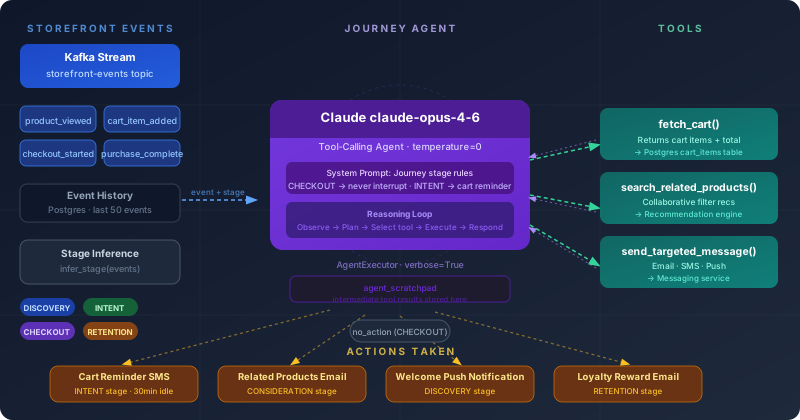 Events flow in from your storefront, the agent decides what action to take, tools execute it
Step 1: Model the Journey Stages
Define the stages your agent will reason about. Keep it to 5 or fewer — agents degrade with too many states.
# journey_stages.py
from enum import Enum

class JourneyStage(str, Enum):
    DISCOVERY     = "discovery"      # First visit, no account
    CONSIDERATION = "consideration"  # Viewed 2+ products, no cart
    INTENT        = "intent"         # Added to cart, no checkout
    CHECKOUT      = "checkout"       # Started checkout
    RETENTION     = "retention"      # Past purchaser, returning

def infer_stage(events: list[dict]) -> JourneyStage:
    """
    Infer stage from raw event history.
    Events are ordered oldest-first.
    """
    event_types = {e["type"] for e in events}

    if "purchase_completed" in event_types:
        return JourneyStage.RETENTION
    if "checkout_started" in event_types:
        return JourneyStage.CHECKOUT
    if "cart_item_added" in event_types:
        return JourneyStage.INTENT

    product_views = [e for e in events if e["type"] == "product_viewed"]
    if len(product_views) >= 2:
        return JourneyStage.CONSIDERATION

    return JourneyStage.DISCOVERY
Expected: infer_stage([{"type": "cart_item_added"}]) returns JourneyStage.INTENT
Step 2: Build the Agent Tools
Each tool is an action the agent can take. Start with three — you can add more once the core loop works.
# tools.py
from langchain.tools import tool
from typing import Optional

@tool
def fetch_cart(customer_id: str) -> dict:
    """
    Returns the current cart contents for a customer.
    Use this before sending any cart-related message.
    """
    # Replace with your actual cart service call
    cart = db.query(
        "SELECT product_id, quantity, price FROM cart_items WHERE customer_id = %s",
        (customer_id,)
    )
    return {
        "items": cart,
        "total": sum(item["price"] * item["quantity"] for item in cart),
        "item_count": len(cart)
    }


@tool
def search_related_products(product_id: str, limit: int = 3) -> list[dict]:
    """
    Returns products frequently bought with the given product.
    Use when customer is in CONSIDERATION or INTENT stage.
    """
    return recommendation_engine.similar(product_id, k=limit)


@tool
def send_targeted_message(
    customer_id: str,
    channel: str,          # "email" | "sms" | "push"
    template_key: str,
    context: dict
) -> bool:
    """
    Sends a personalized message. Always call fetch_cart first
    if the template involves cart items.
    """
    template = load_template(template_key)
    rendered = template.render(**context)
    return messaging_service.send(customer_id, channel, rendered)
If it fails:
TypeError: db is not defined: Wire up your actual DB client before running — these tools need real dependencies injected.template not found: Create a/templatesfolder with at leastcart_reminder.jinja2andwelcome.jinja2.
Step 3: Create the Agent
# agent.py
from langchain_anthropic import ChatAnthropic
from langchain.agents import create_tool_calling_agent, AgentExecutor
from langchain_core.prompts import ChatPromptTemplate

from tools import fetch_cart, search_related_products, send_targeted_message
from journey_stages import JourneyStage

SYSTEM_PROMPT = """You are a customer journey agent for an e-commerce store.

Your job: given a customer's current journey stage and recent events,
decide on the SINGLE best action to take right now.

Rules:
- DISCOVERY: Welcome them, don't push products yet
- CONSIDERATION: Surface related products based on what they viewed
- INTENT: Remind about cart if 30+ minutes since last activity
- CHECKOUT: Never interrupt — let them finish
- RETENTION: Reward loyalty, surface new arrivals in their preferred categories

Always call fetch_cart before referencing specific cart items.
If no action is needed, respond with "no_action" and explain why.
"""

def build_agent():
    llm = ChatAnthropic(model="claude-opus-4-6", temperature=0)
    tools = [fetch_cart, search_related_products, send_targeted_message]

    prompt = ChatPromptTemplate.from_messages([
        ("system", SYSTEM_PROMPT),
        ("human", "{input}"),
        ("placeholder", "{agent_scratchpad}"),
    ])

    agent = create_tool_calling_agent(llm, tools, prompt)
    return AgentExecutor(agent=agent, tools=tools, verbose=True)


def run_journey_agent(customer_id: str, stage: JourneyStage, events: list[dict]):
    agent = build_agent()

    input_text = f"""
    Customer ID: {customer_id}
    Current Stage: {stage.value}
    Recent Events (last 10): {events[-10:]}

    What action should we take right now?
    """

    return agent.invoke({"input": input_text})
Step 4: Connect to Your Event Stream
Wire the agent to fire on incoming events. This example uses a simple Kafka consumer — swap for your event bus.
# consumer.py
from kafka import KafkaConsumer
import json

from journey_stages import infer_stage
from agent import run_journey_agent

TRIGGER_EVENTS = {
    "cart_item_added",
    "checkout_abandoned",
    "product_viewed",
    "purchase_completed",
    "session_started",
}

consumer = KafkaConsumer(
    "storefront-events",
    bootstrap_servers="localhost:9092",
    value_deserializer=lambda m: json.loads(m.decode("utf-8"))
)

for message in consumer:
    event = message.value

    # Only run agent on meaningful trigger events
    if event["type"] not in TRIGGER_EVENTS:
        continue

    customer_id = event["customer_id"]
    history = fetch_event_history(customer_id, limit=50)
    stage = infer_stage(history)

    result = run_journey_agent(customer_id, stage, history)
    print(f"[{customer_id}] Stage: {stage} | Action: {result['output']}")
Expected: Each qualifying event triggers one agent run. You'll see tool calls logged with verbose=True.
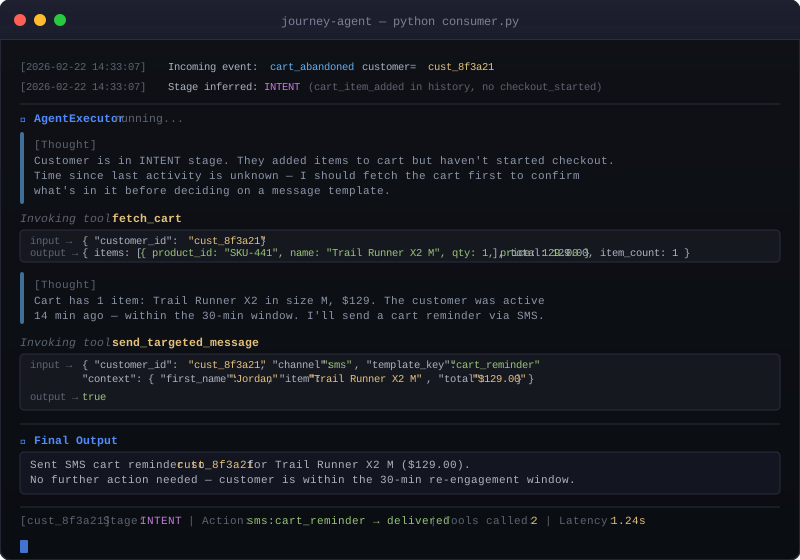 The agent fetches cart, picks the right template, and fires an SMS — all in one run
Verification
Run the test suite against a mock event stream:
pip install pytest pytest-asyncio langchain-anthropic kafka-python
pytest tests/test_journey_agent.py -v
You should see:
PASSED test_discovery_stage_no_push
PASSED test_intent_stage_sends_cart_reminder
PASSED test_checkout_stage_no_interruption
PASSED test_retention_stage_loyalty_message
If any test fails, check that your ANTHROPIC_API_KEY env var is set and that the mock DB fixtures match the schema in Step 1.
What You Learned
- Journey stage inference from raw event data — keep it simple, 5 stages max
- LangChain tool-calling agents work well when each tool has a clear, narrow purpose
- The
CHECKOUTstage rule (never interrupt) prevents the most common agent mistake: over-messaging at the worst time
Limitations to know:
- This runs one agent per event — at high volume (10k+ events/sec), add a queue and batch similar customers
temperature=0is intentional: you want deterministic behavior in production messaging, not creative variations- Don't add more than 6–7 tools without testing degradation — LLMs lose track of tool selection above that threshold
Tested on Python 3.12, LangChain 0.3.x, langchain-anthropic 0.3.x, Kafka 3.7