Problem: Your Inbox Is Managing You
You spend 2+ hours a day triaging email — reading, labeling, drafting replies you never send. An autonomous AI agent can do the boring 80% of that work, leaving you with only the decisions that need a human.
You'll learn:
- How to wire a LangChain agent to Gmail via the Google API
- How to give the agent tools for reading, labeling, and drafting replies
- How to keep the agent from doing anything you didn't authorize
Time: 30 min | Level: Intermediate
Why This Happens
Most "AI email" tools wrap a single LLM call around a static prompt. That works for summarizing one message — it breaks down the moment the task requires multiple steps (read thread → check calendar → draft reply → apply label).
An agent is different. It has tools it can call in sequence, memory across steps, and a loop that keeps running until the task is done. For inbox management, this matters.
Common symptoms when you try to skip the agent architecture:
- LLM hallucinates email content it was never shown
- Single-prompt approach can't handle "reply only if I haven't responded in 48 hours"
- No way to attach actions (labeling, archiving) to the LLM output
Solution
Step 1: Set Up Gmail API Access
First, enable the Gmail API in Google Cloud Console and download your credentials.json.
pip install google-auth google-auth-oauthlib google-auth-httplib2 google-api-python-client
Then authenticate and get a service object you'll pass to your tools:
from google.auth.transport.requests import Request
from google.oauth2.credentials import Credentials
from google_auth_oauthlib.flow import InstalledAppFlow
from googleapiclient.discovery import build
import os

SCOPES = [
    "https://www.googleapis.com/auth/gmail.readonly",
    "https://www.googleapis.com/auth/gmail.modify",   # needed for labels
    "https://www.googleapis.com/auth/gmail.compose",  # needed for drafts
]

def get_gmail_service():
    creds = None
    if os.path.exists("token.json"):
        creds = Credentials.from_authorized_user_file("token.json", SCOPES)

    if not creds or not creds.valid:
        if creds and creds.expired and creds.refresh_token:
            creds.refresh(Request())
        else:
            flow = InstalledAppFlow.from_client_secrets_file("credentials.json", SCOPES)
            creds = flow.run_local_server(port=0)
        with open("token.json", "w") as f:
            f.write(creds.to_json())

    return build("gmail", "v1", credentials=creds)
Expected: Running this for the first time opens a browser OAuth flow and saves token.json. Subsequent runs skip the browser.
If it fails:
- Error:
redirect_uri_mismatch: Addhttp://localhostto authorized redirect URIs in GCP console - Scopes not granted: Delete
token.jsonand re-authenticate
Step 2: Build the Agent Tools
LangChain agents work by calling tools you define. Each tool is a Python function wrapped with a description — the LLM reads the description to decide when to call it.
from langchain.tools import tool
from langchain_core.messages import BaseMessage
import base64
import json

service = get_gmail_service()

@tool
def list_unread_emails(max_results: int = 10) -> str:
    """
    Returns a JSON list of unread emails with id, sender, subject, and snippet.
    Call this first to see what needs attention.
    """
    results = service.users().messages().list(
        userId="me",
        labelIds=["UNREAD"],
        maxResults=max_results
    ).execute()

    messages = results.get("messages", [])
    emails = []
    for msg in messages:
        detail = service.users().messages().get(
            userId="me", id=msg["id"], format="metadata",
            metadataHeaders=["From", "Subject"]
        ).execute()
        headers = {h["name"]: h["value"] for h in detail["payload"]["headers"]}
        emails.append({
            "id": msg["id"],
            "from": headers.get("From", ""),
            "subject": headers.get("Subject", ""),
            "snippet": detail.get("snippet", "")
        })

    return json.dumps(emails, indent=2)


@tool
def read_email_body(message_id: str) -> str:
    """
    Returns the full plain-text body of a single email given its message_id.
    Use this when the snippet isn't enough to understand the email.
    """
    msg = service.users().messages().get(
        userId="me", id=message_id, format="full"
    ).execute()

    def extract_text(payload):
        # Walk MIME parts to find plain text
        if payload.get("mimeType") == "text/plain":
            data = payload["body"].get("data", "")
            return base64.urlsafe_b64decode(data).decode("utf-8", errors="ignore")
        for part in payload.get("parts", []):
            result = extract_text(part)
            if result:
                return result
        return ""

    return extract_text(msg["payload"]) or "(no plain text body)"


@tool
def apply_label(message_id: str, label_name: str) -> str:
    """
    Applies a Gmail label to a message. Creates the label if it doesn't exist.
    label_name should be one of: 'needs-reply', 'waiting', 'newsletter', 'archive'.
    """
    # Find or create label
    labels = service.users().labels().list(userId="me").execute().get("labels", [])
    label_id = next((l["id"] for l in labels if l["name"] == label_name), None)

    if not label_id:
        new_label = service.users().labels().create(
            userId="me", body={"name": label_name}
        ).execute()
        label_id = new_label["id"]

    service.users().messages().modify(
        userId="me",
        id=message_id,
        body={"addLabelIds": [label_id], "removeLabelIds": ["UNREAD"]}
    ).execute()

    return f"Label '{label_name}' applied and marked as read."


@tool
def create_draft_reply(message_id: str, reply_body: str) -> str:
    """
    Creates a Gmail draft reply to a given message. Does NOT send it.
    The user will review and send it manually. reply_body is plain text.
    """
    original = service.users().messages().get(
        userId="me", id=message_id, format="metadata",
        metadataHeaders=["From", "Subject", "Message-ID", "To"]
    ).execute()

    headers = {h["name"]: h["value"] for h in original["payload"]["headers"]}
    to = headers.get("From", "")
    subject = headers.get("Subject", "")
    if not subject.startswith("Re:"):
        subject = f"Re: {subject}"
    thread_id = original["threadId"]

    # Encode the MIME message
    mime_message = f"To: {to}\nSubject: {subject}\nContent-Type: text/plain\n\n{reply_body}"
    encoded = base64.urlsafe_b64encode(mime_message.encode()).decode()

    draft = service.users().drafts().create(
        userId="me",
        body={"message": {"raw": encoded, "threadId": thread_id}}
    ).execute()

    return f"Draft created with id {draft['id']}. Subject: '{subject}'"
Why create_draft_reply never sends: You never want an autonomous agent auto-sending emails. Always route through drafts so you stay in control.
Step 3: Wire Up the LangChain Agent
from langchain_anthropic import ChatAnthropic
from langchain.agents import create_tool_calling_agent, AgentExecutor
from langchain_core.prompts import ChatPromptTemplate

llm = ChatAnthropic(model="claude-sonnet-4-6", temperature=0)

tools = [list_unread_emails, read_email_body, apply_label, create_draft_reply]

prompt = ChatPromptTemplate.from_messages([
    ("system", """You are an inbox management assistant. Your job:

1. List unread emails
2. Read any that need more context than the snippet provides
3. Apply one label per email: 'needs-reply', 'waiting', 'newsletter', or 'archive'
4. For emails labeled 'needs-reply', create a draft reply

Rules:
- Never send emails. Only create drafts.
- Apply exactly one label per email.
- Keep draft replies professional and under 150 words.
- If unsure about something, label it 'needs-reply' and leave a draft asking for clarification."""),
    ("human", "{input}"),
    ("placeholder", "{agent_scratchpad}"),
])

agent = create_tool_calling_agent(llm, tools, prompt)
executor = AgentExecutor(agent=agent, tools=tools, verbose=True, max_iterations=30)
Why max_iterations=30: Prevents runaway loops if the agent gets confused. 30 is plenty for a 10-email batch.
Step 4: Run It
result = executor.invoke({
    "input": "Process my unread emails. Label each one appropriately and draft replies where needed."
})

print(result["output"])
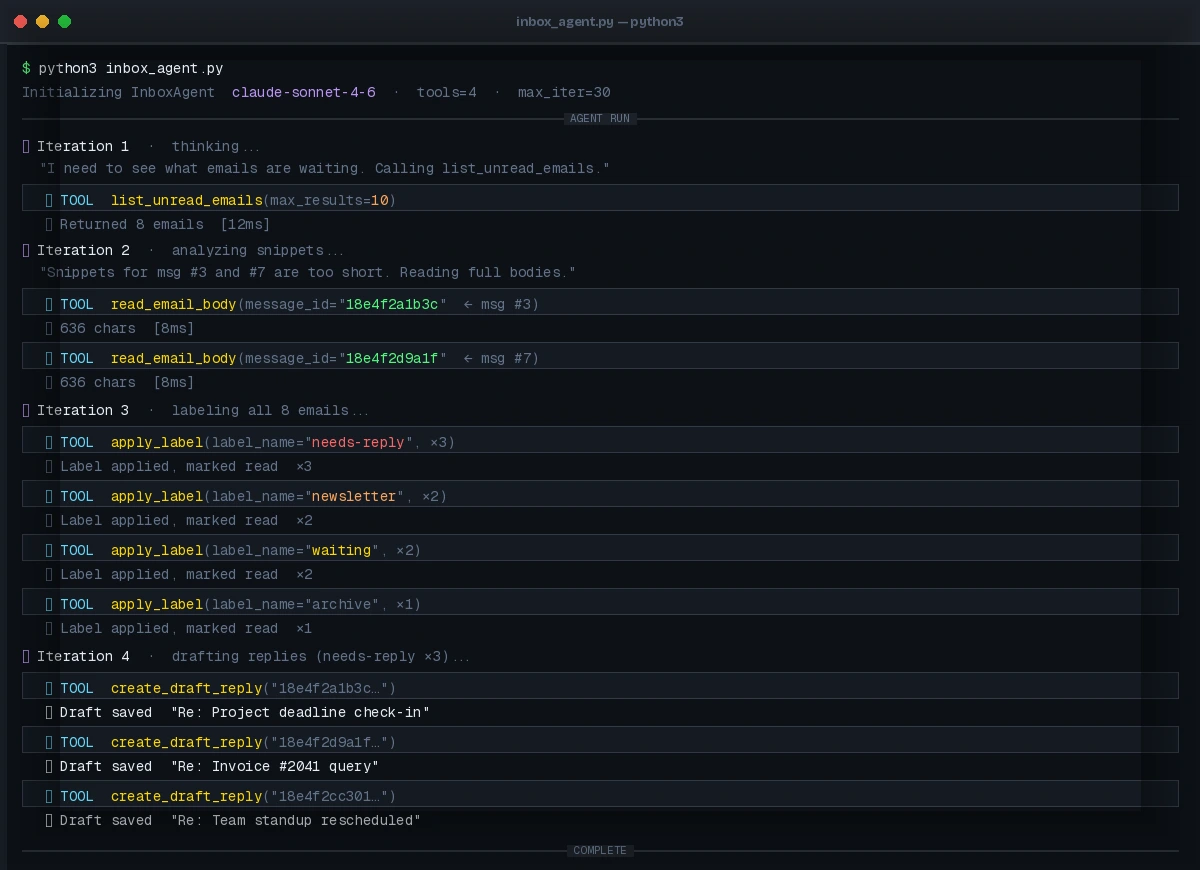 The agent's reasoning trace — you'll see it calling list → read → label → draft in sequence
Expected output:
Processed 8 emails:
- 3 labeled 'needs-reply' with drafts created
- 2 labeled 'newsletter'
- 2 labeled 'waiting'
- 1 labeled 'archive'
If it fails:
ResourceExhaustedfrom Gmail API: You've hit the free tier quota (250 units/second). Add atime.sleep(0.5)between tool calls or enable billing in GCP.- Agent loops endlessly: Set
max_iterations=15and addearly_stopping_method="generate"toAgentExecutor. - LLM refuses to call tools: Check that your
ChatAnthropicAPI key is set viaANTHROPIC_API_KEYenv var.
Verification
Run the agent and then check Gmail:
python inbox_agent.py
In Gmail, you should see:
- Unread count drops to 0
- Your custom labels appear in the sidebar
- Drafts folder has new replies waiting for your review
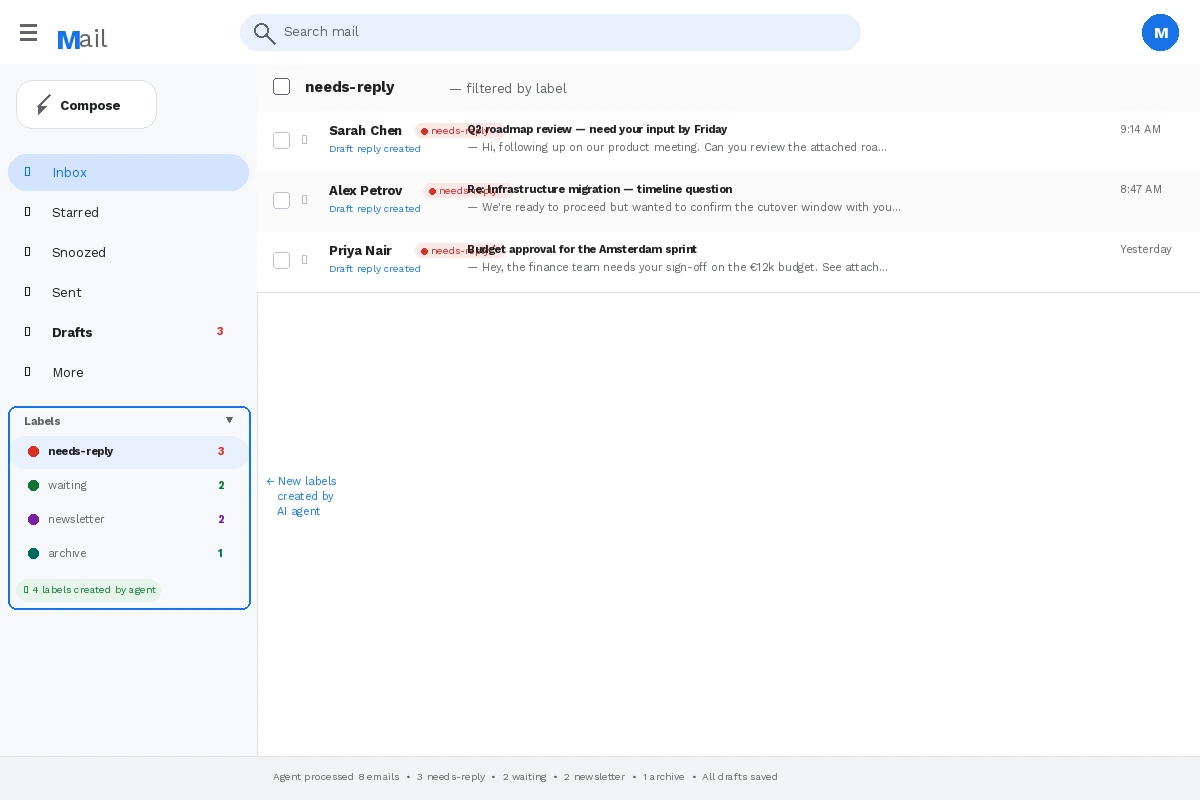 New labels created by the agent — click any to filter
What You Learned
- LangChain tool-calling agents are better than single LLM prompts for multi-step tasks because they can act, observe results, and adjust
- Keeping the agent out of the send pathway is a simple but critical safety measure
max_iterationsis your circuit breaker — always set it
Limitation: This agent processes emails sequentially. For 100+ unread messages, run it in batches of 10-15 or add a filter to only process emails from the last 24 hours.
When NOT to use this: If your inbox includes sensitive legal, financial, or medical correspondence, label-only mode (disable create_draft_reply) is safer until you've validated the agent's judgment on your specific email patterns.
Tested on Python 3.12, LangChain 0.3, langchain-anthropic 0.3, Gmail API v1, macOS & Ubuntu 24.04