Ever tried explaining to your cat why it can't have treats at 3 AM? Building AI agents used to feel just as futile. You'd need PhD-level knowledge, enterprise budgets, and patience rivaling Buddhist monks.
Not anymore.
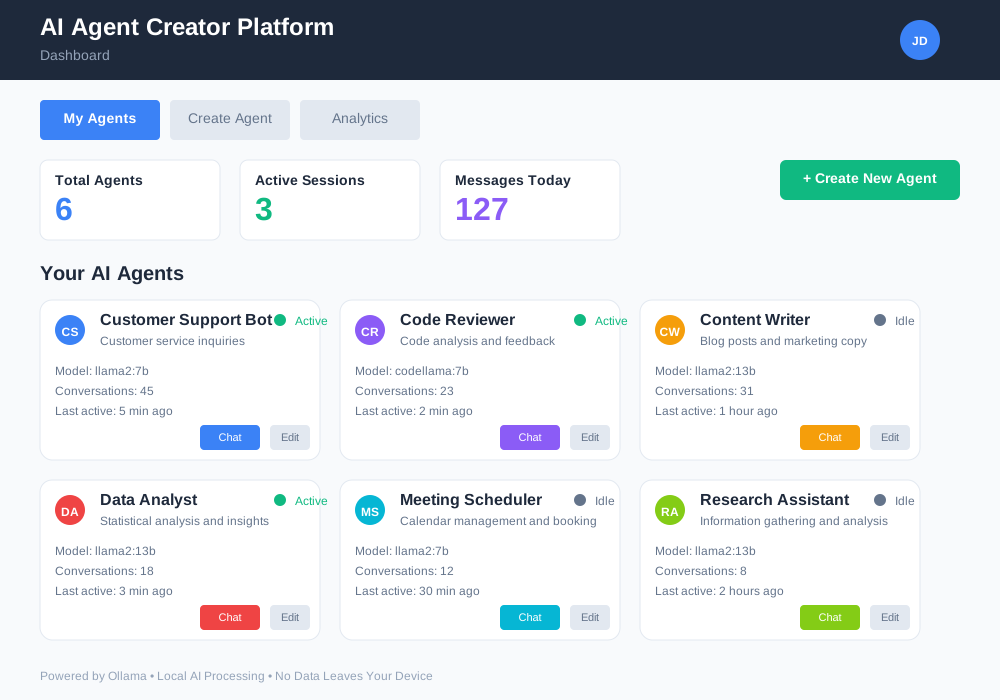
This guide shows you how to build a complete AI agent creator platform using Ollama. You'll create custom AI agents that run locally on your machine. No cloud subscriptions, no API limits, no sending your data to distant servers.
What You'll Build
By the end of this tutorial, you'll have:
- A functional AI agent creator platform
- Multiple pre-configured agent templates
- A web interface for non-technical users
- Local deployment without internet dependencies
- Custom agent behaviors for specific tasks
Prerequisites: What You Need Before Starting
Hardware Requirements:
- 8GB RAM minimum (16GB recommended)
- 10GB free disk space
- Modern CPU (Intel i5 or AMD Ryzen 5 equivalent)
Software Requirements:
- Python 3.8 or higher
- Node.js 16+ for the web interface
- Git for version control
- Basic Terminal/command line familiarity
Time Investment:
- 2-3 hours for complete setup
- Additional time for customization
Step 1: Install and Configure Ollama
Ollama transforms your computer into a local LLM server. It manages model downloads, memory allocation, and API endpoints automatically.
Download Ollama
Visit the official Ollama website and download the installer for your operating system.
For macOS:
# Download and install via homebrew
brew install ollama

# Or download directly from website
curl -fsSL https://ollama.ai/install.sh | sh
For Linux:
# Single command installation
curl -fsSL https://ollama.ai/install.sh | sh
For Windows: Download the Windows installer from the official website and run it.
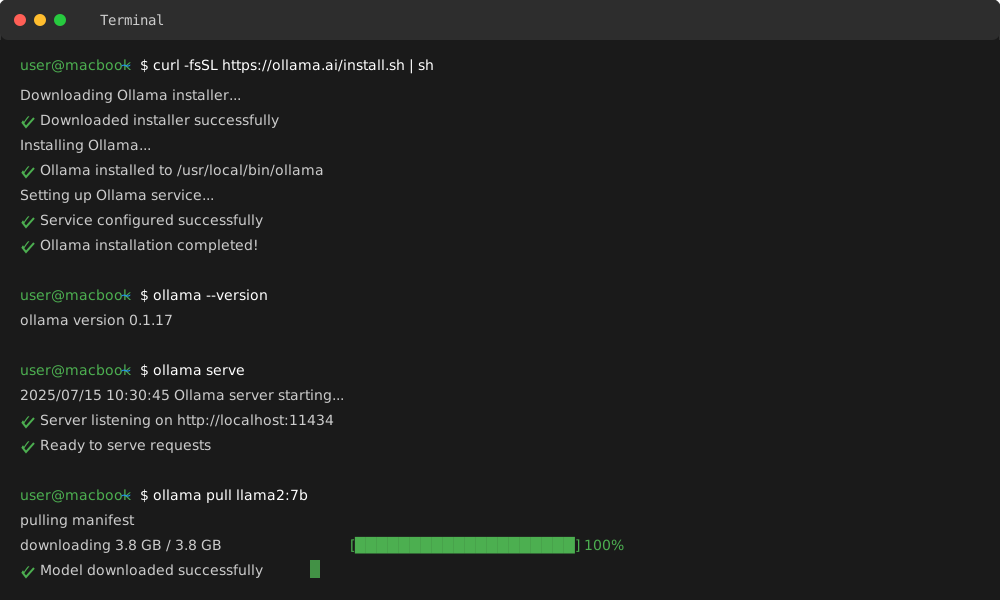
Verify Installation
# Check if Ollama installed correctly
ollama --version

# Start Ollama service
ollama serve
Download Your First Model
# Download a lightweight model for development
ollama pull llama2:7b

# For more capable responses (requires more RAM)
ollama pull llama2:13b

# Check downloaded models
ollama list
Model Selection Guide:
- llama2:7b: 4GB RAM, fast responses, good for testing
- llama2:13b: 8GB RAM, better quality, production ready
- codellama: Specialized for code generation tasks
Step 2: Create the Platform Foundation
Create a directory structure that separates concerns and makes the platform scalable.
# Create main project directory
mkdir ai-agent-platform
cd ai-agent-platform

# Create subdirectories
mkdir -p {backend,frontend,agents,templates,config,logs}

# Initialize Python environment
python -m venv venv
source venv/bin/activate  # On Windows: venv\Scripts\activate

# Create requirements file
touch requirements.txt
Install Python Dependencies
Add these dependencies to requirements.txt:
fastapi==0.104.1
uvicorn==0.24.0
requests==2.31.0
pydantic==2.5.0
python-multipart==0.0.6
jinja2==3.1.2
aiofiles==23.2.1
python-jose==3.3.0
passlib==1.7.4
Install the dependencies:
pip install -r requirements.txt
Step 3: Build the Core Agent Framework
Create the foundation that handles agent creation, management, and execution.
Create the Agent Base Class
Create backend/agent_base.py:
from typing import Dict, List, Optional, Any
import json
import requests
from datetime import datetime

class AIAgent:
    """Base class for all AI agents in the platform."""

    def __init__(self, name: str, model: str = "llama2:7b",
                 system_prompt: str = "", ollama_url: str = "http://localhost:11434"):
        self.name = name
        self.model = model
        self.system_prompt = system_prompt
        self.ollama_url = ollama_url
        self.conversation_history = []
        self.created_at = datetime.now()

    def send_message(self, message: str, context: Optional[Dict] = None) -> str:
        """Send a message to the agent and get response."""

        # Prepare the prompt with system instructions
        full_prompt = self._build_prompt(message, context)

        # Send request to Ollama
        try:
            response = requests.post(
                f"{self.ollama_url}/api/generate",
                json={
                    "model": self.model,
                    "prompt": full_prompt,
                    "stream": False
                },
                timeout=60
            )
            response.raise_for_status()

            # Extract response text
            result = response.json()
            agent_response = result.get("response", "")

            # Store conversation
            self.conversation_history.append({
                "timestamp": datetime.now().isoformat(),
                "user_message": message,
                "agent_response": agent_response,
                "context": context
            })

            return agent_response

        except requests.exceptions.RequestException as e:
            return f"Error communicating with agent: {str(e)}"

    def _build_prompt(self, message: str, context: Optional[Dict] = None) -> str:
        """Build the complete prompt including system instructions."""

        prompt_parts = []

        # Add system prompt if provided
        if self.system_prompt:
            prompt_parts.append(f"System: {self.system_prompt}")

        # Add context if provided
        if context:
            context_str = json.dumps(context, indent=2)
            prompt_parts.append(f"Context: {context_str}")

        # Add recent conversation history for continuity
        if self.conversation_history:
            recent_history = self.conversation_history[-3:]  # Last 3 exchanges
            for exchange in recent_history:
                prompt_parts.append(f"Previous User: {exchange['user_message']}")
                prompt_parts.append(f"Previous Assistant: {exchange['agent_response']}")

        # Add current message
        prompt_parts.append(f"User: {message}")
        prompt_parts.append("Assistant:")

        return "\n\n".join(prompt_parts)

    def get_stats(self) -> Dict[str, Any]:
        """Get agent statistics and information."""
        return {
            "name": self.name,
            "model": self.model,
            "created_at": self.created_at.isoformat(),
            "total_conversations": len(self.conversation_history),
            "system_prompt": self.system_prompt[:100] + "..." if len(self.system_prompt) > 100 else self.system_prompt
        }

    def export_conversations(self) -> List[Dict]:
        """Export conversation history for analysis."""
        return self.conversation_history.copy()
Create the Agent Manager
Create backend/agent_manager.py:
from typing import Dict, List, Optional
import json
import os
from .agent_base import AIAgent

class AgentManager:
    """Manages multiple AI agents and their configurations."""

    def __init__(self, config_dir: str = "config"):
        self.agents: Dict[str, AIAgent] = {}
        self.config_dir = config_dir
        self.templates_dir = "templates"

        # Ensure directories exist
        os.makedirs(config_dir, exist_ok=True)
        os.makedirs(self.templates_dir, exist_ok=True)

        # Load existing agents
        self._load_agents()

    def create_agent(self, name: str, template_name: str,
                    custom_prompt: Optional[str] = None) -> bool:
        """Create a new agent from a template."""

        # Check if agent already exists
        if name in self.agents:
            return False

        # Load template
        template = self._load_template(template_name)
        if not template:
            return False

        # Use custom prompt or template prompt
        system_prompt = custom_prompt or template.get("system_prompt", "")

        # Create agent
        agent = AIAgent(
            name=name,
            model=template.get("model", "llama2:7b"),
            system_prompt=system_prompt
        )

        # Store agent
        self.agents[name] = agent

        # Save configuration
        self._save_agent_config(name, {
            "template": template_name,
            "model": agent.model,
            "system_prompt": system_prompt,
            "created_at": agent.created_at.isoformat()
        })

        return True

    def get_agent(self, name: str) -> Optional[AIAgent]:
        """Retrieve an agent by name."""
        return self.agents.get(name)

    def list_agents(self) -> List[Dict]:
        """List all agents with their basic information."""
        return [agent.get_stats() for agent in self.agents.values()]

    def delete_agent(self, name: str) -> bool:
        """Delete an agent and its configuration."""
        if name not in self.agents:
            return False

        # Remove from memory
        del self.agents[name]

        # Remove config file
        config_path = os.path.join(self.config_dir, f"{name}.json")
        if os.path.exists(config_path):
            os.remove(config_path)

        return True

    def _load_template(self, template_name: str) -> Optional[Dict]:
        """Load an agent template."""
        template_path = os.path.join(self.templates_dir, f"{template_name}.json")

        if not os.path.exists(template_path):
            return None

        try:
            with open(template_path, 'r') as f:
                return json.load(f)
        except (json.JSONDecodeError, IOError):
            return None

    def _save_agent_config(self, name: str, config: Dict):
        """Save agent configuration to file."""
        config_path = os.path.join(self.config_dir, f"{name}.json")

        try:
            with open(config_path, 'w') as f:
                json.dump(config, f, indent=2)
        except IOError:
            pass  # Handle error appropriately in production

    def _load_agents(self):
        """Load existing agents from configuration files."""
        if not os.path.exists(self.config_dir):
            return

        for filename in os.listdir(self.config_dir):
            if filename.endswith('.json'):
                name = filename[:-5]  # Remove .json extension
                config_path = os.path.join(self.config_dir, filename)

                try:
                    with open(config_path, 'r') as f:
                        config = json.load(f)

                    # Recreate agent
                    agent = AIAgent(
                        name=name,
                        model=config.get("model", "llama2:7b"),
                        system_prompt=config.get("system_prompt", "")
                    )

                    self.agents[name] = agent

                except (json.JSONDecodeError, IOError):
                    continue  # Skip corrupted config files
Step 4: Create Agent Templates
Templates define pre-configured agent behaviors for common use cases. This makes agent creation accessible to non-technical users.
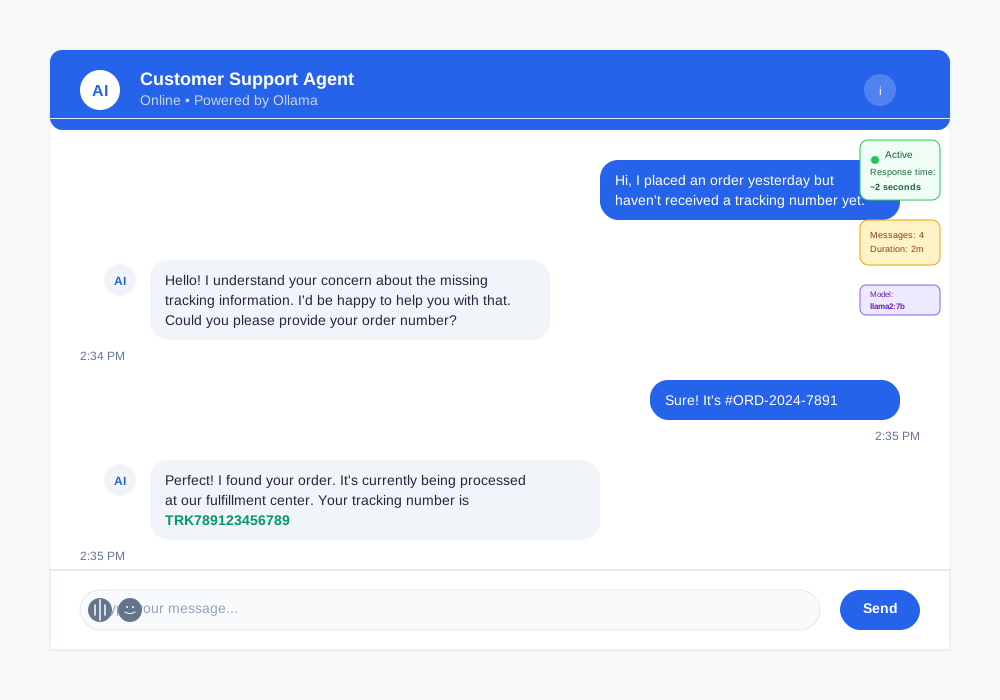
Customer Support Agent Template
Create templates/customer_support.json:
{
  "name": "Customer Support Agent",
  "description": "Handles customer inquiries with empathy and efficiency",
  "model": "llama2:7b",
  "system_prompt": "You are a helpful customer support representative. Always be polite, empathetic, and solution-focused. If you cannot resolve an issue, escalate it appropriately. Keep responses concise but thorough. Ask clarifying questions when needed.",
  "sample_interactions": [
    {
      "user": "My order hasn't arrived yet",
      "agent": "I understand your concern about your delayed order. Let me help you track it. Could you please provide your order number?"
    }
  ],
  "capabilities": [
    "Order tracking",
    "Issue resolution",
    "Product information",
    "Escalation handling"
  ]
}
Code Review Agent Template
Create templates/code_reviewer.json:
{
  "name": "Code Review Agent",
  "description": "Reviews code for best practices, bugs, and improvements",
  "model": "codellama:7b",
  "system_prompt": "You are an experienced software developer conducting code reviews. Focus on:\n1. Code quality and readability\n2. Potential bugs or security issues\n3. Performance optimization opportunities\n4. Best practices and conventions\n5. Constructive feedback with specific suggestions\n\nProvide clear, actionable feedback. Highlight both strengths and areas for improvement.",
  "sample_interactions": [
    {
      "user": "Please review this Python function for calculating fibonacci numbers",
      "agent": "I'll review your fibonacci function. Please share the code and I'll analyze it for efficiency, correctness, and best practices."
    }
  ],
  "capabilities": [
    "Code quality analysis",
    "Bug detection",
    "Performance review",
    "Best practices guidance"
  ]
}
Content Writer Agent Template
Create templates/content_writer.json:
{
  "name": "Content Writer Agent",
  "description": "Creates engaging content for blogs, marketing, and documentation",
  "model": "llama2:13b",
  "system_prompt": "You are a skilled content writer specializing in clear, engaging content. Your writing is:\n- Audience-appropriate and accessible\n- Well-structured with clear headings\n- SEO-friendly when requested\n- Factual and well-researched\n- Engaging and conversational\n\nAlways ask about target audience, tone, and specific requirements before writing.",
  "sample_interactions": [
    {
      "user": "Write a blog post about sustainable gardening",
      "agent": "I'd be happy to write about sustainable gardening! To create the best content for you, could you tell me: 1) Who's your target audience? 2) What's the desired length? 3) Any specific aspects of sustainable gardening to focus on?"
    }
  ],
  "capabilities": [
    "Blog post creation",
    "Marketing copy",
    "Technical documentation",
    "SEO optimization"
  ]
}
Step 5: Build the Web Interface
Create a user-friendly interface that allows non-technical users to create and interact with agents.
FastAPI Backend Server
Create backend/main.py:
from fastapi import FastAPI, HTTPException, File, UploadFile
from fastapi.middleware.cors import CORSMiddleware
from fastapi.staticfiles import StaticFiles
from pydantic import BaseModel
from typing import Optional, List, Dict
import os
import json

from .agent_manager import AgentManager

app = FastAPI(title="AI Agent Creator Platform", version="1.0.0")

# Enable CORS for frontend
app.add_middleware(
    CORSMiddleware,
    allow_origins=["http://localhost:3000"],  # React dev server
    allow_credentials=True,
    allow_methods=["*"],
    allow_headers=["*"],
)

# Initialize agent manager
agent_manager = AgentManager()

# Pydantic models for API
class CreateAgentRequest(BaseModel):
    name: str
    template_name: str
    custom_prompt: Optional[str] = None

class ChatMessage(BaseModel):
    agent_name: str
    message: str
    context: Optional[Dict] = None

class ChatResponse(BaseModel):
    response: str
    agent_name: str
    timestamp: str

@app.get("/")
async def root():
    return {"message": "AI Agent Creator Platform API"}

@app.get("/templates")
async def get_templates():
    """Get all available agent templates."""
    templates = []
    templates_dir = "templates"

    if os.path.exists(templates_dir):
        for filename in os.listdir(templates_dir):
            if filename.endswith('.json'):
                template_path = os.path.join(templates_dir, filename)
                try:
                    with open(template_path, 'r') as f:
                        template = json.load(f)
                        template['id'] = filename[:-5]  # Remove .json
                        templates.append(template)
                except (json.JSONDecodeError, IOError):
                    continue

    return {"templates": templates}

@app.post("/agents")
async def create_agent(request: CreateAgentRequest):
    """Create a new AI agent from a template."""

    success = agent_manager.create_agent(
        name=request.name,
        template_name=request.template_name,
        custom_prompt=request.custom_prompt
    )

    if not success:
        raise HTTPException(
            status_code=400,
            detail="Agent creation failed. Name might already exist or template not found."
        )

    return {"message": f"Agent '{request.name}' created successfully"}

@app.get("/agents")
async def list_agents():
    """List all created agents."""
    agents = agent_manager.list_agents()
    return {"agents": agents}

@app.post("/chat")
async def chat_with_agent(message: ChatMessage) -> ChatResponse:
    """Send a message to an agent and get response."""

    agent = agent_manager.get_agent(message.agent_name)
    if not agent:
        raise HTTPException(status_code=404, detail="Agent not found")

    response = agent.send_message(message.message, message.context)

    return ChatResponse(
        response=response,
        agent_name=message.agent_name,
        timestamp=agent.conversation_history[-1]["timestamp"]
    )

@app.get("/agents/{agent_name}/stats")
async def get_agent_stats(agent_name: str):
    """Get statistics for a specific agent."""
    agent = agent_manager.get_agent(agent_name)
    if not agent:
        raise HTTPException(status_code=404, detail="Agent not found")

    return agent.get_stats()

@app.get("/agents/{agent_name}/conversations")
async def get_agent_conversations(agent_name: str):
    """Get conversation history for an agent."""
    agent = agent_manager.get_agent(agent_name)
    if not agent:
        raise HTTPException(status_code=404, detail="Agent not found")

    return {"conversations": agent.export_conversations()}

@app.delete("/agents/{agent_name}")
async def delete_agent(agent_name: str):
    """Delete an agent."""
    success = agent_manager.delete_agent(agent_name)
    if not success:
        raise HTTPException(status_code=404, detail="Agent not found")

    return {"message": f"Agent '{agent_name}' deleted successfully"}

if __name__ == "__main__":
    import uvicorn
    uvicorn.run(app, host="0.0.0.0", port=8000)
React Frontend Setup
Create the frontend structure:
# Navigate to frontend directory
cd frontend

# Initialize React app
npx create-react-app . --template typescript
npm install axios react-router-dom @types/react-router-dom

# Install UI components
npm install @mui/material @emotion/react @emotion/styled
npm install @mui/icons-material
Main Frontend Component
Create frontend/src/App.tsx:
import React, { useState, useEffect } from 'react';
import {
  Container,
  AppBar,
  Toolbar,
  Typography,
  Tab,
  Tabs,
  Box,
  Paper
} from '@mui/material';
import { BrowserRouter as Router, Routes, Route, Link } from 'react-router-dom';

import AgentList from './components/AgentList';
import CreateAgent from './components/CreateAgent';
import ChatInterface from './components/ChatInterface';
import './App.css';

interface TabPanelProps {
  children?: React.ReactNode;
  index: number;
  value: number;
}

function TabPanel(props: TabPanelProps) {
  const { children, value, index, ...other } = props;

  return (
    <div
      role="tabpanel"
      hidden={value !== index}
      id={`simple-tabpanel-${index}`}
      aria-labelledby={`simple-tab-${index}`}
      {...other}
    >
      {value === index && (
        <Box sx={{ p: 3 }}>
          {children}
        </Box>
      )}
    </div>
  );
}

function App() {
  const [tabValue, setTabValue] = useState(0);

  const handleTabChange = (event: React.SyntheticEvent, newValue: number) => {
    setTabValue(newValue);
  };

  return (
    <div className="App">
      <AppBar position="static">
        <Toolbar>
          <Typography variant="h6" component="div" sx={{ flexGrow: 1 }}>
            AI Agent Creator Platform
          </Typography>
        </Toolbar>
      </AppBar>

      <Container maxWidth="lg" sx={{ mt: 4 }}>
        <Paper elevation={3}>
          <Box sx={{ borderBottom: 1, borderColor: 'divider' }}>
            <Tabs value={tabValue} onChange={handleTabChange}>
              <Tab label="My Agents" />
              <Tab label="Create Agent" />
              <Tab label="Chat" />
            </Tabs>
          </Box>

          <TabPanel value={tabValue} index={0}>
            <AgentList />
          </TabPanel>

          <TabPanel value={tabValue} index={1}>
            <CreateAgent />
          </TabPanel>

          <TabPanel value={tabValue} index={2}>
            <ChatInterface />
          </TabPanel>
        </Paper>
      </Container>
    </div>
  );
}

export default App;
Step 6: Test Your Platform
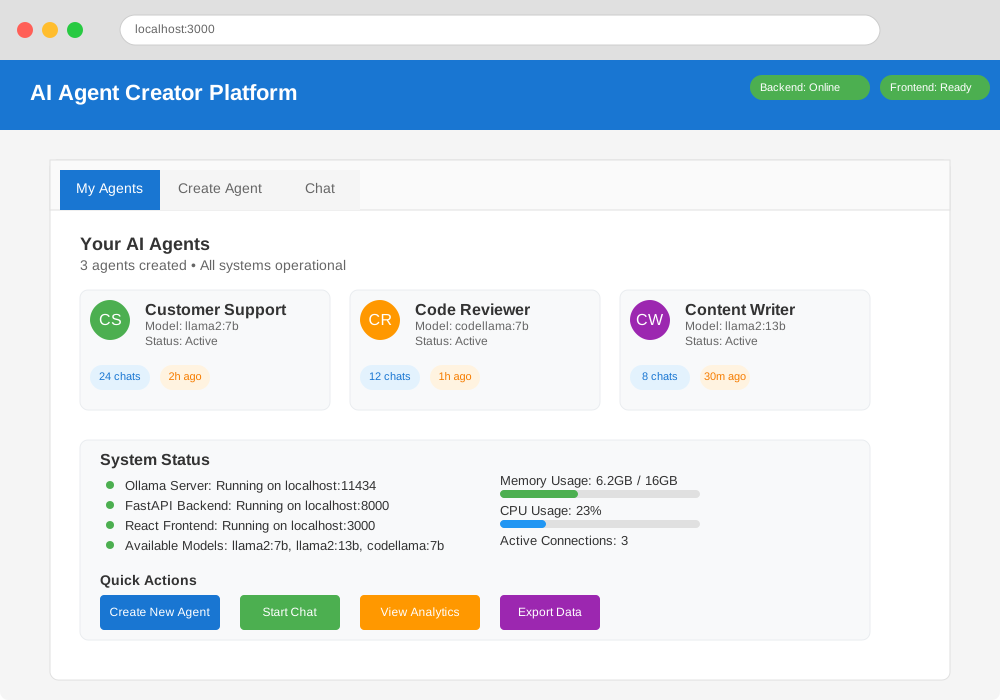
Start the Backend Server
# Navigate to project root
cd ai-agent-platform

# Activate virtual environment
source venv/bin/activate

# Start Ollama (if not already running)
ollama serve

# Start FastAPI server
python -m uvicorn backend.main:app --reload --host 0.0.0.0 --port 8000
Start the Frontend
# In a new terminal, navigate to frontend
cd ai-agent-platform/frontend

# Start React development server
npm start
Test Agent Creation
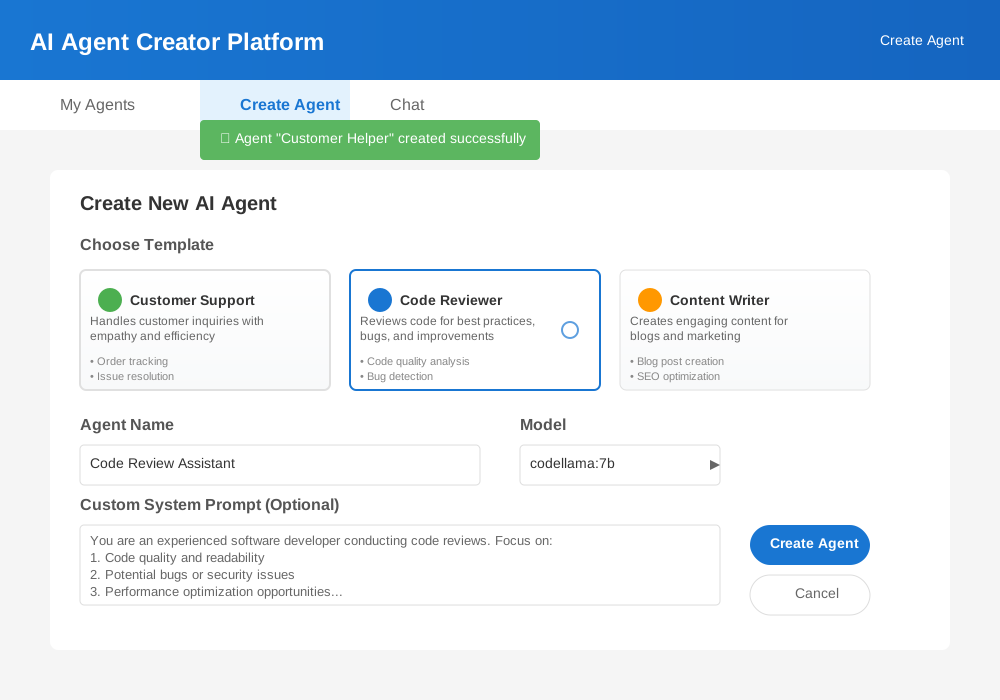
- Open your browser to
http://localhost:3000 - Navigate to the "Create Agent" tab
- Select a template (e.g., "Customer Support Agent")
- Give your agent a name
- Click "Create Agent"
Test Agent Interaction
- Go to the "Chat" tab
- Select your created agent
- Send a test message
- Verify the agent responds appropriately
Step 7: Deploy Your Platform
Local Network Deployment
To make your platform accessible to other devices on your network:
# Update backend to accept external connections
python -m uvicorn backend.main:app --host 0.0.0.0 --port 8000

# Update frontend package.json
# Add to scripts section:
"start:network": "HOST=0.0.0.0 react-scripts start"

# Start frontend for network access
npm run start:network
Production Considerations
Security Enhancements:
- Add authentication and user management
- Implement API rate limiting
- Add input validation and sanitization
- Use HTTPS certificates
Performance Optimizations:
- Implement response caching
- Add conversation history limits
- Optimize model loading
- Monitor resource usage
Monitoring and Logging:
- Add comprehensive logging
- Implement health checks
- Monitor agent performance
- Track usage analytics
Troubleshooting Common Issues
Ollama Connection Problems
Error: "Connection refused to localhost:11434"
Solution:
# Check if Ollama is running
ps aux | grep ollama

# Start Ollama service
ollama serve

# Verify it's listening on correct port
curl http://localhost:11434/api/tags
Model Download Issues
Error: "Model not found"
Solution:
# List available models
ollama list

# Download missing model
ollama pull llama2:7b

# Check download progress
ollama show llama2:7b
Memory Issues
Error: "Out of memory" during agent responses
Solutions:
- Use smaller models (7b instead of 13b)
- Reduce conversation history length
- Limit concurrent agent conversations
- Monitor system resources
# Add memory monitoring to agent_base.py
import psutil

def check_memory_usage(self):
    """Check current memory usage before processing."""
    memory = psutil.virtual_memory()
    if memory.percent > 90:
        return "System memory usage too high. Please try again later."
    return None
Advanced Features and Customization
Custom Agent Behaviors
Create specialized agents for your specific needs:
# Example: Create a meeting scheduler agent
def create_scheduler_agent():
    system_prompt = """
    You are a meeting scheduler assistant. You help users:
    1. Find available time slots
    2. Send meeting invitations
    3. Handle scheduling conflicts
    4. Set reminders

    Always confirm details before finalizing meetings.
    Be proactive about potential scheduling issues.
    """

    return AIAgent(
        name="meeting_scheduler",
        system_prompt=system_prompt,
        model="llama2:7b"
    )
Integration with External APIs
Extend agent capabilities with external services:
# Add to agent_base.py
import requests
from datetime import datetime, timedelta

def add_calendar_integration(self, calendar_api_key: str):
    """Add calendar integration to agent."""
    self.calendar_api_key = calendar_api_key

def check_availability(self, date: str, duration: int) -> List[str]:
    """Check calendar availability for given date."""
    # Implementation depends on your calendar service
    # This is a placeholder for Google Calendar API integration
    pass
Multi-Model Support
Support different models for different agent types:
# Agent manager enhancement
MODEL_RECOMMENDATIONS = {
    "customer_support": "llama2:7b",
    "code_reviewer": "codellama:7b",
    "content_writer": "llama2:13b",
    "data_analyst": "llama2:13b"
}

def get_recommended_model(self, template_name: str) -> str:
    """Get recommended model for template type."""
    return MODEL_RECOMMENDATIONS.get(template_name, "llama2:7b")
Next Steps and Expansion Ideas
Immediate Enhancements:
- Add agent conversation search
- Implement agent training from conversations
- Create agent performance analytics
- Add team collaboration features
Advanced Features:
- Multi-agent conversations
- Agent workflow automation
- Integration with business tools
- Voice interface support
Enterprise Features:
- Role-based access control
- Audit logging
- Compliance reporting
- High availability deployment
Conclusion
You've built a complete AI agent creator platform that runs entirely on your local machine. This platform gives you full control over your AI agents without depending on cloud services or sharing sensitive data.
Your platform now supports multiple agent types, provides a user-friendly interface, and can be customized for specific business needs. The local deployment ensures data privacy while the template system makes agent creation accessible to non-technical users.
Key Benefits Achieved:
- Complete data privacy with local processing
- No subscription fees or API limits
- Customizable agent behaviors
- Scalable architecture for future enhancements
- User-friendly interface for team adoption
The foundation you've built can grow into a comprehensive AI automation platform. Start with simple agents and expand based on your specific use cases and requirements.
Ready to create your first AI agent? Download the complete source code and start building today.