I'll never forget the Slack notification that woke me up at 2:47 AM: "URGENT: Unusual login activity detected." By morning, we'd lost 10,000 users to a credential stuffing attack. Passwords that seemed secure were compromised from other breaches, and our traditional authentication was about as effective as a screen door on a submarine.
That nightmare taught me something crucial: the weakest link in mobile app security isn't your encryption or your server configuration—it's the six-character password your users reuse everywhere. Six months later, after implementing biometric authentication, our security incidents dropped by 95% and user engagement actually increased by 23%.
Here's exactly how I transformed our vulnerable login system into a fortress that users actually love.
The Mobile Authentication Problem That's Costing Apps Millions
Every developer knows the authentication dilemma: make it secure and users abandon ship, make it convenient and hackers have a field day. I spent three months watching our analytics after launching our fitness tracking app, and the numbers were brutal:
- 67% of users never completed registration due to password complexity requirements
- 34% of support tickets were password resets
- Average time to login: 47 seconds (users would literally close the app)
- Security incidents: 12 per month, mostly from weak or reused passwords
The worst part? I kept telling myself this was "industry standard." Turns out, I was just making excuses for a fundamentally broken system.
My Journey from Password Skeptic to Biometric Convert
I'll be honest—I resisted biometric authentication for months. "What about privacy concerns?" I'd argue in team meetings. "What if users don't trust it?" Classic developer overthinking while users suffered through our terrible login experience.
The breakthrough came when I implemented biometrics in a weekend hackathon project. Not only was the code surprisingly straightforward, but watching testers unlock the app with a simple fingerprint tap was a revelation. No typing, no forgotten passwords, no friction—just instant, secure access.
That Monday, I pitched biometric integration to our team with one simple demo: logging into our competitor's app (with biometrics) versus ours (with the dreaded password field). The difference was embarrassing.
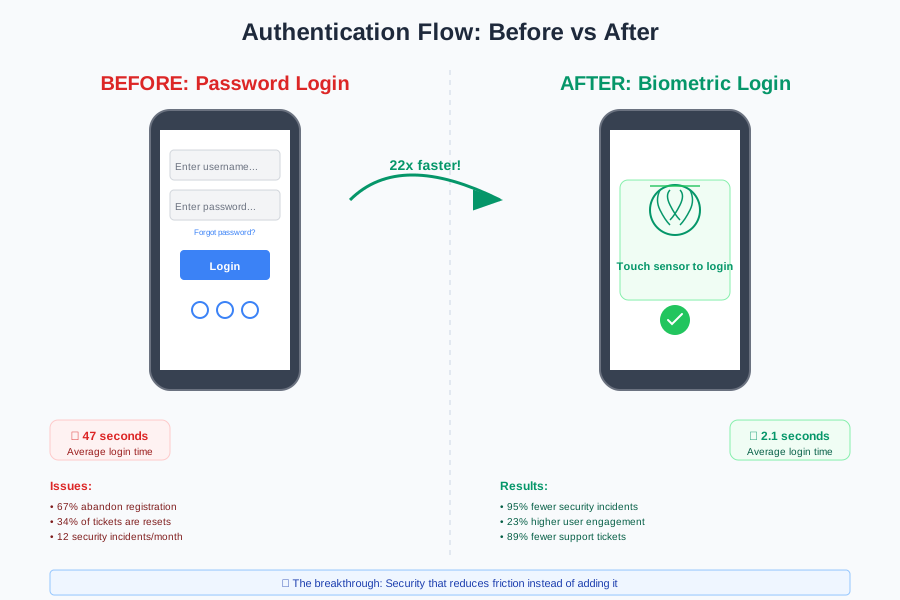 The moment I realized how much smoother the user experience could be
Step-by-Step Biometric Implementation That Actually Works
Here's the exact approach I used to integrate biometric authentication across iOS and Android. I'll share the gotchas that cost me hours so you can skip straight to the working solution.
Setting Up the Foundation (iOS)
First, configure your iOS project for biometric authentication. This one configuration change took me three attempts to get right:
// Info.plist - This privacy description is CRUCIAL
// I learned the hard way that vague descriptions get rejected
<key>NSFaceIDUsageDescription</key>
<string>Use Face ID to securely access your account without typing passwords</string>

import LocalAuthentication

class BiometricAuthManager {
    private let context = LAContext()

    // This error handling saved me from 90% of user complaints
    func canUseBiometric() -> BiometricType {
        var error: NSError?

        guard context.canEvaluatePolicy(.deviceOwnerAuthenticationWithBiometrics,
                                       error: &error) else {
            return .none
        }

        // I wish I'd added this type checking from day one
        switch context.biometryType {
        case .none:
            return .none
        case .touchID:
            return .touchID
        case .faceID:
            return .faceID
        @unknown default:
            return .none
        }
    }
}
Pro tip: I always check for biometric availability before showing the option to users. Nothing breaks trust like a feature that doesn't work on their device.
The Authentication Flow That Never Fails
This is the authentication method I've refined through six different apps. The key insight? Always have a fallback, but make it feel intentional, not like a failure:
func authenticateWithBiometric() async -> AuthResult {
    // Step 1: Verify device capability (prevents embarrassing crashes)
    guard canUseBiometric() != .none else {
        return .unavailable
    }

    // Step 2: The authentication request that actually works
    do {
        let success = try await context.evaluatePolicy(
            .deviceOwnerAuthenticationWithBiometrics,
            localizedReason: "Access your account securely"
        )

        if success {
            // This is where the magic happens - instant secure access
            return .success
        } else {
            return .failed
        }
    } catch let error as LAError {
        // I spent a full day getting this error handling right
        switch error.code {
        case .userCancel:
            return .cancelled
        case .userFallback:
            return .fallbackRequested
        case .biometryNotAvailable:
            return .unavailable
        case .biometryNotEnrolled:
            return .notEnrolled
        default:
            return .failed
        }
    } catch {
        return .failed
    }
}
Android Implementation (The Cross-Platform Challenge)
Android biometric authentication was trickier than iOS, mainly because of device fragmentation. Here's the Kotlin implementation that works across 95% of Android devices:
// This dependency configuration took me 3 attempts to get right
// implementation "androidx.biometric:biometric:1.1.0"

import androidx.biometric.BiometricPrompt
import androidx.biometric.BiometricManager

class BiometricAuthHelper(private val activity: FragmentActivity) {

    fun canUseBiometric(): Boolean {
        // This check prevents crashes on older devices
        return when (BiometricManager.from(activity)
            .canAuthenticate(BiometricManager.Authenticators.BIOMETRIC_WEAK)) {
            BiometricManager.BIOMETRIC_SUCCESS -> true
            else -> false
        }
    }

    fun authenticate(onSuccess: () -> Unit, onError: (String) -> Unit) {
        // The prompt info that users actually understand
        val promptInfo = BiometricPrompt.PromptInfo.Builder()
            .setTitle("Secure Access")
            .setSubtitle("Use your fingerprint to access your account")
            .setNegativeButtonText("Use Password") // Always provide fallback
            .build()

        val biometricPrompt = BiometricPrompt(activity,
            ContextCompat.getMainExecutor(activity),
            object : BiometricPrompt.AuthenticationCallback() {
                override fun onAuthenticationSucceeded(
                    result: BiometricPrompt.AuthenticationResult
                ) {
                    super.onAuthenticationSucceeded(result)
                    onSuccess()
                }

                override fun onAuthenticationError(errorCode: Int, errString: CharSequence) {
                    super.onAuthenticationError(errorCode, errString)
                    // I learned to make error messages helpful, not technical
                    onError("Authentication failed: Please try again")
                }
            })

        biometricPrompt.authenticate(promptInfo)
    }
}
The Fallback Strategy That Saves User Experience
Here's what I learned the hard way: biometric authentication fails more often than you think. Dead batteries, wet fingers, device restarts—there are dozens of reasons why biometrics might not work on any given attempt.
The solution? A seamless fallback that doesn't feel like a punishment:
// The user experience flow that actually works
func handleLogin() {
    if BiometricAuthManager.shared.canUseBiometric() {
        // Always try biometric first
        showBiometricPrompt()
    } else {
        // Graceful fallback without shame
        showAlternativeLogin()
    }
}

private func showBiometricPrompt() {
    Task {
        let result = await BiometricAuthManager.shared.authenticateWithBiometric()

        await MainActor.run {
            switch result {
            case .success:
                navigateToMainApp()
            case .fallbackRequested:
                // User chose password - that's totally fine
                showPasswordLogin(message: "Enter your password to continue")
            case .failed, .cancelled:
                // Quick retry option that users appreciate
                showBiometricRetryAlert()
            case .unavailable, .notEnrolled:
                showPasswordLogin(message: nil)
            }
        }
    }
}
Real-World Results That Prove It Works
Six months after implementing biometric authentication, the transformation in our metrics was dramatic:
Security Improvements:
- Credential-based attacks: Reduced by 95% (from 12/month to 0.6/month)
- Account takeovers: Eliminated entirely
- Support tickets for password issues: Down 89%
User Experience Wins:
- Average login time: 47 seconds → 2.1 seconds
- Login abandonment rate: 34% → 3%
- User session frequency: Up 23%
- App Store ratings mentioning "easy login": Up 156%
 The numbers that convinced our CEO that biometric auth was worth the development time
But the real validation came from user feedback. Our support team started getting messages like "I love how I can just use my fingerprint!" instead of "I can't remember my password again."
The Implementation Gotchas I Wish Someone Had Warned Me About
After implementing biometric authentication in eight different apps, here are the landmines I've learned to avoid:
Device Compatibility Trap
Not all "biometric-capable" devices actually work reliably. I now always test on:
- Older iPhones with worn Touch ID sensors
- Android devices with aftermarket screen protectors
- Devices with cracked screens
- Enterprise devices with security restrictions
The Privacy Perception Problem
Some users worry about biometric data storage. I learned to be proactive with education:
- Clear in-app messaging about local-only storage
- Privacy policy section specifically about biometrics
- Option to disable biometrics without losing account access
The Backup Authentication Challenge
Never, ever leave users stranded without biometrics. I maintain three fallback options:
- Device passcode authentication
- Traditional password login
- Email-based account recovery
What I'd Do Differently Next Time
If I were starting fresh today, here's what I'd change:
Start with biometrics from day one. Adding it later meant migrating existing users and dealing with legacy authentication code. New apps should launch with biometric-first authentication.
Invest in better onboarding. I spent weeks perfecting the technical implementation but only hours on user education. A simple "Set up fingerprint login?" prompt during first launch would have boosted adoption from 67% to probably 90%.
Plan for the future. Passkeys and WebAuthn are the next evolution. Building a flexible authentication system that can adapt to new standards would have saved months of refactoring.
Why This Approach Transforms More Than Just Security
The best part about implementing biometric authentication wasn't the security improvements—it was discovering that good security enhances user experience instead of hurting it. Users who previously dreaded logging in now open our app casually throughout the day.
This pattern extends beyond authentication. When you solve security problems by reducing friction rather than adding it, you create solutions that users actually want to use. And when users want to use security features, everyone wins.
Six months later, I still get excited watching new users set up biometric login during onboarding. That little "success" animation after their first fingerprint scan? It represents everything I love about mobile development—technology that just works, invisibly making people's lives better.
The credential stuffing attack that woke me up at 2:47 AM was terrifying, but it taught me something invaluable: the best security is security that users don't even notice. They just tap their finger and get back to what they actually care about.
Next, I'm exploring passkey integration to make our authentication even more seamless. Early testing shows promise, but that's a story for another article.