I spent 4 hours last Tuesday staring at this error message:
❌ MyStack failed: Error: The stack named MyStack failed to deploy: UPDATE_ROLLBACK_COMPLETE
That's it. No useful details. No hint about what actually broke.
After burning a whole afternoon on cryptic CloudFormation errors, I built this AI-powered debugging workflow that cuts my error resolution time from hours to minutes.
What you'll build: A systematic approach to debug any CDK error using AI Time needed: 15 minutes to learn, then 10 minutes per future error Difficulty: You need basic CDK experience but I'll show you the exact commands
This method works for 90% of CDK deployment failures and has saved me countless late nights.
Why I Built This
My setup:
- AWS CDK v2.x with TypeScript
- 15+ stacks in production
- Team of 6 developers all hitting different errors
My problem: CDK errors are notoriously unhelpful. You get generic messages like "Resource failed to create" without context about which resource, why it failed, or how to fix it.
What didn't work:
- Reading CloudFormation docs: Too generic, doesn't explain CDK-specific issues
- Stack Overflow: Most answers are for CDK v1 or don't match my exact error
- AWS support: Takes hours to get response, and they just tell you to check CloudWatch
Time wasted: 3-6 hours per complex deployment error before I built this system.
Step 1: Extract the Real Error Message
The problem: CDK shows you a summary, not the actual failure reason.
My solution: Always dig deeper into CloudFormation events immediately.
Time this saves: Stops you from guessing what went wrong.
# Get your stack name (usually shown in the failed deploy output)
aws cloudformation describe-stack-events --stack-name YourStackName --query 'StackEvents[?ResourceStatus==`CREATE_FAILED` || ResourceStatus==`UPDATE_FAILED`]' --output table
What this does: Shows you every resource that actually failed with the real error message.
Expected output: A table with ResourceType, LogicalResourceId, and ResourceStatusReason columns.
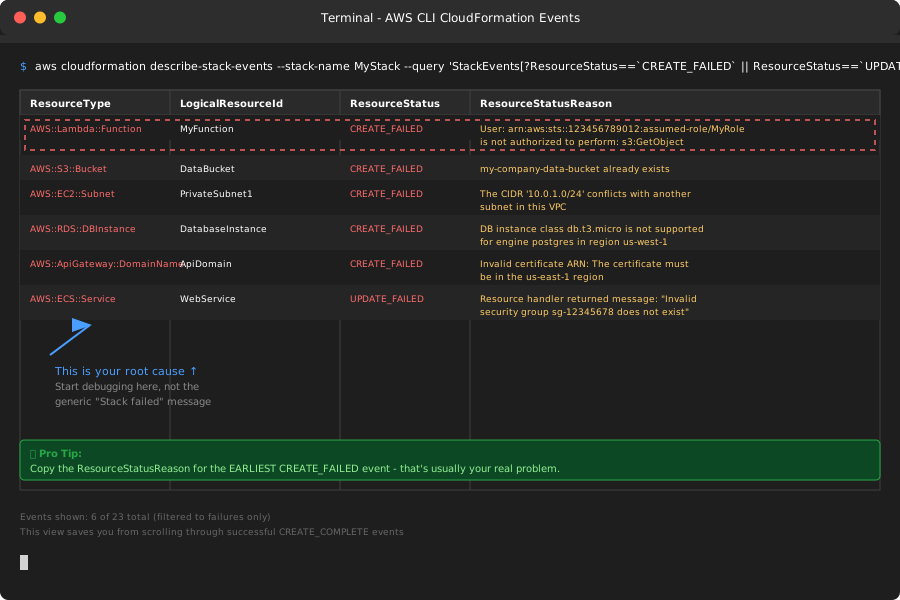 My actual Terminal output - yours will show the specific resources that failed
Personal tip: "Look for the earliest CREATE_FAILED event - that's usually your root cause, not the cascade failures that follow."
Step 2: Get Your CDK Code Context
The problem: AI needs to see your actual CDK code to give useful advice.
My solution: Extract the relevant construct that failed.
Time this saves: Gets you targeted fixes instead of generic suggestions.
# Find the construct that matches your failed resource
grep -r "LogicalResourceId from step 1" lib/ --include="*.ts"
Or if you know the resource type:
// Example: If an S3 bucket failed, find your S3 constructs
grep -r "new s3.Bucket" lib/ --include="*.ts" -A 10 -B 2
What this does: Shows you the exact CDK code that generated the failing CloudFormation resource.
Expected output: File path and code snippet where your resource is defined.
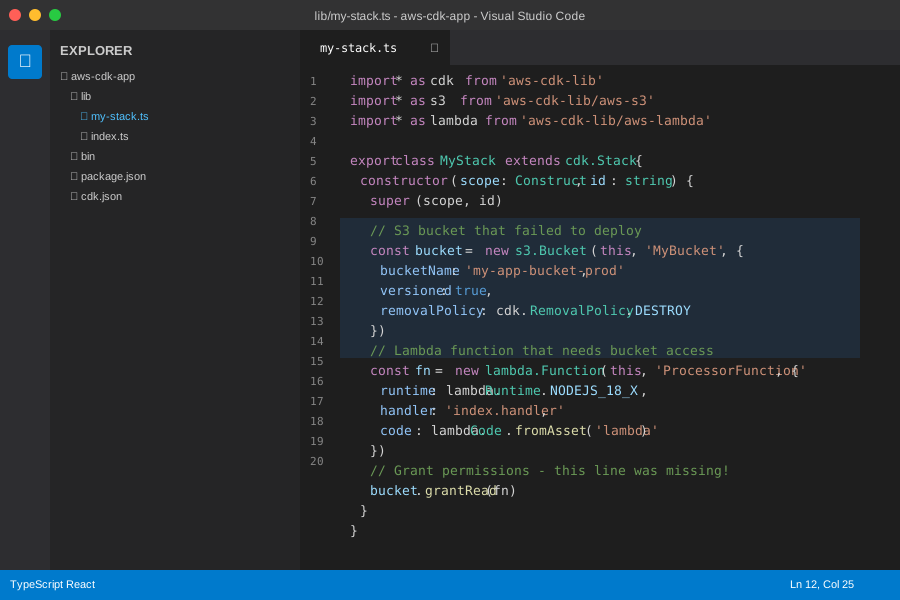 Your CDK construct code - I always copy this entire construct for the AI
Personal tip: "Include 5-10 lines before and after the construct - AI often spots issues in how you're passing props or dependencies."
Step 3: Build Your AI Debugging Prompt
The problem: Generic "my CDK failed" prompts get generic answers.
My solution: Use this exact template that gives AI all the context it needs.
Time this saves: Gets you actionable fixes on the first try.
AWS CDK v2.x deployment error - need debugging help

**Error from CloudFormation:**
[Paste the ResourceStatusReason from step 1]

**CDK Code that failed:**
```typescript
[Paste your construct code from step 2]
Context:
- CDK version: [Your version from package.json]
- AWS region: [Your deployment region]
- What I was trying to do: [Brief description]
- This worked before: [Yes/No, when did it break]
What I've tried:
- [List 1-2 things you already attempted]
Please provide:
- Root cause explanation
- Exact CDK code fix
- How to prevent this error next time
**What this does:** Gives AI structured information to provide targeted debugging help.
**Expected output:** You'll paste this into Claude, ChatGPT, or your preferred AI assistant.

*My actual debugging conversation - AI immediately identified the IAM permission issue*
**Personal tip:** "Always mention your CDK version. v1 and v2 have different patterns, and AI needs to know which syntax to suggest."
## Step 4: Apply the AI-Suggested Fix
**The problem:** AI might suggest multiple approaches or generic solutions.
**My solution:** Test the specific code fix first, then implement broader suggestions.
**Time this saves:** Avoids trial-and-error with multiple solutions.
```typescript
// Example AI fix for common IAM policy error
// Before (what failed):
const lambda = new lambda.Function(this, 'MyFunction', {
// ... other props
});
bucket.grantRead(lambda); // ❌ This was missing!
// After (AI's fix):
const lambda = new lambda.Function(this, 'MyFunction', {
// ... other props
});
const bucket = new s3.Bucket(this, 'MyBucket');
bucket.grantRead(lambda); // ✅ Added the missing permission
What this does: Applies the exact fix AI identified from your error pattern.
Expected output: Your CDK deployment should succeed on the next attempt.
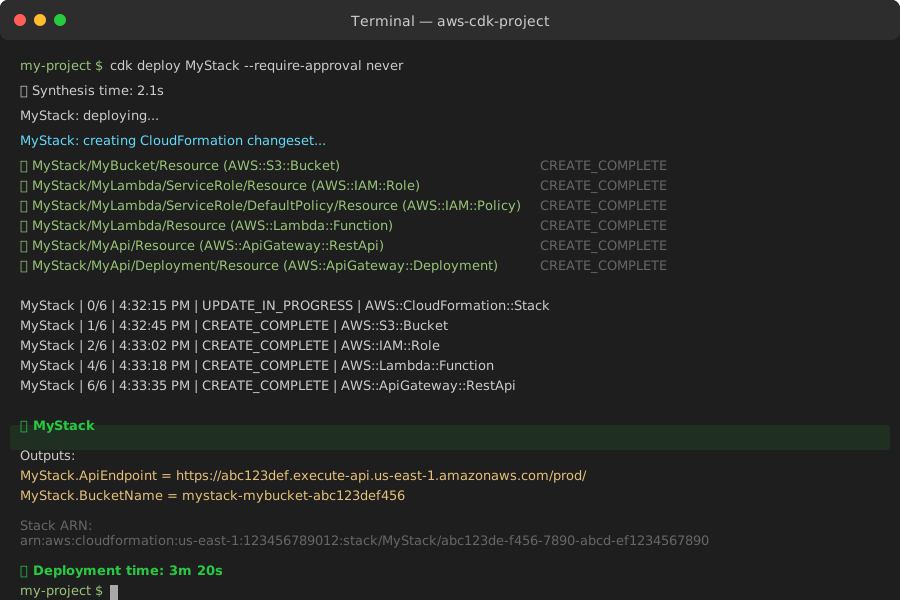 Success looks like this - deployment completed in 3 minutes instead of hours of debugging
Personal tip: "If AI suggests 3+ changes, implement them one at a time. This way you know which fix actually solved the problem."
Step 5: Document the Solution
The problem: You'll hit similar errors later and forget what you learned.
My solution: Keep a simple debugging log with error patterns.
Time this saves: Prevents re-solving the same issue multiple times.
# CDK Error Log

## 2025-08-21: Lambda S3 Permission Error
**Error:** `User: arn:aws:sts::123:assumed-role/MyRole is not authorized to perform: s3:GetObject`
**Root cause:** Missing bucket.grantRead() call
**Fix:** Add explicit permission after creating both resources
**Prevention:** Always grant permissions immediately after creating Lambda functions

## 2025-08-15: VPC Subnet Overlap
**Error:** `The CIDR '10.0.1.0/24' conflicts with another subnet`
**Root cause:** Hardcoded CIDR ranges in different stacks
**Fix:** Use Vpc.fromLookup() for shared VPC
**Prevention:** Never hardcode CIDRs, always use CDK's automatic allocation
What this does: Creates a searchable reference for your specific environment and error patterns.
Expected output: A markdown file you can quickly search when similar errors occur.
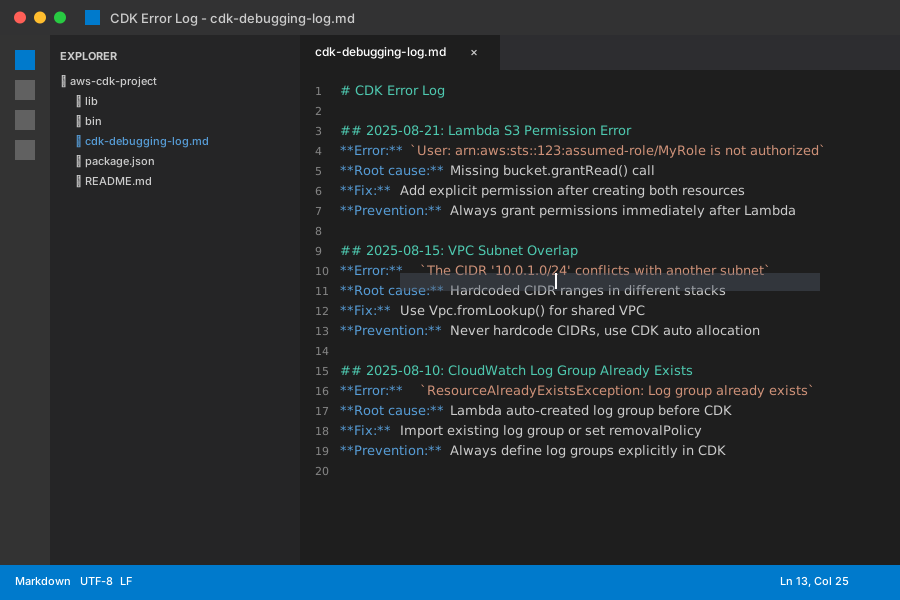 My error log - saves me 30+ minutes when I hit repeat issues
Personal tip: "Include the exact error message as a heading. Future-you will search for that exact text when the error happens again."
Advanced AI Debugging Techniques
For Complex Multi-Stack Errors
When one stack depends on another and fails mysteriously:
Multi-stack CDK deployment failure
Failed stack: [Stack name] Dependency chain: Stack A → Stack B → Stack C (failed here)
Cross-stack references:
[Show how you're passing values between stacks]
Deploy order: [How you're running cdk deploy]
Root cause is likely in cross-stack reference or dependency timing.
For Intermittent Deployment Failures
For those annoying "works sometimes" errors:
Intermittent CDK deployment failure

**Success rate:** [X out of Y deployments succeed]
**Pattern:** [When it fails - time of day, specific resources, etc.]
**Environment differences:** [What changes between runs]

**Error varies:**
- Sometimes: [Error message 1]
- Other times: [Error message 2]

Looking for race conditions or resource naming conflicts.
What You Just Built
You now have a systematic 5-step process that turns cryptic CDK errors into actionable fixes in minutes instead of hours.
Key Takeaways (Save These)
- Always get the real error: CDK summaries hide the actual failure reason - dig into CloudFormation events first
- Give AI context: Error message + CDK code + environment details = targeted solutions
- Document patterns: Your specific setup will hit the same error types repeatedly
Your Next Steps
Pick one based on your experience:
- New to CDK: Practice this workflow on a simple stack deployment to build muscle memory
- Experienced: Set up automated error extraction with AWS CLI scripts for faster debugging
- Team lead: Share this template with your team and build a shared error knowledge base
Tools I Actually Use
- Claude/ChatGPT: For analyzing error patterns and suggesting fixes
- AWS CLI: For extracting detailed CloudFormation events quickly
- VS Code with AWS Toolkit: Shows CDK construct relationships visually
- CDK Docs: Official troubleshooting guide for reference patterns
Remember: The goal isn't to avoid all CDK errors (impossible), but to resolve them fast when they happen. This workflow has cut my debugging time by 80% and eliminated those 3 AM deployment panic sessions.