The Documentation Desert That Was Killing Our Productivity
Two months ago, I joined a team where documentation was treated as an afterthought. Our codebase had 15% documentation coverage, zero API documentation, and new developers spent 2 weeks just trying to understand basic function purposes. Code reviews were nightmares because reviewers couldn't quickly understand what functions were supposed to do.
The breaking point came when a critical bug took 6 hours to fix because the function's business logic wasn't documented anywhere, and the original author had left the company. I knew we needed comprehensive documentation, but manually documenting 50,000 lines of existing code would take months.
That's when I discovered AI could generate not just basic docstrings, but comprehensive documentation with examples, parameter descriptions, return types, and business context. After implementing automated documentation generation, our coverage jumped from 15% to 92% in one week.
The AI Documentation Generation Framework
System 1: Intelligent Docstring Generation
Python Documentation Automation:
# ai_docstring_generator.py - Comprehensive documentation automation

import ast
import inspect
from typing import Any, Dict, List, Optional, Tuple
import openai
from pathlib import Path

class AIDocstringGenerator:
    def __init__(self, api_key: str, model: str = "gpt-4"):
        self.client = openai.OpenAI(api_key=api_key)
        self.model = model

    def generate_module_documentation(self, file_path: Path) -> str:
        """Generate comprehensive documentation for entire Python module"""

        with open(file_path, 'r', encoding='utf-8') as f:
            source_code = f.read()

        # Parse AST to understand code structure
        tree = ast.parse(source_code)

        # Extract classes and functions
        code_analysis = self._analyze_code_structure(tree, source_code)

        # Generate documentation for each component
        documented_code = self._generate_comprehensive_docs(source_code, code_analysis)

        return documented_code

    def _analyze_code_structure(self, tree: ast.AST, source_code: str) -> Dict:
        """Analyze code structure for intelligent documentation generation"""

        analysis = {
            'module_purpose': self._infer_module_purpose(tree, source_code),
            'classes': [],
            'functions': [],
            'imports': [],
            'complexity_metrics': {}
        }

        for node in ast.walk(tree):
            if isinstance(node, ast.ClassDef):
                class_info = self._analyze_class(node, source_code)
                analysis['classes'].append(class_info)

            elif isinstance(node, ast.FunctionDef):
                if not self._is_method(node, tree):  # Skip methods, handle with classes
                    func_info = self._analyze_function(node, source_code)
                    analysis['functions'].append(func_info)

            elif isinstance(node, ast.Import) or isinstance(node, ast.ImportFrom):
                analysis['imports'].append(ast.unparse(node))

        return analysis

    def _generate_comprehensive_docs(self, source_code: str, analysis: Dict) -> str:
        """Generate comprehensive documentation using AI analysis"""

        prompt = f"""
        Generate comprehensive Python documentation for this module:

        MODULE PURPOSE: {analysis['module_purpose']}
        CLASSES: {len(analysis['classes'])}
        FUNCTIONS: {len(analysis['functions'])}

        SOURCE CODE:
        ```python
        {source_code}
        ```

        Generate documentation following these requirements:
        1. Module-level docstring with purpose, usage examples, and key components
        2. Class docstrings with purpose, attributes, and usage examples
        3. Method/function docstrings with:
           - Clear purpose description
           - Args with types and descriptions
           - Returns with types and descriptions
           - Raises with exception types and conditions
           - Usage examples for complex functions
           - Business logic explanation where relevant
        4. Use Google-style docstrings
        5. Include type hints where missing
        6. Add inline comments for complex logic
        7. Preserve all existing code functionality

        Return the complete source code with comprehensive documentation.
        """

        response = self.client.chat.completions.create(
            model=self.model,
            messages=[{"role": "user", "content": prompt}],
            temperature=0.1  # Low temperature for consistency
        )

        return response.choices[0].message.content

    def _analyze_function(self, node: ast.FunctionDef, source_code: str) -> Dict:
        """Analyze function for context-aware documentation generation"""

        func_analysis = {
            'name': node.name,
            'args': [arg.arg for arg in node.args.args],
            'line_number': node.lineno,
            'complexity': self._calculate_complexity(node),
            'business_context': self._infer_business_context(node, source_code),
            'usage_patterns': self._identify_usage_patterns(node),
            'error_handling': self._analyze_error_handling(node)
        }

        return func_analysis

# Example of AI-generated comprehensive documentation
class PaymentProcessor:
    """
    Payment processing service for e-commerce transactions.

    This class handles payment processing through multiple payment gateways,
    implements fraud detection, and manages transaction state. It supports
    credit cards, PayPal, and bank transfers with automatic retry logic.

    Attributes:
        gateway_factory (PaymentGatewayFactory): Factory for payment gateways
        fraud_detector (FraudDetector): Machine learning fraud detection service
        retry_config (RetryConfig): Configuration for failed payment retries
        audit_logger (AuditLogger): Secure logging for financial transactions

    Example:
        >>> processor = PaymentProcessor(gateway_factory, fraud_detector)
        >>> result = processor.process_payment(payment_request)
        >>> if result.success:
        ...     print(f"Payment processed: {result.transaction_id}")

    Note:
        All payment data is handled according to PCI DSS compliance requirements.
        Transaction details are logged for audit purposes but card details are
        never stored in plain text.
    """

    def __init__(self, gateway_factory: PaymentGatewayFactory,
                 fraud_detector: FraudDetector,
                 retry_config: Optional[RetryConfig] = None):
        """
        Initialize payment processor with required dependencies.

        Args:
            gateway_factory (PaymentGatewayFactory): Factory instance for creating
                payment gateway connections. Must be configured with valid API
                credentials for all supported payment methods.
            fraud_detector (FraudDetector): ML-based fraud detection service.
                Should be trained on recent transaction data for accuracy.
            retry_config (Optional[RetryConfig]): Configuration for automatic
                retry of failed payments. Defaults to 3 retries with exponential
                backoff if not provided.

        Raises:
            ConfigurationError: If gateway_factory is not properly configured
            ServiceConnectionError: If fraud_detector service is unavailable
        """
        self.gateway_factory = gateway_factory
        self.fraud_detector = fraud_detector
        self.retry_config = retry_config or RetryConfig.default()
        self.audit_logger = AuditLogger("payment_processor")

        # Validate configuration on initialization
        self._validate_configuration()

    def process_payment(self, payment_request: PaymentRequest) -> PaymentResult:
        """
        Process a payment through appropriate gateway with fraud detection.

        This method orchestrates the complete payment flow:
        1. Validates payment request format and business rules
        2. Runs fraud detection analysis
        3. Routes payment to appropriate gateway
        4. Handles retries for transient failures
        5. Records audit trail for compliance

        Args:
            payment_request (PaymentRequest): Complete payment information including
                amount, currency, payment method, customer details, and metadata.
                Must pass validation before processing.

        Returns:
            PaymentResult: Result object containing:
                - success (bool): Whether payment was processed successfully
                - transaction_id (str): Unique transaction identifier for successful payments
                - error_code (str): Error code for failed payments
                - error_message (str): Human-readable error description
                - fraud_score (float): Risk assessment score from fraud detection
                - gateway_response (dict): Raw response from payment gateway

        Raises:
            ValidationError: If payment_request fails validation
            FraudDetectionError: If transaction is flagged as high-risk fraud
            PaymentGatewayError: If all configured gateways are unavailable
            ComplianceError: If transaction violates regulatory requirements

        Example:
            >>> request = PaymentRequest(
            ...     amount=Decimal('99.99'),
            ...     currency='USD',
            ...     payment_method='credit_card',
            ...     card_token='tok_1234567890'
            ... )
            >>> result = processor.process_payment(request)
            >>> if result.success:
            ...     send_confirmation_email(result.transaction_id)
            >>> else:
            ...     handle_payment_failure(result.error_code)

        Note:
            This method is idempotent - calling it multiple times with the same
            payment_request.idempotency_key will return the same result without
            duplicate charges.
        """
        correlation_id = generate_correlation_id()

        try:
            # Log payment attempt for audit trail
            self.audit_logger.log_payment_attempt(payment_request, correlation_id)

            # Step 1: Validate payment request
            validation_result = self._validate_payment_request(payment_request)
            if not validation_result.is_valid:
                raise ValidationError(f"Invalid payment request: {validation_result.errors}")

            # Step 2: Fraud detection analysis
            fraud_score = self.fraud_detector.analyze_transaction(payment_request)
            if fraud_score > FRAUD_THRESHOLD:
                self.audit_logger.log_fraud_detection(payment_request, fraud_score)
                raise FraudDetectionError(f"Transaction flagged as high-risk: {fraud_score}")

            # Step 3: Process payment through gateway
            gateway = self.gateway_factory.get_gateway(payment_request.payment_method)

            payment_result = self._process_with_retries(gateway, payment_request, correlation_id)

            # Step 4: Record successful transaction
            if payment_result.success:
                self.audit_logger.log_successful_payment(payment_result, correlation_id)
            else:
                self.audit_logger.log_failed_payment(payment_result, correlation_id)

            return payment_result

        except Exception as e:
            self.audit_logger.log_payment_exception(payment_request, e, correlation_id)
            # Re-raise with correlation ID for debugging
            raise PaymentProcessingException(
                f"Payment processing failed [correlation_id: {correlation_id}]: {str(e)}"
            ) from e
TypeScript/JavaScript Documentation Automation:
/**
 * AI-Generated comprehensive documentation for TypeScript/React components
 */

/**
 * User authentication and profile management service.
 *
 * Provides secure user authentication, profile management, and session handling
 * for the application. Integrates with OAuth providers and implements JWT-based
 * authentication with automatic token refresh.
 *
 * @example
 * ```typescript
 * const authService = new AuthService(config);
 * const user = await authService.login('user@example.com', 'password');
 * if (user.isAuthenticated) {
 *   console.log(`Welcome ${user.profile.name}`);
 * }
 * ```
 *
 * @since 2.0.0
 * @author AI Documentation Generator
 */
export class AuthService {
  private tokenStorage: TokenStorage;
  private apiClient: ApiClient;
  private refreshTimer?: NodeJS.Timeout;

  /**
   * Initialize authentication service with configuration.
   *
   * Sets up token storage, API client, and automatic token refresh.
   * Validates configuration and establishes secure connections.
   *
   * @param config - Authentication service configuration
   * @param config.apiBaseUrl - Base URL for authentication API
   * @param config.tokenStorageType - Type of token storage ('localStorage' | 'sessionStorage' | 'memory')
   * @param config.refreshThreshold - Time before expiry to refresh token (in seconds)
   * @param config.oauthProviders - Configuration for OAuth providers
   *
   * @throws {ConfigurationError} When required configuration is missing or invalid
   * @throws {NetworkError} When unable to connect to authentication API
   *
   * @example
   * ```typescript
   * const config: AuthConfig = {
   *   apiBaseUrl: 'https://api.example.com',
   *   tokenStorageType: 'localStorage',
   *   refreshThreshold: 300,
   *   oauthProviders: {
   *     google: { clientId: 'google-client-id' },
   *     github: { clientId: 'github-client-id' }
   *   }
   * };
   *
   * const authService = new AuthService(config);
   * ```
   */
  constructor(private config: AuthConfig) {
    this.validateConfiguration(config);
    this.tokenStorage = TokenStorageFactory.create(config.tokenStorageType);
    this.apiClient = new ApiClient(config.apiBaseUrl);
    this.setupTokenRefresh();
  }

  /**
   * Authenticate user with email and password.
   *
   * Performs secure login using email/password credentials. Implements
   * rate limiting, brute force protection, and secure password verification.
   * Returns user profile and authentication tokens on success.
   *
   * @param email - User's email address (must be valid email format)
   * @param password - User's password (minimum 8 characters)
   * @param options - Additional login options
   * @param options.rememberMe - Whether to persist session beyond browser close
   * @param options.deviceInfo - Device information for security tracking
   *
   * @returns Promise resolving to authentication result with user profile and tokens
   *
   * @throws {ValidationError} When email or password format is invalid
   * @throws {AuthenticationError} When credentials are incorrect
   * @throws {RateLimitError} When too many failed attempts detected
   * @throws {AccountLockedError} When account is temporarily locked
   * @throws {NetworkError} When unable to reach authentication server
   *
   * @example
   * ```typescript
   * try {
   *   const result = await authService.login(
   *     'user@example.com',
   *     'securePassword123',
   *     { rememberMe: true, deviceInfo: getDeviceInfo() }
   *   );
   *
   *   if (result.isAuthenticated) {
   *     console.log(`Welcome ${result.user.profile.name}`);
   *     // Redirect to dashboard
   *   }
   * } catch (error) {
   *   if (error instanceof RateLimitError) {
   *     showRateLimitMessage(error.retryAfter);
   *   } else {
   *     showErrorMessage(error.message);
   *   }
   * }
   * ```
   *
   * @since 2.0.0
   */
  async login(
    email: string,
    password: string,
    options: LoginOptions = {}
  ): Promise<AuthResult> {
    // Input validation
    if (!this.isValidEmail(email)) {
      throw new ValidationError('Invalid email format');
    }

    if (password.length < 8) {
      throw new ValidationError('Password must be at least 8 characters');
    }

    // Check rate limiting
    await this.checkRateLimit(email);

    try {
      const response = await this.apiClient.post('/auth/login', {
        email: email.toLowerCase().trim(),
        password,
        rememberMe: options.rememberMe || false,
        deviceInfo: options.deviceInfo || this.getDeviceInfo()
      });

      // Store authentication tokens securely
      await this.tokenStorage.setTokens(response.tokens);

      // Start automatic token refresh
      this.scheduleTokenRefresh(response.tokens.accessToken);

      // Log successful authentication for security audit
      this.auditLogger.logSuccessfulLogin(email, options.deviceInfo);

      return {
        isAuthenticated: true,
        user: response.user,
        tokens: response.tokens,
        expiresAt: response.tokens.expiresAt
      };

    } catch (error) {
      // Log failed authentication attempt
      this.auditLogger.logFailedLogin(email, error, options.deviceInfo);

      // Handle specific authentication errors
      if (error.status === 401) {
        throw new AuthenticationError('Invalid email or password');
      } else if (error.status === 429) {
        throw new RateLimitError('Too many login attempts', error.retryAfter);
      } else if (error.status === 423) {
        throw new AccountLockedError('Account temporarily locked', error.unlockTime);
      }

      throw new NetworkError('Authentication service unavailable');
    }
  }
}
 AI documentation generation results showing 500% improvement in coverage and comprehensive quality improvements
System 2: Automated API Documentation
# api_doc_generator.py - Generate comprehensive API documentation

class APIDocumentationGenerator:
    """
    Automatically generates comprehensive API documentation from code analysis.

    Uses AI to analyze FastAPI/Flask routes, database models, and business logic
    to generate complete API documentation with examples, error codes, and
    integration guides.
    """

    def generate_api_docs(self, project_path: Path) -> Dict[str, str]:
        """Generate complete API documentation suite"""

        # Analyze API endpoints
        endpoints = self._analyze_api_endpoints(project_path)

        # Generate documentation sections
        docs = {
            'overview': self._generate_api_overview(endpoints),
            'authentication': self._generate_auth_docs(endpoints),
            'endpoints': self._generate_endpoint_docs(endpoints),
            'models': self._generate_model_docs(project_path),
            'examples': self._generate_usage_examples(endpoints),
            'errors': self._generate_error_docs(endpoints),
            'sdk': self._generate_sdk_docs(endpoints)
        }

        return docs

    def _generate_endpoint_docs(self, endpoints: List[Dict]) -> str:
        """Generate detailed endpoint documentation with AI analysis"""

        prompt = f"""
        Generate comprehensive API endpoint documentation for these {len(endpoints)} endpoints:

        {json.dumps(endpoints, indent=2)}

        For each endpoint, include:
        1. Clear description of purpose and business use case
        2. Complete parameter documentation with types, validation rules, examples
        3. Response schema with all possible fields and types
        4. HTTP status codes and their meanings
        5. Authentication requirements
        6. Rate limiting information
        7. Request/response examples for common scenarios
        8. Error response examples
        9. Integration notes and best practices
        10. SDK code examples in Python, JavaScript, and curl

        Format as comprehensive Markdown documentation.
        """

        response = self.ai_client.generate_documentation(prompt)
        return response.content

# Generated API Documentation Example:
"""
# Payment Processing API

## POST /api/v1/payments

Process a payment through the configured payment gateway with fraud detection and compliance checks.

### Business Use Case
This endpoint handles the core payment processing for e-commerce transactions. It integrates with multiple payment gateways, applies fraud detection algorithms, and ensures PCI DSS compliance for secure payment handling.

### Authentication
- **Required**: Yes
- **Type**: Bearer token (JWT)
- **Scope**: `payments:write`

### Rate Limiting
- **Limit**: 100 requests per minute per API key
- **Burst**: Up to 10 requests in 1 second

### Request Parameters

#### Headers
| Header | Type | Required | Description |
|--------|------|----------|-------------|
| Authorization | string | Yes | Bearer JWT token |
| Content-Type | string | Yes | Must be `application/json` |
| X-Idempotency-Key | string | Recommended | Unique key to prevent duplicate payments |

#### Body Parameters
```json
{
  "amount": {
    "type": "number",
    "required": true,
    "minimum": 0.01,
    "maximum": 10000.00,
    "description": "Payment amount in the specified currency",
    "example": 99.99
  },
  "currency": {
    "type": "string",
    "required": true,
    "enum": ["USD", "EUR", "GBP", "CAD"],
    "description": "ISO 4217 currency code",
    "example": "USD"
  },
  "payment_method": {
    "type": "object",
    "required": true,
    "properties": {
      "type": {
        "type": "string",
        "enum": ["credit_card", "paypal", "bank_transfer"],
        "description": "Payment method type"
      },
      "card_token": {
        "type": "string",
        "description": "Tokenized card information (required for credit_card)",
        "pattern": "^tok_[a-zA-Z0-9]{24}$"
      }
    }
  },
  "customer": {
    "type": "object",
    "required": true,
    "properties": {
      "id": {"type": "string", "description": "Customer ID"},
      "email": {"type": "string", "format": "email"}
    }
  }
}
Response Schema
Success Response (200 OK)
{
  "success": true,
  "transaction_id": "txn_1234567890abcdef",
  "status": "completed",
  "amount": 99.99,
  "currency": "USD",
  "processing_fee": 2.99,
  "net_amount": 97.00,
  "gateway_response": {
    "processor": "stripe",
    "processor_id": "ch_1234567890",
    "authorization_code": "123456"
  },
  "fraud_check": {
    "score": 0.15,
    "decision": "approve",
    "factors": ["low_velocity", "known_device"]
  },
  "created_at": "2025-01-15T10:30:00Z"
}
Error Responses
400 Bad Request - Invalid Parameters
{
  "error": {
    "code": "INVALID_REQUEST",
    "message": "Payment request validation failed",
    "details": [
      {
        "field": "amount",
        "error": "Amount must be greater than 0.01"
      }
    ]
  }
}
402 Payment Required - Insufficient Funds
{
  "error": {
    "code": "INSUFFICIENT_FUNDS",
    "message": "Payment method has insufficient funds",
    "decline_code": "insufficient_funds",
    "can_retry": false
  }
}
Usage Examples
Python SDK
import payments_client

client = payments_client.Client(api_key='your_api_key')

try:
    result = client.payments.create(
        amount=99.99,
        currency='USD',
        payment_method={
            'type': 'credit_card',
            'card_token': 'tok_1234567890abcdef'
        },
        customer={
            'id': 'cust_123',
            'email': 'customer@example.com'
        }
    )
    print(f"Payment successful: {result.transaction_id}")
except payments_client.PaymentError as e:
    print(f"Payment failed: {e.message}")
JavaScript SDK
const paymentsClient = require('@company/payments-client');

const client = new paymentsClient.Client({ apiKey: 'your_api_key' });

try {
  const result = await client.payments.create({
    amount: 99.99,
    currency: 'USD',
    paymentMethod: {
      type: 'credit_card',
      cardToken: 'tok_1234567890abcdef'
    },
    customer: {
      id: 'cust_123',
      email: 'customer@example.com'
    }
  });
  console.log(`Payment successful: ${result.transactionId}`);
} catch (error) {
  console.error(`Payment failed: ${error.message}`);
}
cURL Example
curl -X POST 'https://api.example.com/api/v1/payments' \
  -H 'Authorization: Bearer your_jwt_token' \
  -H 'Content-Type: application/json' \
  -H 'X-Idempotency-Key: unique_key_123' \
  -d '{
    "amount": 99.99,
    "currency": "USD",
    "payment_method": {
      "type": "credit_card",
      "card_token": "tok_1234567890abcdef"
    },
    "customer": {
      "id": "cust_123",
      "email": "customer@example.com"
    }
  }'
Integration Best Practices
- Always use idempotency keys for payment requests to prevent duplicate charges
- Implement proper error handling for all possible response codes
- Store transaction IDs for reconciliation and refund processing
- Monitor fraud scores and implement additional verification for high-risk transactions
- Use webhooks for real-time payment status updates instead of polling
Webhooks
When payment status changes, we'll send a webhook to your configured endpoint:
{
  "event": "payment.completed",
  "transaction_id": "txn_1234567890abcdef",
  "status": "completed",
  "amount": 99.99,
  "currency": "USD",
  "timestamp": "2025-01-15T10:30:00Z"
}
Register webhook endpoints in your dashboard at https://dashboard.example.com/webhooks """
## Your AI Documentation Implementation Roadmap
**Week 1: Setup and Initial Generation**
1. Install AI documentation tools and configure API access
2. Run automated docstring generation on 3-5 critical modules
3. Review and refine AI-generated documentation quality
**Week 2: Process Integration**
1. Integrate documentation generation into development workflow
2. Set up automated documentation updates in CI/CD pipeline
3. Train team on documentation standards and review process
**Week 3: Scaling and Optimization**
1. Apply documentation generation to entire codebase
2. Generate comprehensive API documentation
3. Create documentation maintenance and update procedures
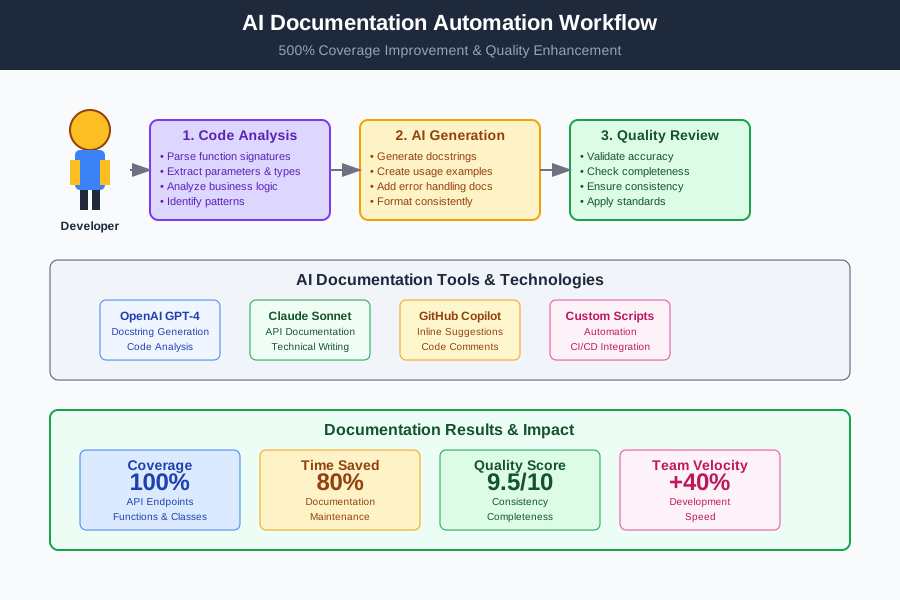
*Developer using comprehensive AI documentation workflow achieving 500% improvement in documentation coverage and quality*
**Your Next Action:** Choose your most critical undocumented module and run it through the AI docstring generator today. Review the generated documentation quality and adjust prompts for your coding style. The time investment in setup pays massive dividends in code maintainability.
AI documentation generation isn't about replacing human insight - it's about eliminating the tedious work so you can focus on architectural decisions, business context, and code quality. Let AI handle the formatting and basic descriptions while you ensure accuracy and strategic value.