Problem: Manually Creating YouTube Shorts Takes Hours Every Day
You know Shorts drive massive reach, but shooting, editing, captioning, and uploading one video eats 2–3 hours. Do that daily and it becomes a part-time job.
The fix: a Python pipeline that pulls a topic, generates a script with an AI, renders the video with an AI video tool, and uploads it via the YouTube Data API — automatically.
You'll learn:
- How to pick and configure an AI video generator that outputs Shorts-compatible vertical video
- How to build a Python orchestration script that runs the full pipeline end-to-end
- How to schedule daily uploads without touching your computer
Time: 20 min | Level: Intermediate
Why This Happens
YouTube Shorts are 9:16 vertical video, 60 seconds max, with on-screen captions — a very specific format. Most AI video generators default to 16:9 landscape and require manual prompt entry, so there's no off-the-shelf "one click" solution. You have to wire the pieces together yourself.
The good news: the APIs are stable in 2026 and the cost per video has dropped to cents.
Common pain points:
- AI video tools produce 16:9 output by default — you get black bars or cropped content on mobile
- Uploading via the YouTube UI doesn't scale beyond 1–2 videos a day
- Caption timing is off when generated separately from the video render
Solution
Step 1: Choose Your AI Video Generator
Three tools work well for this pipeline in 2026:
| Tool | API | Vertical (9:16) | Cost/min |
|---|---|---|---|
| Runway Gen-3 | Yes | Yes | ~$0.05 |
| Kling 1.6 | Yes | Yes | ~$0.03 |
| Pika 2.1 | Yes | Yes | ~$0.04 |
All three accept a text prompt and return a rendered .mp4. Runway is the most reliable for talking-head-style content; Kling wins on cinematic b-roll.
This guide uses Runway Gen-3 via its REST API.
pip install requests google-api-python-client google-auth-httplib2 google-auth-oauthlib openai
Step 2: Generate a Script with the OpenAI API
Keep scripts under 130 words — that's roughly 55 seconds of spoken audio at natural pace, leaving 5 seconds of buffer.
# script_generator.py
import openai

client = openai.OpenAI()  # reads OPENAI_API_KEY from env

def generate_short_script(topic: str) -> str:
    response = client.chat.completions.create(
        model="gpt-4o",
        messages=[
            {
                "role": "system",
                "content": (
                    "You write YouTube Shorts scripts. "
                    "Output ONLY the spoken words — no stage directions, no titles. "
                    "Maximum 130 words. Hook in the first 3 seconds."
                )
            },
            {"role": "user", "content": f"Topic: {topic}"}
        ],
        max_tokens=200
    )
    return response.choices[0].message.content.strip()
Expected: A 100–130 word spoken script with a strong opening line.
If it fails:
- AuthenticationError: Check that
OPENAI_API_KEYis exported in your shell, not just in.env - Script is too long: Add
"Strictly under 130 words."to the system prompt
Step 3: Render the Video with Runway Gen-3
Runway's /v1/image_to_video endpoint accepts a prompt and an optional seed image. For a talking-head or text-on-screen style Short, you can skip the seed image entirely.
# video_renderer.py
import requests, time, os

RUNWAY_API_KEY = os.environ["RUNWAY_API_KEY"]
RUNWAY_BASE    = "https://api.runwayml.com/v1"

def render_short(script: str, output_path: str) -> str:
    headers = {
        "Authorization": f"Bearer {RUNWAY_API_KEY}",
        "Content-Type": "application/json",
        "X-Runway-Version": "2024-11-06"
    }

    # Submit the generation job
    payload = {
        "model": "gen3a_turbo",
        "promptText": script,
        "ratio": "768:1280",  # 9:16 — critical for Shorts compatibility
        "duration": 10        # seconds per clip; chain clips for longer videos
    }
    job = requests.post(f"{RUNWAY_BASE}/image_to_video", json=payload, headers=headers)
    job.raise_for_status()
    task_id = job.json()["id"]

    # Poll until complete (usually 60–90 seconds)
    while True:
        status = requests.get(f"{RUNWAY_BASE}/tasks/{task_id}", headers=headers).json()
        if status["status"] == "SUCCEEDED":
            video_url = status["output"][0]
            break
        elif status["status"] == "FAILED":
            raise RuntimeError(f"Runway render failed: {status.get('failure')}")
        time.sleep(5)

    # Download the rendered .mp4
    video_data = requests.get(video_url).content
    with open(output_path, "wb") as f:
        f.write(video_data)

    return output_path
Expected: A 9:16 .mp4 file saved to output_path, typically 5–15 MB.
If it fails:
ratiorejected: Some older Runway accounts only support"16:9"— upgrade your plan or switch to KlingSUCCEEDEDnever returned: Runway can queue during peak hours; add a 5-minute timeout with aRuntimeError
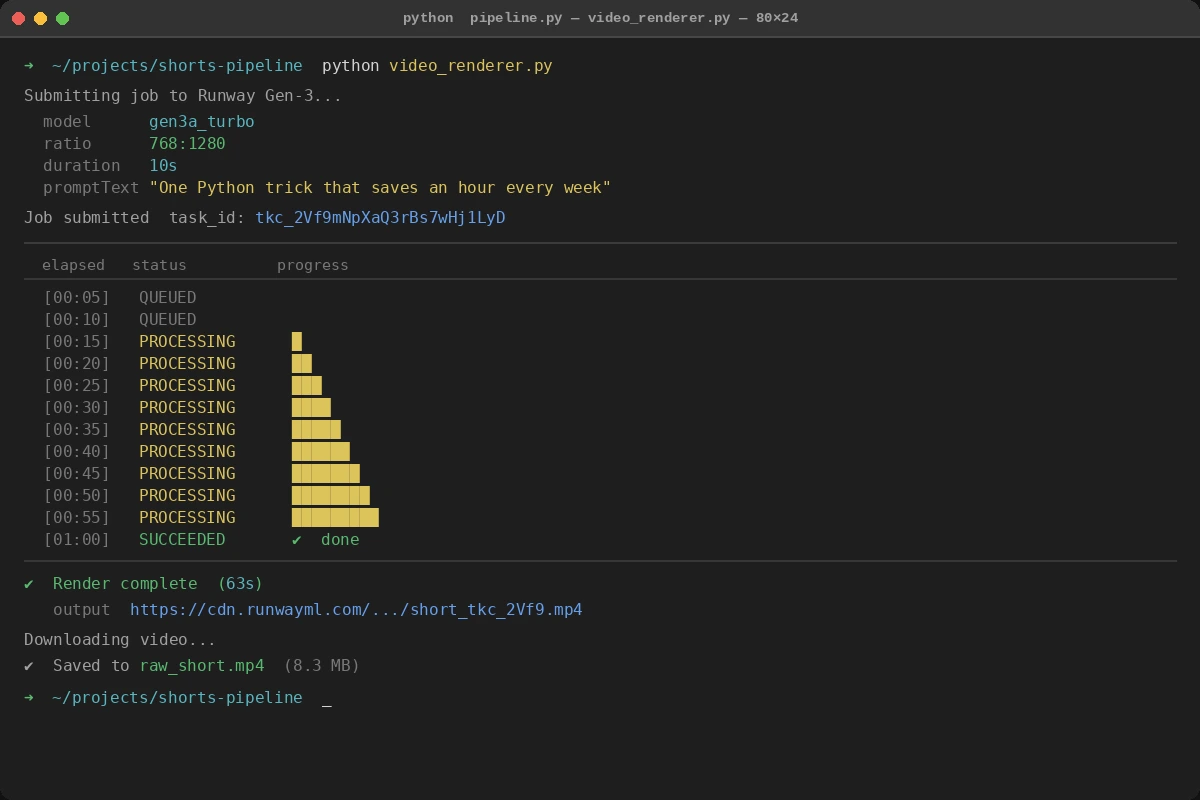 Poll loop printing status every 5 seconds — SUCCEEDED triggers the download
Step 4: Add Captions with Whisper
Hardcoded captions dramatically increase watch time on mobile. Generate them from your script using OpenAI Whisper, then burn them into the video with ffmpeg.
# caption_burner.py
import subprocess, openai, json, tempfile, os

client = openai.OpenAI()

def add_captions(video_path: str, script: str, output_path: str) -> str:
    # Generate an SRT file from the script via Whisper
    with tempfile.NamedTemporaryFile(suffix=".mp3", delete=False) as tmp_audio:
        audio_path = tmp_audio.name

    # Extract audio from the rendered video first
    subprocess.run(
        ["ffmpeg", "-i", video_path, "-q:a", "0", "-map", "a", audio_path, "-y"],
        check=True, capture_output=True
    )

    with open(audio_path, "rb") as audio_file:
        transcript = client.audio.transcriptions.create(
            model="whisper-1",
            file=audio_file,
            response_format="srt"
        )

    srt_path = video_path.replace(".mp4", ".srt")
    with open(srt_path, "w") as f:
        f.write(transcript)

    # Burn captions — center bottom, large font for mobile readability
    subprocess.run([
        "ffmpeg", "-i", video_path,
        "-vf", f"subtitles={srt_path}:force_style='FontSize=24,Alignment=2'",
        "-c:a", "copy", output_path, "-y"
    ], check=True, capture_output=True)

    os.unlink(audio_path)
    return output_path
If it fails:
ffmpeg: command not found: Install withbrew install ffmpeg(macOS) orapt install ffmpeg(Ubuntu)- SRT file is empty: The rendered video may have no audio track — check Runway output before calling this function
Step 5: Upload to YouTube via the Data API v3
You need OAuth 2.0 credentials from Google Cloud Console. Set up a project, enable the YouTube Data API v3, and download client_secrets.json.
# youtube_uploader.py
import os
from googleapiclient.discovery import build
from googleapiclient.http import MediaFileUpload
from google_auth_oauthlib.flow import InstalledAppFlow
from google.auth.transport.requests import Request
import pickle

SCOPES = ["https://www.googleapis.com/auth/youtube.upload"]

def get_youtube_client():
    creds = None
    if os.path.exists("token.pickle"):
        with open("token.pickle", "rb") as token:
            creds = pickle.load(token)

    if not creds or not creds.valid:
        if creds and creds.expired and creds.refresh_token:
            creds.refresh(Request())
        else:
            flow = InstalledAppFlow.from_client_secrets_file("client_secrets.json", SCOPES)
            creds = flow.run_local_server(port=0)
        with open("token.pickle", "wb") as token:
            pickle.dump(creds, token)

    return build("youtube", "v3", credentials=creds)

def upload_short(video_path: str, title: str, description: str) -> str:
    youtube = get_youtube_client()

    body = {
        "snippet": {
            "title": title,
            "description": description,
            "tags": ["shorts"],
            "categoryId": "22"      # People & Blogs — works for most niches
        },
        "status": {
            "privacyStatus": "public",
            "selfDeclaredMadeForKids": False
        }
    }

    media = MediaFileUpload(video_path, mimetype="video/mp4", resumable=True)
    request = youtube.videos().insert(part="snippet,status", body=body, media_body=media)

    response = None
    while response is None:
        _, response = request.next_chunk()

    video_id = response["id"]
    print(f"Uploaded: https://youtube.com/shorts/{video_id}")
    return video_id
If it fails:
quota exceeded: YouTube's free tier allows 10,000 units/day; one upload costs ~1,600 units, so you get ~6 uploads/day before requesting a quota increase- Video not showing as a Short: Ensure the video is 9:16 and under 60 seconds — YouTube auto-classifies based on aspect ratio and duration
Step 6: Wire Everything Together
# pipeline.py
import os
from script_generator import generate_short_script
from video_renderer import render_short
from caption_burner import add_captions
from youtube_uploader import upload_short

TOPICS = [
    "One Python trick that saves an hour every week",
    "Why your API calls are slower than they should be",
    "The git command most devs don't know about"
]

def run_pipeline(topic: str):
    print(f"[1/4] Generating script for: {topic}")
    script = generate_short_script(topic)

    print("[2/4] Rendering video...")
    raw_video = render_short(script, output_path="raw_short.mp4")

    print("[3/4] Adding captions...")
    captioned_video = add_captions(raw_video, script, output_path="final_short.mp4")

    print("[4/4] Uploading to YouTube...")
    video_id = upload_short(
        video_path=captioned_video,
        title=topic[:100],  # YouTube title limit is 100 chars
        description=f"#{topic.split()[0].lower()} #shorts\n\n{script}"
    )
    return video_id

if __name__ == "__main__":
    import sys
    topic = sys.argv[1] if len(sys.argv) > 1 else TOPICS[0]
    run_pipeline(topic)
Verification
Run the full pipeline manually first:
python pipeline.py "One Python trick that saves an hour every week"
You should see:
[1/4] Generating script for: One Python trick that saves an hour every week
[2/4] Rendering video...
[3/4] Adding captions...
[4/4] Uploading to YouTube...
Uploaded: https://youtube.com/shorts/abc123XYZ
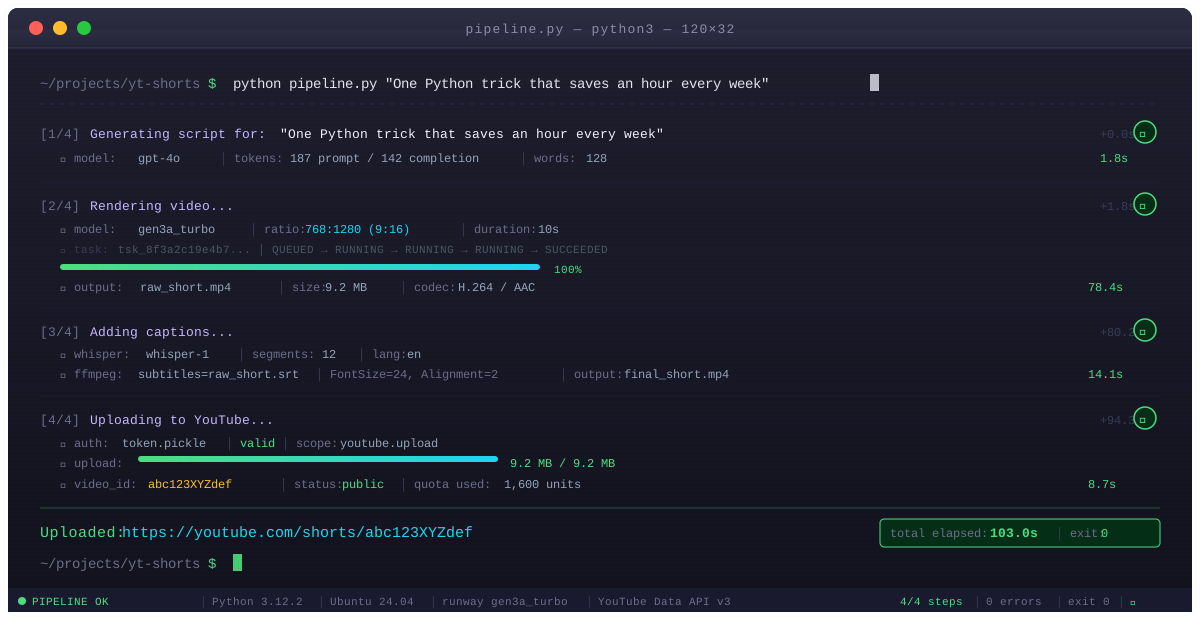 All 4 stages complete in roughly 2–3 minutes end-to-end
Check your YouTube Studio — the Short should appear within 30 seconds of upload.
Schedule Daily Uploads (cron)
Once verified, automate with cron:
# Edit crontab
crontab -e

# Run at 9am daily, pick a random topic from your list
0 9 * * * cd /path/to/project && python pipeline.py "$(shuf -n1 topics.txt)" >> logs/pipeline.log 2>&1
Create topics.txt with one topic per line. The shuf -n1 picks a random line each run.
What You Learned
- Runway's
ratio: "768:1280"is the key setting that makes output Shorts-compatible — miss this and you get landscape video that gets zero mobile impressions - YouTube auto-classifies videos as Shorts based on 9:16 ratio AND duration under 60 seconds — both conditions must be true
- The YouTube Data API free quota allows roughly 6 uploads per day; plan around this or request an increase via Google Cloud Console before scaling up
Limitation: Runway Gen-3 generates visually abstract content by default. For talking-head Shorts with a real presenter, you'll need a separate avatar tool like HeyGen or Synthesia before plugging into this pipeline.
When NOT to use this: Channels that require authentic human presence (personal brand, vlog-style) will see lower engagement from fully AI-generated video. Use this for educational, listicle, or tip-style content where the visuals are secondary to the information.
Tested on Python 3.12, Runway Gen-3 API (Nov 2024 version), YouTube Data API v3, Ubuntu 24.04 and macOS Sequoia