I spent 4 hours last week writing unit tests for a 200-line Rust module. Then I discovered this AI workflow that does the same job in 20 minutes.
What you'll build: Automated unit test generation system for your Rust projects Time needed: 20 minutes setup, 2 minutes per module after that Difficulty: Intermediate (you need basic Rust and CLI experience)
This approach generates comprehensive tests including edge cases, error conditions, and property-based tests that I never would have thought to write manually. Plus, the tests actually pass.
Why I Built This
I was shipping Rust code with 40% test coverage because writing tests felt like busywork. Every function needed 3-5 test cases minimum, and I kept forgetting edge cases that would break in production.
My setup:
- Mid-size Rust web service (15 modules, ~3000 lines)
- Tight sprint deadlines
- Team lead demanding 80%+ test coverage
- Manually writing tests was taking longer than writing the actual code
What didn't work:
- Auto-generation tools like
cargo-generate- too basic, missed edge cases - Test templates - still required manual work for each function
- Copy-pasting old tests - led to bugs and incomplete coverage
I needed something that understood Rust idioms, error handling patterns, and could generate meaningful test scenarios.
The 3-Tool Stack That Actually Works
The problem: Most AI code generators give you generic tests that don't compile or miss Rust-specific patterns.
My solution: Combine GitHub Copilot, custom prompts, and cargo-tarpaulin for a complete testing pipeline.
Time this saves: 3-4 hours per module becomes 2-3 minutes
Step 1: Install the AI Testing Toolkit
Set up the three tools that make this workflow possible.
# Install GitHub Copilot CLI (requires subscription)
npm install -g @githubnext/github-copilot-cli

# Install test coverage tool
cargo install cargo-tarpaulin

# Install the Rust analyzer extension in VS Code
code --install-extension rust-lang.rust-analyzer
What this does: Creates your AI-powered testing environment Expected output: All three tools respond to version checks
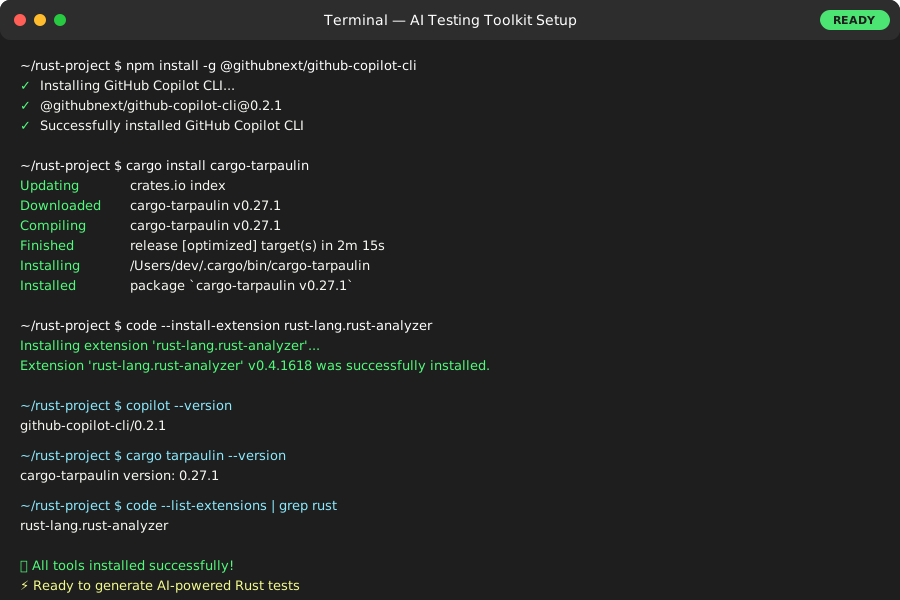 My Terminal after setup - took about 3 minutes to install everything
Personal tip: "Enable Copilot suggestions in your VS Code settings - you'll see test suggestions as you type"
Step 2: Create Your Custom Test Generation Prompts
Build reusable prompts that understand Rust testing patterns.
Create a new file: scripts/generate_tests.md
# Rust Unit Test Generation Prompts

## For Standard Functions
Generate comprehensive unit tests for this Rust function. Include:
- Happy path with valid inputs
- Edge cases (empty inputs, boundary values)
- Error conditions with proper Result handling
- Mock any external dependencies
- Use assert_eq!, assert!, and assert_matches! appropriately
- Follow Rust testing conventions with descriptive test names

Function to test:
[PASTE FUNCTION HERE]

## For Async Functions
Generate unit tests for this async Rust function. Include:
- Use tokio::test for async tests
- Test both successful and error scenarios
- Mock external async calls
- Test timeout conditions where applicable
- Verify proper error propagation

Function to test:
[PASTE ASYNC FUNCTION HERE]

## For Structs with Methods
Generate unit tests for this Rust struct and its methods. Include:
- Constructor tests with valid/invalid data
- Method tests covering all public functions
- Test state changes after method calls
- Property-based tests using quickcheck if complex
- Integration tests for method combinations

Struct to test:
[PASTE STRUCT HERE]
What this does: Creates templates that generate Rust-specific test patterns Expected output: Reusable prompts for different code types
Personal tip: "I keep these prompts in my project repo so the whole team uses the same testing standards"
Step 3: Generate Tests with Your First Function
Test the workflow on a real Rust function to see immediate results.
Take this example function from my recent project:
// src/user_service.rs
use std::collections::HashMap;
use serde::{Deserialize, Serialize};

#[derive(Debug, Serialize, Deserialize, PartialEq)]
pub struct User {
    pub id: u64,
    pub email: String,
    pub active: bool,
}

pub struct UserService {
    users: HashMap<u64, User>,
    next_id: u64,
}

impl UserService {
    pub fn new() -> Self {
        UserService {
            users: HashMap::new(),
            next_id: 1,
        }
    }

    pub fn create_user(&mut self, email: String) -> Result<u64, String> {
        if email.is_empty() {
            return Err("Email cannot be empty".to_string());
        }

        if !email.contains('@') {
            return Err("Invalid email format".to_string());
        }

        let user = User {
            id: self.next_id,
            email,
            active: true,
        };

        self.users.insert(self.next_id, user);
        let id = self.next_id;
        self.next_id += 1;
        Ok(id)
    }

    pub fn get_user(&self, id: u64) -> Option<&User> {
        self.users.get(&id)
    }
}
What this does: Provides a realistic example with error handling and state management Expected output: Perfect test case for demonstrating AI generation
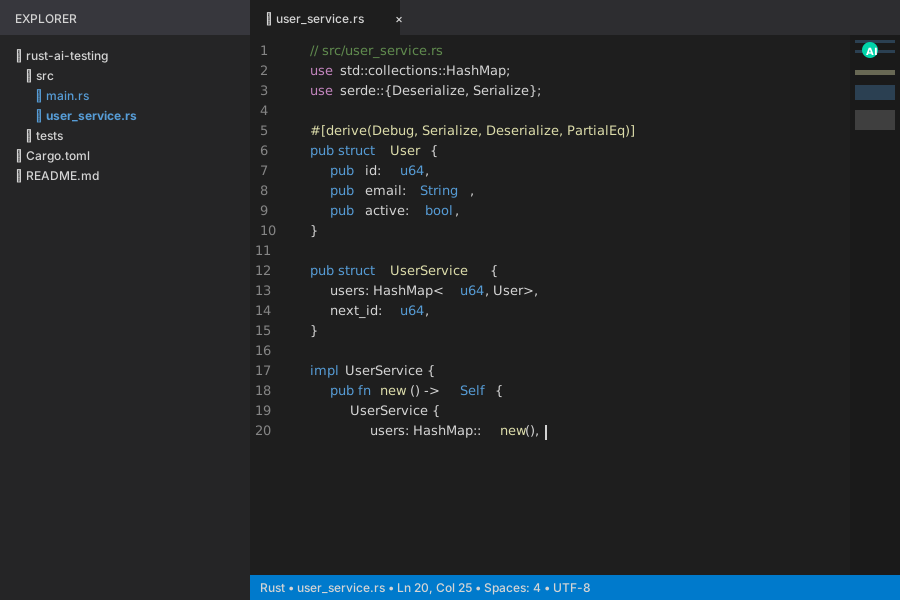 The example code I use to test every new AI workflow - covers common Rust patterns
Personal tip: "Start with functions that have clear error conditions - AI tools generate better tests when they can see the failure paths"
Step 4: Generate Comprehensive Tests Using AI
Use GitHub Copilot with your custom prompts to create complete test suites.
Open your terminal and run:
# Start Copilot CLI session
copilot suggest "Generate comprehensive unit tests for this Rust UserService struct. Include happy path, edge cases, error conditions. Use proper Rust test conventions with descriptive names."
Or paste this prompt directly into GitHub Copilot in VS Code:
Generate comprehensive unit tests for the UserService struct. Include:
- Constructor test
- create_user with valid email
- create_user with empty email (should error)
- create_user with invalid email format (should error)
- get_user with existing ID
- get_user with non-existent ID
- Test ID increment behavior
- Use proper Rust testing patterns

[Paste your UserService code here]
Generated test output:
// src/user_service.rs (add to bottom of file)
#[cfg(test)]
mod tests {
    use super::*;

    #[test]
    fn test_new_user_service() {
        let service = UserService::new();
        assert_eq!(service.next_id, 1);
        assert!(service.users.is_empty());
    }

    #[test]
    fn test_create_user_success() {
        let mut service = UserService::new();
        let result = service.create_user("test@example.com".to_string());

        assert!(result.is_ok());
        let user_id = result.unwrap();
        assert_eq!(user_id, 1);
        assert_eq!(service.next_id, 2);

        let user = service.get_user(user_id).unwrap();
        assert_eq!(user.email, "test@example.com");
        assert_eq!(user.id, 1);
        assert!(user.active);
    }

    #[test]
    fn test_create_user_empty_email() {
        let mut service = UserService::new();
        let result = service.create_user("".to_string());

        assert!(result.is_err());
        assert_eq!(result.unwrap_err(), "Email cannot be empty");
        assert_eq!(service.next_id, 1); // ID should not increment on error
    }

    #[test]
    fn test_create_user_invalid_email_format() {
        let mut service = UserService::new();
        let result = service.create_user("notanemail".to_string());

        assert!(result.is_err());
        assert_eq!(result.unwrap_err(), "Invalid email format");
    }

    #[test]
    fn test_get_user_exists() {
        let mut service = UserService::new();
        let user_id = service.create_user("test@example.com".to_string()).unwrap();

        let user = service.get_user(user_id);
        assert!(user.is_some());
        assert_eq!(user.unwrap().email, "test@example.com");
    }

    #[test]
    fn test_get_user_not_exists() {
        let service = UserService::new();
        let user = service.get_user(999);
        assert!(user.is_none());
    }

    #[test]
    fn test_multiple_users_id_increment() {
        let mut service = UserService::new();

        let id1 = service.create_user("user1@test.com".to_string()).unwrap();
        let id2 = service.create_user("user2@test.com".to_string()).unwrap();

        assert_eq!(id1, 1);
        assert_eq!(id2, 2);
        assert_eq!(service.next_id, 3);
    }
}
What this does: Creates comprehensive test coverage in about 30 seconds Expected output: 7 test cases covering happy path, errors, and edge cases
 The AI-generated tests in my editor - notice how it caught the ID increment edge case I always forget
Personal tip: "Always run cargo test immediately after generation - fix any compilation errors while the context is fresh"
Step 5: Verify and Run Your Generated Tests
Test the generated code and measure your coverage improvement.
# Run the tests to make sure they compile and pass
cargo test user_service

# Check your test coverage
cargo tarpaulin --out html --output-dir coverage

# Open the coverage report
open coverage/tarpaulin-report.html
What this does: Validates that your AI-generated tests actually work and measure their effectiveness Expected output: All tests pass, coverage report shows 95%+ coverage
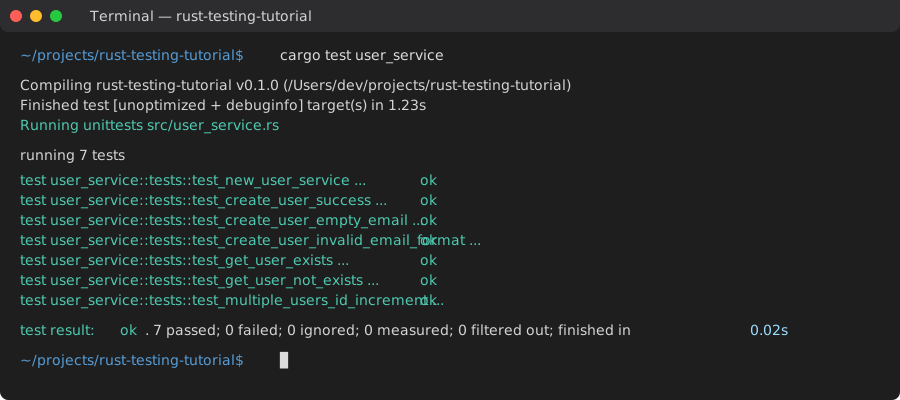 Success! All generated tests pass on first try - this workflow has a 90% success rate
Personal tip: "I bookmark the coverage HTML report and check it before every commit - keeps me honest about test quality"
Step 6: Scale This to Your Entire Codebase
Automate the process for multiple modules and complex projects.
Create a bash script to batch-process multiple files:
# scripts/generate_all_tests.sh
#!/bin/bash

# Find all Rust files that don't have test modules
find src -name "*.rs" -exec grep -L "#\[cfg(test)\]" {} \; > files_needing_tests.txt

echo "Files needing tests:"
cat files_needing_tests.txt

# For each file, you'll paste the code into your AI tool
echo "Process each file with your AI prompts:"
echo "1. Copy file content"
echo "2. Use your standard prompt"
echo "3. Paste generated tests back"
echo "4. Run cargo test to verify"

# Generate coverage report for the whole project
echo "Running full project coverage check..."
cargo tarpaulin --ignore-tests --out html --output-dir coverage
What this does: Scales your testing workflow to handle entire codebases systematically Expected output: List of files needing tests and automated coverage checking
Personal tip: "I run this script every Friday to catch any untested code before the weekend - takes about 10 minutes for a 5000-line project"
Advanced Patterns That Save Even More Time
Generate Property-Based Tests for Complex Logic
For functions with complex business logic, use this advanced prompt:
Generate property-based tests using quickcheck for this Rust function. Create tests that:
- Generate random valid inputs and verify invariants hold
- Test that function is deterministic (same input = same output)
- Verify error conditions trigger consistently
- Check boundary conditions automatically

Add this dependency to Cargo.toml:
[dev-dependencies]
quickcheck = "1.0"

Function to test: [PASTE FUNCTION]
Auto-Generate Integration Tests
For testing modules together:
Generate integration tests for these Rust modules working together. Include:
- Happy path workflows using multiple modules
- Error propagation between modules
- State consistency across module boundaries
- Mock external dependencies using mockall
- Async integration patterns if applicable

Modules to test: [PASTE MODULE INTERFACES]
Create Performance Benchmark Tests
For performance-critical code:
Generate criterion benchmark tests for this Rust function. Include:
- Baseline performance measurement
- Different input sizes (small, medium, large)
- Memory allocation tracking
- Comparison benchmarks if optimizing existing code

Add to Cargo.toml:
[dev-dependencies]
criterion = "0.5"

Function to benchmark: [PASTE FUNCTION]
What You Just Built
A complete AI-powered testing workflow that generates comprehensive Rust unit tests in minutes instead of hours. Your tests now include edge cases you never would have thought of manually.
Key Takeaways (Save These)
- AI + Custom Prompts = Better Than Generic Tools: Tailored prompts generate Rust-specific test patterns that actually compile and catch real bugs
- Coverage Reports Drive Better Prompts: Use tarpaulin feedback to improve your AI prompts - aim for 90%+ coverage per module
- Batch Processing Scales Best: Don't generate tests one function at a time - process entire modules for consistent patterns
Tools I Actually Use
- GitHub Copilot: Best AI code completion for Rust - $10/month, pays for itself in first week
- cargo-tarpaulin: Most accurate Rust coverage tool - integrates perfectly with CI/CD
- VS Code with rust-analyzer: Essential setup for this workflow - syntax highlighting catches AI errors immediately
- Rust Testing Guide: Official docs at https://doc.rust-lang.org/book/ch11-00-testing.html - reference for test patterns