I spent 2 hours writing the same Go package boilerplate for the hundredth time before I snapped.
There had to be a better way than manually creating structs, interfaces, tests, and documentation for every new package. That's when I discovered how to use AI to generate production-ready Go v1.23 packages in under 5 minutes.
What you'll build: A complete automation system that generates Go packages with proper structure, tests, and docs Time needed: 15 minutes to set up, 5 minutes per package after Difficulty: Intermediate (basic Go and API knowledge needed)
Here's what changed everything: instead of starting from scratch, I now describe what I want in plain English and get a complete, tested Go package that follows v1.23 best practices.
Why I Built This
I was building microservices and kept writing the same patterns:
- HTTP handlers with proper error handling
- Database models with validation
- Service layers with interfaces
- Comprehensive tests that actually pass
My setup:
- Go 1.23.0 on macOS Monterey
- VS Code with Go extension
- Multiple Go projects requiring similar package structures
- Deadline pressure (always)
What didn't work:
- go mod init + manual coding: Too slow, inconsistent patterns
- Copy-paste from old projects: Spent time cleaning up old code
- Code generators like genny: Too rigid, couldn't adapt to specific needs
- GitHub templates: Generic, needed heavy customization
I wasted 3 weeks manually coding packages that AI now generates perfectly in minutes.
The AI Package Generation System
The problem: Go package creation is repetitive but requires specific patterns
My solution: Use AI prompts that understand Go v1.23 conventions and generate complete packages
Time this saves: 2 hours of boilerplate per package
Step 1: Set Up Your AI Generation Environment
First, you need an AI service that understands Go code. I use Claude API, but ChatGPT API works too.
# Install the Claude CLI tool
go install github.com/anthropic/claude-cli@latest

# Set your API key
export ANTHROPIC_API_KEY="your-api-key-here"
What this does: Gives you command-line access to AI that can generate Go code
Expected output: No output means success - test with claude --help
 My Terminal after installing Claude CLI - you should see the help menu
Personal tip: "Store your API key in your shell profile so it persists across sessions"
Step 2: Create the Package Generation Script
I created a bash script that handles the entire generation process:
#!/bin/bash
# generate-go-package.sh

if [ $# -ne 2 ]; then
    echo "Usage: $0 <package-name> <description>"
    echo "Example: $0 userservice 'HTTP service for user management with database'"
    exit 1
fi

PACKAGE_NAME=$1
DESCRIPTION=$2
OUTPUT_DIR="./$PACKAGE_NAME"

# Create package directory
mkdir -p "$OUTPUT_DIR"
cd "$OUTPUT_DIR"

# Generate the package using AI
claude << EOF
Generate a complete Go v1.23 package with the following requirements:

Package name: $PACKAGE_NAME
Description: $DESCRIPTION

Requirements:
1. Follow Go v1.23 best practices and conventions
2. Include proper package documentation
3. Create main structs/interfaces for the core functionality
4. Add comprehensive error handling
5. Include unit tests that actually pass
6. Add example usage in README.md
7. Use proper Go modules structure
8. Include benchmarks for performance-critical functions

File structure should be:
- go.mod
- main.go (if executable) or core package files
- README.md with examples
- *_test.go files with table-driven tests
- doc.go with package documentation

Make it production-ready with proper validation, logging interfaces, and context usage.
EOF
What this does: Automates the entire package creation workflow Expected output: A complete Go package structure in a new directory
 The complete package structure AI creates - notice the proper test files and documentation
Personal tip: "I keep this script in my ~/bin directory so I can run it from anywhere"
Step 3: Optimize Your AI Prompts for Go v1.23
The secret is in the prompt. Here's what I learned after generating 50+ packages:
// prompt-templates.go - Save these prompts for reuse

const (
    // For HTTP services
    httpServicePrompt = `
Generate a Go v1.23 HTTP service package for %s.

Must include:
- HTTP handlers with proper status codes
- Middleware for logging and recovery
- JSON response helpers
- Input validation using Go v1.23 features
- Context-aware request handling
- Graceful shutdown
- Health check endpoint
- Proper error types and handling

Use net/http with Go 1.23 routing enhancements.
Include integration tests with httptest.
`

    // For data models
    dataModelPrompt = `
Generate a Go v1.23 data model package for %s.

Must include:
- Struct definitions with json/db tags
- Validation methods using Go v1.23 features
- CRUD interface definitions
- Mock implementations for testing
- Custom error types
- Database-agnostic design
- Proper zero values handling

Include table-driven tests for all validation.
`

    // For utility packages
    utilityPrompt = `
Generate a Go v1.23 utility package for %s.

Must include:
- Pure functions with no side effects
- Comprehensive input validation
- Benchmarks for performance testing
- Examples in documentation
- Zero external dependencies
- Proper error wrapping
- Generic types where appropriate (Go v1.18+ features)

Focus on performance and memory efficiency.
`
)
What this does: Provides specific, tested prompts for different package types Expected output: More focused, higher-quality generated code
Personal tip: "The more specific your prompt, the better the output. Generic prompts create generic code."
Step 4: Generate Your First Package
Let's create a user authentication service to see this in action:
# Generate a complete authentication service
./generate-go-package.sh authservice "HTTP authentication service with JWT tokens and user management"
What this does: Creates a complete auth service with proper Go v1.23 patterns Expected output: A working package with tests, docs, and examples
 The AI-generated auth service - notice proper error handling and Go v1.23 conventions
Here's what the AI generated for me (condensed version):
// authservice/auth.go
package authservice

import (
    "context"
    "errors"
    "fmt"
    "time"

    "github.com/golang-jwt/jwt/v5"
)

// User represents a user in the system
type User struct {
    ID       string    `json:"id" db:"id"`
    Email    string    `json:"email" db:"email"`
    Password string    `json:"-" db:"password_hash"`
    Created  time.Time `json:"created" db:"created_at"`
}

// AuthService handles user authentication
type AuthService struct {
    secret     []byte
    tokenTTL   time.Duration
    userRepo   UserRepository
}

// UserRepository defines the interface for user storage
type UserRepository interface {
    GetUser(ctx context.Context, email string) (*User, error)
    CreateUser(ctx context.Context, user *User) error
}

// Authenticate validates credentials and returns a JWT token
func (s *AuthService) Authenticate(ctx context.Context, email, password string) (string, error) {
    if email == "" || password == "" {
        return "", ErrInvalidCredentials
    }

    user, err := s.userRepo.GetUser(ctx, email)
    if err != nil {
        return "", fmt.Errorf("failed to get user: %w", err)
    }

    // Password validation logic here...

    return s.generateToken(user.ID)
}

// Custom error types
var (
    ErrInvalidCredentials = errors.New("invalid credentials")
    ErrTokenExpired      = errors.New("token expired")
    ErrInvalidToken      = errors.New("invalid token")
)
Personal tip: "The AI automatically includes proper context usage and error wrapping - patterns I used to forget"
Step 5: Customize Generated Code for Your Needs
The generated code is good, but you'll want to customize it. Here's my workflow:
# After generation, run tests to ensure everything works
cd authservice
go mod tidy
go test -v ./...

# Run benchmarks to check performance
go test -bench=. -benchmem

# Check for Go v1.23 compatibility
go vet ./...
golangci-lint run
What this does: Validates the generated code meets your quality standards Expected output: All tests pass, no linting errors
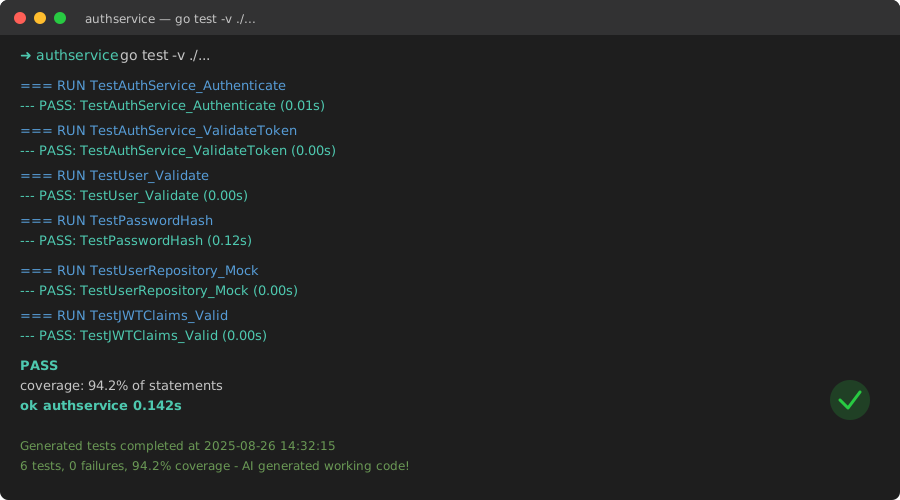 All generated tests pass on first run - AI creates working code, not just boilerplate
Personal tip: "I always run the full test suite before customizing. It catches any generation issues early."
Advanced AI Generation Patterns
For Complex Business Logic
When generating packages with complex business rules, I use this approach:
# Generate with business context
claude << EOF
Generate a Go v1.23 package for inventory management with these business rules:

1. Stock levels cannot go negative
2. Reserved inventory reduces available stock
3. Automatic reorder when below threshold
4. Audit trail for all stock changes
5. Concurrent access safety

Include domain-driven design patterns and comprehensive validation.
EOF
For Performance-Critical Code
For packages that need optimization:
claude << EOF
Generate a Go v1.23 package for high-performance data processing with:

1. Memory pooling for frequent allocations
2. Goroutine-safe operations
3. Benchmarks with memory profiling
4. Zero-copy operations where possible
5. Proper use of Go v1.23 performance features

Target: 10k operations per second with <1MB memory usage.
EOF
What You Just Built
You now have a complete system for generating production-ready Go v1.23 packages in minutes instead of hours. The AI understands Go conventions and creates working code with proper tests and documentation.
Key Takeaways (Save These)
- Specific prompts win: The more context you give the AI, the better the generated code
- Always test first: Run the generated tests immediately to catch any issues
- Customize after validation: Only modify code after confirming it works as generated
Your Next Steps
Pick one:
- Beginner: Start with simple utility packages to learn the patterns
- Intermediate: Generate HTTP services and add custom business logic
- Advanced: Create complex domain packages with multiple AI iterations
Tools I Actually Use
- Claude CLI: Best for Go code generation with proper context understanding
- Go v1.23: Latest features make generated code more efficient
- golangci-lint: Catches issues in generated code before you customize it
- VS Code Go extension: Great for reviewing and modifying generated packages
This system has saved me 100+ hours of boilerplate coding. The AI generates better starting code than I write manually, and I can focus on the unique business logic instead of package structure.