Problem: Claude API Costs Explode at Scale
Anthropic prompt caching is a feature that lets you cache large, repeated prompt segments — system prompts, tool definitions, documents — so you pay up to 90% less per token on every subsequent call that hits the cache.
Without caching, every API call re-processes your entire prompt from scratch. If your system prompt is 10,000 tokens and you run 1,000 calls per day, you're billing 10 million input tokens daily for content that never changes.
You'll learn:
- How prompt caching works under the hood and when it activates
- How to place
cache_controlbreakpoints in Python and TypeScript - How to read cache metrics from the API response to verify hits
- How to architect multi-turn conversations to maximize cache reuse
Time: 20 min | Difficulty: Intermediate
Why Prompt Caching Cuts Costs So Dramatically
When you send a request to the Claude API, the model tokenizes and processes every token in your prompt on each call. For long system prompts, RAG documents, or tool definitions, this is expensive — both in dollars and latency.
Prompt caching breaks the prompt into cacheable prefix segments. On the first call, Anthropic processes and stores the KV cache for that prefix. On every subsequent call within the cache TTL, the model loads the stored cache instead of re-processing. The savings stack directly:
- Input tokens: cached tokens bill at 10% of standard input price
- Latency: up to 85% reduction on cache hits because tokenization is skipped
- Cache writes: first-time cache population costs 25% more than standard input — this amortizes quickly
Symptoms that you need caching:
- System prompts longer than 1,024 tokens (minimum cacheable block size)
- Repeated tool definitions across many calls
- RAG pipelines that inject the same large document corpus into every call
- Multi-turn chat where the conversation history grows with each turn
How Prompt Caching Works — Architecture
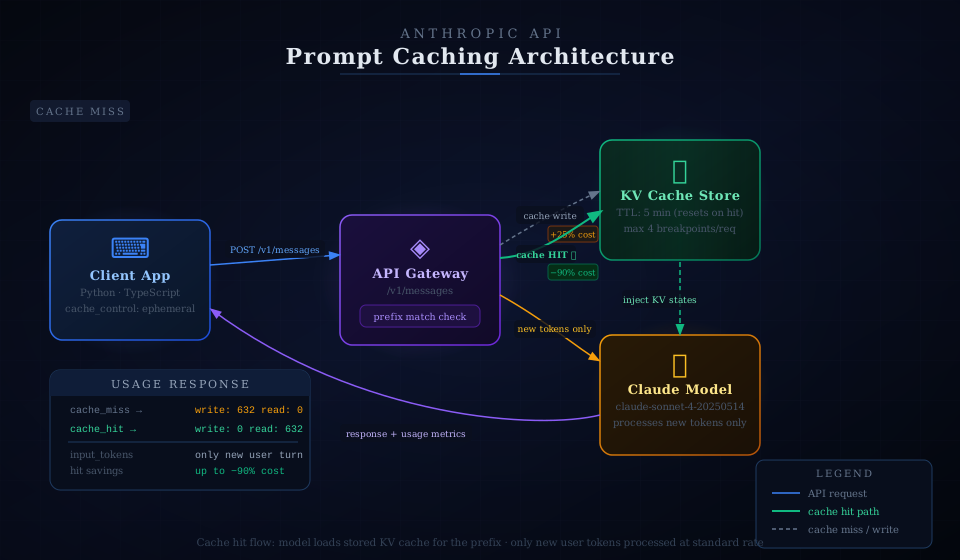 Cache hit flow: the model loads the stored KV cache for the prefix and only processes the new user turn — avoiding full re-tokenization.
The Claude API caches at the token prefix level. Anthropic maintains the KV cache server-side with a 5-minute TTL (extended on each access). You mark cache breakpoints using the cache_control parameter with type: "ephemeral".
Rules that determine a cache hit:
- The cached prefix must match byte-for-byte from the start of the prompt up to the breakpoint
- The model must be identical — cache does not transfer across model versions
- The request must arrive within 5 minutes of the last access; each hit resets the TTL
You can place up to four cache_control breakpoints per request. The API processes them hierarchically — the longest matching prefix wins.
Solution
Step 1: Install the Anthropic SDK
# Python — use uv for fast, reproducible installs
uv add anthropic

# Or pip
pip install anthropic --break-system-packages

# Node.js / TypeScript
npm install @anthropic-ai/sdk
Verify your SDK version supports prompt caching — it was introduced in Python SDK 0.28.0 and Node SDK 0.26.0.
python -c "import anthropic; print(anthropic.__version__)"
# Expected: 0.40.0 or higher
Step 2: Add cache_control to Your System Prompt
The minimum cacheable block is 1,024 tokens. Placing a breakpoint on a shorter block is silently ignored — you'll see cache_creation_input_tokens: 0 in the response.
import anthropic

client = anthropic.Anthropic()

# Large system prompt — must be 1,024+ tokens to cache
SYSTEM_PROMPT = """
You are a senior software engineer specializing in distributed systems.
You help teams design, debug, and optimize production infrastructure.

[... your full 2,000+ token system prompt here ...]
"""

response = client.messages.create(
    model="claude-sonnet-4-20250514",
    max_tokens=1024,
    system=[
        {
            "type": "text",
            "text": SYSTEM_PROMPT,
            "cache_control": {"type": "ephemeral"},  # Mark this prefix for caching
        }
    ],
    messages=[
        {"role": "user", "content": "How do I reduce p99 latency in a gRPC service?"}
    ],
)

print(response.content[0].text)

# Check cache metrics
usage = response.usage
print(f"Cache write tokens:  {usage.cache_creation_input_tokens}")
print(f"Cache read tokens:   {usage.cache_read_input_tokens}")
print(f"Standard input:      {usage.input_tokens}")
Expected output on first call (cache miss — writes cache):
cache_creation_input_tokens: 512   # Your system prompt token count
cache_read_input_tokens:     0
input_tokens:                45    # Only the user turn
Expected output on second call (cache hit):
cache_creation_input_tokens: 0
cache_read_input_tokens:     512   # Full prefix loaded from cache
input_tokens:                45
If you see cache_creation_input_tokens: 0 on the first call: Your system prompt is shorter than 1,024 tokens. Expand it, or consolidate multiple prompts into a single cached block.
Step 3: Cache Tool Definitions
Tool definitions are large and identical across calls in most agent pipelines. They're prime candidates for caching.
tools = [
    {
        "name": "run_query",
        "description": "Execute a SQL query against the production database and return results as JSON.",
        "input_schema": {
            "type": "object",
            "properties": {
                "query": {"type": "string", "description": "Valid SQL SELECT statement"},
                "database": {"type": "string", "enum": ["prod", "replica", "analytics"]},
                "timeout_ms": {"type": "integer", "description": "Query timeout in milliseconds. Max 30000."},
            },
            "required": ["query", "database"],
        },
    },
    # ... more tools
]

# Add cache_control to the LAST tool in the list
# The cache prefix covers everything up to and including this breakpoint
tools[-1]["cache_control"] = {"type": "ephemeral"}

response = client.messages.create(
    model="claude-sonnet-4-20250514",
    max_tokens=1024,
    tools=tools,
    messages=[{"role": "user", "content": "Show me the top 10 users by revenue this month."}],
)
Place the cache_control breakpoint on the last tool in your list. The cache covers the entire tool block as a prefix up to that point.
Step 4: Cache Documents in RAG Pipelines
RAG pipelines often inject the same document corpus into every call. Cache the documents and only vary the question.
import anthropic

client = anthropic.Anthropic()

# Load your document once — e.g., a 50-page technical spec
with open("technical_spec.txt", "r") as f:
    document_content = f.read()

def ask_about_document(question: str) -> str:
    response = client.messages.create(
        model="claude-sonnet-4-20250514",
        max_tokens=2048,
        system=[
            {
                "type": "text",
                "text": "You are a technical documentation assistant. Answer questions accurately based only on the provided document.",
                "cache_control": {"type": "ephemeral"},  # Cache the instruction
            },
        ],
        messages=[
            {
                "role": "user",
                "content": [
                    {
                        "type": "text",
                        "text": f"<document>\n{document_content}\n</document>",
                        "cache_control": {"type": "ephemeral"},  # Cache the document
                    },
                    {
                        "type": "text",
                        "text": question,  # Only this varies per call — not cached
                    },
                ],
            }
        ],
    )
    return response.content[0].text

# First call — writes cache for both system prompt and document
answer1 = ask_about_document("What are the rate limits for the /v1/messages endpoint?")

# Second call — both prefixes hit cache; only the question token is billed at standard rate
answer2 = ask_about_document("What authentication methods are supported?")
You can stack up to four breakpoints in a single request. The API matches the longest valid cache prefix from the start.
Step 5: Cache Conversation History in Multi-Turn Chat
In a long conversation, re-sending the full history each turn is expensive. Cache the history prefix and only process the latest user message at standard rates.
import anthropic

client = anthropic.Anthropic()

def chat_with_caching(conversation_history: list, new_user_message: str) -> tuple[str, list]:
    """
    Send a multi-turn chat message with the history prefix cached.
    Returns (assistant_reply, updated_history).
    """
    # Mark the last assistant message in history as the cache breakpoint
    # Everything before this is a stable prefix
    cached_history = []
    for i, msg in enumerate(conversation_history):
        if i == len(conversation_history) - 1 and msg["role"] == "assistant":
            # Cache breakpoint at the end of existing history
            cached_history.append({
                "role": msg["role"],
                "content": [
                    {
                        "type": "text",
                        "text": msg["content"],
                        "cache_control": {"type": "ephemeral"},
                    }
                ],
            })
        else:
            cached_history.append(msg)

    messages = cached_history + [{"role": "user", "content": new_user_message}]

    response = client.messages.create(
        model="claude-sonnet-4-20250514",
        max_tokens=1024,
        system="You are a helpful assistant.",
        messages=messages,
    )

    assistant_reply = response.content[0].text

    # Append the new turn to history for the next call
    updated_history = conversation_history + [
        {"role": "user", "content": new_user_message},
        {"role": "assistant", "content": assistant_reply},
    ]

    return assistant_reply, updated_history


# Usage
history = []
reply, history = chat_with_caching(history, "Explain CAP theorem in simple terms.")
reply, history = chat_with_caching(history, "How does Cassandra trade off consistency?")
reply, history = chat_with_caching(history, "What about CockroachDB?")
# By the third call, the growing history is served from cache at 10% of input token cost
Step 6: TypeScript Implementation
import Anthropic from "@anthropic-ai/sdk";

const client = new Anthropic();

const SYSTEM_PROMPT = `
You are a senior backend engineer specializing in API design and performance.
[... your 1,024+ token system prompt ...]
`;

async function callWithCaching(userMessage: string): Promise<string> {
  const response = await client.messages.create({
    model: "claude-sonnet-4-20250514",
    max_tokens: 1024,
    system: [
      {
        type: "text",
        text: SYSTEM_PROMPT,
        cache_control: { type: "ephemeral" },
      },
    ],
    messages: [{ role: "user", content: userMessage }],
  });

  // Log cache metrics for monitoring
  const { usage } = response;
  console.log({
    cacheWrite: usage.cache_creation_input_tokens,  // Tokens written to cache
    cacheRead: usage.cache_read_input_tokens,        // Tokens loaded from cache
    standardInput: usage.input_tokens,               // Non-cached input tokens
  });

  const block = response.content[0];
  if (block.type !== "text") throw new Error("Unexpected response type");
  return block.text;
}

// First call — cache miss, writes the system prompt prefix
await callWithCaching("What HTTP status code should I return for rate limiting?");

// Second call — cache hit, system prompt loads from cache
await callWithCaching("How do I implement exponential backoff correctly?");
Verification — Confirm Cache Hits
After implementing caching, verify it works before deploying to production.
import anthropic

client = anthropic.Anthropic()

SYSTEM = "You are a helpful assistant. " + ("word " * 600)  # ~1,024+ tokens

def test_call(label: str):
    resp = client.messages.create(
        model="claude-sonnet-4-20250514",
        max_tokens=50,
        system=[{"type": "text", "text": SYSTEM, "cache_control": {"type": "ephemeral"}}],
        messages=[{"role": "user", "content": "Say hello."}],
    )
    u = resp.usage
    print(f"{label}:")
    print(f"  cache_write={u.cache_creation_input_tokens} cache_read={u.cache_read_input_tokens} input={u.input_tokens}")

test_call("Call 1 — should write cache")
test_call("Call 2 — should read cache")
test_call("Call 3 — should read cache")
You should see:
Call 1 — should write cache:
  cache_write=632 cache_read=0 input=5

Call 2 — should read cache:
  cache_write=0 cache_read=632 input=5

Call 3 — should read cache:
  cache_write=0 cache_read=632 input=5
If cache_read stays at 0 across all calls, check that your breakpoint prefix is byte-identical between calls and that the system prompt exceeds 1,024 tokens.
Cost Calculation — What You Actually Save
Prompt caching pricing for claude-sonnet-4-20250514 (USD):
| Token type | Price per million tokens |
|---|---|
| Standard input | $3.00 |
| Cache write (first call) | $3.75 (+25%) |
| Cache read (subsequent calls) | $0.30 (−90%) |
| Output | $15.00 (unchanged) |
Example: RAG pipeline, 5,000-token document, 1,000 calls/day
Without caching:
5,000 tokens × 1,000 calls × $3.00/M = $15.00/day
With caching (1 write + 999 reads):
- Write:
5,000 × 1 × $3.75/M = $0.019 - Reads:
5,000 × 999 × $0.30/M = $1.50 - Total: $1.52/day — a 90% reduction
At AWS us-east-1 scale with Claude API accessed via Bedrock or direct, this pattern saves tens of thousands of dollars monthly on high-volume inference workloads.
What You Learned
- Prompt caching requires a 1,024-token minimum per breakpoint — below this, the API silently ignores the
cache_controlmarker - The cache TTL is 5 minutes, reset on each access — design your call patterns to stay within this window
- You can place up to 4 breakpoints per request — stack system prompt, tools, documents, and conversation history separately
- Cache hits are confirmed by
cache_read_input_tokens > 0in the responseusageobject - Do NOT change the cached prefix between calls — even a single token difference forces a cache miss and a new write at 1.25× cost
Tested on Anthropic Python SDK 0.40.0 and Node SDK 0.35.0, claude-sonnet-4-20250514, macOS & Ubuntu 24.04
FAQ
Q: Does prompt caching work with streaming responses?
A: Yes. Add stream=True in Python or stream: true in TypeScript — the usage block is returned in the final message_delta event and contains the same cache metrics.
Q: What is the minimum prompt length to benefit from caching? A: The minimum cacheable block is 1,024 tokens for Claude Sonnet and Opus. If your system prompt is shorter, consolidate it with your tool definitions into a single cached block that exceeds the threshold.
Q: Does the cache persist across different API keys or regions? A: No. Cache is scoped to your API key and Anthropic's infrastructure region. Requests routed through different regions (e.g., AWS Bedrock us-east-1 vs eu-west-1) maintain separate caches.
Q: Can I force a cache refresh before the 5-minute TTL expires?
A: Not directly. To bust the cache, modify even one token in the prefix before the breakpoint. For intentional refresh cycles, append a version token like <!-- v2 --> to your system prompt.
Q: Does prompt caching work with claude-haiku-4-5? A: Yes, but the minimum block size is 2,048 tokens for Haiku models. Pricing follows the same 90% read discount and 25% write premium ratios as Sonnet.