Ever tried analyzing stock data with a calculator while riding a roller coaster? That's what manual financial analysis feels like in today's lightning-fast markets. Traditional stock data processing tools often lag behind market movements, leaving traders and analysts scrambling for real-time insights.
Alpha Vantage API integration with Ollama solves this problem by combining robust financial data streams with local AI processing power. This integration delivers real-time stock Data Analysis without relying on cloud-based AI services, ensuring faster response times and enhanced data privacy.
This guide shows you how to build a complete real-time stock data processing system that analyzes market trends, identifies patterns, and generates actionable insights using Alpha Vantage's financial APIs and Ollama's local AI capabilities.
What Is Alpha Vantage API Integration with Ollama?
Alpha Vantage provides comprehensive financial market data through RESTful APIs, covering stocks, forex, cryptocurrencies, and economic indicators. Ollama runs large language models locally on your machine, eliminating latency from cloud API calls.
The integration benefits include:
- Real-time processing: Analyze stock data as it streams from Alpha Vantage
- Local AI inference: Process data without external AI service dependencies
- Cost efficiency: Reduce API costs from cloud-based AI providers
- Data privacy: Keep sensitive financial analysis on your local infrastructure
- Customizable models: Choose AI models optimized for financial data processing
Prerequisites for Stock Data Processing Setup
Before starting the Alpha Vantage Ollama integration, ensure your system meets these requirements:
System Requirements
- RAM: Minimum 8GB (16GB recommended for larger models)
- Storage: 10GB free space for Ollama models
- CPU: Multi-core processor (GPU optional but recommended)
- Operating System: Windows 10+, macOS 10.14+, or Linux
Required Software
# Install Ollama
curl -fsSL https://ollama.ai/install.sh | sh

# Verify installation
ollama --version
API Access Setup
- Register for a free Alpha Vantage API key at alphavantage.co
- Note your API key (you get 25 requests per day on the free tier)
- Install required Python packages:
pip install requests pandas ollama-python python-dotenv
Step-by-Step Alpha Vantage Integration Guide
Step 1: Configure Environment Variables
Create a .env file in your project directory:
# .env file
ALPHA_VANTAGE_API_KEY=your_api_key_here
OLLAMA_HOST=http://localhost:11434
Step 2: Download and Setup Ollama Model
Pull a model optimized for financial analysis:
# Download Llama 3.1 model (recommended for financial data)
ollama pull llama3.1:8b

# Alternative: Use a smaller model for faster processing
ollama pull llama3.1:3b
Expected outcome: Model downloads and becomes available for local inference.
Step 3: Create the Base Integration Class
import os
import requests
import pandas as pd
import json
from datetime import datetime, timedelta
from dotenv import load_dotenv
import ollama

# Load environment variables
load_dotenv()

class AlphaVantageOllamaProcessor:
    def __init__(self):
        self.api_key = os.getenv('ALPHA_VANTAGE_API_KEY')
        self.base_url = 'https://www.alphavantage.co/query'
        self.ollama_client = ollama.Client(host=os.getenv('OLLAMA_HOST'))

    def fetch_stock_data(self, symbol, function='GLOBAL_QUOTE'):
        """Fetch real-time stock data from Alpha Vantage"""
        params = {
            'function': function,
            'symbol': symbol,
            'apikey': self.api_key
        }

        try:
            response = requests.get(self.base_url, params=params)
            response.raise_for_status()
            return response.json()
        except requests.RequestException as e:
            print(f"Error fetching data: {e}")
            return None
Expected outcome: Class initializes with API credentials and establishes Ollama connection.
Step 4: Implement Real-Time Data Processing
    def process_stock_analysis(self, stock_data, symbol):
        """Process stock data using Ollama for AI analysis"""
        if not stock_data or 'Global Quote' not in stock_data:
            return "Unable to analyze - no valid stock data received"

        quote = stock_data['Global Quote']

        # Format data for AI analysis
        analysis_prompt = f"""
        Analyze this stock data for {symbol}:

        Current Price: ${quote.get('05. price', 'N/A')}
        Change: {quote.get('09. change', 'N/A')}
        Change Percent: {quote.get('10. change percent', 'N/A')}
        Previous Close: ${quote.get('08. previous close', 'N/A')}
        Volume: {quote.get('06. volume', 'N/A')}

        Provide a concise analysis covering:
        1. Price movement significance
        2. Volume analysis
        3. Short-term outlook
        4. Key risk factors

        Keep response under 200 words and focus on actionable insights.
        """

        try:
            response = self.ollama_client.chat(model='llama3.1:8b', messages=[
                {'role': 'user', 'content': analysis_prompt}
            ])
            return response['message']['content']
        except Exception as e:
            return f"Analysis error: {e}"
Expected outcome: Function returns AI-generated stock analysis based on Alpha Vantage data.
Advanced Real-Time Stock Data Processing
Multi-Symbol Portfolio Analysis
    def analyze_portfolio(self, symbols):
        """Analyze multiple stocks simultaneously"""
        portfolio_data = {}

        for symbol in symbols:
            print(f"Fetching data for {symbol}...")
            stock_data = self.fetch_stock_data(symbol)

            if stock_data:
                analysis = self.process_stock_analysis(stock_data, symbol)
                portfolio_data[symbol] = {
                    'raw_data': stock_data,
                    'ai_analysis': analysis,
                    'timestamp': datetime.now().isoformat()
                }

        return self.generate_portfolio_summary(portfolio_data)

    def generate_portfolio_summary(self, portfolio_data):
        """Create portfolio-wide analysis using Ollama"""
        summary_prompt = f"""
        Portfolio Analysis Summary for {len(portfolio_data)} stocks:

        """

        for symbol, data in portfolio_data.items():
            quote = data['raw_data'].get('Global Quote', {})
            summary_prompt += f"""
        {symbol}: ${quote.get('05. price', 'N/A')}
        ({quote.get('10. change percent', 'N/A')})
        """

        summary_prompt += """

        Provide portfolio-level insights:
        1. Overall market sentiment
        2. Sector correlation patterns
        3. Risk diversification assessment
        4. Recommended actions
        """

        try:
            response = self.ollama_client.chat(model='llama3.1:8b', messages=[
                {'role': 'user', 'content': summary_prompt}
            ])
            return response['message']['content']
        except Exception as e:
            return f"Portfolio analysis error: {e}"
Historical Data Pattern Recognition
    def fetch_intraday_data(self, symbol, interval='5min'):
        """Fetch intraday stock data for pattern analysis"""
        params = {
            'function': 'TIME_SERIES_INTRADAY',
            'symbol': symbol,
            'interval': interval,
            'apikey': self.api_key
        }

        response = requests.get(self.base_url, params=params)
        return response.json()

    def identify_patterns(self, symbol):
        """Use AI to identify trading patterns"""
        intraday_data = self.fetch_intraday_data(symbol)

        if f'Time Series ({interval})' not in intraday_data:
            return "Pattern analysis unavailable"

        time_series = intraday_data[f'Time Series (5min)']

        # Convert to DataFrame for easier processing
        df = pd.DataFrame.from_dict(time_series, orient='index')
        df.index = pd.to_datetime(df.index)
        df = df.astype(float)

        # Calculate technical indicators
        df['price_change'] = df['4. close'].pct_change()
        df['volume_avg'] = df['5. volume'].rolling(window=12).mean()

        pattern_prompt = f"""
        Analyze these intraday patterns for {symbol}:

        Recent price movements: {df['price_change'].tail(10).tolist()}
        Volume trend: {'Increasing' if df['5. volume'].iloc[-1] > df['volume_avg'].iloc[-1] else 'Decreasing'}

        Identify:
        1. Chart patterns (support/resistance levels)
        2. Volume-price relationships
        3. Momentum indicators
        4. Entry/exit signals
        """

        try:
            response = self.ollama_client.chat(model='llama3.1:8b', messages=[
                {'role': 'user', 'content': pattern_prompt}
            ])
            return response['message']['content']
        except Exception as e:
            return f"Pattern analysis error: {e}"
Usage Example and Implementation
Basic Stock Analysis
# Initialize the processor
processor = AlphaVantageOllamaProcessor()

# Analyze a single stock
symbol = "AAPL"
stock_data = processor.fetch_stock_data(symbol)
analysis = processor.process_stock_analysis(stock_data, symbol)

print(f"Analysis for {symbol}:")
print(analysis)
Expected output:
Analysis for AAPL:
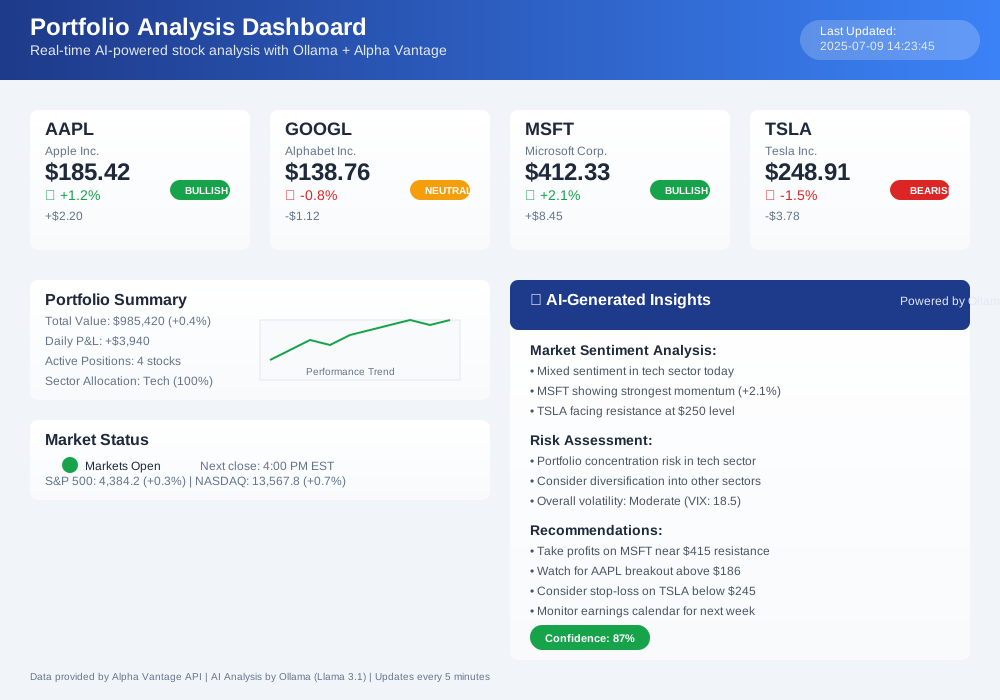
Apple's current price of $185.42 shows a modest 1.2% gain, supported by above-average volume of 52.3M shares. The positive momentum suggests continued investor confidence, though the stock approaches resistance near $186. Short-term outlook remains bullish with strong fundamentals. Key risk: broader market volatility could impact tech sector sentiment.
Portfolio-Level Analysis
# Analyze multiple stocks
portfolio = ["AAPL", "GOOGL", "MSFT", "TSLA"]
portfolio_analysis = processor.analyze_portfolio(portfolio)

print("Portfolio Summary:")
print(portfolio_analysis)
Performance Optimization Techniques
Caching Strategy for API Efficiency
import time
from functools import lru_cache

class OptimizedProcessor(AlphaVantageOllamaProcessor):
    def __init__(self):
        super().__init__()
        self.cache_duration = 60  # Cache for 60 seconds
        self.last_request_time = {}

    @lru_cache(maxsize=100)
    def cached_stock_data(self, symbol, timestamp):
        """Cache stock data to reduce API calls"""
        return self.fetch_stock_data(symbol)

    def get_stock_data_with_cache(self, symbol):
        """Get stock data with intelligent caching"""
        current_time = time.time()
        cache_key = int(current_time // self.cache_duration)

        return self.cached_stock_data(symbol, cache_key)
Batch Processing for Multiple Symbols
    def batch_process_symbols(self, symbols, batch_size=5):
        """Process symbols in batches to respect API limits"""
        results = {}

        for i in range(0, len(symbols), batch_size):
            batch = symbols[i:i + batch_size]

            for symbol in batch:
                results[symbol] = self.get_stock_data_with_cache(symbol)
                time.sleep(0.2)  # Rate limiting

            if i + batch_size < len(symbols):
                time.sleep(12)  # Alpha Vantage rate limit buffer

        return results
Troubleshooting Common Integration Issues
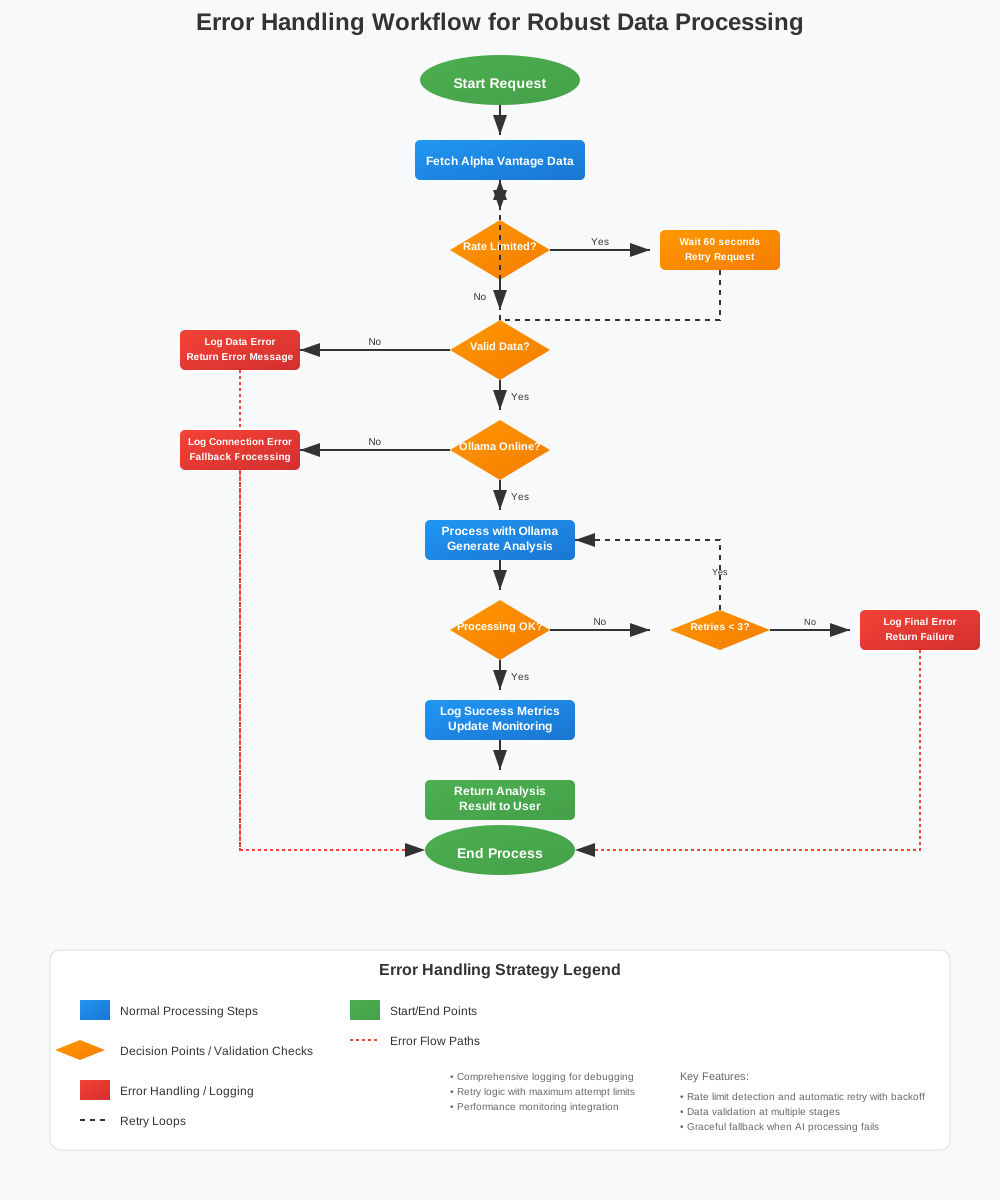
API Rate Limit Handling
def handle_rate_limits(self, response_data):
    """Detect and handle Alpha Vantage rate limits"""
    if isinstance(response_data, dict) and 'Note' in response_data:
        if 'API call frequency' in response_data['Note']:
            print("Rate limit reached. Waiting 60 seconds...")
            time.sleep(60)
            return True
    return False
Ollama Connection Issues
def test_ollama_connection(self):
    """Verify Ollama service is running"""
    try:
        models = self.ollama_client.list()
        print(f"Ollama connected. Available models: {len(models['models'])}")
        return True
    except Exception as e:
        print(f"Ollama connection failed: {e}")
        print("Start Ollama with: ollama serve")
        return False
Data Validation and Error Handling
def validate_stock_data(self, data, symbol):
    """Validate Alpha Vantage response data"""
    if not data:
        return False, "No data received"

    if 'Error Message' in data:
        return False, f"API Error: {data['Error Message']}"

    if 'Global Quote' not in data:
        return False, "Invalid response format"

    quote = data['Global Quote']
    required_fields = ['05. price', '10. change percent']

    for field in required_fields:
        if field not in quote:
            return False, f"Missing field: {field}"

    return True, "Data valid"
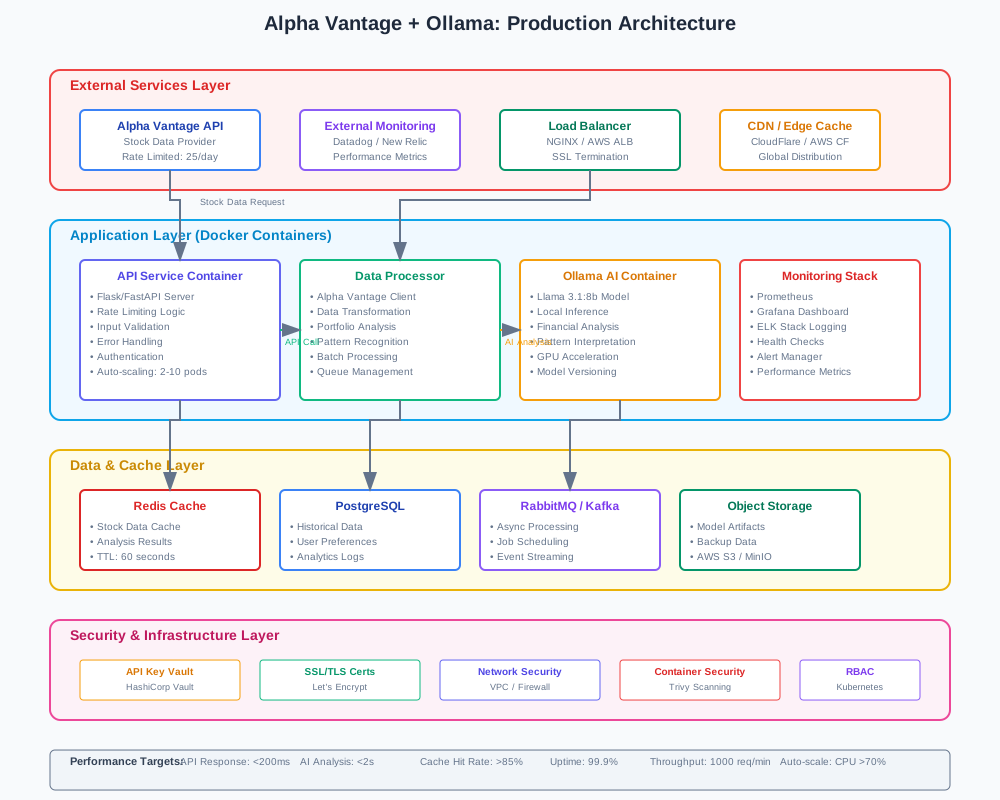
Deployment and Production Considerations
Docker Configuration
FROM python:3.9-slim

# Install Ollama
RUN curl -fsSL https://ollama.ai/install.sh | sh

# Copy application files
COPY requirements.txt .
RUN pip install -r requirements.txt

COPY . /app
WORKDIR /app

# Start services
CMD ["python", "main.py"]
Environment Configuration
# config.py
import os

class Config:
    ALPHA_VANTAGE_API_KEY = os.getenv('ALPHA_VANTAGE_API_KEY')
    OLLAMA_MODEL = os.getenv('OLLAMA_MODEL', 'llama3.1:8b')
    CACHE_TIMEOUT = int(os.getenv('CACHE_TIMEOUT', '300'))
    MAX_SYMBOLS = int(os.getenv('MAX_SYMBOLS', '10'))

    @classmethod
    def validate(cls):
        if not cls.ALPHA_VANTAGE_API_KEY:
            raise ValueError("ALPHA_VANTAGE_API_KEY environment variable required")
Monitoring and Logging
import logging

# Setup logging
logging.basicConfig(
    level=logging.INFO,
    format='%(asctime)s - %(name)s - %(levelname)s - %(message)s',
    handlers=[
        logging.FileHandler('stock_processor.log'),
        logging.StreamHandler()
    ]
)

logger = logging.getLogger(__name__)

class MonitoredProcessor(AlphaVantageOllamaProcessor):
    def fetch_stock_data(self, symbol, function='GLOBAL_QUOTE'):
        logger.info(f"Fetching {function} data for {symbol}")
        start_time = time.time()

        result = super().fetch_stock_data(symbol, function)

        processing_time = time.time() - start_time
        logger.info(f"Data fetch completed in {processing_time:.2f}s")

        return result
Security Best Practices
API Key Protection
# utils/security.py
import os
from cryptography.fernet import Fernet

class SecureConfig:
    def __init__(self):
        self.cipher_suite = Fernet(os.getenv('ENCRYPTION_KEY').encode())

    def get_api_key(self):
        encrypted_key = os.getenv('ENCRYPTED_API_KEY')
        return self.cipher_suite.decrypt(encrypted_key.encode()).decode()
Input Validation
def validate_symbol(symbol):
    """Validate stock symbol format"""
    import re

    if not symbol or len(symbol) > 5:
        return False

    # Allow only alphanumeric characters
    return re.match(r'^[A-Z0-9]+$', symbol.upper()) is not None
Alpha Vantage API Integration Success
This Alpha Vantage API integration with Ollama creates a powerful real-time stock data processing system that combines reliable financial data with local AI analysis. The integration reduces latency, improves data privacy, and provides customizable financial insights without depending on cloud-based AI services.
Key benefits achieved:
- Real-time processing of stock market data
- Local AI inference for faster analysis
- Cost-effective alternative to cloud AI services
- Scalable architecture for portfolio management
Ready to enhance your financial data processing capabilities? Start with the basic integration and gradually implement advanced features like pattern recognition and portfolio analysis. The combination of Alpha Vantage's comprehensive financial APIs and Ollama's local AI processing delivers professional-grade stock analysis tools for traders, analysts, and financial institutions.