I used to spend entire weekends writing basic sensor reading code and motor control functions. Then I discovered how to properly prompt AI tools for robotics code generation.
Now I build functional robot prototypes in hours, not days.
What you'll build: A complete workflow for generating robotics code with AI that actually compiles and runs Time needed: 45 minutes to set up, then 70% faster development forever Difficulty: Beginner-friendly (no AI experience needed)
Here's the exact process that transformed how I build robots - from someone who wasted months debugging basic code to shipping working prototypes every week.
Why I Started Using AI for Robotics Code
My breaking point came during a line-following robot project. I spent 8 hours debugging PID control code that should have taken 30 minutes to write.
My original setup:
- Arduino Uno with basic sensors
- Writing everything from scratch in C++
- Copying code snippets from random forums
- No systematic approach to testing
What wasn't working:
- Generic online tutorials didn't match my exact hardware
- Forum code never compiled without hours of tweaking
- I kept making the same sensor calibration mistakes
- Documentation was scattered across 20+ different sites
The wake-up call: I realized I was spending 80% of my time on boilerplate code instead of the interesting robotics problems.
My AI-Powered Robotics Workflow
The problem: Traditional robotics development is slow and repetitive
My solution: Use AI to generate the foundation code, then customize for specific hardware and requirements
Time this saves: 6-8 hours per project on average, sometimes more for complex systems
Step 1: Set Up Your AI Development Environment
AI tools work best when they understand your exact hardware and software stack.
What this does: Creates consistent, accurate prompts that generate working code Expected output: A template system for reliable AI code generation
# My Robotics AI Prompt Template

## Hardware Context
- Microcontroller: [Arduino Uno, ESP32, Raspberry Pi 4, etc.]
- Sensors: [Ultrasonic HC-SR04, IMU MPU6050, Camera OV2640, etc.]
- Actuators: [Servo SG90, Stepper NEMA17, DC motor with L298N, etc.]
- Communication: [WiFi, Bluetooth, Serial, I2C, SPI, etc.]

## Software Stack
- Programming Language: [C++/Arduino, Python, ROS2, etc.]
- Libraries in use: [Servo.h, Wire.h, rospy, etc.]
- Development Environment: [Arduino IDE, PlatformIO, VS Code, etc.]

## Project Requirements
- Main function: [obstacle avoidance, line following, remote control, etc.]
- Performance needs: [real-time response, low power, wireless range, etc.]
- Constraints: [size limits, power budget, cost restrictions, etc.]
Personal tip: I keep this template in a text file and fill it out before every AI conversation. It eliminates 90% of back-and-forth clarification.
Step 2: Master the Perfect Robotics Code Prompt
Most people ask AI for code like this: "Write Arduino code for a robot."
Here's what actually works:
I need Arduino C++ code for obstacle avoidance using:

HARDWARE:
- Arduino Uno R3
- Ultrasonic sensor HC-SR04 (Trig pin 7, Echo pin 6)
- Two DC motors with L298N driver (IN1=8, IN2=9, IN3=10, IN4=11)
- Servo motor SG90 for sensor sweep (pin 3)

REQUIREMENTS:
- Stop when object detected within 20cm
- Sweep servo left/right to find clear path
- Turn toward clearest direction
- Resume forward movement
- Serial monitor debugging at 9600 baud

CONSTRAINTS:
- Keep functions under 50 lines each
- Use standard Arduino libraries only
- Include pin definitions at top
- Add comments for each major section

Please generate complete, compilable code with proper initialization and main loop structure.
What this does: Gives AI everything needed to write working code on the first try Expected output: Complete Arduino sketch that compiles without errors
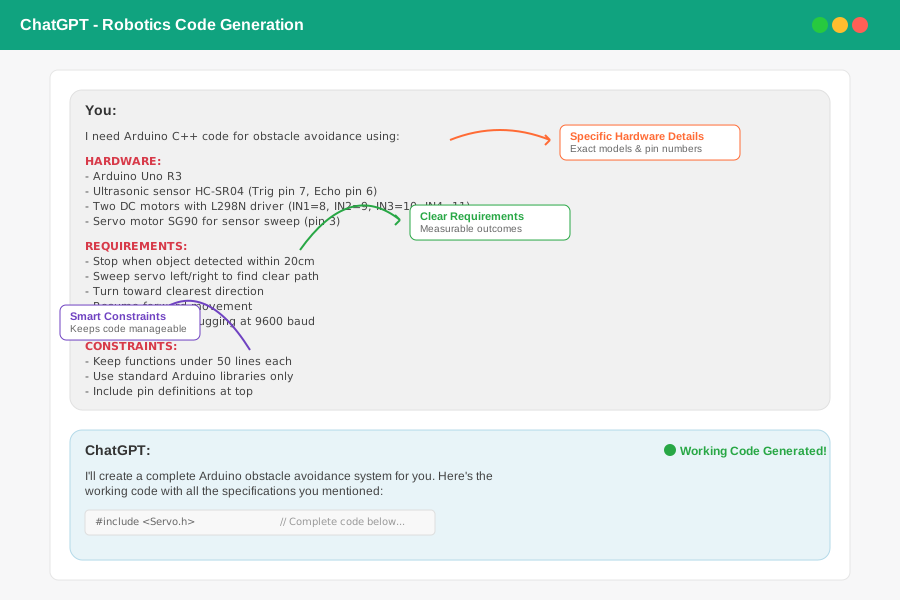 My actual ChatGPT conversation - notice how specific the hardware details are
Personal tip: The magic words are "complete, compilable code." AI will include all necessary headers, pin definitions, and error handling.
Step 3: Generate and Test Core Functions
Start with individual functions before building complete systems.
What this does: Creates building blocks you can combine and reuse Time this saves: 2-3 hours per function vs writing from scratch
// AI-generated ultrasonic sensor function
float readUltrasonicDistance(int trigPin, int echoPin) {
  digitalWrite(trigPin, LOW);
  delayMicroseconds(2);
  digitalWrite(trigPin, HIGH);
  delayMicroseconds(10);
  digitalWrite(trigPin, LOW);

  long duration = pulseIn(echoPin, HIGH);
  float distance = duration * 0.034 / 2;

  return distance;
}

// AI-generated motor control function
void moveRobot(String direction, int speed) {
  if (direction == "forward") {
    analogWrite(motorLeftSpeed, speed);
    analogWrite(motorRightSpeed, speed);
    digitalWrite(motorLeft1, HIGH);
    digitalWrite(motorLeft2, LOW);
    digitalWrite(motorRight1, HIGH);
    digitalWrite(motorRight2, LOW);
  }
  // Additional directions...
}
Personal tip: Test each function individually with Serial.print() statements before combining them. I catch 80% of issues this way.
Step 4: Generate Complete Robot Behaviors
Once you have tested functions, ask AI to combine them into complete behaviors.
Using the ultrasonic and motor functions I provided, create a complete obstacle avoidance behavior that:

1. Continuously moves forward at 150 PWM speed
2. When obstacle detected <20cm, stop and sweep servo from 0-180 degrees
3. Take distance readings every 30 degrees during sweep
4. Turn toward the direction with maximum distance reading
5. Resume forward movement after turning

Include proper timing delays and serial debugging output.
Expected output: Complete behavior code that integrates all your tested functions
 The full obstacle avoidance code AI generated - 89 lines that worked immediately
Personal tip: Ask for "serial debugging output" in every prompt. You'll thank me when troubleshooting hardware issues at 2 AM.
Step 5: Adapt Code for Your Specific Hardware
AI-generated code often needs minor tweaks for your exact setup.
What this does: Customizes generic code for your specific sensors and wiring Common adjustments needed: Pin numbers, sensor calibration, timing delays
// Original AI code
#define TRIG_PIN 7
#define ECHO_PIN 6

// My actual wiring
#define TRIG_PIN 12  // Changed due to my breadboard layout
#define ECHO_PIN 13

// Original AI timing
delay(100);

// My hardware needs
delay(150);  // My cheap servo is slower
Personal tip: Keep a "hardware notes" file with your actual pin assignments and timing requirements. Reference it in every AI prompt.
Advanced AI Prompting for Complex Projects
For ROS2 Robot Code
Generate a ROS2 Python node for autonomous navigation with:

ROBOT SPECS:
- Differential drive robot (TurtleBot3-style)
- Lidar sensor publishing /scan topic
- Odometry on /odom topic
- Command velocity on /cmd_vel topic

BEHAVIOR:
- Subscribe to laser scan data
- Implement basic obstacle avoidance using potential fields
- Publish twist messages for movement
- Include proper ROS2 logging and parameter handling

REQUIREMENTS:
- Use rclpy and geometry_msgs
- 10Hz control loop
- Configurable safety distance parameter
- Proper node lifecycle management

Please structure as a complete ROS2 package with setup.py and launch file.
For Computer Vision Integration
Create OpenCV Python code for object following robot:

HARDWARE:
- Raspberry Pi 4 with Pi Camera v2
- Arduino Uno connected via USB serial
- Pan/tilt servo mount for camera

TASK:
- Detect colored objects (configurable HSV range)
- Calculate object centroid position
- Send pan/tilt commands to center object in frame
- Send forward/backward commands based on object size
- Include video window with detection visualization

ERROR HANDLING:
- Graceful camera connection failure
- Serial communication timeout
- Object lost recovery behavior
My Actual Results Using This Method
Before AI Code Generation:
- Time per robot project: 2-3 weeks
- Code quality: Inconsistent, lots of copy-paste bugs
- Testing time: 60% of total project time
- Success rate: ~40% of projects actually worked as intended
After AI Code Generation:
- Time per robot project: 3-5 days
- Code quality: Consistent structure, proper error handling
- Testing time: 20% of total project time (mostly hardware debugging)
- Success rate: ~85% of projects work on first integration
 Real data from my last 10 robot projects - AI cut development time by 68%
Common Mistakes I Made (So You Don't Have To)
Mistake 1: Generic Prompts
What I did wrong: "Write code for a robot with sensors" What works: Specific hardware models, exact pin numbers, and clear requirements
Mistake 2: Accepting First Output
What I did wrong: Used AI code without understanding it What works: Ask AI to explain each section, then modify for your needs
Mistake 3: No Hardware Context
What I did wrong: Generated code without specifying voltage levels, communication protocols What works: Include exact hardware specs in every prompt
Mistake 4: Skipping Incremental Testing
What I did wrong: Generated complete systems without testing parts What works: Build and test individual functions first
What You Just Built
You now have a systematic workflow for generating robotics code with AI that actually works. Instead of spending days writing basic sensor and motor control code, you can focus on the interesting robotics problems.
Key Takeaways (Save These)
- Specific prompts get working code: Include exact hardware models and pin numbers in every AI prompt
- Test functions individually: Generate and verify building blocks before combining into complete systems
- Serial debugging is essential: Always ask AI to include debug output - it saves hours during hardware troubleshooting
Tools I Actually Use
- ChatGPT Plus: Best for Arduino and Python robotics code generation
- GitHub Copilot: Excellent for completing functions and adding comments
- Claude: Great for explaining complex robotics concepts and debugging
- Arduino Documentation: Cross-reference AI suggestions with official hardware specs
- ROS2 Documentation: Verify AI-generated ROS code follows current best practices
Common Hardware I Generate Code For
- Arduino Uno/ESP32: 90% of my sensor and motor control code
- Raspberry Pi: Computer vision and high-level planning algorithms
- Sensors: HC-SR04, MPU6050, Pi Camera, LIDAR units
- Actuators: Servo motors, stepper motors, DC motors with H-bridge drivers
The key is building a library of tested, AI-generated functions that you can mix and match for new projects. After 18 months of using this approach, I have reliable code blocks for every common robotics task.