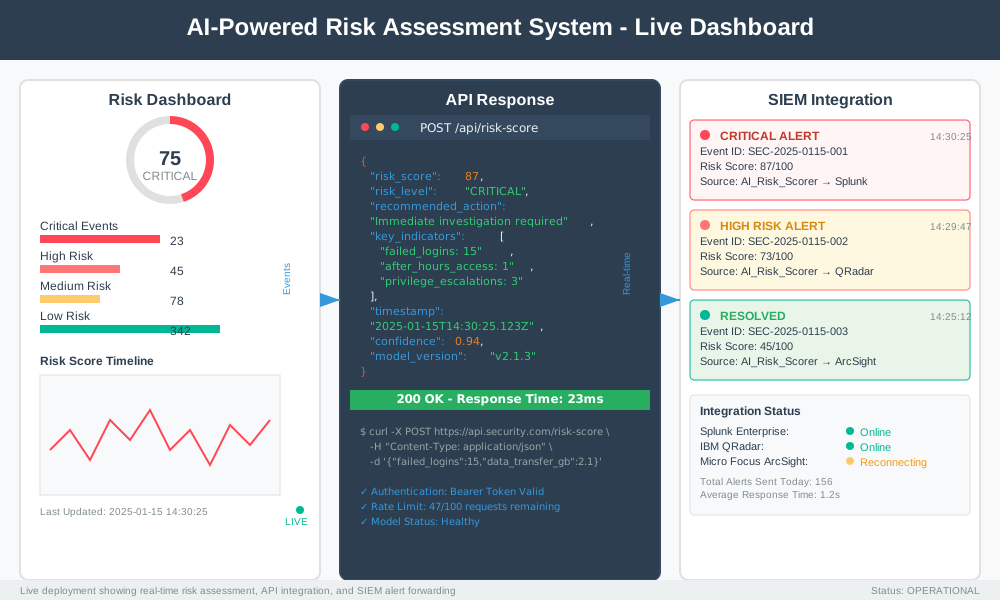
Remember when security meant a guy named Bob watching monitors and drinking coffee? Those days are deader than Internet Explorer. Today's cyber threats move faster than a JavaScript framework update cycle. Enter AI-powered risk assessment – the superhero your security team didn't know it needed.
Machine learning security scoring transforms mountains of security data into actionable intelligence. No more playing whack-a-mole with alerts. This guide shows you how to build automated security risk evaluation systems that actually work.
Why Traditional Security Scoring Falls Flat
Traditional security tools generate more false positives than a pregnancy test factory malfunction. Security teams drown in alerts while real threats slip through like a ninja at a heavy metal concert.
The problems are clear:
- Manual risk assessment takes forever
- Human analysts make mistakes under pressure
- Static rules can't adapt to new threats
- Alert fatigue leads to missed critical issues
AI-powered risk assessment solves these problems by learning patterns, adapting to new threats, and scoring risks with mathematical precision.
How Machine Learning Security Scoring Actually Works
Machine learning security scoring uses algorithms to analyze security events and assign risk scores. Think of it as a very smart calculator that never gets tired or distracted by cat videos.
The Core Components
Data Collection Layer Your system needs security logs, network traffic, user behavior data, and threat intelligence feeds. More data equals smarter decisions.
Feature Engineering Transform raw security data into meaningful patterns. This step separates the wheat from the chaff.
Model Training Algorithms learn from historical security incidents to identify risk patterns.
Scoring Engine Real-time risk calculation that outputs actionable scores.
Building Your First AI Risk Assessment System
Let's build a practical machine learning security scoring system. We'll use Python because it's the duct tape of programming languages – fixes everything.
Step 1: Set Up Your Environment
# Install required packages
# pip install scikit-learn pandas numpy matplotlib seaborn

import pandas as pd
import numpy as np
from sklearn.ensemble import RandomForestClassifier
from sklearn.model_selection import train_test_split
from sklearn.preprocessing import StandardScaler
from sklearn.metrics import classification_report, confusion_matrix
import matplotlib.pyplot as plt
import seaborn as sns
Step 2: Create Sample Security Data
# Generate realistic security event data
def create_security_dataset(n_samples=10000):
    """
    Creates sample security data for ML training
    Features include login attempts, data transfers, access patterns
    """
    np.random.seed(42)

    data = {
        'failed_logins': np.random.poisson(2, n_samples),
        'data_transfer_gb': np.random.exponential(1, n_samples),
        'after_hours_access': np.random.binomial(1, 0.3, n_samples),
        'unique_ips': np.random.poisson(3, n_samples),
        'privilege_escalations': np.random.poisson(0.5, n_samples),
        'suspicious_processes': np.random.poisson(1, n_samples),
    }

    # Create risk labels based on feature combinations
    # High risk = multiple suspicious indicators
    risk_score = (
        data['failed_logins'] * 0.3 +
        data['data_transfer_gb'] * 0.2 +
        data['after_hours_access'] * 0.8 +
        data['unique_ips'] * 0.1 +
        data['privilege_escalations'] * 1.0 +
        data['suspicious_processes'] * 0.4
    )

    # Binary classification: high risk (1) vs low risk (0)
    data['high_risk'] = (risk_score > np.percentile(risk_score, 80)).astype(int)

    return pd.DataFrame(data)

# Create the dataset
security_data = create_security_dataset()
print("Dataset shape:", security_data.shape)
print("\nFirst 5 rows:")
print(security_data.head())
Step 3: Build the Machine Learning Model
class SecurityRiskScorer:
    """
    AI-powered risk assessment system using Random Forest
    Scores security events from 0-100 based on risk level
    """

    def __init__(self):
        self.model = RandomForestClassifier(
            n_estimators=100,
            max_depth=10,
            random_state=42
        )
        self.scaler = StandardScaler()
        self.feature_columns = None
        self.is_trained = False

    def prepare_features(self, data):
        """Extract and scale features for ML model"""
        # Remove target column if present
        feature_cols = [col for col in data.columns if col != 'high_risk']
        self.feature_columns = feature_cols

        X = data[feature_cols]
        return self.scaler.fit_transform(X) if not self.is_trained else self.scaler.transform(X)

    def train(self, data):
        """Train the risk assessment model"""
        X = self.prepare_features(data)
        y = data['high_risk']

        # Split data for training and validation
        X_train, X_test, y_train, y_test = train_test_split(
            X, y, test_size=0.2, random_state=42, stratify=y
        )

        # Train the model
        self.model.fit(X_train, y_train)
        self.is_trained = True

        # Evaluate performance
        y_pred = self.model.predict(X_test)
        print("Model Performance:")
        print(classification_report(y_test, y_pred))

        return X_test, y_test, y_pred

    def calculate_risk_score(self, event_data):
        """
        Calculate risk score (0-100) for security events
        Higher scores = higher risk
        """
        if not self.is_trained:
            raise ValueError("Model must be trained first!")

        # Prepare features
        X = self.prepare_features(event_data)

        # Get probability of high risk
        risk_probabilities = self.model.predict_proba(X)[:, 1]

        # Convert to 0-100 scale
        risk_scores = (risk_probabilities * 100).astype(int)

        return risk_scores

# Initialize and train the model
risk_scorer = SecurityRiskScorer()
X_test, y_test, y_pred = risk_scorer.train(security_data)
Step 4: Implement Real-Time Risk Scoring
def real_time_risk_assessment(event_data, risk_scorer):
    """
    Process security events and assign risk scores
    Returns detailed risk assessment with recommendations
    """
    risk_scores = risk_scorer.calculate_risk_score(event_data)

    results = []
    for idx, score in enumerate(risk_scores):
        event = event_data.iloc[idx]

        # Determine risk level
        if score >= 80:
            risk_level = "CRITICAL"
            action = "Immediate investigation required"
        elif score >= 60:
            risk_level = "HIGH"
            action = "Escalate to security team"
        elif score >= 40:
            risk_level = "MEDIUM"
            action = "Monitor closely"
        else:
            risk_level = "LOW"
            action = "Log for analysis"

        results.append({
            'event_id': idx,
            'risk_score': score,
            'risk_level': risk_level,
            'recommended_action': action,
            'key_indicators': get_risk_indicators(event, risk_scorer)
        })

    return results

def get_risk_indicators(event, risk_scorer):
    """Identify which features contribute most to risk score"""
    feature_importance = risk_scorer.model.feature_importances_
    feature_names = risk_scorer.feature_columns

    # Get top 3 risk indicators for this event
    indicators = []
    for i, importance in enumerate(feature_importance):
        if importance > 0.1:  # Only significant features
            feature_value = event[feature_names[i]]
            indicators.append(f"{feature_names[i]}: {feature_value}")

    return indicators[:3]

# Test with sample events
sample_events = security_data.head(5)
risk_results = real_time_risk_assessment(sample_events, risk_scorer)

print("Risk Assessment Results:")
for result in risk_results:
    print(f"\nEvent {result['event_id']}:")
    print(f"  Risk Score: {result['risk_score']}/100")
    print(f"  Risk Level: {result['risk_level']}")
    print(f"  Action: {result['recommended_action']}")
    print(f"  Key Indicators: {', '.join(result['key_indicators'])}")
Step 5: Create Risk Monitoring Dashboard
def create_risk_dashboard(security_data, risk_scorer):
    """Generate visual dashboard for risk monitoring"""

    # Calculate risk scores for all data
    risk_scores = risk_scorer.calculate_risk_score(security_data)

    # Create dashboard plots
    fig, axes = plt.subplots(2, 2, figsize=(15, 10))
    fig.suptitle('AI-Powered Security Risk Assessment Dashboard', fontsize=16)

    # Risk score distribution
    axes[0, 0].hist(risk_scores, bins=20, color='skyblue', alpha=0.7)
    axes[0, 0].set_title('Risk Score Distribution')
    axes[0, 0].set_xlabel('Risk Score')
    axes[0, 0].set_ylabel('Number of Events')

    # Risk levels pie chart
    risk_levels = ['LOW', 'MEDIUM', 'HIGH', 'CRITICAL']
    level_counts = [
        sum(risk_scores < 40),
        sum((risk_scores >= 40) & (risk_scores < 60)),
        sum((risk_scores >= 60) & (risk_scores < 80)),
        sum(risk_scores >= 80)
    ]

    axes[0, 1].pie(level_counts, labels=risk_levels, autopct='%1.1f%%',
                   colors=['green', 'yellow', 'orange', 'red'])
    axes[0, 1].set_title('Risk Level Distribution')

    # Feature importance
    feature_importance = risk_scorer.model.feature_importances_
    feature_names = risk_scorer.feature_columns

    axes[1, 0].barh(feature_names, feature_importance)
    axes[1, 0].set_title('Feature Importance in Risk Scoring')
    axes[1, 0].set_xlabel('Importance')

    # Risk trend over time (simulated)
    time_points = range(len(risk_scores[:100]))
    axes[1, 1].plot(time_points, risk_scores[:100], color='red', alpha=0.7)
    axes[1, 1].set_title('Risk Score Timeline (Sample)')
    axes[1, 1].set_xlabel('Time')
    axes[1, 1].set_ylabel('Risk Score')

    plt.tight_layout()
    plt.savefig('risk_dashboard.png', dpi=300, bbox_inches='tight')
    plt.show()

# Generate the dashboard
create_risk_dashboard(security_data, risk_scorer)
Advanced Risk Scoring Techniques
Ensemble Models for Better Accuracy
Combine multiple algorithms for more robust risk assessment:
from sklearn.ensemble import VotingClassifier
from sklearn.svm import SVC
from sklearn.linear_model import LogisticRegression

def create_ensemble_risk_scorer():
    """
    Advanced ensemble model combining multiple algorithms
    Better accuracy through model diversity
    """

    # Create individual models
    rf_model = RandomForestClassifier(n_estimators=100, random_state=42)
    svm_model = SVC(probability=True, random_state=42)
    lr_model = LogisticRegression(random_state=42)

    # Combine into ensemble
    ensemble = VotingClassifier(
        estimators=[
            ('rf', rf_model),
            ('svm', svm_model),
            ('lr', lr_model)
        ],
        voting='soft'  # Use probability voting
    )

    return ensemble

# Train ensemble model
ensemble_scorer = create_ensemble_risk_scorer()
X = risk_scorer.prepare_features(security_data)
y = security_data['high_risk']

X_train, X_test, y_train, y_test = train_test_split(X, y, test_size=0.2, random_state=42)
ensemble_scorer.fit(X_train, y_train)

print("Ensemble Model Accuracy:", ensemble_scorer.score(X_test, y_test))
Real-Time Anomaly Detection
Detect unusual patterns that might indicate new threats:
from sklearn.ensemble import IsolationForest

class AnomalyDetector:
    """
    Detects unusual security patterns using Isolation Forest
    Complements risk scoring with anomaly detection
    """

    def __init__(self, contamination=0.1):
        self.model = IsolationForest(
            contamination=contamination,
            random_state=42
        )
        self.is_trained = False

    def train(self, normal_data):
        """Train on normal security patterns"""
        self.model.fit(normal_data)
        self.is_trained = True

    def detect_anomalies(self, data):
        """
        Detect anomalous security events
        Returns -1 for anomalies, 1 for normal events
        """
        if not self.is_trained:
            raise ValueError("Model must be trained first!")

        return self.model.predict(data)

# Train anomaly detector
anomaly_detector = AnomalyDetector()
normal_data = X_train[y_train == 0]  # Train on low-risk events
anomaly_detector.train(normal_data)

# Detect anomalies in test data
anomalies = anomaly_detector.detect_anomalies(X_test)
print(f"Detected {sum(anomalies == -1)} anomalies out of {len(anomalies)} events")
Deployment Best Practices
Production-Ready Risk Scoring API
from flask import Flask, request, jsonify
import joblib

app = Flask(__name__)

# Load trained model (save/load your trained model)
# joblib.dump(risk_scorer, 'risk_scorer_model.pkl')
# risk_scorer = joblib.load('risk_scorer_model.pkl')

@app.route('/api/risk-score', methods=['POST'])
def calculate_risk():
    """
    API endpoint for real-time risk scoring
    Accepts security event data and returns risk assessment
    """
    try:
        # Get event data from request
        event_data = request.json

        # Convert to DataFrame
        df = pd.DataFrame([event_data])

        # Calculate risk score
        risk_score = risk_scorer.calculate_risk_score(df)[0]

        # Determine risk level and action
        if risk_score >= 80:
            risk_level = "CRITICAL"
            action = "Immediate investigation required"
        elif risk_score >= 60:
            risk_level = "HIGH"
            action = "Escalate to security team"
        elif risk_score >= 40:
            risk_level = "MEDIUM"
            action = "Monitor closely"
        else:
            risk_level = "LOW"
            action = "Log for analysis"

        return jsonify({
            'risk_score': int(risk_score),
            'risk_level': risk_level,
            'recommended_action': action,
            'timestamp': pd.Timestamp.now().isoformat()
        })

    except Exception as e:
        return jsonify({'error': str(e)}), 400

if __name__ == '__main__':
    app.run(debug=True, host='0.0.0.0', port=5000)
Model Monitoring and Updates
class ModelMonitor:
    """
    Monitor model performance and trigger retraining
    Prevents model drift and maintains accuracy
    """

    def __init__(self, performance_threshold=0.8):
        self.performance_threshold = performance_threshold
        self.performance_history = []

    def check_performance(self, y_true, y_pred):
        """Check if model performance is acceptable"""
        from sklearn.metrics import accuracy_score

        accuracy = accuracy_score(y_true, y_pred)
        self.performance_history.append(accuracy)

        if accuracy < self.performance_threshold:
            print(f"⚠️ Model performance dropped to {accuracy:.2f}")
            print("Consider retraining the model with recent data")
            return False

        return True

    def should_retrain(self, window_size=100):
        """Determine if model needs retraining based on recent performance"""
        if len(self.performance_history) < window_size:
            return False

        recent_performance = np.mean(self.performance_history[-window_size:])
        return recent_performance < self.performance_threshold

# Initialize model monitor
monitor = ModelMonitor()
Common Pitfalls and How to Avoid Them
Data Quality Issues
Poor data quality kills machine learning models faster than a Windows update. Common problems include:
- Missing values: Handle with imputation or removal
- Imbalanced datasets: Use techniques like SMOTE or class weighting
- Feature leakage: Don't include future information in training data
- Concept drift: Monitor and retrain models regularly
Overfitting Prevention
from sklearn.model_selection import cross_val_score

def validate_model(model, X, y, cv_folds=5):
    """
    Cross-validation to check for overfitting
    Good models have consistent performance across folds
    """
    scores = cross_val_score(model, X, y, cv=cv_folds, scoring='accuracy')

    print(f"Cross-validation scores: {scores}")
    print(f"Mean accuracy: {scores.mean():.3f} (+/- {scores.std() * 2:.3f})")

    # Check for overfitting (high variance)
    if scores.std() > 0.1:
        print("⚠️ High variance detected - possible overfitting")
        print("Consider reducing model complexity or getting more data")

    return scores

# Validate your model
scores = validate_model(risk_scorer.model, X, y)
Performance Optimization Tips
Feature Selection for Speed
from sklearn.feature_selection import SelectKBest, f_classif

def optimize_features(X, y, k=5):
    """
    Select top K features for faster inference
    Reduces model complexity while maintaining accuracy
    """
    selector = SelectKBest(score_func=f_classif, k=k)
    X_selected = selector.fit_transform(X, y)

    # Get selected feature names
    selected_indices = selector.get_support(indices=True)
    selected_features = [risk_scorer.feature_columns[i] for i in selected_indices]

    print(f"Selected features: {selected_features}")
    return X_selected, selected_features

# Optimize feature set
X_optimized, selected_features = optimize_features(X, y, k=4)
Batch Processing for Scale
def batch_risk_assessment(events_df, batch_size=1000):
    """
    Process large volumes of security events efficiently
    Memory-efficient batch processing
    """
    total_events = len(events_df)
    results = []

    for start_idx in range(0, total_events, batch_size):
        end_idx = min(start_idx + batch_size, total_events)
        batch = events_df.iloc[start_idx:end_idx]

        # Process batch
        batch_scores = risk_scorer.calculate_risk_score(batch)
        batch_results = real_time_risk_assessment(batch, risk_scorer)

        results.extend(batch_results)

        print(f"Processed {end_idx}/{total_events} events")

    return results

# Process large dataset
# large_results = batch_risk_assessment(large_security_dataset)
Integration with Security Tools
SIEM Integration Example
import requests
import json

class SIEMIntegration:
    """
    Integration with Security Information and Event Management systems
    Sends high-risk alerts to SIEM platforms
    """

    def __init__(self, siem_endpoint, api_key):
        self.siem_endpoint = siem_endpoint
        self.api_key = api_key

    def send_alert(self, risk_result):
        """Send high-risk events to SIEM"""
        if risk_result['risk_score'] >= 60:  # Only high/critical risks

            alert_data = {
                'timestamp': pd.Timestamp.now().isoformat(),
                'risk_score': risk_result['risk_score'],
                'risk_level': risk_result['risk_level'],
                'event_id': risk_result['event_id'],
                'indicators': risk_result['key_indicators'],
                'source': 'AI_Risk_Scorer'
            }

            headers = {
                'Authorization': f'Bearer {self.api_key}',
                'Content-Type': 'application/json'
            }

            try:
                response = requests.post(
                    self.siem_endpoint,
                    data=json.dumps(alert_data),
                    headers=headers
                )

                if response.status_code == 200:
                    print(f"Alert sent for event {alert_data['event_id']}")
                else:
                    print(f"Failed to send alert: {response.status_code}")

            except Exception as e:
                print(f"SIEM integration error: {e}")

# Initialize SIEM integration
# siem = SIEMIntegration('https://your-siem.com/api/alerts', 'your-api-key')
Measuring Success
Track these key metrics to prove your AI-powered risk assessment system works:
- Detection Rate: Percentage of actual threats caught
- False Positive Rate: Percentage of benign events flagged as risky
- Mean Time to Detection (MTTD): How quickly threats are identified
- Alert Fatigue Reduction: Decrease in total alerts reviewed by analysts
- Investigation Efficiency: Time saved on manual risk assessment
def calculate_metrics(y_true, y_pred, risk_scores):
    """Calculate comprehensive performance metrics"""
    from sklearn.metrics import precision_score, recall_score, f1_score, roc_auc_score

    metrics = {
        'accuracy': accuracy_score(y_true, y_pred),
        'precision': precision_score(y_true, y_pred),
        'recall': recall_score(y_true, y_pred),
        'f1_score': f1_score(y_true, y_pred),
        'auc_score': roc_auc_score(y_true, risk_scores)
    }

    print("Performance Metrics:")
    for metric, value in metrics.items():
        print(f"  {metric}: {value:.3f}")

    return metrics

# Calculate metrics for your model
y_pred_binary = (risk_scorer.calculate_risk_score(security_data) >= 50).astype(int)
metrics = calculate_metrics(security_data['high_risk'], y_pred_binary,
                          risk_scorer.calculate_risk_score(security_data))
Future-Proofing Your Security Scoring
Continuous Learning Pipeline
class ContinuousLearner:
    """
    Automatically retrain models with new security data
    Adapts to evolving threat landscape
    """

    def __init__(self, retrain_threshold=1000):
        self.new_data_buffer = []
        self.retrain_threshold = retrain_threshold

    def add_new_data(self, event_data, true_label):
        """Add verified security events for retraining"""
        self.new_data_buffer.append({
            'data': event_data,
            'label': true_label
        })

        if len(self.new_data_buffer) >= self.retrain_threshold:
            self.retrain_model()

    def retrain_model(self):
        """Retrain model with accumulated new data"""
        print("🔄 Retraining model with new security data...")

        # Convert buffer to training format
        new_X = pd.DataFrame([item['data'] for item in self.new_data_buffer])
        new_y = [item['label'] for item in self.new_data_buffer]

        # Retrain the model (you might want to combine with historical data)
        risk_scorer.train(pd.concat([new_X, security_data], ignore_index=True))

        # Clear buffer
        self.new_data_buffer = []

        print("✅ Model retrained successfully!")

# Initialize continuous learner
learner = ContinuousLearner()
Conclusion
AI-powered risk assessment transforms security from reactive firefighting to proactive threat hunting. Machine learning security scoring gives you mathematical precision where gut feelings used to rule.
The benefits are clear: fewer false positives, faster threat detection, and security analysts who don't want to quit their jobs. Your automated security risk evaluation system learns from every incident, getting smarter while threats get more sophisticated.
Start small with the basic risk scoring model. Add ensemble methods and anomaly detection as your confidence grows. Remember: the best security system is one that actually gets used, not the most complex one gathering dust.
Ready to build your own AI-powered risk assessment system? Start with the code examples above and adapt them to your specific security environment. Your future self (and your security team) will thank you.