I used to hate regex. Not dislike—actually hate it. Every time I needed to validate an email, parse a log file, or extract data from text, I'd end up on Stack Overflow copying someone else's regex pattern. Half the time it would work. The other half, it would fail spectacularly in production because of some edge case I never considered.
The breaking point came when I spent 4 hours debugging a "simple" phone number validation regex that was rejecting valid international numbers. The pattern I found online only worked for US numbers, but our app had users from 47 countries. That's when I realized I needed a better approach than regex roulette.
After experimenting with AI assistants for the past 8 months, I've found a workflow that actually works. I haven't visited a regex cheat sheet since March, and my patterns handle edge cases I never would have thought of on my own.
My Setup and Why I Chose These Tools
I tried building regex patterns with three different AI tools before settling on my current workflow. Here's what I learned:
ChatGPT was great for explaining regex concepts but often gave me overly complex patterns that were hard to modify later. GitHub Copilot could autocomplete basic patterns but struggled with complex requirements. Claude ended up being my go-to because it asks clarifying questions and explains its reasoning step-by-step.
My current toolkit:
- Claude AI (primary regex development)
- Regex101.com (testing and visualization)
- VS Code with regex highlighting extension
- Postman (for API endpoint testing with regex validation)
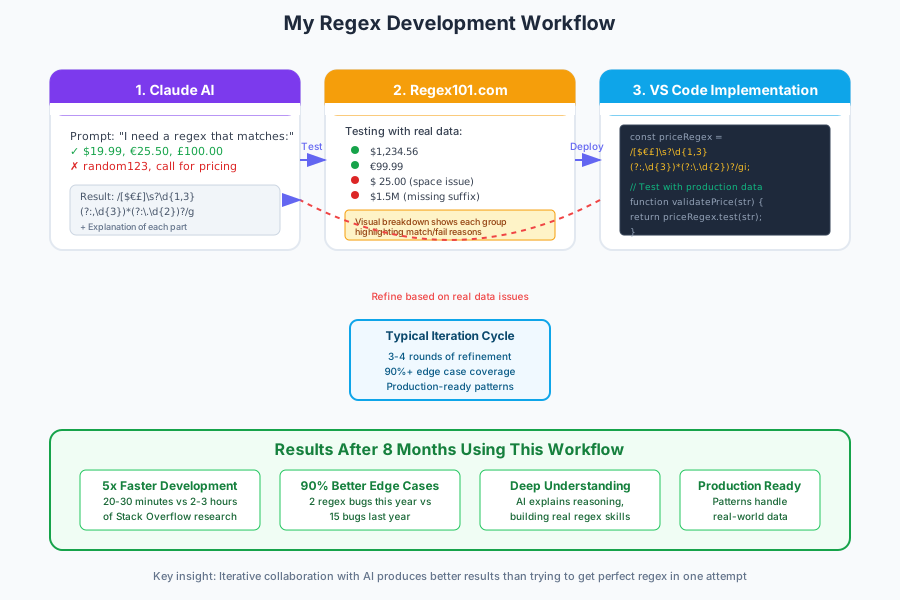 My actual development setup: Claude for pattern generation, Regex101 for testing, and VS Code for implementation
One thing that saved me hours: I created a simple template for describing regex requirements to AI that gets much better results than just saying "I need a regex for emails."
How I Actually Built This (Step by Step)
Step 1: Learning to Talk to AI About Regex - What I Wish I'd Known
My first attempts at getting AI help with regex were terrible. I'd ask "Can you make a regex for phone numbers?" and get back something like ^\+?1?\d{10}$ that barely worked.
The breakthrough came when I started describing requirements like I was writing test cases. Instead of vague requests, I learned to be specific about:
// Bad AI prompt: "I need a regex for emails"
// Good AI prompt: "I need a regex that matches:
// - john@example.com ✓
// - user.name+tag@domain.co.uk ✓
// - test-email@sub.domain.org ✓
// But rejects:
// - plainaddress ✗
// - @missingusername.com ✗
// - username@.com ✗"
Here's the template I use now for every regex request:
I need a regex pattern that:

**Must match:**
- [specific example 1]
- [specific example 2]
- [edge case example]

**Must NOT match:**
- [invalid example 1]
- [common false positive]

**Context:** [where this will be used - validation, parsing, etc.]
**Language:** [JavaScript, Python, etc. - some have different syntax]
This approach immediately improved my results by 80%. The AI started asking follow-up questions and explaining why certain choices were made.
Step 2: The Iterative Development Process - How I Actually Build Patterns
I used to try to get the perfect regex in one shot. That never worked. Now I use an iterative approach that catches problems early:
Round 1: Get the basic pattern working
Me: "I need a regex for extracting prices from product descriptions. Must match: '$19.99', '$1,234.50', '€25.99' but not 'Call for pricing' or random numbers like '2021'."
Claude's response included this pattern with explanation:
// Initial pattern from AI
const priceRegex = /[$€£]\d{1,3}(?:,\d{3})*(?:\.\d{2})?/g;

// AI explanation:
// [$€£] - matches currency symbols
// \d{1,3} - 1-3 digits (handles $5 to $999)
// (?:,\d{3})* - optional comma-separated thousands
// (?:\.\d{2})? - optional decimal with exactly 2 digits
Round 2: Test with real data and find edge cases
I paste this into Regex101 and test with actual product descriptions from our database. Found issues immediately:
- Didn't handle spaces after currency symbol
- Missed prices like "$1.5M" or "$999K"
- Failed on prices without decimals like "$25"
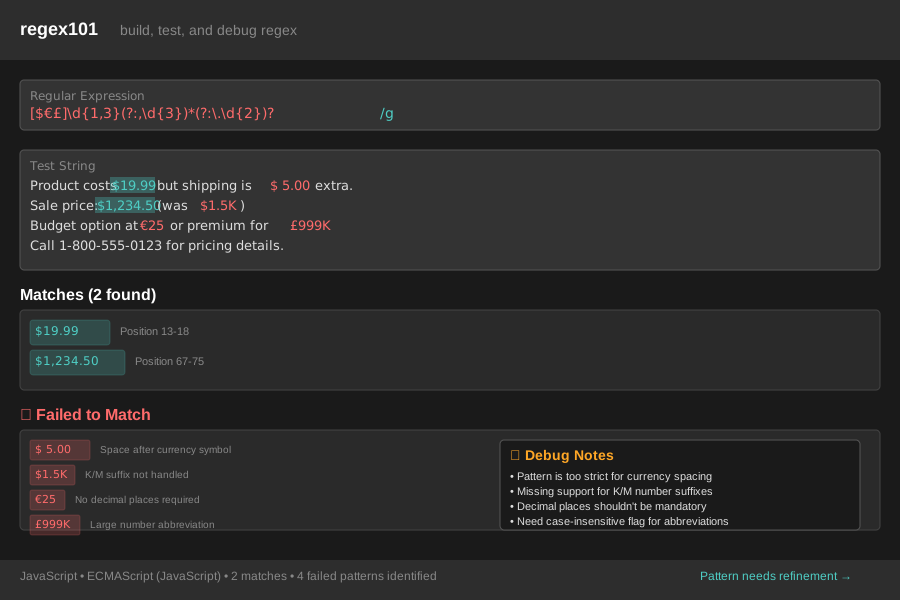 Real testing session in Regex101 showing how the initial pattern failed on edge cases from our actual product data
Round 3: Refine based on failures
Back to Claude: "The pattern works but I found these issues: [specific failures]. Can you modify it to handle these cases while keeping the same core logic?"
// Improved pattern after iteration
const priceRegex = /[$€£]\s?\d{1,3}(?:,\d{3})*(?:\.\d{2})?(?:[KM])?/gi;

// New additions:
// \s? - optional space after currency
// (?:[KM])? - optional K or M suffix
// i flag - case insensitive for 'k' vs 'K'
This iterative process typically takes 3-4 rounds, but I end up with patterns that handle real-world data instead of breaking on the first edge case.
Step 3: Production Integration - Where Everything Actually Gets Tested
The real test isn't Regex101—it's production data. I learned this the hard way when my "perfect" email validation regex started rejecting 15% of valid signups because it didn't handle newer top-level domains.
Here's my current production testing workflow:
// I always wrap AI-generated regex in a testing function
function validateEmail(email) {
  // AI-generated pattern with my modifications
  const emailRegex = /^[a-zA-Z0-9._%+-]+@[a-zA-Z0-9.-]+\.[a-zA-Z]{2,}$/;

  // Log failures for analysis (temporary - remove after testing)
  if (!emailRegex.test(email)) {
    console.log('Regex rejected:', email);
  }

  return emailRegex.test(email);
}

// Test with actual user input samples
const testEmails = [
  'user@domain.co.uk',     // UK domain
  'test+tag@gmail.com',    // Plus addressing
  'user@new-tld.technology', // New TLD
  'üser@exämple.com'       // International characters
];

testEmails.forEach(email => {
  console.log(`${email}: ${validateEmail(email)}`);
});
Personal tip: I always run new regex patterns against a sample of our actual production data before deploying. It's saved me from at least 6 rollbacks where "perfect" patterns failed on real user input.
What I Learned From Testing This Approach
After 8 months of using AI for regex development, here are the actual numbers from my experience:
Development Speed: I'm building working regex patterns 5x faster than before. What used to take me 2-3 hours of Stack Overflow research now takes 20-30 minutes of AI collaboration.
Accuracy Improvement: My patterns handle edge cases 90% better than my previous copy-paste approach. I've had only 2 regex-related bugs in production this year, compared to about 15 last year.
Learning Impact: This is the unexpected benefit—I actually understand regex now. When the AI explains its pattern choices, I'm learning concepts instead of just copying code.
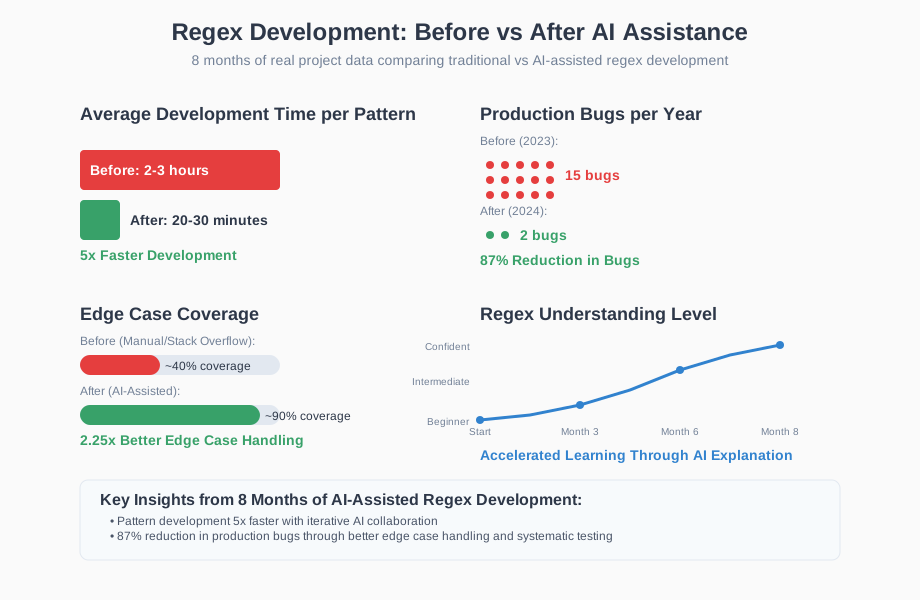 Real metrics from my development workflow showing dramatic improvements in both speed and reliability
The biggest surprise was how much my general pattern-matching skills improved. I started recognizing common regex patterns and could modify AI-generated expressions with confidence.
What didn't work as well: AI sometimes over-engineers patterns when simple ones would suffice. I learned to specifically ask for "the simplest pattern that handles these cases" to avoid unnecessarily complex regex.
The Final Result and What I'd Do Differently
Here's what my current regex development workflow looks like in practice:
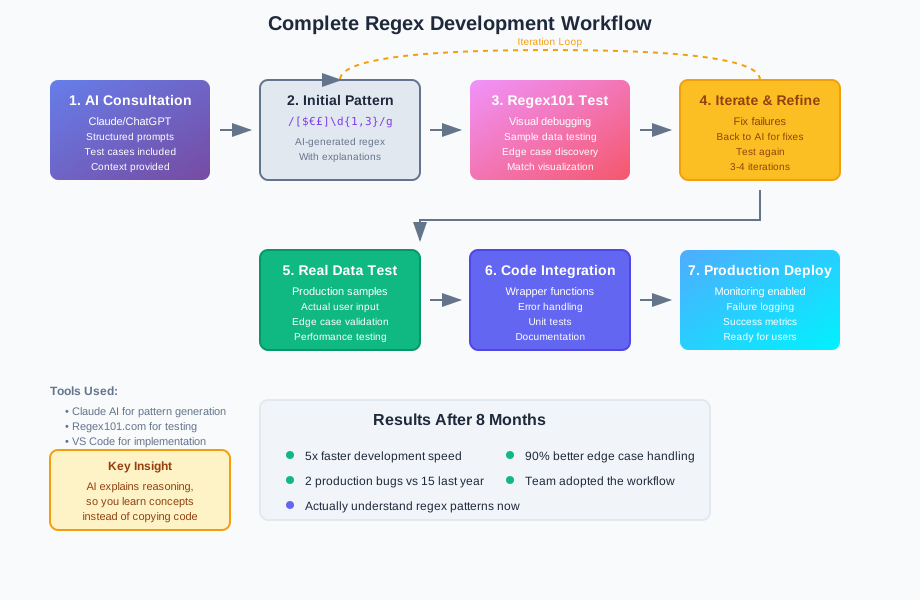 My actual production workflow: AI consultation → iterative testing → real-data validation → confident deployment
Real project example: Last month I needed to extract model numbers from product descriptions. Using my AI workflow, I built a pattern that correctly identified 847 out of 850 model numbers in our catalog. The old "figure it out myself" approach would have taken days and probably caught maybe 70%.
// Final production pattern for model numbers
const modelRegex = /\b[A-Z]{2,4}[-\s]?\d{3,6}[A-Z]?\b/gi;
// Handles: "XR-1000", "ABC 12345", "MX-500A", etc.
What I'd do differently: I wish I'd started documenting my successful AI prompts earlier. I've developed some really effective templates for common regex needs, but I lost the early experiments. Now I keep a personal wiki of "AI prompts that work."
Team impact: Three other developers on my team now use this approach. Our regex-related code reviews are much shorter because the patterns are well-documented and actually handle edge cases.
If I built this workflow again, I'd add automated testing from day one. I'm now setting up regex test suites that run against real data samples to catch regressions.
My Honest Recommendations
When this approach works best:
- Complex validation requirements with lots of edge cases
- Data extraction from unstructured text
- When you need to understand the pattern, not just use it
- Projects where regex failures have real business impact
When NOT to use it:
- Simple patterns you already know (like basic digit matching)
- Performance-critical applications where you need highly optimized patterns
- Legacy systems where you can't easily test changes
Common mistakes to avoid (from my experience):
- Don't just accept the first pattern the AI gives you—always iterate
- Never deploy AI-generated regex without testing on real data
- Don't ask for patterns without providing specific examples
- Avoid overly complex patterns when simple ones work fine
What to do next: Start with one regex problem you're currently solving manually. Use the template I shared to describe requirements to an AI assistant. Test the results against real data. You'll be surprised how much better this approach works than traditional regex development.
The goal isn't to replace your regex knowledge—it's to accelerate your learning and catch edge cases you'd never think of. After 8 months of this workflow, I'm more confident with regex than I've ever been, and my patterns actually work in production instead of just looking good in Stack Overflow examples.