I spent 4 hours last week trying to understand a recursive algorithm my teammate wrote. Then I fed it to Claude and got a perfect explanation in 30 seconds.
What you'll learn: Turn any confusing code into clear, step-by-step explanations using AI Time needed: 15 minutes to learn, 2 minutes per code block after that Difficulty: Anyone who can copy and paste
Here's why this approach beats traditional debugging: AI doesn't judge your "obvious" questions and explains things at exactly your level.
Why I Started Using AI for Code Explanations
My specific situation: Working on a fintech app with legacy code from 3 different teams. No documentation. Senior devs too busy to explain every function.
My setup:
- VS Code with GitHub Copilot extension
- ChatGPT Plus subscription
- Claude Pro for complex explanations
- Legacy JavaScript, Python, and SQL codebases
What didn't work:
- Stack Overflow searches took 20+ minutes per question
- Code comments were either missing or unhelpful ("// magic happens here")
- Pair programming requests felt like bothering busy teammates
- Reading through entire codebases to understand one function
Stop Wasting Time on Bad AI Prompts
The problem: Most developers ask AI "What does this code do?" and get generic, useless answers.
My solution: Specific prompts that get you exactly the explanation you need.
Time this saves: 15 minutes of head-scratching per code block
Step 1: Use the Context-First Prompt Template
The biggest mistake I made for months: dumping code into AI without context.
Bad prompt: "Explain this code"

Good prompt: "I'm a [your level] developer working on [project type].
This function handles [business logic]. Please explain what this code does,
focusing on [specific area you're confused about]:

[your code here]

Explain it like you're doing a code review with someone at my level."
What this does: Gives AI the context to match their explanation to your needs Expected output: Targeted explanations instead of generic "this is a for loop" responses
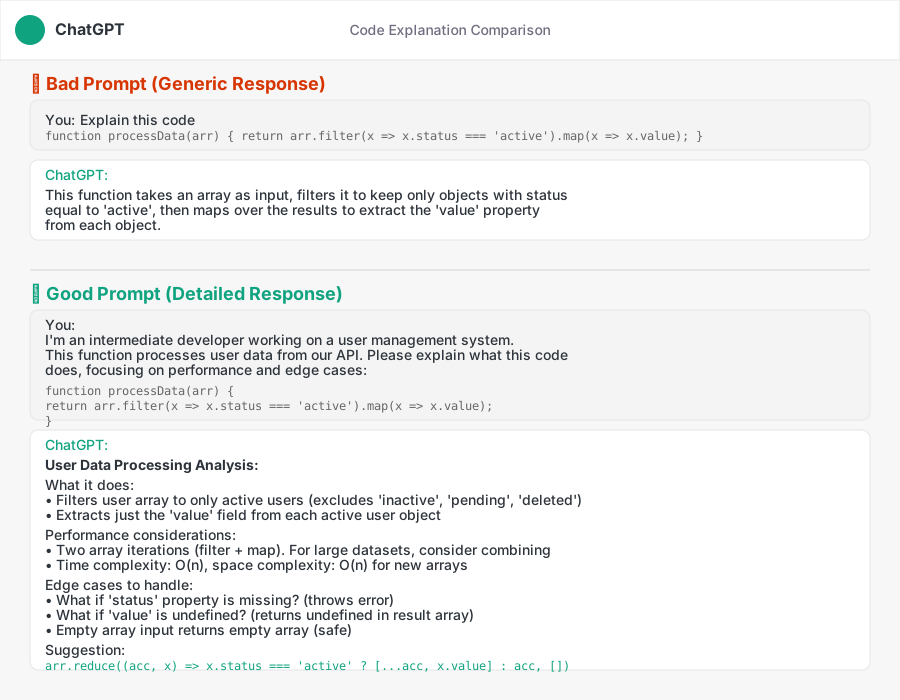 My actual ChatGPT conversation - see how the context changes the response quality
Personal tip: "Always mention your experience level. AI explains differently to beginners vs senior developers."
Step 2: Break Down Complex Functions Into Digestible Pieces
The problem: Feeding 200-line functions to AI gets overwhelming responses.
My solution: Ask AI to break down the logic flow first, then explain each piece.
Time this saves: 10 minutes of trying to follow complex explanations
Prompt template for complex functions:

"This function is [brief description]. Before explaining the details,
please:
1. List the main steps this function takes in plain English
2. Identify any complex algorithms or patterns used
3. Then explain each step with the relevant code snippets

[your complex code here]"
Real example I used last week:
// 47-line function that processes financial transactions
function processTransactionBatch(transactions, config) {
    const results = [];
    const errors = [];

    for (const txn of transactions) {
        try {
            const validatedTxn = validateTransaction(txn, config.rules);
            const enrichedTxn = await enrichWithAccountData(validatedTxn);
            const processedTxn = await applyBusinessRules(enrichedTxn, config);
            results.push(processedTxn);
        } catch (error) {
            errors.push({ transaction: txn.id, error: error.message });
        }
    }

    return { processed: results, failed: errors };
}
AI's breakdown response:
- Input validation loop: Goes through each transaction one by one
- Three-stage processing: Validate → Enrich → Apply rules
- Error handling: Catches failures without stopping the batch
- Result separation: Returns successful and failed transactions separately
Personal tip: "Ask for the breakdown first, then dive into specific steps. Your brain processes it better this way."
Step 3: Get Line-by-Line Explanations for Confusing Sections
When AI's overview still leaves you confused about specific lines:
Follow-up prompt:

"I understand the overall flow now, but I'm still confused about this specific part:

[paste the 5-10 lines that confuse you]

Please explain this line by line, including:
- What each variable contains at this point
- Why this specific approach was chosen
- What would happen if this line was removed"
Example that saved me 2 hours:
# This line broke my brain for an hour
result = [item for sublist in data for item in sublist if item.get('status') != 'deleted']
AI's line-by-line breakdown:
datacontains lists of dictionaries (list of lists)for sublist in dataiterates through each inner listfor item in sublistgoes through each dictionary in the current listif item.get('status') != 'deleted'filters out deleted items- Result: One flat list with only active items
Personal tip: "The .get() method prevents KeyError if 'status' key doesn't exist - that's why they didn't use item['status']"
Advanced Techniques That Actually Work
Ask AI to Identify Code Smells and Suggest Improvements
The problem: Understanding what code does is only half the battle. You need to know if it's good code.
My solution: Get AI to review the code quality while explaining it.
Quality review prompt:

"Please explain this code AND identify any potential issues:

[your code]

Focus on:
- Performance bottlenecks
- Security concerns
- Readability problems
- Better approaches for this use case"
Use AI to Generate Test Cases from Complex Code
This trick helps you understand code by seeing what it should do:
Test generation prompt:

"Based on this code, please:
1. Explain what it does
2. Generate 3-5 test cases that would verify it works correctly
3. Include edge cases that might break it

[your code here]"
Expected output: Clear understanding of inputs, outputs, and edge cases
Personal tip: "The test cases often reveal business logic that isn't obvious from just reading the code."
Common Mistakes That Waste Your Time
Mistake 1: Not Specifying Your Programming Level
What I did wrong: Asked AI to explain React hooks without mentioning I was new to React The fix: Always include "I'm familiar with [technologies] but new to [specific concept]"
Mistake 2: Asking About Code Without Business Context
What I did wrong: Asked AI to explain a pricing algorithm without mentioning it was for subscription billing The fix: Always include what the code is supposed to accomplish in the real world
Mistake 3: Not Following Up When Confused
What I did wrong: Accepted AI's first explanation even when parts didn't make sense The fix: Keep asking "Why did they choose this approach?" and "What's an alternative?"
My Actual AI Tool Setup
Primary tools I use daily:
- ChatGPT-4: Best for general code explanation and alternatives
- Claude Sonnet 4: Superior for complex algorithm analysis and academic code
- GitHub Copilot Chat: Perfect for quick explanations while coding
- Perplexity: When I need to understand code patterns with current best practices
My prompt library saved in VS Code snippets:
{
  "explain-code": {
    "prefix": "explain",
    "body": [
      "I'm a $1 developer working on $2.",
      "Please explain this code focusing on $3:",
      "",
      "$4",
      "",
      "Explain it like you're doing a code review."
    ]
  }
}
Personal tip: "I keep my most-used prompts as VS Code snippets. Saves 30 seconds every time."
What You Just Learned
You now have a system to understand any complex code in minutes instead of hours.
Key Takeaways (Save These)
- Context is everything: Always tell AI your level and what the code is supposed to do
- Break it down: Get the overview first, then dive into confusing sections
- Ask for quality review: Understanding bad code isn't enough - learn what makes it bad
Your Next Steps
Pick one:
- Beginner: Practice these prompts on your current codebase for a week
- Intermediate: Start asking AI to suggest refactoring improvements along with explanations
- Advanced: Use AI explanations to document legacy code for your team
Tools I Actually Use
- ChatGPT Plus ($20/month): My daily driver for code explanations
- Claude Pro ($20/month): Best for complex algorithms and academic code
- GitHub Copilot ($10/month): Instant explanations inside VS Code
- VS Code Snippets: Free way to save your best prompts