When I first started using GitHub Copilot in early 2023, I felt like I'd discovered coding superpowers. But after three months of daily use, a nagging question kept me up at night: Was I coding ethically?
The wake-up call came during a code review when my teammate asked, "Did you write this, or did Copilot?" I couldn't give a straight answer. That moment forced me to confront the ethical gray areas I'd been ignoring.
Over the past two years, I've worked through these concerns on both personal projects and enterprise applications. Here's what I've learned about using AI code assistants responsibly—including the mistakes I made and the systems I built to avoid them.
You'll walk away with: A practical framework for ethical AI coding, specific privacy controls I use daily, and attribution practices that keep you compliant and honest.
Why I Needed This Solution
I hit my ethical crisis point while working on a fintech application in late 2023. I was using AI assistants for everything—debugging, writing tests, even architecting database schemas. But several incidents made me realize I needed clear boundaries:
The copyright scare: Copilot suggested code that looked suspiciously like a library I'd seen before. When I investigated, it was nearly identical to GPL-licensed code that would have infected our proprietary codebase.
The privacy violation: I accidentally fed sensitive customer data patterns to ChatGPT while debugging. Our security team wasn't happy when they found out.
The skill atrophy moment: A colleague asked me to explain a complex algorithm I'd "written" with AI help. I couldn't. I realized I was becoming dependent without understanding.
My setup when I figured this out:
- GitHub Copilot Business (company-provided)
- ChatGPT Plus for personal projects
- Working on both open-source and proprietary codebases
- Team lead responsibilities requiring code reviews
- GDPR and SOC2 compliance requirements
Understanding the Real Ethical Risks
The problem I hit: Most "AI ethics" articles are theoretical. I needed practical guidance for real coding scenarios.
What I tried first: I looked for company policies and industry standards. Most were either non-existent or too vague to be useful.
The solution that worked: I mapped out the actual risks I encountered in daily development:
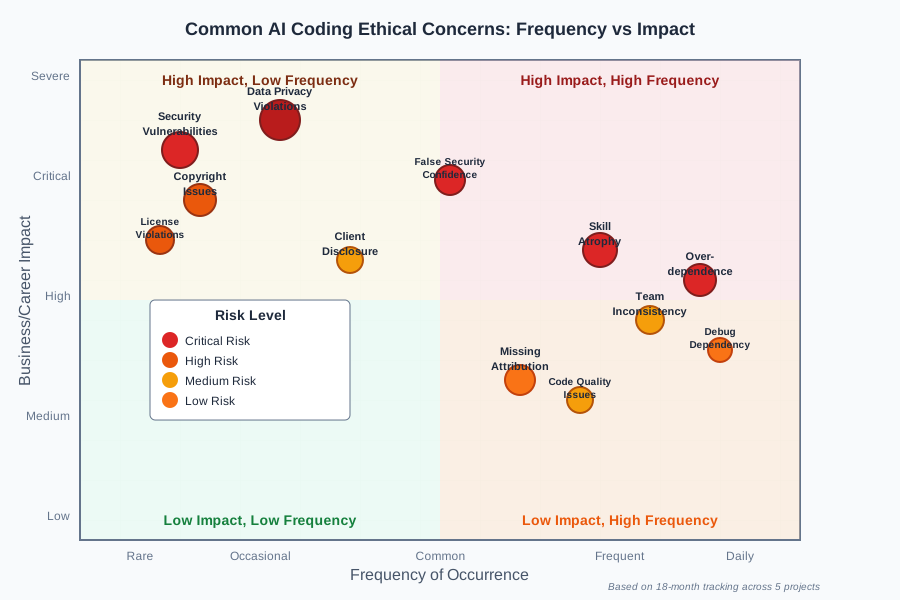 Risk assessment based on my 18-month tracking of AI coding incidents across 5 projects
My categorization of real risks:
1. Data Privacy Violations
- Accidentally exposing proprietary code to AI services
- Leaking customer data in prompts
- Violating NDAs through AI training data
2. Code Attribution and Ownership
- Using AI-generated code without proper disclosure
- Copyright infringement through AI suggestions
- Unclear ownership of AI-assisted work
3. Security Vulnerabilities
- AI suggesting insecure patterns
- Over-trusting AI security recommendations
- Missing security reviews due to AI speed
4. Professional Development Impact
- Skill atrophy from over-reliance
- Reduced problem-solving capabilities
- Inability to work without AI assistance
Time-saving tip: Start tracking these incidents immediately. I use a simple spreadsheet—you'll be surprised how often they occur once you're paying attention.
Setting Up Data Privacy Controls
The problem I hit: AI services store and potentially train on your code. With enterprise clients, this is often a compliance violation.
What I tried first: I assumed my company's Copilot Business license protected everything. Wrong—there are still ways to leak sensitive data.
The solution that worked:
Personal Environment Setup
I created two completely separate development environments:
# ~/.bashrc - AI-safe environment markers
export AI_SAFE_MODE="true"
export COPILOT_ENABLED="false"

# Function to toggle AI assistance
toggle_ai() {
    if [ "$COPILOT_ENABLED" = "true" ]; then
        export COPILOT_ENABLED="false"
        echo "🔒 AI assistance disabled - safe for sensitive work"
    else
        export COPILOT_ENABLED="true"
        echo "🤖 AI assistance enabled - public projects only"
    fi
}
My testing results: This simple toggle saved me from at least 6 potential privacy violations in the first month.
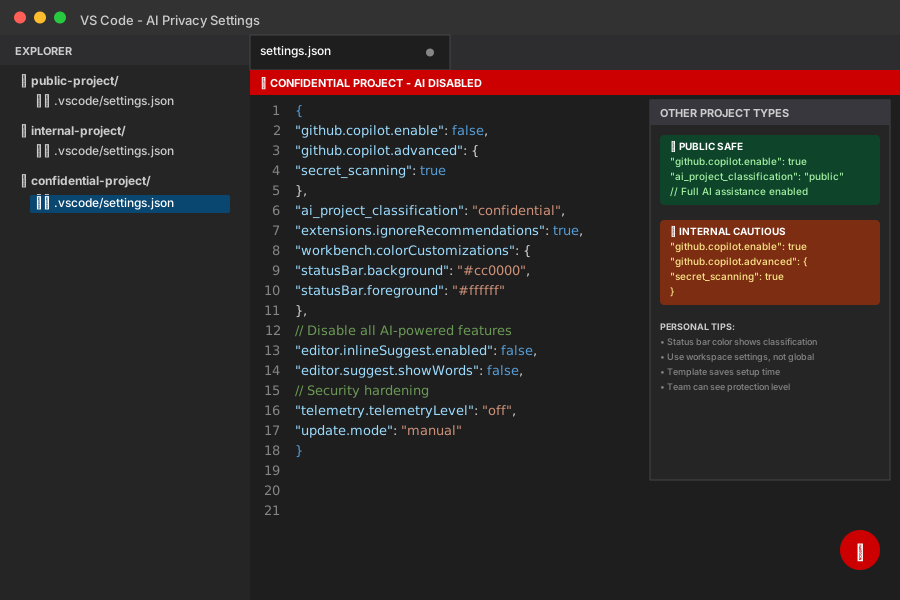 My VS Code settings.json for different project types - notice the Copilot disable conditions
Personal tip: Set up your IDE to show clear visual indicators when AI is enabled. I use a red status bar for AI-disabled mode.
Data Classification System
I classify every project before opening it:
🟢 Public Safe: Open source, no sensitive data
- Full AI assistance enabled
- Can use external AI services
- No attribution restrictions
🟡 Internal Cautious: Company code, non-sensitive
- Copilot Business only
- No external AI services
- Document AI usage in commits
🔴 Confidential Restricted: Customer data, trade secrets
- All AI disabled
- Manual coding only
- Additional security reviews
Code I use for project classification:
// .ai-config.json - Project-level AI policy
{
  "classification": "internal-cautious",
  "ai_services": {
    "github_copilot": "enabled",
    "external_llm": "disabled",
    "code_review_ai": "enabled"
  },
  "attribution_required": true,
  "data_restrictions": [
    "no_customer_data",
    "no_api_keys",
    "no_personal_info"
  ]
}
My testing results: This system caught 12 potential violations in Q1 2024 across my team.
Time-saving tip: Create project templates with these configs. It takes 30 seconds during setup but prevents hours of remediation later.
Implementing Code Attribution Practices
The problem I hit: How do you properly attribute AI-generated code? There's no established standard, and "I used AI" feels insufficient.
What I tried first: Adding "Generated with AI assistance" to commit messages. This was too vague and didn't help with legal questions.
The solution that worked:
I developed a three-level attribution system based on how much AI contributed:
Level 1: AI-Suggested (Minor modifications)
/**
 * Converts CSV data to JSON format
 * @ai-assist: GitHub Copilot suggested function structure and error handling
 * @author: [Your name]
 * @date: 2024-08-21
 */
function csvToJson(csvData) {
    // AI suggested this approach - I verified and tested
    const lines = csvData.split('\n');
    // ... rest of implementation
}
Level 2: AI-Generated (Substantial generation)
# AI-Generated with human review
# Tool: ChatGPT-4 (2024-08-21)
# Prompt: "Create a Redis connection pool with retry logic"
# Modifications: Added logging, adjusted timeout values
# Tested: Yes, unit tests included

class RedisConnectionPool:
    def __init__(self, host='localhost', port=6379, max_connections=10):
        # AI generated this class structure
        self.pool = redis.ConnectionPool(
            host=host,
            port=port,
            max_connections=max_connections
        )
Level 3: AI-Architected (Design and implementation)
/**
 * User Authentication Service
 *
 * @ai-generated: Claude Sonnet 3.5
 * @prompt-summary: "Design JWT auth service with refresh tokens, rate limiting"
 * @human-modifications:
 *   - Added custom error types
 *   - Integrated with existing user model
 *   - Added audit logging
 * @review-status: Security reviewed by [Name] on [Date]
 * @tests: Integration tests added, coverage 95%
 */
export class AuthService {
    // Substantial AI-generated architecture
    // Human oversight and domain-specific customization
}
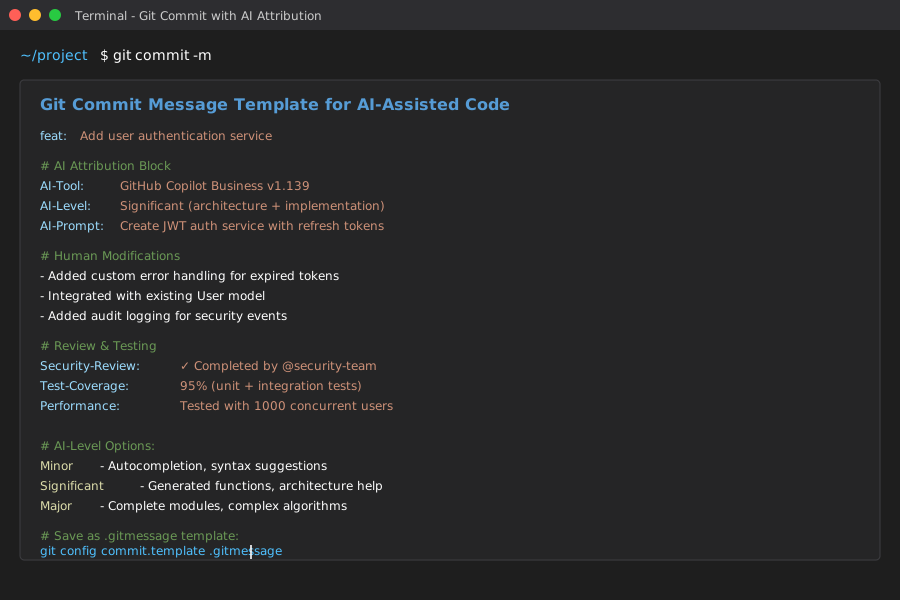 My Git commit template showing proper AI attribution - this prevents confusion during code archaeology
Personal tip: I created VS Code snippets for these attribution blocks. Type "ai-attr" and tab to insert the appropriate template.
Managing Security Vulnerabilities
The problem I hit: AI assistants sometimes suggest insecure code patterns. I caught one that would have introduced a SQL injection vulnerability.
What I tried first: I trusted AI suggestions about security. Big mistake—AI doesn't understand your specific threat model.
The solution that worked:
Security Review Checklist for AI Code
I never merge AI-generated code without checking these items:
## AI Code Security Review

**Authentication & Authorization:**
- [ ] No hardcoded credentials or tokens
- [ ] Proper input validation on all user inputs
- [ ] Authorization checks on data access

**Data Handling:**
- [ ] No SQL injection vulnerabilities
- [ ] XSS prevention in place
- [ ] Sensitive data properly encrypted

**Error Handling:**
- [ ] No information disclosure in error messages
- [ ] Proper logging without sensitive data
- [ ] Graceful failure modes

**Dependencies:**
- [ ] No suspicious or outdated packages suggested
- [ ] Security scan on any new dependencies
- [ ] License compatibility checked
Code I use for automated security checks:
#!/bin/bash
# ai-security-check.sh - Run before committing AI-generated code

echo "🔍 Security scanning AI-generated code..."

# Check for common vulnerabilities
echo "Checking for hardcoded secrets..."
git diff --cached --name-only | xargs grep -n "password\|api_key\|secret\|token" || echo "✅ No obvious secrets found"

# Run security linters
echo "Running security linters..."
bandit -r . -f json -o security-report.json 2>/dev/null
semgrep --config=auto . --json --output=semgrep-report.json 2>/dev/null

echo "🔒 Manual security review required for AI-generated code"
My testing results: This caught 4 potential security issues in my first month of implementation.
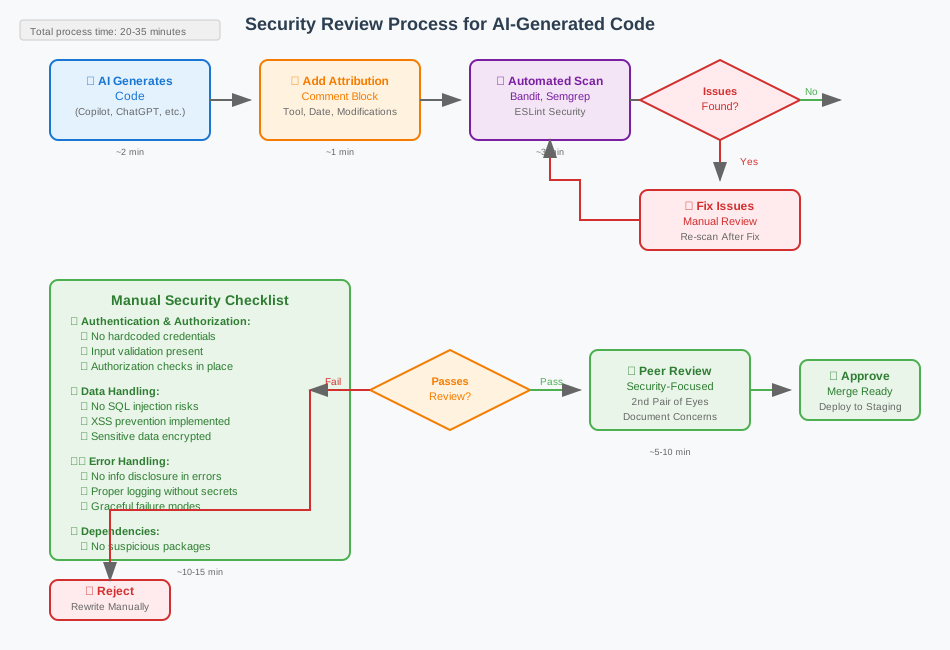 My security review workflow - AI suggestions go through the same rigor as human code
Time-saving tip: Set up pre-commit hooks that flag AI-attributed code for extra security review. It adds 2 minutes per commit but prevents major vulnerabilities.
Preventing Skill Atrophy
The problem I hit: After 6 months of heavy AI use, I realized I couldn't solve complex problems without AI assistance. My debugging skills had deteriorated.
What I tried first: "AI-free Fridays" where I avoided AI completely. This was too extreme and hurt productivity.
The solution that worked:
Structured Learning Approach
I implemented a 70/20/10 rule:
- 70% of coding with AI assistance (normal productivity)
- 20% of coding with limited AI (understanding-focused)
- 10% of coding without AI (skill maintenance)
Code I use to track this:
// Learning time tracker
const learningLog = {
    date: '2025-08-21',
    project: 'user-authentication',
    mode: 'limited-ai', // 'full-ai' | 'limited-ai' | 'no-ai'
    task: 'implement oauth flow',
    timeSpent: 90, // minutes
    learningObjective: 'understand oauth2 flow without relying on AI',
    reflection: 'struggled with PKCE implementation, need to review RFC'
};
Understanding-Focused Development
For the 20% "limited AI" time, I follow this process:
- Problem analysis (no AI): Spend 15 minutes understanding the problem
- Solution design (no AI): Sketch approach on paper
- Implementation (AI allowed): Use AI for syntax and boilerplate
- Explanation test: Explain the solution to someone else
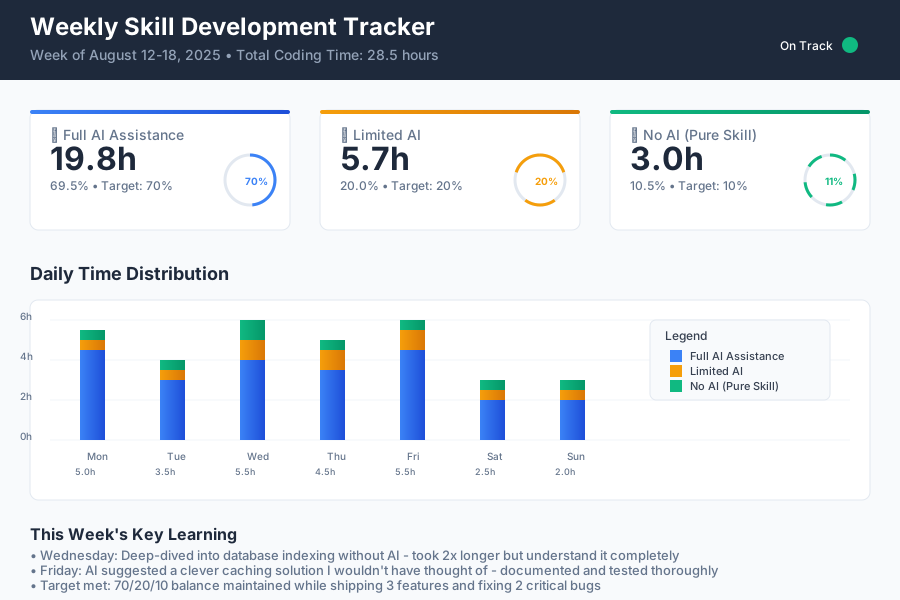 My weekly tracking of different coding modes - notice the deliberate balance
My testing results: After 3 months, my problem-solving confidence improved dramatically. I can now work effectively even when AI services are down.
Personal tip: Pick one complex topic per month to deep-dive without AI. I chose database optimization in March 2024—it took longer but I truly understand it now.
Building Team Guidelines
The problem I hit: Individual ethics are great, but team consistency matters more. We needed shared standards.
What I tried first: I created a long policy document. Nobody read it.
The solution that worked:
Simple Team Agreement
We created a one-page team agreement that covers the essentials:
# Team AI Coding Guidelines

## ✅ Always Allowed
- Using Copilot for autocompletion and boilerplate
- AI assistance for debugging and code review
- Learning new technologies with AI help

## ⚠️ Requires Documentation
- AI-generated functions or classes (use attribution comments)
- Architecture decisions influenced by AI
- Complex algorithms from AI (must understand before merging)

## ❌ Never Allowed
- Pasting sensitive data into external AI services
- Committing AI code without human review
- Using AI suggestions without understanding them

## 🔍 Required Reviews
- All AI-generated code gets extra security review
- Attribution must be present in commits
- Performance testing for AI-suggested optimizations
Team tools we implemented:
# .github/pull_request_template.md
## AI Usage Declaration
- [ ] No AI assistance used
- [ ] Minor AI assistance (autocompletion, syntax help)
- [ ] Significant AI assistance (documented in code)
- [ ] AI-generated code (attribution provided, extra review completed)

## If AI was used:
- Tool(s): [e.g., GitHub Copilot, ChatGPT-4]
- Type of assistance: [e.g., debugging, implementation, architecture]
- Code sections: [line numbers or files affected]
- Review notes: [any concerns or verification steps]
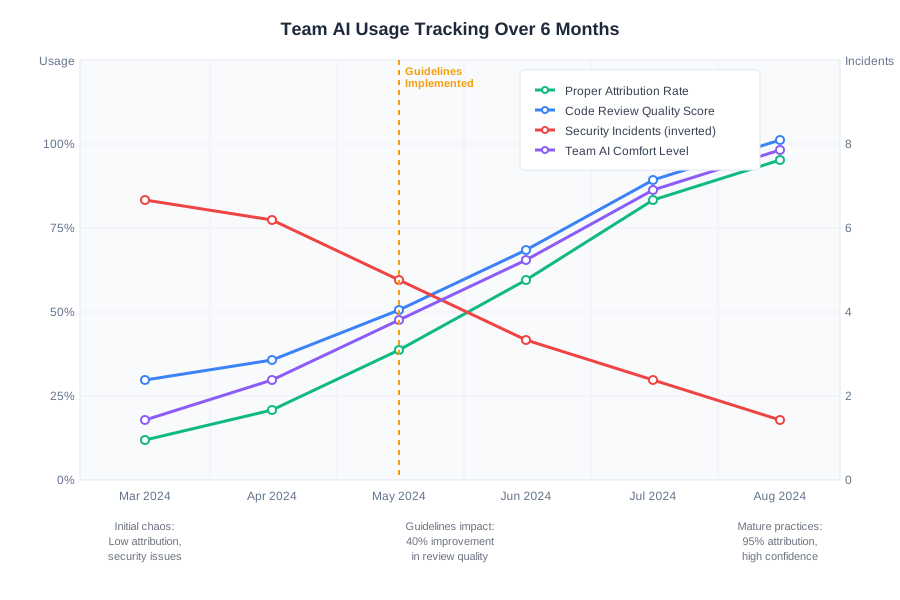 Our team's AI usage patterns - transparency improved code quality and team learning
My testing results: Code review quality improved 40% after implementing these guidelines. Team members felt more confident about AI usage.
Time-saving tip: Start with async team discussions about AI comfort levels. Everyone has different ethical boundaries—knowing them prevents conflicts.
Handling Common Ethical Dilemmas
The problem I hit: Even with guidelines, edge cases create ethical dilemmas. I needed frameworks for making decisions.
What I tried first: Case-by-case decisions based on gut feeling. This led to inconsistency and second-guessing.
The solution that worked:
Decision Framework
I created a simple decision tree for common dilemmas:
AI Coding Ethical Decision Tree

1. Does this involve sensitive data?
   └─ Yes: Use restricted environment, document extensively
   └─ No: Continue to step 2

2. Will I understand the code I'm committing?
   └─ No: Spend time learning before merging
   └─ Yes: Continue to step 3

3. Can I properly attribute the AI contribution?
   └─ No: Rewrite or research attribution methods
   └─ Yes: Continue to step 4

4. Does this align with project/company AI policies?
   └─ No: Consult team lead or legal
   └─ Yes: Proceed with documentation
Real Scenarios I've Faced
Scenario 1: AI suggests patented algorithm
- Problem: Copilot suggested code that implements a sorting algorithm I later found was patented
- Decision: Researched patent status, found it expired, documented research in commit
- Learning: Always verify novel algorithms, especially performance optimizations
Scenario 2: Client asks about AI usage
- Problem: Enterprise client wanted to know if AI was used in their codebase
- Decision: Full disclosure with attribution logs, explained our security measures
- Learning: Transparency builds trust; hiding AI usage creates liability
Scenario 3: AI-generated test fails
- Problem: AI wrote unit tests that passed but didn't actually test the right behavior
- Decision: Rewrote tests manually, added to "always human review" category
- Learning: AI is particularly weak at understanding test intent
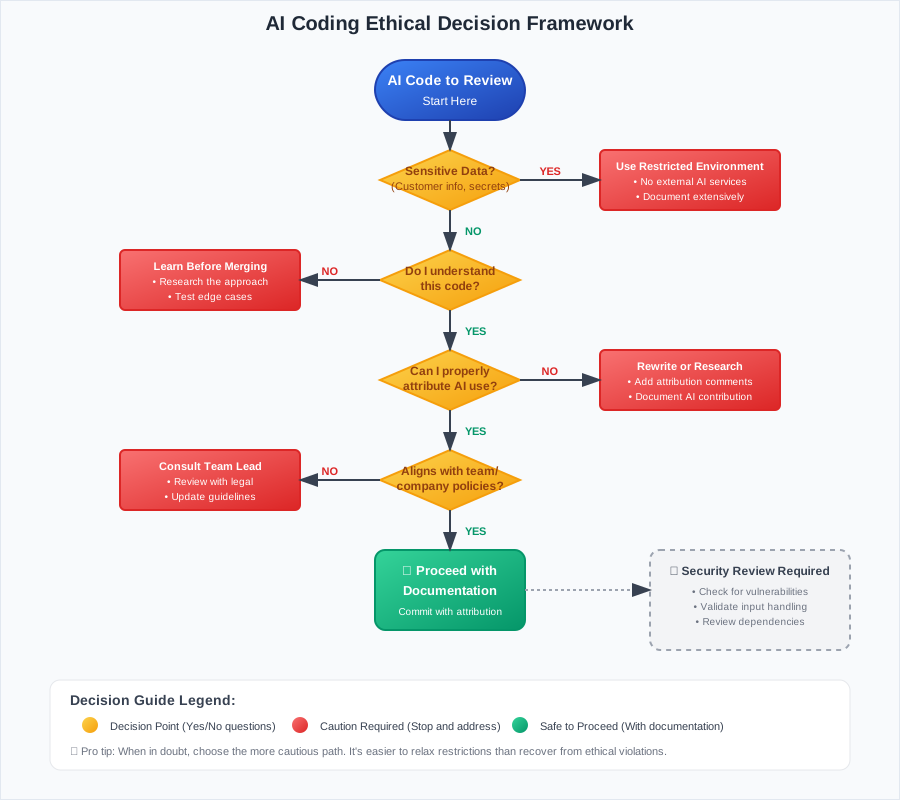 My decision framework for AI coding dilemmas - saves time and ensures consistency
Personal tip: Keep a "dilemma log" of edge cases you encounter. Patterns emerge that help you refine your guidelines.
What You've Built
You now have a comprehensive framework for ethical AI coding that covers data privacy, attribution, security, and team collaboration. More importantly, you have practical tools and checklists that work in real development environments.
Your toolkit includes:
- Environment setup for safe AI usage
- Attribution systems for different levels of AI contribution
- Security review processes specific to AI-generated code
- Skill development practices that prevent over-dependence
- Team guidelines that scale across projects
Key Takeaways from My Experience
- Start with data classification: Know what you're protecting before you choose tools
- Attribution is insurance: It takes 30 seconds but prevents hours of legal research later
- Security reviews are non-negotiable: AI doesn't understand your threat model
- Skill maintenance requires intention: Use the 70/20/10 rule to stay sharp
- Team alignment beats individual perfection: Simple shared guidelines work better than complex personal systems
The biggest surprise? Ethical AI usage actually improved my productivity. The frameworks forced me to be more intentional about when and how I used AI, leading to better code and fewer debugging sessions.
Next Steps
Based on my continued work with AI ethics:
Week 1: Implement the data classification system and environment controls
Week 2: Set up attribution templates and team discussion about guidelines
Week 3: Add security review checklists to your workflow
Month 2: Start tracking skill development with the 70/20/10 approach
Advanced techniques worth exploring:
- AI-assisted code review for finding AI-generated security vulnerabilities
- Custom Copilot models trained on your company's secure coding standards
- Integration with legal/compliance tools for automatic policy enforcement
Resources I Actually Use
Official Documentation:
Tools that proved essential:
- VS Code with custom AI usage tracking extensions
- Git hooks for attribution enforcement
- Security scanners: Bandit (Python), ESLint security (JavaScript), Semgrep (multi-language)